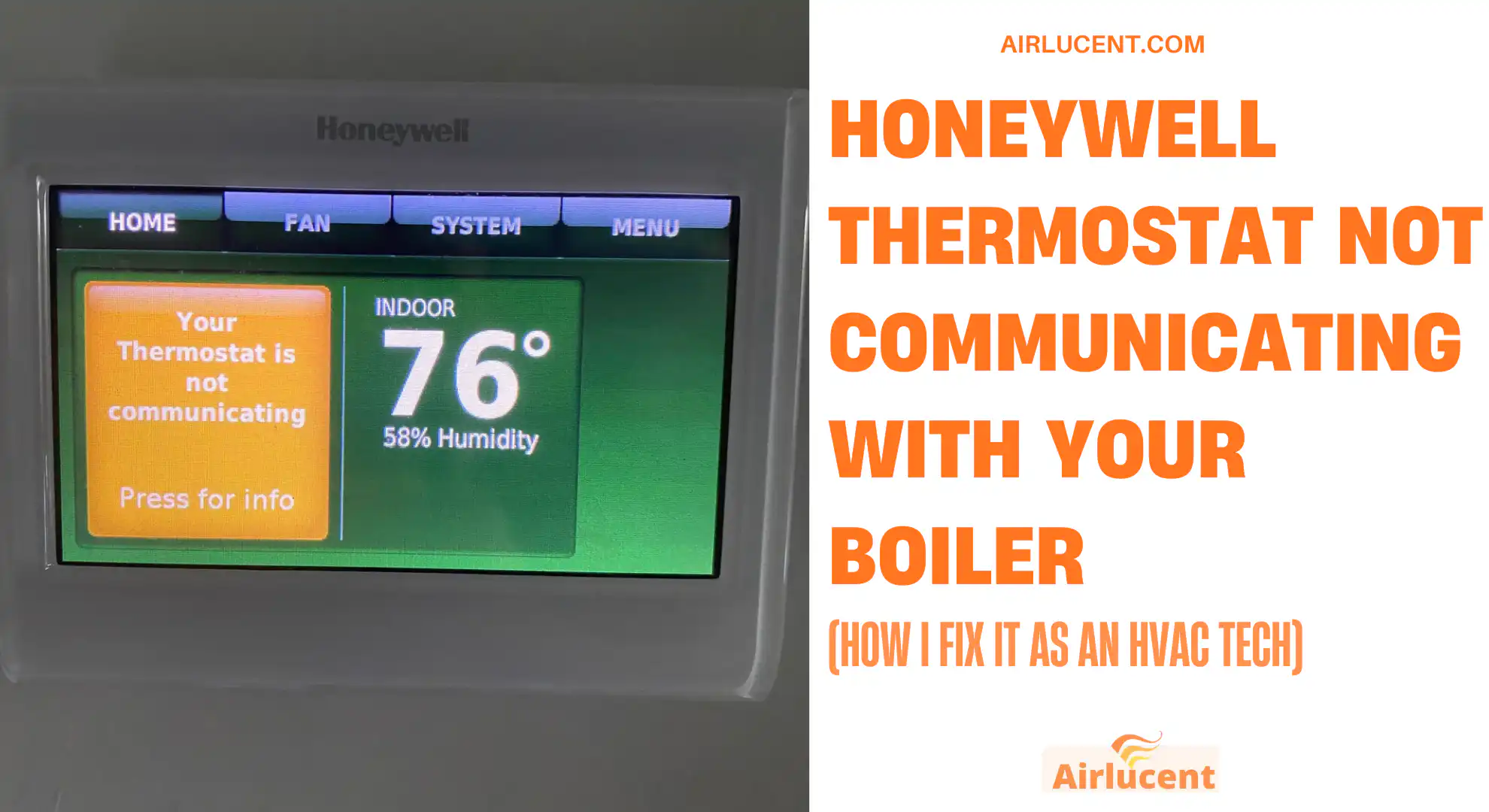
I’m Nathan. I’ve worked as an HVAC technician for over 10 years, and I’ve seen this exact problem spike every year when people turn the heat back on after summer. Your Honeywell thermostat looks fine, but the boiler does nothing, or you’re seeing a signal loss message, flashing lights on the receiver, or the heating only works when you press override.
The good news is this is usually a simple issue like batteries, pairing, power to the receiver, or a boiler lockout. In this guide, I’ll walk you through a clean, practical troubleshooting process I use on service calls so you can fix it yourself when it’s safe to do so.
- How the thermostat and boiler actually communicate (so the fixes make sense)
- Common symptoms and what they usually mean
- Start here: my 5 minute checklist.
- Fixing wireless Honeywell thermostats (most common situation)
- Fixing wired Honeywell thermostats (what I check in the field)
- When the thermostat is fine but the boiler will not respond
- Firmware and app issues (smart Honeywell thermostats)
- Cleaning and placement (small thing that makes a difference)
- What to do if you tried everything and it still will not communicate
- Cost reality check: if the boiler is the problem
- Prevention tips (what I tell my own customers)
- Frequently asked questions
- Conclusion
How the thermostat and boiler actually communicate (so the fixes make sense)
Most Honeywell setups fall into one of these:
- Wireless thermostat + receiver box near the boiler
The thermostat talks to a receiver using radio frequency. The receiver then switches the boiler on and off through a relay. - Wired thermostat directly connected to the boiler or wiring center
The thermostat sends a call for heat through wiring (often 24V control wiring, sometimes 230V depending on the system). - Smart thermostat using Wi-Fi (plus a relay/receiver)
Wi-Fi is usually for app control. The actual boiler switching still happens through wiring or a receiver.
When communication fails, you’re usually dealing with:
- No power to thermostat or receiver
- The thermostat is not actually calling for heat.
- Wireless pairing dropped
- Interference or range issues
- Loose wiring (wired systems)
- The boiler is locked out or not accepting external demand.
Common symptoms and what they usually mean
| Thermostat says signal lost or no RF | Batteries, pairing dropped, range | Replace batteries, move closer, rebind |
| Receiver shows flashing red | Lost binding or receiver fault | Power cycle, rebind, check power |
| Thermostat says heating on but boiler stays off | Boiler lockout, receiver not switching, wiring issue | Check receiver lights, boiler reset, faults |
| Boiler runs only with receiver override | Thermostat not communicating | Rebind thermostat to receiver |
| Boiler runs even when thermostat is off | Stuck relay, wiring short, incorrect wiring | Turn off demand, check wiring, call pro |
Start here: my 5 minute checklist.
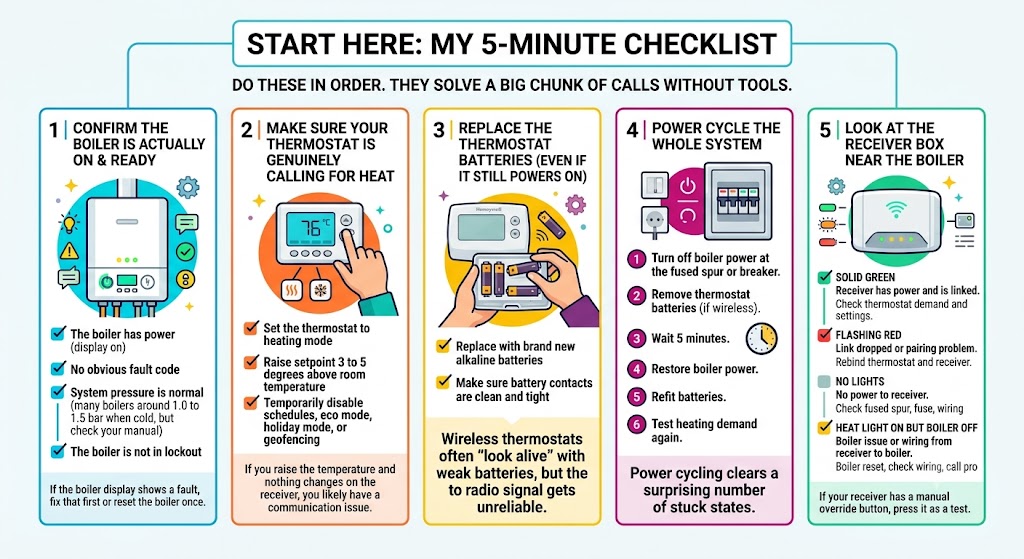
Do these in order. They solve a big chunk of calls without tools.
1) Confirm the boiler is actually on and ready
Check:
- The boiler has power (display on)
- No obvious fault code
- System pressure is normal (many boilers are around 1.0 to 1.5 bar when cold, but check your manual)
- The boiler is not in lockout.
If the boiler display shows a fault, fix that first or reset the boiler once.
2) Make sure your thermostat is genuinely calling for heat
This sounds basic, but it catches a lot.
- Set the thermostat to heating mode.
- Raise setpoint 3 to 5 degrees above room temperature.
- Temporarily disable schedules, eco mode, holiday mode, or geofencing.
If you raise the temperature and nothing changes on the receiver, you likely have a communication issue.
3) Replace the thermostat batteries (even if it still powers on)
Wireless Honeywell thermostats often “look alive” with weak batteries, but the radio signal gets unreliable.
What I do:
- Replace with brand new alkaline batteries.
- Make sure battery contacts are clean and tight.
4) Power cycle the whole system
Power cycling clears a surprising number of stuck states.
Steps:
- Turn off boiler power at the fused spur or breaker.
- Remove thermostat batteries (if wireless)
- Wait 5 minutes
- Restore boiler power
- Refit batteries
- Test heating demand again
5) Look at the receiver box lights near the boiler
If you have a wireless Honeywell thermostat, you almost always have a receiver box near the boiler.
Here’s a simple reference (lights vary by model, but this matches many Honeywell receivers).
| Solid green | Receiver has power and is linked | Check thermostat demand and settings |
| Flashing red | Link dropped or pairing problem | Rebind thermostat and receiver |
| No lights | No power to receiver | Check fused spur, fuse, wiring |
| Heat light on but boiler off | Boiler issue or wiring from receiver to boiler | Boiler reset, check wiring, call pro |
If your receiver has a manual override button, press it as a test. If the boiler fires with override, your boiler is capable of heating, and the issue is almost always pairing, thermostat, or receiver switching logic.
Fixing wireless Honeywell thermostats (most common situation)
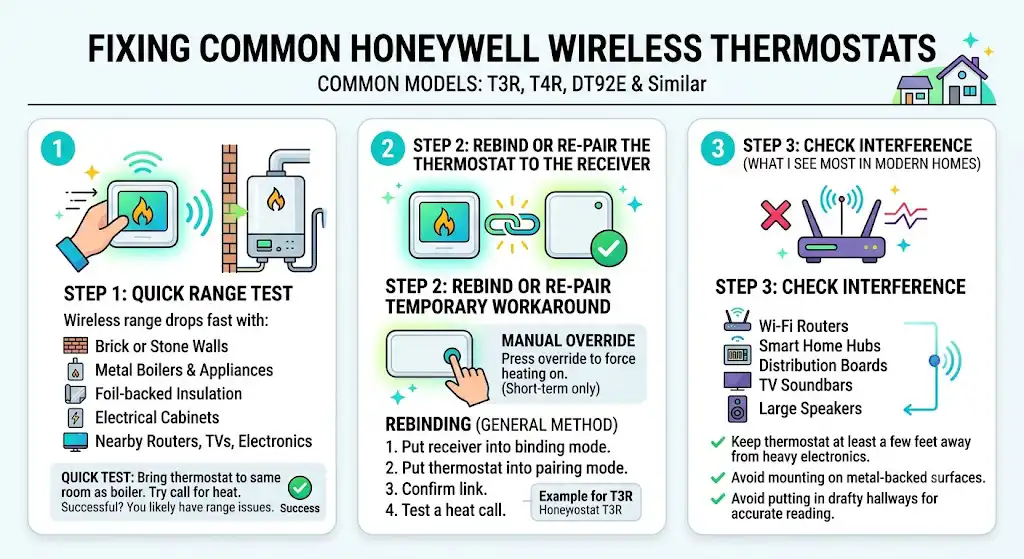
Wireless models people commonly have include Honeywell T3R, T4R, DT92E and similar.
Step 1: Move the thermostat closer (quick range test)
Wireless range is often quoted around 30 to 50 meters, but real-world range drops fast with:
- Brick or stone walls
- Metal boilers and appliances
- Foil-backed insulation
- Electrical cabinets
- Routers, smart TVs, and dense electronics nearby
Do a quick test:
- Bring the thermostat to the same room as the boiler.
- Try calling for heat again.
If it works close-up, you likely have range or interference issues. Relocating the thermostat or receiver (done properly) is the long term fix.
Step 2: Rebind or re-pair the thermostat to the receiver
When the binding drops, the thermostat and receiver stop recognizing each other.
Temporary heat workaround
Most receivers let you use manual override so you are not freezing while you troubleshoot:
- Press the manual override to force heating on
- Use this only short term because it can run continuously
Rebinding (general method)
Exact steps vary by model, but the process is usually:
- Put the receiver into binding mode.
- Put the thermostat into pairing mode.
- Confirm link (light changes or signal icon clears)
- Test a heat call
Rebinding example for Honeywell T3R style receivers
I’ve used a version of this process many times:
- At the receiver, press and hold the button for about 15 seconds until the red LED changes behavior (often fast flashing)
- Keep holding a bit longer until it transitions (often slow flashing)
- On the thermostat, enter the installer or binding menu and start pairing (some models reference a parameter like 14A)
- Wait for confirmation on the receiver (often returns to solid green)
Step 3: Check interference (what I see most in modern homes)
I’ve been in homes where the thermostat was mounted right next to:
- Wi-Fi routers
- Smart home hubs
- Distribution boards
- TV soundbars
- Large speakers
Try this:
- Keep the thermostat at least a few feet away from heavy electronics.
- Avoid mounting on metal-backed surfaces.
- Avoid putting it in a drafty hallway that never represents real room temperature.
Fixing wired Honeywell thermostats (what I check in the field)

If your Honeywell thermostat is wired, “not communicating” often means the boiler never receives the call for heat.
Step 1: Check the simple stuff
- The thermostat has power (some need a common wire, often marked C)
- The setpoint is above room temperature.
- No schedule blocking operation
Step 2: Inspect the wiring at the thermostat (power OFF)
Only do this if you’re comfortable and the system is safely isolated.
What I look for:
- Loose terminal screws
- Corrosion on copper
- Broken conductors
- Wires pulled tight with no slack
Common terminals you may see:
- R (power)
- W (heat call)
- C (common)
If R or C is missing on a thermostat that needs constant power, it may boot but behave unpredictably.
Step 3: Inspect the boiler control terminals or wiring center
In many UK systems, the thermostat doesn’t go directly to the boiler. It goes into a wiring center that also controls zone valves and pumps.
This is where a pro can save you time:
- Miswired zone valve end switches
- Failed relay
- Burnt terminal block
- Loose live feed at the wiring center
If you suspect any of this, I recommend calling a qualified heating engineer or electrician, depending on local rules and boiler type.
When the thermostat is fine but the boiler will not respond
Sometimes the thermostat is communicating perfectly, but the boiler cannot fire.
1) Boiler reset and fault codes
If the boiler is in safety lockout, the thermostat can call all day, and nothing happens.
- Reset once
- Note any fault code
- If it locks out again, stop resetting and get it diagnosed.
2) Flame sensing and ignition issues (common cause of repeated lockouts)
A classic example is a dirty flame sensor causing the boiler to shut down for safety. This is not always a DIY task, especially on gas appliances, but it explains why:
- The thermostat says heating is on
- Boiler tries, then fails.
- Lockout appears
3) Boiler age and reliability
In my experience, when boilers pass the 10 to 15 year mark, you start seeing more control and ignition issues. That does not mean you must replace it, but communication complaints can sometimes be the first sign of deeper reliability problems.
Firmware and app issues (smart Honeywell thermostats)
If your Honeywell is a smart model:
- Wi-Fi issues can break app control
- But local heating control might still work, depending on system design
What I recommend:
- Confirm the thermostat is connected to the correct Wi-Fi network (many prefer 2.4 GHz)
- Reboot your router
- Check the Honeywell app for device status
- Apply firmware updates if available
- Reboot thermostat after update
If your heating depends on a hub or internet connection, a router change or password update can look like “boiler not communicating” to the homeowner.
Cleaning and placement (small thing that makes a difference)
A thermostat can misread temperature or behave erratically if it is dirty or poorly placed.
How I clean one safely
- Turn power off to the thermostat if it is wired
- Remove cover carefully
- Use a soft brush or dry cloth to remove dust
- Let it fully dry if you used any cleaning alcohol on the exterior only
- Refit and test
Best placement rules I tell homeowners
- Interior wall
- Away from direct sunlight
- Away from radiators and heat sources
- Not in a draft
- Not behind curtains
What to do if you tried everything and it still will not communicate
At that point, you are usually down to:
- Failed receiver box
- Failed thermostat radio module
- Wiring fault between receiver and boiler
- Boiler control board issue
- System wiring center or zone valve issue
When I strongly recommend calling a professional
- Receiver has no power and you cannot identify why
- You see damaged wiring, burnt smell, or scorching
- Boiler is repeatedly locking out
- You are not confident working around mains voltage
- Gas boiler internal faults are suspected
If you are in the UK, use a Gas Safe registered engineer for gas boiler work.
Cost reality check: if the boiler is the problem
If your boiler is failing to respond due to internal faults, replacement sometimes becomes the practical choice, especially on older systems.
Typical new boiler costs people often see (UK guidance ranges):
- £1,845 to £3,500 total installed
The final number depends on:
- Boiler type and output
- Flue and condensate changes
- Controls upgrades
- Warranty length
- Labor and complexity
| Install complexity | Like for like swap | Moving boiler location, new flue route |
| System condition | Clean system, good pipework | Sludge, powerflush needed |
| Controls | Reusing existing compatible controls | Upgrading to new smart controls and wiring |
Prevention tips (what I tell my own customers)
- Run the heating for 10 to 15 minutes every few weeks in summer to keep parts moving
- Replace thermostat batteries once a year before winter
- Keep the thermostat manual or download it and save it to your phone
- If wireless, do not mount the thermostat right next to high powered electronics
Frequently asked questions
How do I know if my thermostat is actually calling for heat?
Set the thermostat several degrees above room temperature and wait a minute. If the receiver does not click or indicate demand, the call for heat is not reaching the boiler.
Why does the boiler run when the thermostat is off?
This can happen with a stuck relay in the receiver, incorrect wiring, or a short in control wiring. Turn the thermostat fully down and check if the receiver still shows heat demand. If it does, you likely need a pro to test the receiver or wiring.
How can I restore communication between the thermostat and boiler?
For wireless systems: replace batteries, power cycle boiler and thermostat, then rebind the thermostat to the receiver. For wired systems: check power and wiring integrity, then test the control circuit.
My receiver has a flashing red light. What does it mean?
Most commonly it indicates the wireless link has dropped. Rebinding usually fixes it. If rebinding fails repeatedly, the receiver or thermostat may be faulty or there may be heavy interference.
Conclusion
If you work through the checklist in this guide, you will solve most cases without spending money. And if you hit the point where it’s clearly electrical, wiring center related, or boiler-internal, that’s the moment to bring in a qualified engineer and get it fixed properly and safely.