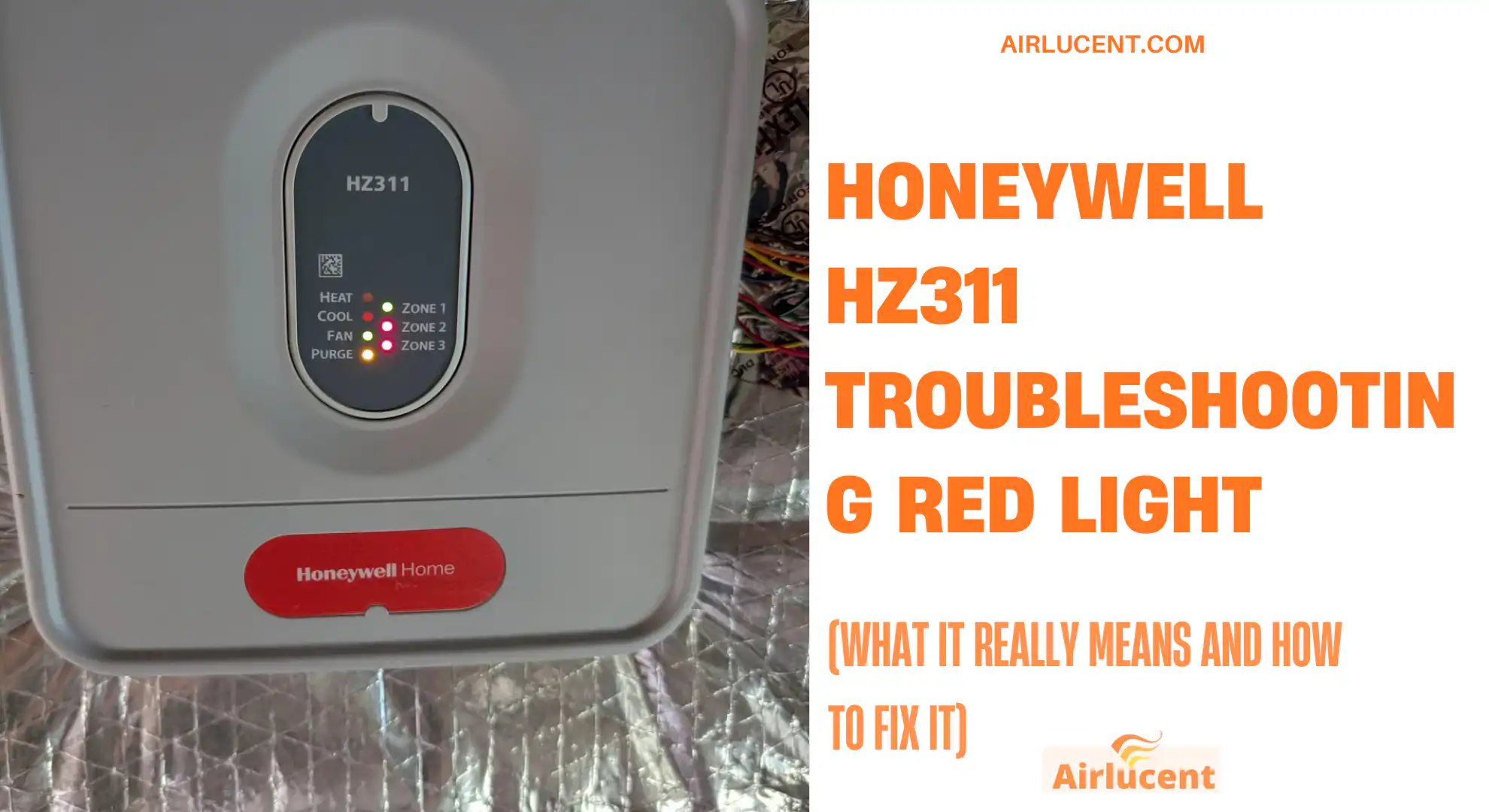
If you’re staring at a red light on your Honeywell HZ311 and thinking “Great, now what?”, you’re not alone. I’ve been on a lot of service calls where the homeowner assumed the zone panel was “in error” because they saw red.
Here’s the truth.
On many Honeywell TrueZONE HZ311 setups, a solid red light on a Zone LED is often normal. It usually means that zone damper is closed or closing because that zone is not currently calling for heating or cooling.
But sometimes a red light does point to a real problem, especially when comfort is off, a fuse blows, or you’re also seeing other warning lights or odd equipment behavior.
In this guide, I’ll walk you through a practical, tech-style troubleshooting process you can do at home. I’ll also show you when it’s time to stop and call a pro.
- Quick 5-minute fix checklist (start here)
- First, what is the Honeywell HZ311 (and where is the “red light” coming from)?
- Honeywell HZ311 light meanings (plain English table)
- Step 1: Confirm the zone is actually calling (this solves a lot)
- Step 2: Check power and low voltage (24VAC) the right way
- Step 3: If the fuse is blown, don’t just replace it and hope
- Step 4: Red zone light plus comfort problems usually means damper trouble
- Step 5: Thermostat wiring issues that trigger “red light” confusion
- Step 6: Don’t ignore airflow restrictions (they can make zoning look “broken”)
- Step 7: Equipment problems that can show up as “HZ311 red light issues”
- How to reset the Honeywell HZ311 safely (the reset that actually works)
- When you should call a professional (and what to tell them)
- Preventing future red light headaches (my real world tips)
- FAQ: Honeywell HZ311 red light
- Conclusion
- References and trusted resources
Quick 5-minute fix checklist (start here)
Before we go deep, do these in order:
- Look closely at which light is red.
- Is it a Zone 1, Zone 2, or Zone 3 light?
- Or a power, purge, heat, cool light?
- Or are you seeing a blinking amber fault light (on some boards)?
- Check the thermostat in the problem zone.
- Is it actually calling for heating or cooling right now?
- Try raising or lowering the setpoint by 3 to 5 degrees so it clearly calls.
- Power cycle the system
- Turn HVAC power off at the furnace switch or breaker for 30 to 60 seconds, then back on.
- Check the zone panel fuse.
- Many HZ311 panels use a small blade fuse (commonly 3A). If it’s blown, nothing will behave correctly.
- Replace the air filter.
- A clogged filter can create airflow problems that snowball into zoning complaints.
If the red light is still confusing after that, keep going.
First, what is the Honeywell HZ311 (and where is the “red light” coming from)?
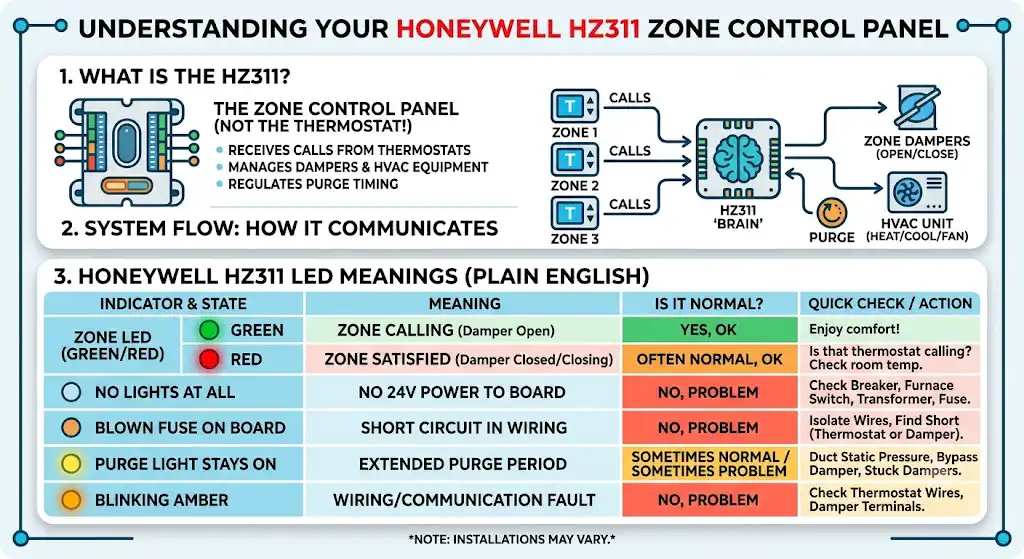
The Honeywell HZ311 is a zone control panel, usually mounted near your furnace or air handler. It is not the thermostat itself.
Your thermostats tell the HZ311 what each zone wants. The HZ311 then:
- opens or closes zone dampers in the ductwork
- tells the HVAC equipment to heat, cool, or run the fan
- manages “purge” timing to relieve pressure and prevent overheating or coil freeze
So when you see a red light, we need to identify whether it’s:
- a normal zone status indication, or
- a true fault condition like a wiring short, damper issue, or power problem
Honeywell HZ311 light meanings (plain English table)
This is the part that clears up most homeowner confusion.
Zone LED color meaning (common behavior on HZ311)
On many HZ311 panels:
- Green Zone LED = that zone is calling (damper should be open)
- Red Zone LED = that zone is not calling (damper closed or closing)
That means a red zone light can be completely normal.
Use this table to interpret what you’re seeing.
| Solid red on Zone 1, 2, or 3 | Zone is satisfied, damper closed or closing | Often normal | Is that thermostat actually calling? |
| Green on a zone but room not heating or cooling | Zone calling but air not delivering | Problem | Damper stuck, wiring, airflow, equipment issue |
| No lights at all | No 24V power to board | Problem | Breaker, furnace switch, transformer, fuse |
| Blown fuse on the board | Short in thermostat wire, damper wire, or a component | Problem | Isolate wires, find short |
| Purge light stays on a long time | Panel is trying to protect equipment and manage pressure | Sometimes normal, sometimes problem | Duct static pressure, bypass damper, stuck dampers |
| Blinking amber (on boards that show amber faults) | Often wiring or thermostat communication issue | Problem | Thermostat wiring terminals, damper terminals |
Important: Different installations can behave slightly differently depending on how it’s wired and what dampers you have. But the red Zone LED meaning above is extremely common in the field.
Step 1: Confirm the zone is actually calling (this solves a lot)
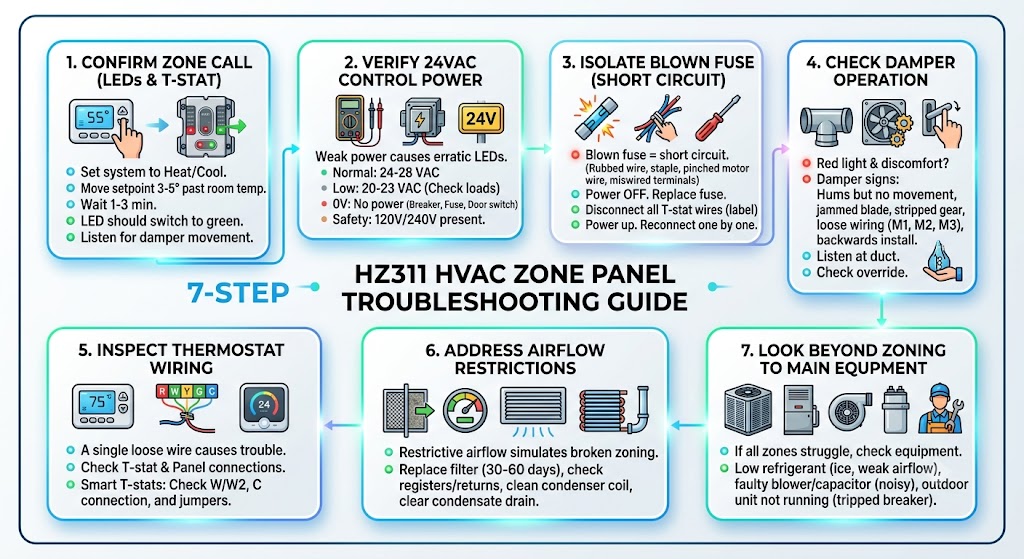
Stand at the thermostat for the zone that has the red light.
What I want you to do
- Set the system to Heat (or Cool, depending on the season)
- Move the setpoint 3 to 5 degrees past room temperature.
- Wait 1 to 3 minutes
What should happen
- That zone LED should typically switch to green.
- You may hear a damper motor move (light buzzing or a short movement sound)
If the zone never switches to green even though the thermostat is clearly calling, the panel might not be receiving the call due to wiring, thermostat issue, or a power problem on the R side.
Step 2: Check power and low voltage (24VAC) the right way
The HZ311 is a 24 volt control system. A weak transformer or power issue can cause weird, inconsistent LEDs.
Typical healthy voltage range
Most systems should read around 24 to 28 VAC under normal load.
Here’s a simple reference:
| 24 to 28 VAC | Normal | Move to wiring and damper checks |
| 20 to 23 VAC | Low voltage under load | Check transformer size, shorts, too many dampers on one transformer |
| 0 VAC | No control power | Check furnace door switch, breaker, transformer, fuse |
Safety note from the field: Even though the control side is 24V, the equipment cabinet also contains 120V or 240V. If you’re not comfortable, stop here and call a technician.
Step 3: If the fuse is blown, don’t just replace it and hope
A blown fuse usually means a short circuit somewhere on the 24V side.
What I see most often
- thermostat wire rubbed through on the sheet metal
- a staple through the thermostat wire
- Damper motor wire pinched
- miswired thermostat terminals (especially after a DIY thermostat swap)
My practical method to isolate the short
- Turn the power off to the HVAC system.
- Replace the fuse with the exact same amperage (commonly 3A).
- Disconnect all thermostat wires from the zone panel (label them first).
- Power up.
- If the fuse holds, reconnect thermostats one zone at a time until it pops.
- Do the same isolation with damper wires if needed.
If you find “Zone 2 thermostat wiring makes the fuse pop,” you’ve narrowed the problem to that cable run or that thermostat.
Step 4: Red zone light plus comfort problems usually means damper trouble
If you’re uncomfortable in a zone and the LED behavior doesn’t match what the thermostat is asking for, I immediately think about dampers.
Common damper failure signs I see in homes.
- The damper motor hums or buzzes but doesn’t move
- damper blade is jammed with debris or has a loose screw
- Motor gear stripped
- wiring to M1 M2 M3 is loose or wrong
- damper is installed backwards (it happens)
Quick damper checks you can do
- Listen at the duct near the damper when the zone calls.
- Look for a manual override on the damper (some have a lever you can lock open).
- Inspect damper wiring at the HZ311 terminals (loose connections are very common)
If a damper is stuck closed, the zone can call all day and you’ll never get airflow where you need it.
Step 5: Thermostat wiring issues that trigger “red light” confusion
I’ve fixed plenty of HZ311 problems that were simply one loose thermostat wire.
What to inspect
At both the thermostat and the zone panel:
- R (power)
- W (heat call)
- Y (cool call)
- G (fan)
- C (common, if your thermostat needs it)
A loose wire under a terminal can look connected but not actually be clamped down.
If you recently installed a smart thermostat, double check that:
- You didn’t mix up W and W2
- You didn’t lose the C connection
- The old jumper settings weren’t needed anymore (depends on system)
Step 6: Don’t ignore airflow restrictions (they can make zoning look “broken”)
Zoning systems depend on airflow. If airflow is restricted, you can get:
- rooms not heating or cooling
- longer run times
- coil freezing in cooling
- high limit trips in heating
- purge cycling and odd panel behavior
The most common airflow restriction is a dirty filter.
The U.S. Department of Energy notes that replacing dirty filters can reduce HVAC energy use, commonly cited in the 5 to 15 percent range depending on system conditions and restriction level.
Here’s a realistic homeowner maintenance table I recommend:
| Air filter | Every 30 to 60 days | Keeps static pressure down and airflow balanced |
| Supply registers | Seasonally | Closed vents can throw off zone balance |
| Return grilles | Seasonally | Blocked returns starve airflow |
| Outdoor condenser coil | Seasonally (cooling) | Dirty coil reduces cooling capacity and can cause long run times |
| Condensate drain | Seasonally | Backups can shut systems down and look like zoning failures |
Step 7: Equipment problems that can show up as “HZ311 red light issues”
Sometimes the zone panel is doing its job, but the equipment can’t deliver.
These are examples I see on calls where homeowners blame the HZ311:
Low refrigerant or frozen evaporator coil (cooling)
- weak airflow
- Ice on copper lines
- system runs but doesn’t cool well
Low refrigerant is not a DIY fix. It’s also often a sign of a leak that must be found and repaired.
Blower motor or capacitor problems
- Poor airflow in every zone
- louder than normal operation
- system short cycling
Outdoor unit not running.
- indoor fan runs, but no cooling
- tripped breaker, failed capacitor, contactor issue
If every zone is struggling, look beyond the dampers and thermostats.
How to reset the Honeywell HZ311 safely (the reset that actually works)
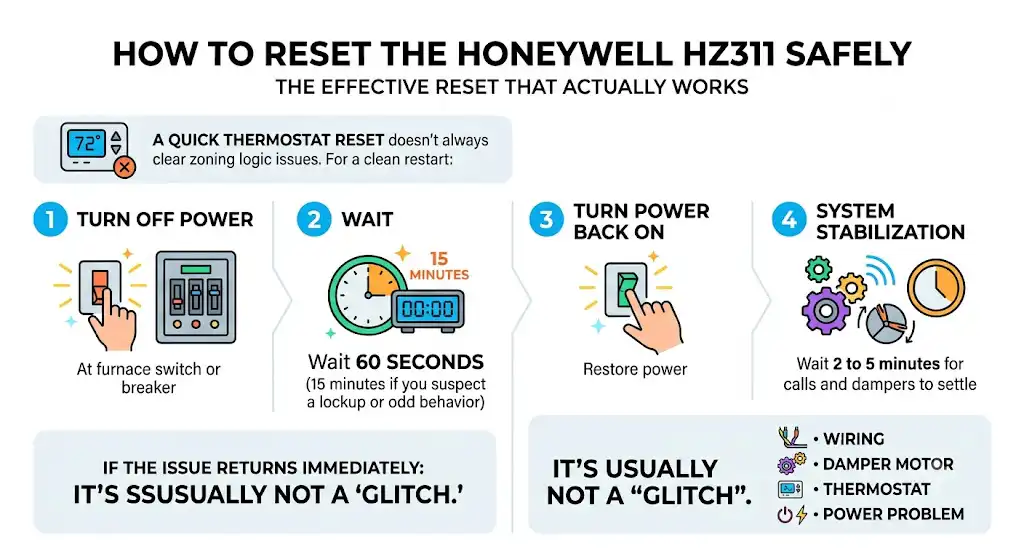
A quick thermostat reset doesn’t always clear zoning logic issues. If I want a clean restart:
- Turn off the power at the furnace switch or breaker.
- Wait 60 seconds (15 minutes if you suspect a lockup or odd behavior).
- Turn the power back on.
- Wait 2 to 5 minutes for calls and dampers to settle.
If the issue returns immediately, it’s usually not a “glitch.” It’s wiring, a damper motor, a thermostat, or a power problem.
When you should call a professional (and what to tell them)
Call an HVAC technician if:
- You smell burning or see melted wire insulation
- The fuse keeps blowing
- Dampers are buzzing loudly or overheating
- You suspect low refrigerant or a frozen coil
- The equipment is tripping breakers or shutting down on safety
What to tell the tech (this saves time and money)
- Which zone number is affected
- What color the zone LED is when the thermostat is calling
- Whether the damper moves or makes noise
- Whether the fuse has blown
- Any recent changes (new thermostat, renovations, power outage)
As a tech, that information immediately narrows the diagnostic path.
Preventing future red light headaches (my real world tips)
If you want your zoning system to behave long-term:
- Keep filters clean and use the correct size and MERV rating for your system
- Don’t close a bunch of supply vents to “force air” into one room. Zoning already does that, and closing vents can spike static pressure.
- Have the system checked yearly. On zoning systems, I like verifying:
- damper operation
- transformer voltage under load
- safe temperature rise in heat
- coil conditions in cooling
- duct static pressure and bypass operation (if installed)
Why I’m picky about static pressure: Zoning systems can stress ductwork if too many zones close at once. When static pressure is too high, you get noise, comfort problems, and shorter equipment life.
FAQ: Honeywell HZ311 red light
What does a solid red light on a zone mean on the Honeywell HZ311?
Most commonly, it means the zone is not calling and the damper is closed or closing. That can be normal.
Why is my zone red but I’m not comfortable?
Either the thermostat isn’t actually calling, the damper is stuck, the wiring is wrong, or the HVAC equipment isn’t delivering proper heating or cooling.
How do I know if it’s a damper problem?
If the thermostat calls but that zone never gets airflow, and you don’t hear or see damper movement, the damper motor or linkage may be stuck or failed.
Can I replace the fuse myself?
Yes, if you’re comfortable and you match the exact amperage. But if it blows again, you need to find the short. Replacing fuses repeatedly can damage the transformer.
What voltage should the HZ311 have?
Typically around 24 to 28 VAC on the control side under normal operation.
Conclusion
A Honeywell HZ311 red light is not automatically bad news. In many homes, a solid red zone LED simply means that zone is closed because it’s satisfied.
Where you need to pay attention is when:
- The thermostat is calling but the zone doesn’t respond
- The fuse blows
- You have airflow issues, odd purge behavior, or equipment lockouts
If you tell me what you’re seeing, I can help you pinpoint it fast:
- Is the light solid red on a zone, or blinking amber?
- Which zone number?
- Is that thermostat calling for heat or cool right now?
References and trusted resources
- U.S. Department of Energy, HVAC maintenance and filter guidance (energy savings commonly cited when replacing dirty filters)
- U.S. Energy Information Administration (EIA), residential energy use breakdowns (heating and cooling are major household energy loads)
- Honeywell Home TrueZONE documentation (HZ311 zone control panel installation and wiring concepts)