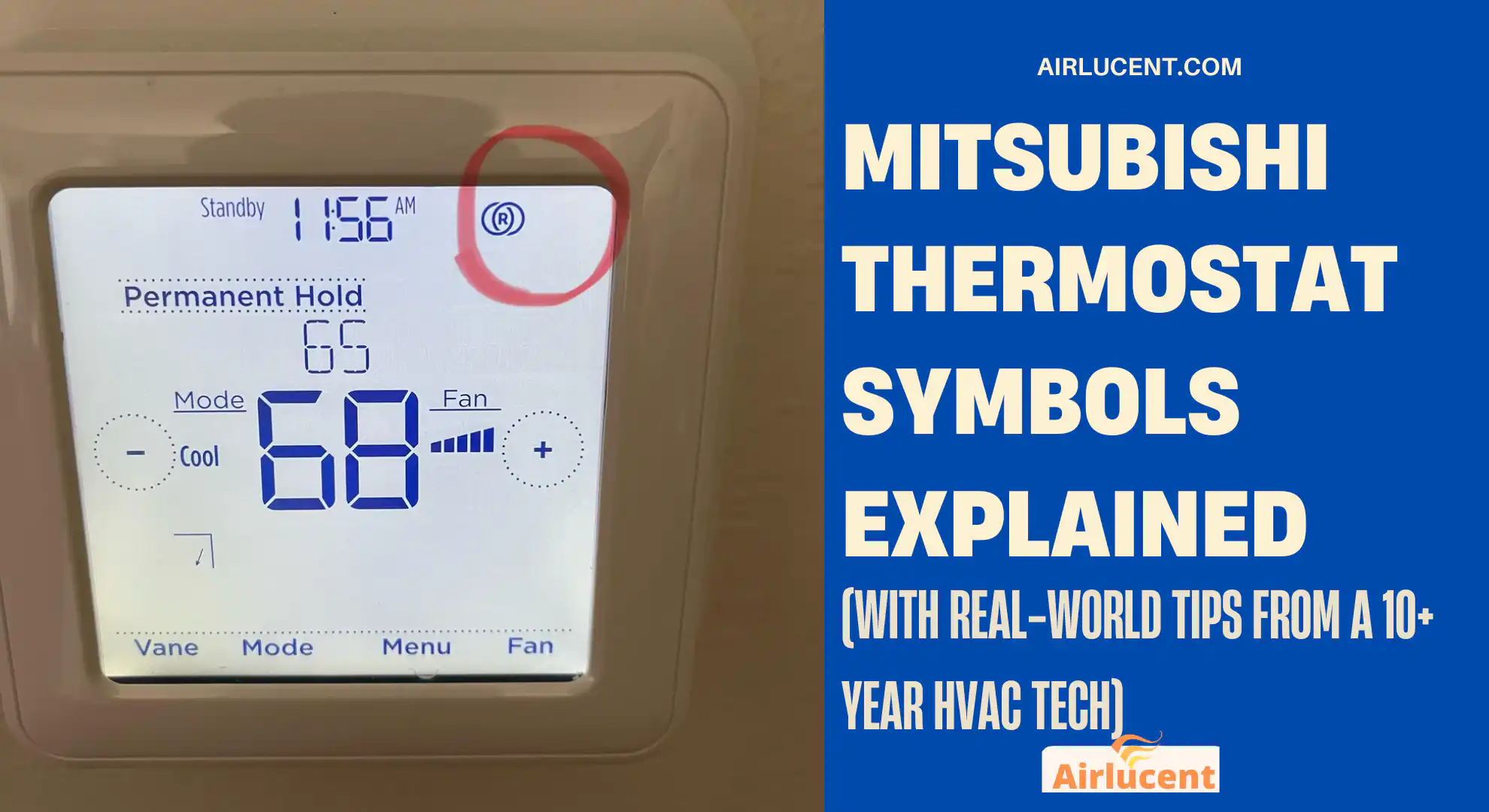
Hi, I’m Nathan. I’ve worked as an HVAC technician for over 10 years, and I can tell you this is one of the most common homeowner frustrations I see: you look at your Mitsubishi thermostat or handheld remote, see a tiny symbol, press a button, and suddenly the system “acts weird”.
The good news is that Mitsubishi’s symbols are consistent once you know what they mean. In this guide, I’ll walk you through the most common Mitsubishi thermostat symbols (including Mitsubishi Electric split system remotes and many wall controllers), what each one does, when you should use it, and the mistakes that quietly raise your power bill.
If you want, you can tell me your remote model (it’s usually on the back, near the batteries) and I’ll help you identify the exact icon set for your unit.
- Quick note: “Thermostat” vs “Remote” on Mitsubishi systems
- Mitsubishi thermostat symbols quick reference table
- Mode symbols (the big five) and what they actually do
- Temperature control symbols (up and down arrows)
- Fan speed symbols (Auto, Quiet, Low, Medium, High, Super High)
- Swing and louver direction symbols (Vane, Wide Vane, Swing)
- Timer symbols (On timer, Off timer, Sleep timer)
- Eco and energy-saving symbols (Eco, Econo Cool, i-save, Night Setback)
- Powerful mode symbol (Powerful)
- i-see sensor and 3D sensor symbols (LN series style features)
- Purifier symbol (Purifier)
- Common warning and maintenance symbols (Filter, service, flashing icons)
- Troubleshooting: Mitsubishi remote not working (fast checks)
- The most common Mitsubishi symbol mistakes I see (and how you avoid them)
- Best-practice settings I recommend to homeowners
- When to call a professional
- FAQs: Mitsubishi thermostat symbols
- What does the snowflake symbol mean on my Mitsubishi thermostat?
- What does the sun symbol mean?
- What does the water drop symbol mean?
- What does the fan symbol mean?
- What symbol means Auto mode?
- Why is there a clock symbol on my Mitsubishi thermostat?
- What does the leaf symbol mean?
- What does Powerful mode do?
- What does the lock symbol mean and how do I remove it?
- What should I do if a symbol is flashing?
Quick note: “Thermostat” vs “Remote” on Mitsubishi systems
Homeowners call it a thermostat, but Mitsubishi setups typically use one of these:
- Handheld remote (most common with wall-mounted indoor heads)
- Wall controller (PAR-series and others)
- Wireless thermostat kits (like MHK2-style setups on some ducted or air handler systems)
Most of the mode symbols (cool, heat, dry, fan, auto) are the same across all of them. The advanced icons (like i-see sensor, purifier, 3D airflow) depend on the series (LN, AP, GL, etc.).
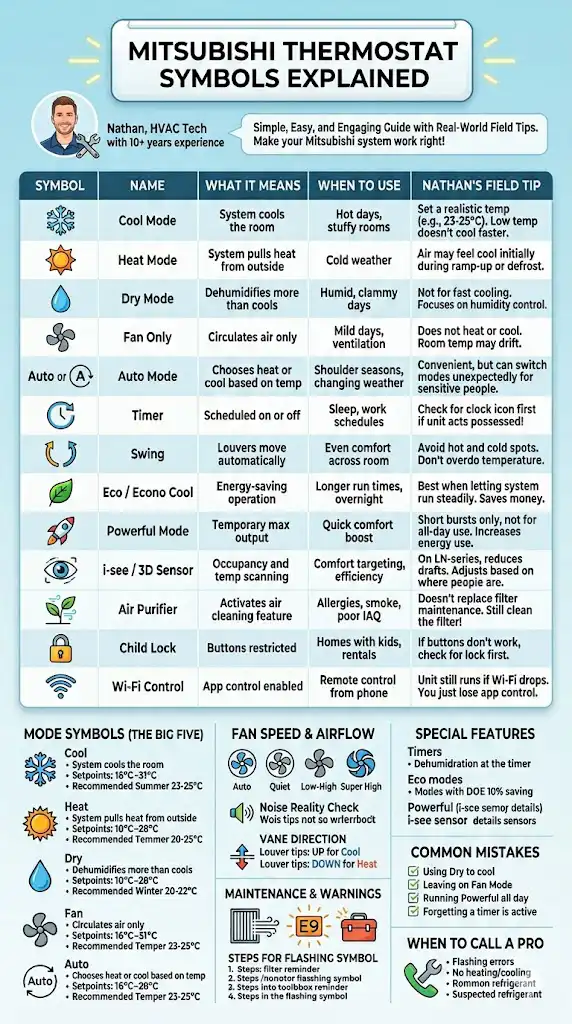
Mitsubishi thermostat symbols quick reference table
These are the symbols I see most often in homes. Your remote may show an icon, text, or both depending on model.
| Snowflake | Cool mode | System is actively cooling | Hot days, rooms that feel stuffy | Set a realistic temp. Very low setpoints usually do not cool faster, they just run longer |
| Sun | Heat mode | System is heating | Cold weather | If air feels “cool” at first, that can be normal during ramp-up or defrost recovery |
| Water drop | Dry mode | Dehumidifies more than it cools | Humid, clammy days | Dry mode is not the same as A C. It’s for humidity control, not fast cooling |
| Fan blades | Fan only | Circulates air only | Mild days, ventilation | Fan mode cannot heat or cool. If the room temp is drifting, this is why |
| “Auto” or “A” | Auto mode | Chooses heat or cool automatically | Shoulder seasons, changing weather | Great for convenience, but can be less predictable if you hate temperature swings |
| Clock | Timer | Scheduled on or off | Sleep, work schedules | A forgotten timer is one of the top reasons people think their unit is “possessed” |
| Swing or louver icon | Swing | Louvers move automatically | Even comfort across room | Use swing to avoid hot and cold spots instead of cranking temperature |
| Leaf | Eco or Econo Cool | Energy-saving operation | Longer run times, overnight | Eco features save money most when you let the system run steadily |
| “Powerful” or rocket | Powerful mode | Temporary max output | Quick comfort boost | It is usually designed for short bursts, not all-day use |
| Sensor icon | i-see or 3D sensor | Occupancy and temp scanning | Comfort targeting, efficiency | On LN-series style units, this can noticeably reduce drafts on people |
| “Purifier” | Air purifier | Activates indoor air cleaning feature (model dependent) | Allergies, smoke, general IAQ | Still clean the filter. Purifier mode does not replace filter maintenance |
| Lock | Child lock | Buttons restricted | Homes with kids, rentals | If nothing changes when you press buttons, check for lock first |
| Wi‑Fi bars | Wi‑Fi control | App control enabled | Remote control from phone | If Wi‑Fi drops, the unit still runs normally. You just lose app control |
Mode symbols (the big five) and what they actually do
Cool mode (snowflake)
What it does: The system removes heat from the room to reach your set temperature.
Typical setpoint range (common Mitsubishi Electric remotes):
- Many models: 16°C to 31°C in cooling
What I recommend to homeowners:
- For comfort and reasonable runtime, most homes land around 23°C to 25°C in summer.
- If you set it to 16°C, the system does not “try harder” forever. It simply runs longer and may never reach that setpoint on very hot days.
Heat mode (sun)
What it does: The system pulls heat from outside and moves it indoors.
Typical setpoint range:
- Often 10°C to 28°C or up to 31°C depending on model
A real-world thing that scares people:
Heat pumps do not always blow “toasty” air like a furnace. They often blow air that feels mildly warm, especially once the room is near setpoint. That is normal and usually more efficient.
My comfort target for most homes:
- 20°C to 22°C in winter is a common sweet spot.
Dry mode (water drop)
What it does: Prioritizes humidity reduction. On many Mitsubishi models, temperature control is limited or automatic in Dry mode.
When you should use it:
- Rainy days
- Rooms that feel clammy even when they are not that hot
Common mistake I fix:
People use Dry mode expecting fast cooling. If your goal is to drop room temperature quickly, Cool mode is usually the better choice.
Fan mode (fan symbol)
What it does: Runs the indoor fan only. No heating or cooling is being produced.
When it’s helpful:
- Air circulation
- Mixing temperatures between rooms (limited benefit unless doors are open)
- Mild weather when you just want airflow
If your room is getting warmer or colder while in Fan mode, that is expected. The unit is not conditioning the air.
Auto mode (“Auto” or “A”)
What it does: The system decides whether to heat or cool based on room temperature and setpoint.
When it’s useful:
- Spring and fall when daytime and nighttime temps swing
What you should watch for:
- If someone in your home is sensitive to temperature changes, Auto can feel inconsistent because it may switch modes when you do not expect it.
Temperature control symbols (up and down arrows)
On most Mitsubishi controllers, temperature changes in 1°C steps.
Typical Mitsubishi temperature ranges by mode (common handheld remotes)
| Cool | 16°C to 31°C |
| Heat | 10°C to 28°C or up to 31°C (model dependent) |
| Dry | Often limited or auto-managed |
| Fan | No temperature setting impact |
If your remote will not let you change temperature, check if you are in Dry or Fan mode.
Fan speed symbols (Auto, Quiet, Low, Medium, High, Super High)
Mitsubishi usually gives you several fan speeds plus Auto.
| Auto | Fan ramps up and down automatically | Most situations | This is the best “set it and forget it” option |
| Quiet | Lowest indoor fan | Bedrooms, light sleepers | If comfort is uneven, Quiet can struggle to push air across the whole room |
| Low to High | Fixed airflow | Steady comfort | Great when you want predictable airflow |
| Super High (on some models) | Maximum airflow | Quick pull-down or warm-up | Use it short-term, then drop back to Auto |
Noise reality check (what I see in the field)
Many Mitsubishi indoor units are designed to be very quiet on low speed. Some models list indoor sound levels down around the high teens to low 20s dB(A) on their quiet settings, while higher fan speeds are noticeably louder. Exact numbers depend on the indoor unit series and size, but the takeaway is simple: fan speed matters for noise and for how evenly a room conditions.
Swing and louver direction symbols (Vane, Wide Vane, Swing)
These symbols control where the air goes, and they matter more than most people think.
Vertical vane and horizontal vane basics
- Swing on: Louvers move automatically to distribute air
- Fixed position: Points air in one direction
Practical setup I use in homes
- Cooling: aim airflow more upward so it can fall and mix
- Heating: aim airflow more downward so heat reaches the occupied zone faster
If one side of the room is always hotter or colder, don’t immediately change temperature. First, change air direction and fan speed.
Timer symbols (On timer, Off timer, Sleep timer)
Timers are excellent for comfort and energy control, but they are also a top cause of confusion.
Common timer functions
- On Timer: system turns on at a set time
- Off Timer: system shuts off at a set time
- Sleep or Night schedule: adjusts operation while you sleep (varies by model)
My troubleshooting tip: If your unit keeps turning off “randomly,” check the screen for a clock icon or timer indicator before assuming something is broken.
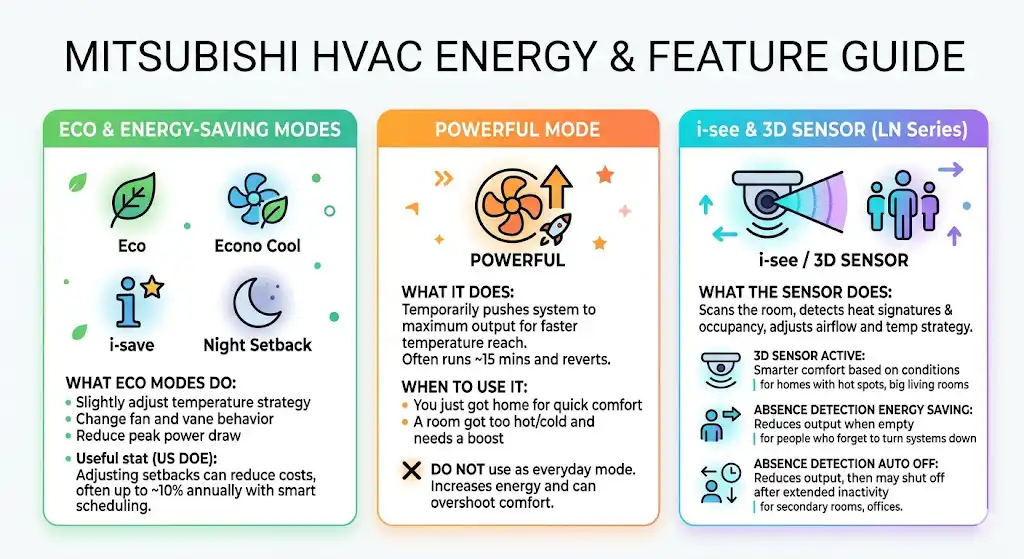
Eco and energy-saving symbols (Eco, Econo Cool, i-save, Night Setback)
Mitsubishi uses a few different energy-saving labels depending on the controller and region.
What Eco style modes usually do
- Slightly adjust temperature strategy
- Change fan and vane behavior
- Reduce peak power draw while maintaining comfort
Useful stat (backed by a mainstream energy authority)
The U.S. Department of Energy notes that adjusting thermostat settings for setbacks over time can reduce heating and cooling costs, often cited around up to about 10 percent annually when done correctly (for example, setting back for several hours a day). Your exact savings depend on insulation, climate, and system type, but the principle holds: big savings usually come from smart scheduling and steady setpoints, not extreme temperatures.
Powerful mode symbol (Powerful)
What it does: Temporarily pushes the system to maximum output to reach temperature faster. Many Mitsubishi remotes run Powerful for a limited period (often around 15 minutes) and then revert.
When to use it:
- You just got home and want quick comfort
- A room got too hot or too cold and you want a boost
What not to do:
Do not treat Powerful like a normal everyday mode. It increases energy use and can overshoot comfort.
i-see sensor and 3D sensor symbols (LN series style features)
Some Mitsubishi systems include advanced occupancy sensing.
What the sensor does (in plain English)
- Scans the room
- Detects heat signatures and occupancy
- Adjusts airflow direction and sometimes temperature strategy
Common sensor-related icons and what they mean
| 3D sensor active | Smarter comfort based on room conditions and occupancy | Homes with hot spots, big living rooms |
| Absence detection energy saving | Reduces output when it detects no one | People who forget to turn systems down |
| Absence detection auto off | Reduces output then may shut off after extended no movement | Secondary rooms, offices |
If you ever notice the system “backing off” when you leave the room, this is usually why.
Purifier symbol (Purifier)
On models that include it, Purifier mode activates an internal air cleaning function designed to reduce certain airborne particles.
Important technician note: Purifier mode does not replace filter cleaning. A dirty filter reduces airflow, hurts comfort, and can increase operating cost.
Common warning and maintenance symbols (Filter, service, flashing icons)
Different controllers show warnings differently, but here’s the pattern I see:
Filter reminder icon
- Often appears after a run-time interval
- Does not always mean something is broken
- It is your cue to clean the indoor unit filter
What to do if a symbol is flashing
- Write down what you see (icon and any error code)
- Turn the unit off, wait a minute, turn it back on
- Check filters and airflow
- If it returns quickly, it may need a technician diagnosis
If you can share the exact icon or any code, you can usually avoid guessing.
Troubleshooting: Mitsubishi remote not working (fast checks)
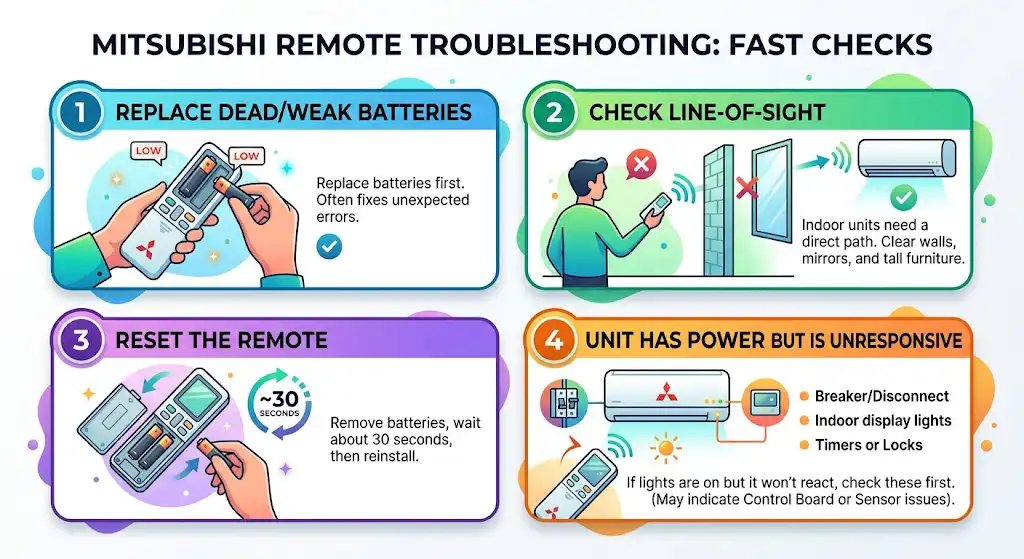
1) Dead or weak batteries
Replace batteries first. It solves a surprising number of “system problems.”
2) Remote has no line-of-sight
Many indoor heads need a clear path to receive the signal. Mirrors, walls, and even tall furniture can interfere.
3) Remote needs a reset
Remove batteries, wait about 30 seconds, reinstall.
4) Unit has power but is unresponsive
Check:
- breaker or disconnect
- indoor unit display lights
- whether a timer or lock is enabled
If the indoor unit has lights but does not respond to any command, that is usually when I start looking for control board issues or sensor faults.
The most common Mitsubishi symbol mistakes I see (and how you avoid them)
- Using Dry mode to cool the house
Dry is for humidity control. Use Cool for temperature reduction. - Leaving it on Fan mode and wondering why it is not heating
Fan mode only moves air. - Running Powerful all the time
Powerful is a short burst tool, not an efficiency mode. - Cranking the setpoint way past comfortable
Extreme setpoints usually increase runtime and cost without improving comfort faster. - Forgetting a timer is active
If the system turns on or off by itself, always check the clock icon first.
Best-practice settings I recommend to homeowners
These are general targets I’ve seen work well for comfort and efficiency in typical homes:
| Summer | Cool | 23°C to 25°C | Auto or Medium |
| Winter | Heat | 20°C to 22°C | Auto |
| Humid days | Dry | Use as needed | Auto or Low |
| Night | Cool or Heat plus Night features | Slightly relaxed setpoint | Quiet or Auto |
If you want maximum comfort, pair good settings with the basics: clean filters, open airflow, and correct vane direction.
When to call a professional
Call a technician if:
- Symbols are flashing with an error code that returns after reset
- The unit runs but does not heat or cool after basic checks
- You suspect a refrigerant issue (ice buildup, poor performance, unusual noises)
- The remote and indoor unit seem mismatched or will not communicate
After 10+ years in HVAC, I’ll tell you the honest truth: most symbol confusion is normal. But repeated error indicators are the system asking for help.
FAQs: Mitsubishi thermostat symbols
What does the snowflake symbol mean on my Mitsubishi thermostat?
It means the unit is in Cool mode and will try to lower room temperature to your setpoint.
What does the sun symbol mean?
It means Heat mode is active.
What does the water drop symbol mean?
That is Dry mode, which focuses on reducing humidity. It may not allow normal temperature control on some models.
What does the fan symbol mean?
Fan-only mode. It circulates air but does not heat or cool.
What symbol means Auto mode?
Usually “Auto” or an “A”. The system chooses heating or cooling automatically.
Why is there a clock symbol on my Mitsubishi thermostat?
A timer is enabled. The system may be scheduled to turn on or off automatically.
What does the leaf symbol mean?
Usually an Eco or energy-saving feature like Econo Cool, depending on your model.
What does Powerful mode do?
It temporarily boosts heating or cooling output for faster comfort, then typically returns to normal settings.
What does the lock symbol mean and how do I remove it?
It means the controller is locked. The unlock method depends on the model (often holding a button combo). If you tell me your remote model number, I can point you to the exact steps.
What should I do if a symbol is flashing?
Check for a timer, reset power to the remote, clean the filter, and note any error code. If it returns, it likely needs a service call.