I’m Nathan. I’ve worked as an HVAC technician for more than 10 years, and one of the most common calls I get is people asking me My thermostat is stuck on Hold or Why will it not follow the schedule anymore?
The good part is that, in many cases, this turns out to be a pretty easy fix. In this short guide, I’m going to show you how to turn off Hold on most thermostats, including Honeywell, Nest, ecobee, Trane, Emerson, and other brands. I’ll also cover what Hold actually means, and how to dodge bigger energy bills from accidentally leaving a permanent “hold” running.
- Quick answer (works for most thermostats)
- What does Hold mean on a thermostat?
- Temporary Hold vs Permanent Hold (why it matters)
- When you should use Hold (and when you shouldn’t)
- Does using Hold save energy or waste energy
- How to turn off Hold on your thermostat (by brand)
- If your thermostat is “stuck on Hold” (the troubleshooting I use on service calls)
- My best advice: use Hold without losing comfort or savings
- When to call an HVAC technician (what might be going on)
- FAQ: Turning off Hold on a thermostat
- References
Quick answer (works for most thermostats)
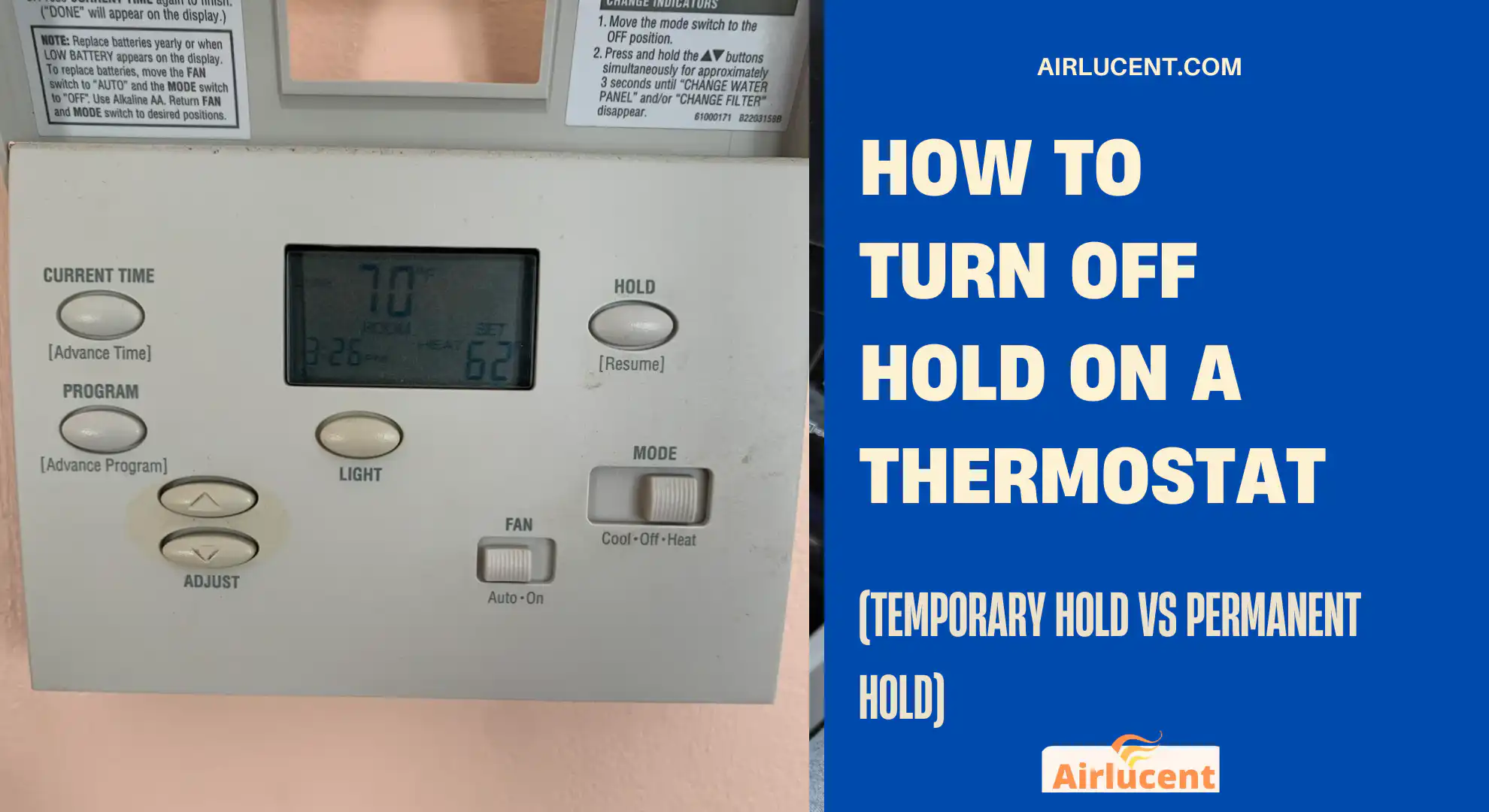
To turn off Hold, press one of these buttons on your thermostat:
- Run
- Run Schedule
- Resume
- Cancel
- Cancel Hold
If you have a smart thermostat, you can simply do it from the app.
If you don’t see any of those options, check the steps below.
What does Hold mean on a thermostat?
On a programmable thermostat, Hold usually means you’ve kind of overridden what the schedule was doing, like you’ve instructed the thermostat to stay at one particular temperature instead of automatically cycling through the day.
In real life, it’s like telling your thermostat:
- “Ignore the schedule. Stay right here until I tell you otherwise.”
As an HVAC tech, I like this feature when it’s used intentionally. The problems happen when someone bumps the temperature, sees “Hold” pop up, and doesn’t realize the schedule is no longer controlling comfort or energy use.
Temporary Hold vs Permanent Hold (why it matters)
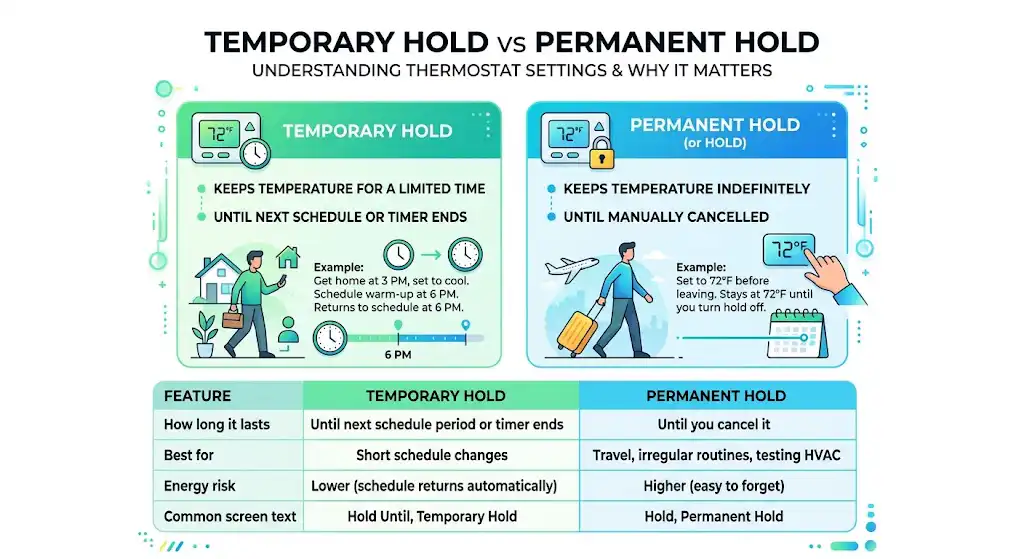
Different thermostats label these a little differently, but the idea is consistent.
Temporary Hold
A Temporary Hold keeps that new temperature only for a while—until the next scheduled adjustment, or until the time you set actually runs out.
Example: You normally let the house start warming up at 6 pm, but you get home at 3 pm and you want it comfortable right away. Temporary hold acts like a bridge for that stretch, then the routine goes back to normal later.
Permanent Hold
A Permanent Hold (sometimes called just “Hold”) keeps the temperature indefinitely until you manually cancel it.
Example: You set it to 72°F, and it will keep trying to maintain 72°F morning, day, and night until you turn Hold off.
Comparison table
| How long it lasts | Until next schedule period or timer ends | Until you cancel it |
| Best for | Short schedule changes | Travel, irregular routines, testing HVAC |
| Energy risk | Lower (schedule returns automatically) | Higher (easy to forget) |
| Common screen text | Hold Until, Temporary Hold | Hold, Permanent Hold |
When you should use Hold (and when you shouldn’t)
You should use Hold when your real schedule doesn’t match your programmed schedule, like:
- You’re home sick and want comfort during hours the thermostat thinks you’re away.
- You’re hosting guests and need steadier cooling/heating for a few hours.
- You’re leaving for a weekend and don’t have a vacation mode.
- Extreme weather where you want consistent protection (like avoiding frozen pipes)
When I recommend avoiding Hold, if you have a working schedule already set up and you’re only making frequent small tweaks. Repeated permanent holds often erase the entire point of having a programmable thermostat.
Does using Hold save energy or waste energy
It depends on the temperature you hold and how long you hold it.
- A hold can save energy if you use it to maintain an efficient setback temperature while you’re away (example: 60°F in winter or 80°F in summer, depending on your home and comfort needs).
- A hold can waste energy if you lock in a comfort temperature all day while nobody is home.
How to turn off Hold on your thermostat (by brand)
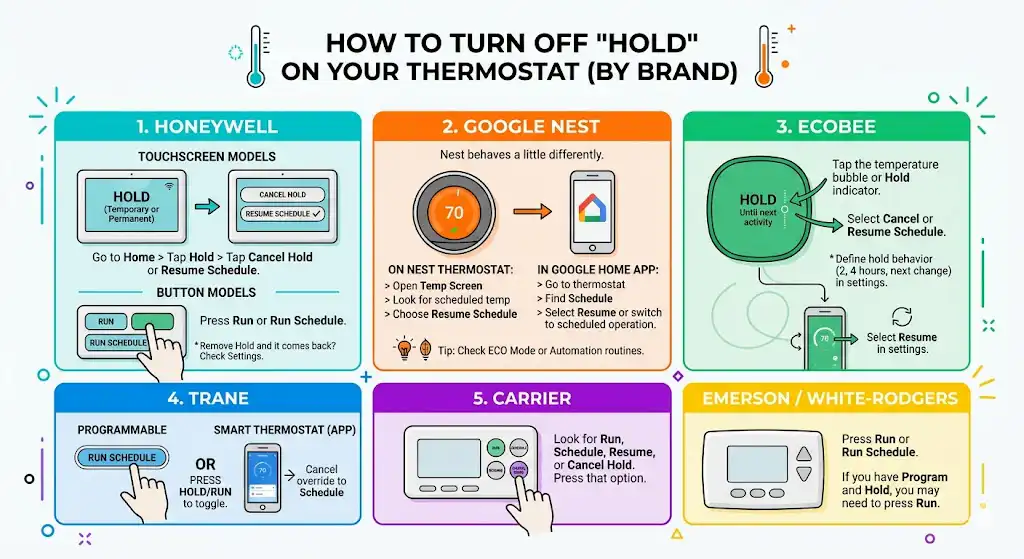
Honeywell
Honeywell is one of the most common brands I see in homes.
Honeywell touchscreen models (common on RTH series)
- Go to the Home screen.
- Tap Hold (it may say Hold Until or Permanent Hold)
- Tap Cancel Hold (or Resume Schedule)
- Confirm you now see something like the following schedule
Honeywell button models (older programmable)
- Press Run or Run Schedule
- If you see a Hold button, pressing Hold again may toggle it off on certain models.
If you remove Hold and it comes right back, check whether the thermostat is set to Permanent Hold or whether the schedule is disabled in settings.
Google Nest thermostat: turn off Hold (Schedule override)
Nest behaves a little differently because it’s learning-based and app-driven.
On Nest, you’re usually dealing with a manual setpoint or a scheduled temperature, not always a button literally called Hold.
To cancel the override:
- On the Nest thermostat, open the Temp screen.
- Look for the scheduled temperature vs your manual setting.
- Choose Resume schedule (wording varies by model)
In the Google Home app (or Nest app on older systems):
- Go to your thermostat
- Find Schedule
- Select Resume or switch back to scheduled operation
Tip from the field: If someone used Eco mode or Hold through a home automation routine, you may need to disable that automation as well.
Ecobee thermostat: cancel Hold
ecobee commonly shows Hold with a duration like “Until next scheduled activity” or “Until you change it.”
To remove it:
- Tap the temperature bubble or the small Hold indicator.
- Select Cancel or Resume Schedule
- Confirm it returns to your comfort settings schedule.
ecobee also lets you define hold behavior (2 hours, 4 hours, until next scheduled change). If you hate accidental long holds, this setting helps a lot.
Trane programmable thermostats: Run Schedule / Hold-Run
Trane has a mix of older programmable units and newer smart thermostats.
Trane programmable (common behavior)
- Press Run Schedule to end Hold and return to programmed operation
Some Trane models use a combined button:
- Press Hold/Run to toggle hold off and resume the schedule
Trane smart thermostat (app-based)
Many overrides are handled in the Trane app using temporary schedule overrides/automations. You typically cancel the override and set it back to Schedule.
Carrier thermostats: cancel Hold / resume schedule
Carrier-branded thermostats often follow the same logic:
- Look for Run, Schedule, Resume, or Cancel Hold
- Press that option to return to the programmed schedule
Carrier dealers often explain Hold as a manual override that stops schedule changes, which matches what I see in service calls.
Emerson / White-Rodgers: Run Schedule or Program
Many Emerson/White-Rodgers thermostats:
- Press Run or Run Schedule
- If it has Program and Hold, you may need to press Run to return to the program.
If your thermostat is “stuck on Hold” (the troubleshooting I use on service calls)

1) You may have a permanent hold on (not temporary)
If it says Permanent Hold, it will never end on its own. Cancel it using:
- Run Schedule
- Cancel Hold
- Resume
2) Your schedule might be turned off
Some thermostats have scheduling disabled in settings, so it can feel like it’s “stuck” even after canceling Hold.
What to look for in settings:
- Schedule: On
- Program: Enabled
3) The thermostat clock is wrong
If the clock/time is wrong, the schedule won’t change when you expect.
Fix:
- Set correct time, day, and weekday/weekend settings.
4) Low batteries or power issues (common on older units)
If the thermostat is battery-powered, weak batteries can cause weird behavior.
Fix:
- Replace batteries
- Make sure the thermostat is firmly snapped onto the wall plate.
5) You might be using a phone app or automation that re-applies the hold
This happens a lot with smart thermostats integrated with:
- Google Home routines
- Alexa routines
- HomeKit automations
- Utility energy-saving events
Fix:
- Check automations and utility program settings and disable the one forcing overrides.
My best advice: use Hold without losing comfort or savings
Here’s what I tell homeowners after I fix the issue:
Use Temporary Hold for day-to-day changes.
If you tend to forget, a temporary hold is safer because it returns to your schedule automatically.
Use Permanent Hold only when you mean it
Permanent hold is useful for:
- vacations
- HVAC troubleshooting
- inconsistent schedules
But if you leave it on accidentally, you can undo months of “smart thermostat” savings.
At-a-glance: buttons and words that end Hold
| Hold | Run / Resume / Cancel |
| Hold Until | Cancel Hold (or wait until time ends) |
| Permanent Hold | Run Schedule / Cancel Hold |
| Override | Resume Schedule |
| Manual | Switch back to Auto Schedule (in settings/app) |
When to call an HVAC technician (what might be going on)
Most Hold issues are user-settings. But I recommend calling a pro if:
- The thermostat won’t respond to touches or buttons even after a power reset
- The screen is blank or flickering (possible power/transformer issue)
- The HVAC system runs nonstop even after Hold is removed
- You suspect wiring issues behind the thermostat
Sometimes the issue isn’t Hold at all. It’s a shorted thermostat wire, a stuck relay, or a control board problem that makes it look like “the thermostat is ignoring me.”
FAQ: Turning off Hold on a thermostat
Will Temporary Hold turn off automatically
Yes, temporary hold ends at the next scheduled change or when its timer ends (depends on model and settings).
Why did my schedule stop working after a power outage
After a power loss, the thermostat clock can reset, or the schedule can be disabled. Check time/day settings first.
Is it bad to leave Hold on all the time
Not mechanically “bad,” but it can be expensive if the held temperature is more aggressive than your schedule setbacks.
References
- U.S. Department of Energy guidance commonly cited on thermostat setbacks and potential savings (often summarized as up to ~10% savings with proper setback scheduling)
- Manufacturer and dealer explanations of Hold behavior on programmable thermostats (Carrier dealer-style explanations, Honeywell hold cancellation steps, Trane hold/run schedule behavior)