I’m Nathan. I’ve worked as an HVAC technician for over 10 years, and a big part of my job has been fixing comfort problems that come down to one simple device: the thermostat.
If you’re stuck choosing between a Honeywell thermostat and a Nest thermostat, you’re not alone. These are two of the most common smart thermostat brands I see in real homes. They both look great on paper, but they behave very differently once they’re controlling actual HVAC equipment day after day.
In this guide, I’ll break it down the way I explain it to homeowners at the kitchen table: what matters, what doesn’t, what typically goes wrong, and which one fits your home and your habits.
- How I evaluate smart thermostats (real-world, not just specs)
- Honeywell vs Nest at a glance (best for most homes)
- Design and interface: touchscreen practicality vs the Nest dial
- Temperature accuracy and comfort: the part most people feel
- Installation and wiring: the C-wire issue you should not ignore
- HVAC compatibility: where Honeywell usually pulls ahead
- Smart features: learning vs scheduling (what actually saves money)
- App and smart-home integration: Google-first vs more flexible setups
- Reliability and long-term satisfaction (what I see after the first year)
- Price and value (typical ranges)
- Energy savings: what’s realistic
- Which one should you choose? My scenario-based recommendations
- My “homeowner checklist” before you buy
- FAQs
How I evaluate smart thermostats (real-world, not just specs)

When I “test” a thermostat, I’m not only looking at whether it turns heat on and off. Most modern thermostats can do that. What actually affects your day-to-day comfort is:
1) Temperature control and swing
How tightly does it hold the set temperature? Some thermostats allow a wider swing before they call for heating or cooling again. That swing is the difference between “always comfortable” and “why is it cold again?”
2) Ease of use on the wall
When your phone is dead or the WiFi is acting up, you should still be able to walk up and make a change quickly.
3) App reliability and setup
A smart thermostat that disconnects constantly is basically an expensive regular thermostat.
4) HVAC compatibility and wiring
This is where most buying guides are weak. I care about:
- Heat pumps and auxiliary heat
- Multi-stage systems
- Dual-fuel setups
- Dehumidification and ventilation control
- Whether a C wire is present and how the thermostat behaves without one
5) Automation that actually helps
Learning schedules, geofencing, room sensors, alerts. The best feature is the one you’ll actually use.
Honeywell vs Nest at a glance (best for most homes)
Here’s the simplest way I explain the difference:
- Nest is built around automation and a sleek, minimalist design.
- Honeywell is built around HVAC control first, with broad system support and straightforward operation.
Comparison table (general brand behavior)
| Best for | Homeowners who want reliable control and broad HVAC compatibility | Homeowners who want hands-off automation and a premium design |
| On-wall usability | Traditional touchscreen or clear menus | Dial style interface, minimal controls |
| Scheduling style | You set schedules, plus optional geofencing | Learning schedules, Home Away assist, automation-first |
| Room sensors | Strong options on T9 and T10 (prioritize rooms) | Sensors exist, but scheduling and control can be more limited |
| HVAC compatibility | Typically broader, especially with multi-stage and accessory control | Mostly focused on standard 24V residential systems |
| C-wire situations | Generally more straightforward expectations | Can run into power-related issues without a proper C-wire |
| Cloud dependence | Many functions still work fine locally | More features rely on cloud and internet stability |
| Typical price | Often lower for comparable comfort control | Often higher for design and automation |
Design and interface: touchscreen practicality vs the Nest dial
Honeywell design (why techs like it)
Most Honeywell smart thermostats I install have a rectangular touchscreen with clear menus. It’s not “art,” but it’s practical.
What homeowners usually like:
- Bigger display, easy to read across the room
- Straightforward buttons and settings
- Less confusion when guests or babysitters need to adjust temperature
If you care about simple day-to-day operation, Honeywell usually wins here.
Nest design (why homeowners fall in love with it)
Nest is the thermostat people point at and say, “That looks cool.”
What Nest does well:
- Premium materials
- The dial interaction is simple for basic up and down changes
- The screen wakes up nicely and feels modern
Where some people get annoyed:
- Deeper settings can take more steps than you expect
- The dial can feel less direct than a full touchscreen, especially when you’re trying to make quick changes
My honest take: Nest looks better. Honeywell is easier to “live with” for most families.
Temperature accuracy and comfort: the part most people feel
Comfort is the whole point. If the thermostat isn’t consistent, nothing else matters.
What I see most often in the field
- Honeywell models typically hold tighter comfort bands when configured correctly.
- Nest thermostats can allow a wider temperature swing depending on settings, system type, and how the algorithm is behaving.
That swing becomes noticeable in homes that are:
- Drafty
- Two-story
- Have oversized equipment
- Have rooms that run hot or cold
Real-world comfort tip from me
If you or your family is sensitive to temperature changes, or you’ve already struggled with hot and cold swings, I usually steer you to Honeywell with room sensors (T9 or T10). It’s one of the most practical ways to solve comfort complaints without major HVAC modifications.
Installation and wiring: the C-wire issue you should not ignore
This is where a lot of Nest versus Honeywell conversations should start.
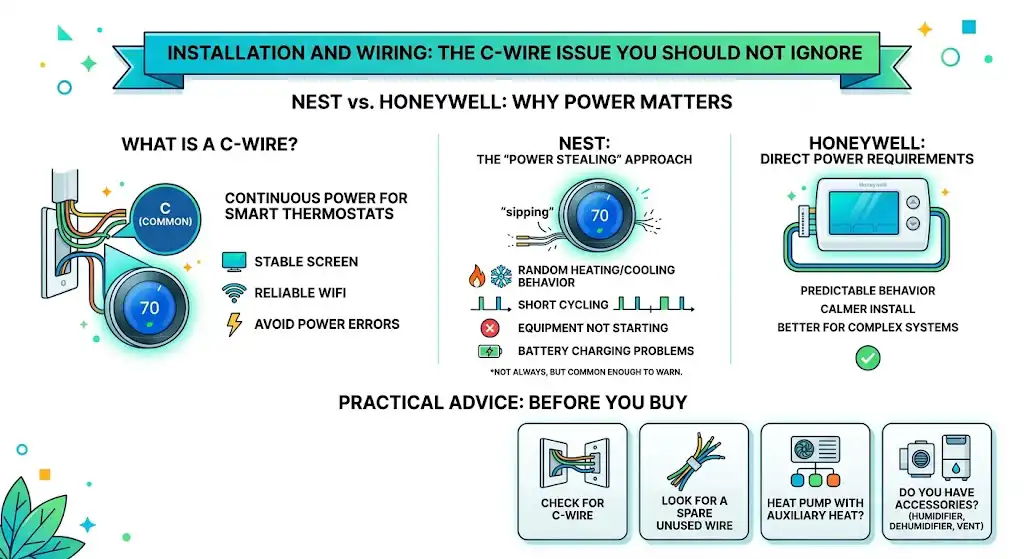
What is a C wire and why do you care?
A C wire is the common wire that provides continuous power to the thermostat.
Many smart thermostats work best with a C wire because:
- The screen stays stable
- WiFi stays connected more reliably
- You avoid strange cycling or power-related errors
Nest and “power stealing” behavior (why some systems act weird)
Nest has a long-running reputation in HVAC circles for issues when installed without a proper C wire. When it doesn’t have enough power, it may try to “sip” power through control circuits. Depending on the equipment, that can lead to:
- Random heating or cooling behavior
- Short cycling
- Equipment not starting when it should
- Battery charging problems
Does this happen in every home? No.
Do I see it often enough to warn homeowners? Yes.
Honeywell wiring behavior
Honeywell thermostats are usually more direct about power requirements and tend to behave more predictably when wired correctly. If your system is more complex, Honeywell is typically the calmer install.
Practical advice before you buy
Before choosing either brand, pull your current thermostat off the wall and check:
- Do you have a wire connected to C?
- Do you have a spare unused wire in the bundle?
- Is your system a heat pump with auxiliary heat?
- Do you have humidifier, dehumidifier, or ventilation accessories?
HVAC compatibility: where Honeywell usually pulls ahead
This is the technician side of the answer.
Honeywell strengths
Honeywell is commonly favored in professional installs because many models support:
- Multi-stage heating and cooling
- Heat pump configurations
- Dual fuel systems
- Accessory controls such as humidification and dehumidification on select models
- More conventional, transparent wiring terminals
Nest strengths and limitations
Nest works great on a lot of standard 24V systems. But homeowners run into limitations more often when they have:
- Dual fuel setups
- Advanced dehumidification needs
- Complex staging
- Non-standard wiring or older control boards
If your system is basic, Nest can be smooth.
If your system is complicated, Honeywell is usually safer.
Smart features: learning vs scheduling (what actually saves money)
Nest smart features
Nest is built around automation:
- Learns your schedule
- Home Away modes
- Eco temperatures
- Integrates deeply with Google Home
This is perfect if you want the thermostat to “think” for you.
Honeywell smart features
Honeywell is built around controlled scheduling and comfort tuning:
- Strong scheduling options
- Geofencing on many models
- Excellent support for room sensors on T9 and T10 models
Honeywell is better if you want to set it up once and know exactly what it’s doing.
App and smart-home integration: Google-first vs more flexible setups
Nest app and Google Home
If your house already runs on Google Home, Nest can feel seamless.
Honeywell Home app
Honeywell’s app experience is usually more “plain” but often stable for:
- Scheduling
- Temperature changes
- Basic alerts
- Sensor management (model dependent)
If your goal is reliable remote control, Honeywell is often the less dramatic option.
Reliability and long-term satisfaction (what I see after the first year)
This is where real EEAT matters. I don’t just install these. I get the call when something stops working on a weekend.
What I see more with Nest
- Power related issues when no C-wire is present
- Connectivity frustration in some homes
- Some homeowners love it for years, but the failure stories tend to cluster around power and cloud dependence
What I see more with Honeywell
- Generally stable HVAC control
- Fewer total “my thermostat is dead” situations
- Occasional app or firmware quirks, but the thermostat usually still runs the system
Price and value (typical ranges)
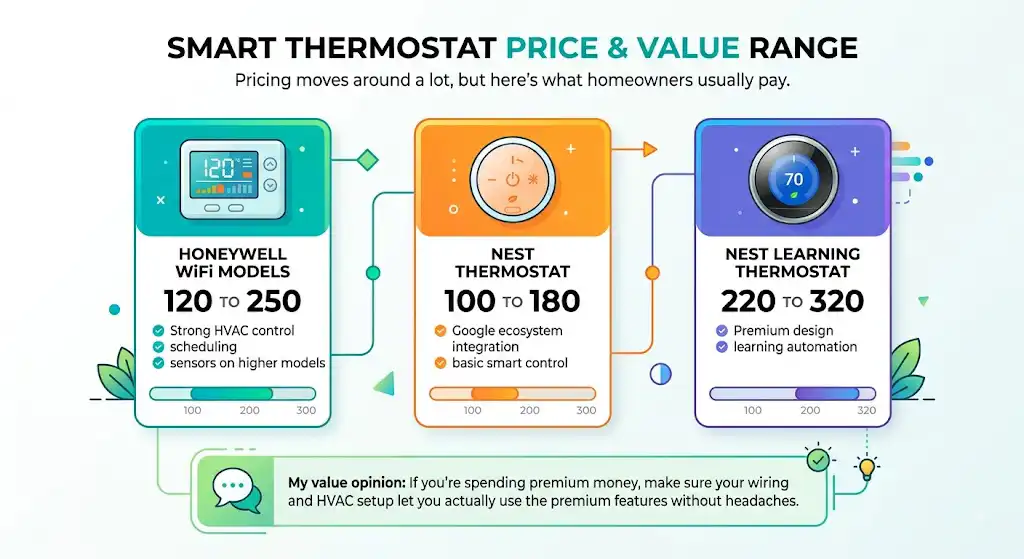
Pricing moves around a lot, but here’s what homeowners usually pay.
| Honeywell WiFi models | 120 to 250 | Strong HVAC control, scheduling, sensors on higher models |
| Nest Thermostat | 100 to 180 | Google ecosystem integration and basic smart control |
| Nest Learning Thermostat | 220 to 320 | Premium design and learning automation |
My value opinion: If you’re spending premium money, make sure your wiring and HVAC setup let you actually use the premium features without headaches.
Energy savings: what’s realistic
You’ll save the most if:
- You currently keep one temperature 24/7
- Your schedule is predictable
- You actually use setbacks (or automation) consistently
You’ll save less if:
- You already manage your settings well
- Someone in the home overrides the schedule constantly
- Your system is oversized and short-cycles (that’s an equipment issue, not a thermostat issue)
Which one should you choose? My scenario-based recommendations
Choose Honeywell if you want:
- The safest bet for HVAC compatibility
- Consistent comfort with fewer surprises
- Easier manual control on the wall
- Room sensor comfort balancing (T9 or T10)
- Less risk in homes without a perfect C-wire setup
Choose Nest if you want:
- A modern design that looks high-end
- Hands-off automation and learning behavior
- You already use Google Home devices
- You have a proper C-wire and stable WiFi
- You’re comfortable relying on app and cloud features
My “homeowner checklist” before you buy
Answer these and your choice becomes obvious:
- Do you have a C wire connected now?
- Is your system a heat pump, multi-stage, or dual fuel?
- Do you want room sensors to fix hot and cold rooms?
- Do you want to control humidity or ventilation accessories?
- Do you prefer “set it and forget it” automation or total manual control?
If you’re not sure, send me:
- A photo of your current thermostat wiring
- Your HVAC type (furnace, boiler, heat pump, etc.)
And I’ll tell you which direction I’d go.
FAQs
Is Honeywell better than Nest?
In most real homes I service, Honeywell is the safer choice for reliability, compatibility, and straightforward control. Nest can be excellent in the right setup, especially for Google-focused homes.
Do Nest thermostats require a C wire?
They don’t always require it, but they behave best with a C wire. Without it, you’re more likely to experience power or cycling issues depending on the HVAC equipment.
Which thermostat is easier to use without the app?
Most homeowners find Honeywell’s touchscreen models easier for quick manual adjustments. Nest is simple for turning temperature up or down, but deeper settings are less direct.
Which is better for hot and cold rooms?
Honeywell models that support room sensors (like T9 and T10) are usually the best practical fix without modifying ductwork. Nest sensors can help too, but Honeywell’s sensor control is often more straightforward.