Hi, I’m Nathan. I’ve worked as an HVAC technician for over 10 years, and I’ve installed and troubleshot a lot of smart thermostats including ecobee. When an ecobee touch screen stops responding, it feels like you lose control of your whole heating and cooling system. The good news is most touch screen issues come down to a few repeat causes: a simple software freeze, a power problem (usually the C wire or furnace safety/power), or something basic like a dirty screen.
Below is the exact troubleshooting process I use in the field, written so you can follow it step by step at home.
- Quick answer (start here)
- Before you touch anything: a quick safety note
- Identify your symptom (this matters)
- Troubleshooting table (fast diagnosis)
- Step-by-step: Ecobee screen is ON but not responding
- Step-by-step: Ecobee screen is OFF or BLACK (no power)
- The most common causes I see (real-world)
- What to do if nothing works (when to call support or a technician)
- Prevention tips (so you don’t deal with this again)
- Quick FAQ
Quick answer (start here)
If your ecobee screen is on but not responding:
- Gently pull the ecobee faceplate straight off the wall
- Wait 30 seconds
- Push it firmly back on until it fully seats
- Let it reboot and test the screen again
This “faceplate reboot” is also the official first step ecobee recommends when the display is unresponsive.
If your ecobee screen is completely black/off:
- That’s almost always a power issue. Check the HVAC breaker, the furnace switch, the furnace door (safety switch), and the C wire.
Sources: ecobee support articles on unresponsive screens and “won’t turn on” troubleshooting.
Before you touch anything: a quick safety note
Thermostats are low voltage (typically 24V), but your furnace/air handler has 120V or higher power inside. If you’re going to open the furnace panel to check wiring or a fuse:
- Turn off the furnace/air handler switch and the breaker first
- If you’re not comfortable, stop at the thermostat-level steps and call a licensed HVAC tech
Identify your symptom (this matters)
Ecobee problems fall into two main categories, and the fix depends on which one you have.
Symptom A: Screen is lit but not responding to touch
- Display is on
- You can see the temperature
- Touch input does nothing or feels “frozen”
This is usually a temporary software freeze or a stuck process.
Symptom B: Screen is black/off (no display)
- No lights, no backlight, nothing
- Often happens after an install, power outage, or a furnace door being opened
This is almost always loss of 24V power to the thermostat.
Troubleshooting table (fast diagnosis)
| Screen on but taps do nothing | Firmware/app freeze | Faceplate reboot | Reboot + Wi-Fi reconnect/firmware update |
| Screen frozen on one page | Temporary software hang | Faceplate reboot | Reboot (30 seconds off wall) |
| Screen black/off | No 24V power to thermostat | Check breaker and furnace switch | Restore power, check furnace door switch, verify C wire |
| Screen keeps rebooting or “calibrating” | Power instability | Check C wire and connections | Tighten C wire, check furnace control board and fuse |
| Touch works sometimes, misses taps | Dirty screen or protective film | Clean screen properly | Microfiber wipe, no chemicals |
| Touch screen stopped after HVAC work | Loose wire or blown fuse | Check wiring and fuse | Re-seat wires, replace 3A fuse if blown |
Step-by-step: Ecobee screen is ON but not responding

Step 1: Clean the screen the right way
It sounds too simple, but I’ve seen smudges, cooking grease film, and dust cause “missed taps” that looks like a touch failure.
What I do:
- Use a clean, dry microfiber cloth
- Gently wipe the entire screen
- Do not spray cleaner directly on the thermostat
- Avoid harsh cleaners (ammonia-based glass cleaners can damage plastics)
Then test again.
Step 2: Do the faceplate reboot (the most effective fix)
This is the reboot method ecobee support recommends, and it’s the first thing I try on service calls.
- Place one hand on the thermostat body
- Gently pull the ecobee straight toward you (do not twist)
- Leave it off for 30 seconds
- Push it back onto the wall plate until fully seated
- Wait for it to reboot, then test touch
Why it works:
- It fully power-cycles the thermostat from the base
- It clears frozen UI processes the same way restarting a phone does
Step 3: Confirm Wi-Fi connection (prevents repeat freezes and enables updates)
Ecobee touch issues sometimes come back when firmware updates fail or the thermostat is stuck mid-process. Staying connected reduces those glitches.
On the thermostat:
- Main Menu
- Settings
- Wi-Fi
- Confirm it’s connected
If your touch still isn’t working but the thermostat has power, you can temporarily control heating and cooling from the ecobee mobile app while you troubleshoot.
Step 4: Check for firmware updates (when touch comes back)
You typically don’t “force” an ecobee update like you would a phone, but ensuring internet access allows it to update automatically when available. If your thermostat has been offline for a long time, reconnecting it can resolve odd behavior.
Step-by-step: Ecobee screen is OFF or BLACK (no power)

When the screen is blank, I stop thinking about touch sensitivity and start thinking about power delivery.
Step 1: Check your HVAC breaker and furnace switch
In many homes, the thermostat gets power from the indoor equipment (furnace/air handler), not the outdoor unit.
Check:
- Your electrical panel: HVAC/furnace/air handler breaker ON
- The furnace power switch (often looks like a light switch near the unit) ON
Step 2: Make sure the furnace door is fully closed
This one gets homeowners all the time.
Most furnaces have a door safety switch. If the blower door isn’t seated perfectly, the switch opens and the furnace shuts down, which kills power to the thermostat.
If you recently changed the air filter, this is a top suspect.
Step 3: Pull the thermostat and inspect wiring (quick visual check)
If you feel comfortable:
- Pull the ecobee faceplate off
- Look for any wire that slipped out of its terminal
What I look for most:
- A loose C wire (common wire)
- A loose R wire (power)
Even slightly loose connections can cause:
- Black screen
- Random reboots
- “Calibrating” messages that repeat
Common thermostat terminals (plain-English cheat sheet)
| R / Rc / Rh | 24V power from transformer |
| C | Common return path, provides steady power |
| Y | Cooling call |
| W | Heating call |
| G | Fan |
If you’re seeing the ecobee lose power, the C wire is involved more often than people think.
Step 4: Check the furnace control board fuse (if you opened the unit)
If the thermostat wiring shorted during install or a wire touched the wrong terminal, many systems will blow a low-voltage fuse on the control board.
Typical specs I see:
- 3 amp automotive-style blade fuse (common on many furnaces)
If it’s blown, the thermostat often goes completely dead.
If you replace a fuse and it blows again quickly, stop. That suggests an active short that needs proper diagnosis.
The most common causes I see (real-world)
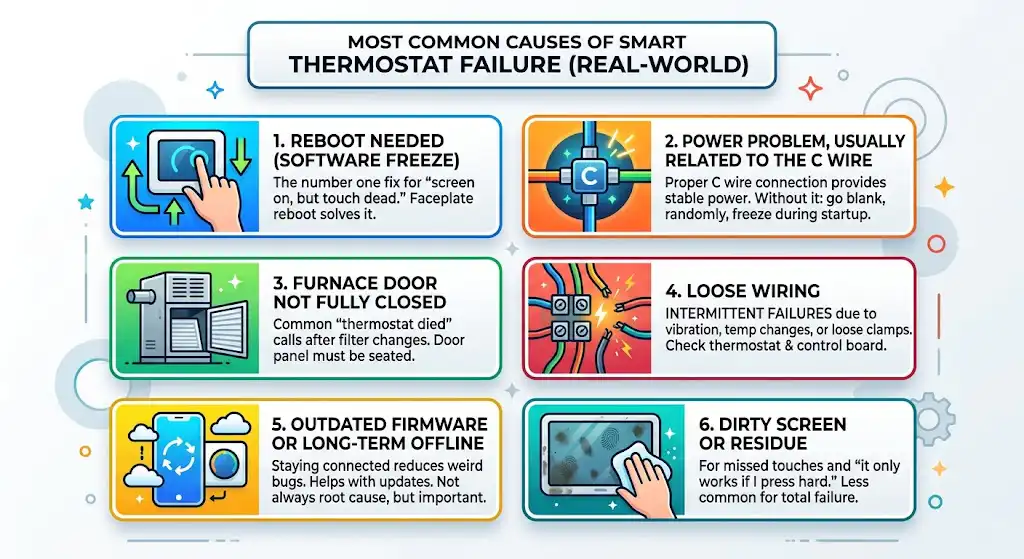
1. Reboot needed (software freeze)
This is the number one fix for “screen on, but touch dead.” The faceplate reboot solves it most of the time.
2. Power problem, usually related to the C wire
A properly connected C wire provides stable power. Without stable power, smart thermostats can:
- go blank
- reboot randomly
- freeze during startup
3. Furnace door not fully closed
I can’t count how many “thermostat died” calls ended up being a door panel not seated after a filter change.
4. Loose wiring at the thermostat or control board
Temperature changes, vibration, or a wire that wasn’t clamped firmly can cause intermittent failures.
5. Outdated firmware or long-term offline thermostat
Not always the root cause, but staying connected reduces weird bugs and helps the thermostat stay updated.
6. Dirty screen or residue
Less common for total failure, but common for missed touches and “it only works if I press hard.”
What to do if nothing works (when to call support or a technician)
Contact ecobee support if:
- The thermostat has power but repeatedly freezes even after reboots
- You can’t get it to connect to Wi-Fi and it’s behaving erratically
- It’s under warranty and you suspect hardware failure
Call an HVAC technician (like I do on service calls) if:
- The screen is blank and you’ve confirmed breaker, switch, and door are correct
- You suspect a blown fuse, shorted thermostat wire, or transformer issue
- The system repeatedly loses power or you smell electrical burning
In the field, when an ecobee won’t power up, I’m usually verifying 24VAC at the equipment and at the thermostat. That’s not something most homeowners have tools for, and that’s okay.
Prevention tips (so you don’t deal with this again)
- Keep the thermostat connected to Wi-Fi so it stays current
- Don’t overtighten or kink thermostat wires behind the wall
- After changing a furnace filter, always re-seat the door panel firmly
- If you’re installing or rewiring, turn off power to the furnace first (blown fuses are very common after wiring changes)
Quick FAQ
Why is my ecobee screen on but not responding?
Most commonly it’s a temporary software freeze. Remove the faceplate, wait 30 seconds, and re-seat it to reboot. This is ecobee’s recommended first step.
Why is my ecobee screen completely black?
That indicates it has no power. Check the HVAC breaker, furnace switch, furnace door safety switch, and wiring (especially the C wire). A blown 3A low-voltage fuse on the furnace control board is another common cause.
Can I control my ecobee if the touch screen is frozen?
If it still has power and Wi-Fi, yes. Use the ecobee app as a temporary workaround while you reboot and troubleshoot.
Conclusion
When an ecobee touch screen isn’t working, I treat it like one of two problems: a frozen interface or a power loss. If your screen is lit but won’t respond, the faceplate reboot fixes it in minutes most of the time. If the screen is black, focus on power: breaker, furnace switch, furnace door, C wire, and the control board fuse.