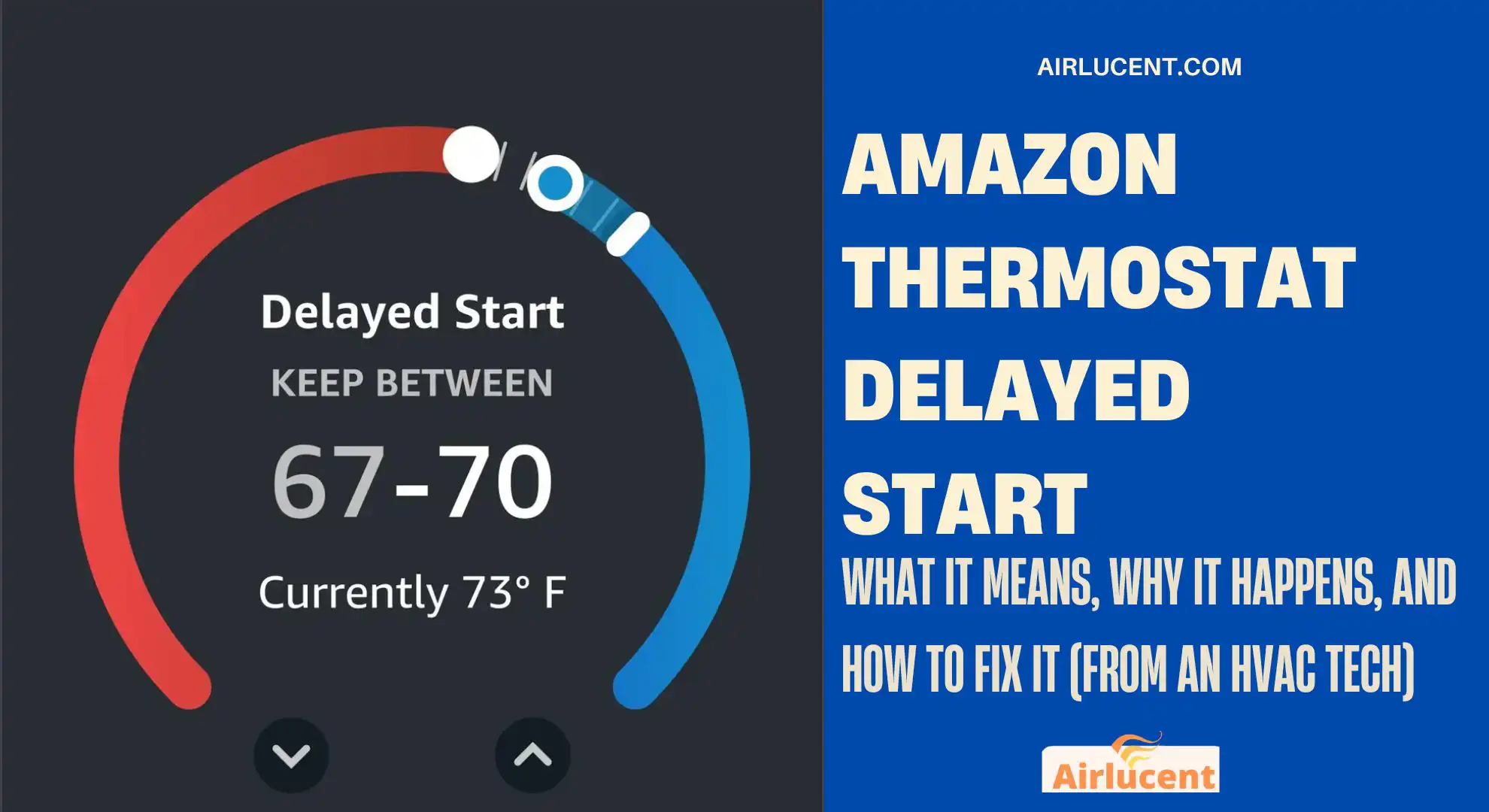
Hi, I’m Nathan. I’ve worked as an HVAC technician for over 10 years, and I’ve seen some version of the “Delayed Start” message on just about every modern thermostat out there. If your Amazon Thermostat says Delayed Start and your heat or AC isn’t coming on right now, it’s easy to assume something is broken.
Most of the time, it’s not broken.
This guide walks you through both situations:
- When “Delayed Start” is normal and you should simply wait
- When it’s a real problem and exactly how to troubleshoot it step by step
- What “Delayed Start” Means on an Amazon Thermostat
- How Long Should Amazon Thermostat Delayed Start Last?
- Why Amazon Thermostat Shows “Delayed Start” (Most Common Causes)
- Before You Touch Anything: Safety Notes I Use on Every Service Call
- How to Fix Amazon Thermostat Delayed Start (Step-by-Step)
- Step 1: Wait the full delay time (seriously)
- Step 2: Confirm the thermostat is actually calling correctly
- Step 3: Check Eco Mode, Smart Scheduling, and “helpful” features
- What I recommend
- Step 4: Check your temperature differential (temperature swing)
- Practical example
- Step 5: Check for firmware/software updates
- Step 6: Inspect basic HVAC health (the stuff that causes delays indirectly)
- Quick homeowner checklist
- Step 7: Check breakers and service switches (very common)
- Step 8: Verify wiring and configuration (common after DIY install)
- What I see most often
- Single R wire note (jumper situation)
- Step 9: Reset the thermostat (when the delay seems “stuck”)
- When Delayed Start Is NOT the Thermostat’s Fault
- My “Fast Diagnosis” Flow (What I Do on Calls)
- How to Reduce Delayed Starts Without Wrecking Efficiency
- FAQ: Amazon Thermostat Delayed Start
What “Delayed Start” Means on an Amazon Thermostat
When your Amazon Thermostat displays Delayed Start (often worded like “system will start shortly”), it means the thermostat is intentionally waiting before turning on your heating or cooling equipment.
In the field, we call this an anti short-cycle delay.
Why the thermostat delays on purpose
Your HVAC system, especially the air conditioner and heat pump, shouldn’t be turned off and back on rapidly. Starting a compressor too soon after it shuts off can:
- Stress the compressor and capacitor
- Increase amperage draw at startup
- Reduce equipment lifespan
- Cause nuisance trips and lockouts on some systems
So the thermostat “holds” the call for cooling or heating for a short time.
How Long Should Amazon Thermostat Delayed Start Last?
In most normal situations, Delayed Start lasts about 2 to 5 minutes.
Here’s the practical way I explain it to homeowners:
- Under 5 minutes: usually normal protection timing
- Over 5–10 minutes repeatedly: likely a setup, power, wiring, or equipment issue worth troubleshooting
Normal vs not normal (quick reference)
| Delayed Start after power outage | Compressor protection | Wait 5 minutes |
| Delayed Start after changing temp a lot | System protecting itself | Wait, then verify it starts |
| Delayed Start shows constantly and system never runs | Miswiring, configuration, power issue, or HVAC fault | Use the troubleshooting steps below |
| Delayed Start happens but fan runs and outdoor unit never starts | Outdoor unit issue, compressor start problem, wiring/control issue | Check breakers, disconnect, call a pro if needed |
Why Amazon Thermostat Shows “Delayed Start” (Most Common Causes)
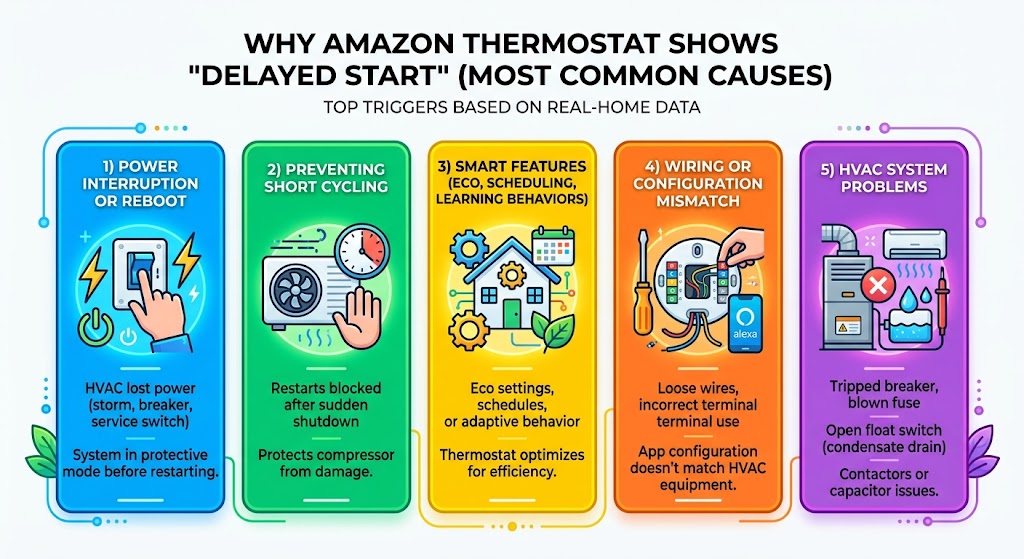
From what I’ve seen in real homes, these are the top triggers.
1) Power interruption or reboot
If your HVAC lost power and came back (storm, breaker trip, service switch turned off), delayed start commonly appears as the system protects itself before restarting.
2) Preventing short cycling
If your system just shut off and the thermostat immediately tries to start it again, the thermostat blocks the start for a few minutes.
3) Smart features (Eco, scheduling, learning behaviors)
Some “delay” complaints aren’t compressor delays at all. They’re the thermostat deciding it can wait due to:
- Eco settings
- a schedule change
- adaptive behavior
- temperature swing settings
4) Wiring or configuration mismatch
This is a big one with DIY installs. The thermostat may power up fine, but the cooling/heating call doesn’t behave properly if:
- a wire is loose
- the wrong terminal is used
- the Alexa app HVAC configuration doesn’t match the actual equipment type
5) HVAC system problems
Sometimes the thermostat is doing its job, but the equipment doesn’t respond. Common culprits include:
- tripped breaker
- blown low-voltage fuse in the furnace/air handler
- float switch open (condensate drain safety switch)
- contactor or capacitor issues (AC/heat pump)
Before You Touch Anything: Safety Notes I Use on Every Service Call
If you’re going to remove the thermostat from the wall or check wiring:
- Turn off power to the HVAC system at the breaker
- Confirm the system is off (no blower, no outdoor unit)
- If you’re unsure, stop and call a pro
How to Fix Amazon Thermostat Delayed Start (Step-by-Step)
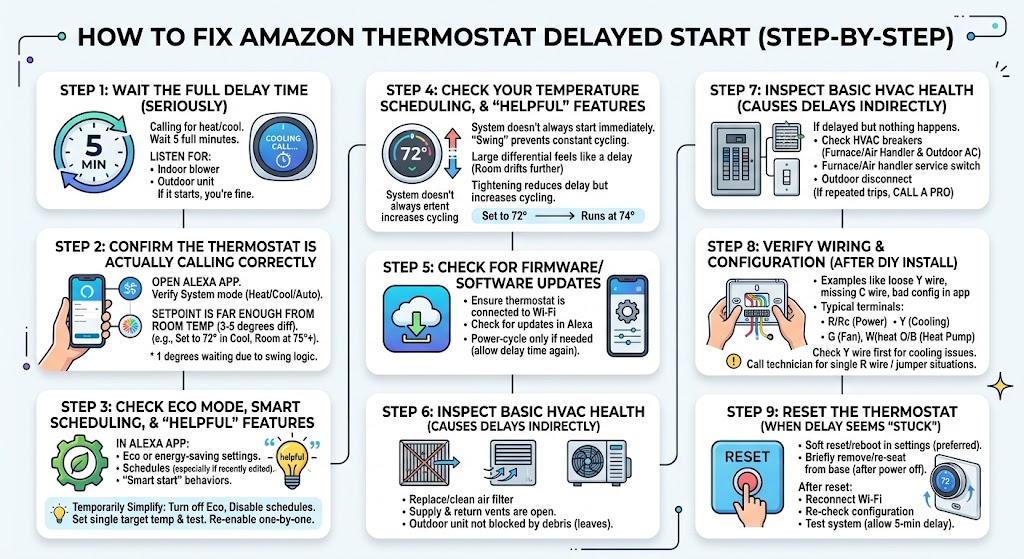
Step 1: Wait the full delay time (seriously)
If you just had a power outage, changed settings, or the system shut off a minute ago, start here.
- Leave the thermostat calling for cooling or heating
- Wait 5 full minutes
- Listen for:
- indoor blower start (for heat/cool)
- outdoor unit start (for cooling/heat pump)
If it starts, you’re likely fine.
Step 2: Confirm the thermostat is actually calling correctly
Open the Alexa app and verify:
- System mode is correct (Heat, Cool, Auto)
- Setpoint is far enough from room temp to demand operation
- For cooling: set temp 3–5 degrees lower
- For heating: set temp 3–5 degrees higher
If you set it only 1 degree away, the thermostat may wait due to temperature swing logic.
Step 3: Check Eco Mode, Smart Scheduling, and “helpful” features
In my experience, homeowners often confuse energy features with malfunction.
Things to check in the Alexa app:
- Eco or energy-saving settings
- Schedules (especially if you recently edited them)
- Any “smart start” style behavior
What I recommend
If you’re troubleshooting, temporarily simplify everything:
- Turn off Eco settings (temporarily)
- Disable schedules (temporarily)
- Set a single target temperature and test operation
Once everything works normally, re-enable features one at a time.
Step 4: Check your temperature differential (temperature swing)
The thermostat doesn’t always start the system the moment you hit the setpoint. Most thermostats allow a “swing” so the system doesn’t cycle constantly.
If your differential is large, you’ll feel like it’s “delaying” because it’s waiting for the room to drift further before it runs again.
Practical example
- Set to 72 in cooling
- Differential/swing is 2 degrees
- The AC may not start until the room hits 74
If your Amazon Thermostat allows adjusting swing/differential, tightening it can reduce perceived delays. Just know: tighter swing can increase cycling.
Step 5: Check for firmware/software updates
Smart thermostats are small computers. Updates can fix bugs, connectivity issues, and control timing problems.
- Ensure the thermostat is connected to Wi-Fi
- Check for updates in settings
- Power-cycle only if needed (and allow delay time again)
Step 6: Inspect basic HVAC health (the stuff that causes delays indirectly)
These aren’t “Delayed Start” features, but they cause the system to struggle, run longer, or behave oddly.
Quick homeowner checklist
- Replace/clean air filter (if it’s clogged)
- Make sure supply and return vents are open
- Make sure the outdoor unit is not blocked by leaves/debris
Step 7: Check breakers and service switches (very common)
If your thermostat says delayed start but nothing happens:
- Check your HVAC breakers (air handler/furnace and outdoor AC)
- Check the furnace/air handler service switch (looks like a light switch near the unit)
- Check the outdoor disconnect (near the condenser)
If a breaker trips repeatedly, stop resetting it and call a pro. That’s a symptom, not the problem.
Step 8: Verify wiring and configuration (common after DIY install)
What I see most often
- A slightly loose Y wire
- A missing C wire (or weak power situation)
- Configuration in the app doesn’t match the equipment
Typical terminals (general guidance)
| R / Rc | 24V power |
| C | Common (power return) |
| Y | Cooling call (compressor) |
| G | Fan |
| W | Heat call (furnace) |
| O/B | Heat pump reversing valve |
If your cooling won’t start, Y is the first wire I inspect for secure connection.
Single R wire note (jumper situation)
Some systems use one R wire, some separate R and Rc. Depending on your setup, you may need the thermostat configured correctly so power routes properly. If you’re not confident here, this is one of the few spots where I recommend getting a technician involved—miswiring can blow fuses on the control board.
Step 9: Reset the thermostat (when the delay seems “stuck”)
If delayed start persists beyond normal timing and you’ve checked the basics:
- Soft reset / reboot through settings (preferred)
- If needed, remove thermostat from its base briefly and re-seat it (only after power is off)
After reset:
- Reconnect Wi-Fi
- Re-check HVAC configuration in the app
- Test heating/cooling again and allow the 5-minute protection delay
When Delayed Start Is NOT the Thermostat’s Fault
If your Amazon Thermostat is calling for cooling and stays in delayed start, but the outdoor unit never runs even after 5–10 minutes, I start thinking like a service tech:
Signs you may have an HVAC equipment issue
- Indoor blower runs but outdoor unit doesn’t
- You hear buzzing/clicking outside but no startup
- Breaker trips when it tries to start
- System starts sometimes, fails other times
Common HVAC causes behind the scenes
| Outdoor unit silent | No power at condenser, bad disconnect, tripped breaker | Electrical diagnosis |
| Outdoor unit clicks but doesn’t start | Weak capacitor or failing compressor | Replace capacitor or further testing |
| Works then stops, then delay repeats | Overheating, pressure issue, airflow problem | Maintenance and diagnosis |
| Thermostat loses power intermittently | C-wire/power issue, loose connection, transformer issue | Wiring/power repair |
If you’re getting into capacitor/contactor territory, that’s a “call a pro” moment for most homeowners.
My “Fast Diagnosis” Flow (What I Do on Calls)
Use this as your quick decision guide:
- Did you lose power recently or shut the system off?
- Yes: wait 5 minutes
- No: go to step 2
- Is the setpoint at least 3–5 degrees away from room temp?
- No: adjust and test
- Yes: go to step 3
- After 5–10 minutes, does the system run?
- Yes: normal protection delay
- No: go to step 4
- Check breakers, service switch, and filter
- If all good: go to step 5
- Verify wiring and app configuration
- If unsure: call a technician (this is where most DIY installs go wrong)
How to Reduce Delayed Starts Without Wrecking Efficiency
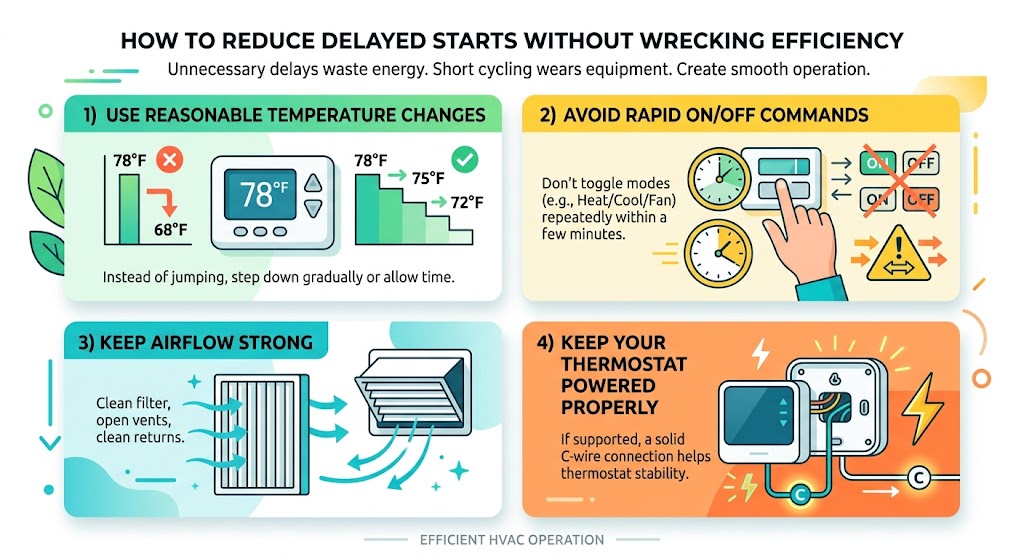
You don’t want your system short cycling. That’s how equipment wears out early. But you can reduce unnecessary delays by:
1) Use reasonable temperature changes
Instead of jumping from 78 to 68, step it down gradually or give it time.
2) Avoid rapid on/off commands
Don’t toggle modes repeatedly within a couple minutes.
3) Keep airflow strong
Clean filter, open vents, clean returns.
4) Keep your thermostat powered properly
If your system supports it, a solid C-wire connection helps thermostat stability.
Helpful Stats (Realistic, Field-Based Perspective)
I’ll keep these practical and honest:
- Anti short-cycle delays of 2–5 minutes are common across most modern thermostats and control boards to protect compressors.
- Short cycling (starting and stopping too frequently) is one of the most common contributors to premature compressor and capacitor failures I see in the field.
- Smart thermostat energy savings vary a lot by household, but many studies and manufacturer reports commonly show single-digit to mid-teens percentage savings when schedules and setbacks are used correctly. Your results depend on insulation, habits, climate, and system condition.
FAQ: Amazon Thermostat Delayed Start
Why is my Amazon Thermostat saying “Delayed Start”?
Most often, it’s preventing short cycling. This frequently happens after a power interruption, a recent shutdown, or a quick change in settings. It’s usually normal for a few minutes.
What does “Delayed Start” mean on my thermostat?
It means the thermostat is intentionally waiting before energizing heating or cooling. For AC and heat pumps, this is commonly a compressor protection timer.
How long should the delay last?
Typically 2 to 5 minutes. If it regularly goes beyond 5–10 minutes and the system doesn’t start, you likely have a setup, wiring, power, or equipment problem.
Does delayed start mean my thermostat is bad?
Not necessarily. In my experience, the thermostat is often doing its job and the issue is power, configuration, or the HVAC equipment itself. But if you bypass the thermostat (a technician test) and the system runs normally, then yes, the thermostat could be the culprit.
Should I turn off delayed start?
I don’t recommend disabling compressor protection features (if your device even allows it). That delay is there to prevent expensive damage. The better approach is fixing the root cause of repeated delays and optimizing settings.