
If you’re staring at a Honeywell zone control board and the PURGE light is blinking, I know exactly why you’re concerned. Homeowners usually ask me two things:
- What does the blinking purge light mean
- Can I reset it and make it stop
In most Honeywell TrueZONE systems, a blinking PURGE light usually points to a Discharge Air Temperature Sensor problem. Honeywell calls it the DATS sensor. It’s the small sensor that helps the zone board “see” supply air temperature so it can protect your system from overheating in heat mode or freezing the coil in cool mode.
The important part: your HVAC system may still run, but you lose high and low temperature limit protection until the DATS issue is fixed.
- Quick answer: What a blinking PURGE light usually means
- First, confirm what equipment you actually have.
- What the DATS sensor does (and why it matters)
- Common causes and fixes (table)
- Step by step: How I troubleshoot a blinking PURGE light
- Step 1: Look for the DATS terminals and confirm a sensor is actually wired in
- Step 2: Confirm the sensor is mounted in the right place
- Step 3: Power cycle the zone board to see if it clears (only after you check wiring)
- Step 4: Test the DATS sensor's basic health (no advanced numbers needed)
- Step 5: Inspect the wiring run back to the board
- Step 6: If the sensor and wiring are good, suspect the board (less common)
- Another scenario: PURGE light due to zoning changeover or conflicting calls
- How to use the PURGE OVERRIDE button (and what it tells you)
- When the system runs, but the blinking PURGE light is still a problem.
- Normal purge timing: what you should expect (table)
- Fast homeowner checklist (no tools)
- When I recommend calling a pro
- Preventing this from happening again
- FAQs: Honeywell purge light blinking
- Bottom line
Quick answer: What a blinking PURGE light usually means
On many Honeywell TrueZONE boards, a blinking PURGE LED commonly indicates one of these:
- The DATS sensor is not connected.
- The DATS sensor wiring is loose or broken.
- The DATS sensor has failed.
- Less common: the zone board has an input failure (bad control board)
From my own service calls, the most common fix is simple: reconnect or replace the DATS sensor.
First, confirm what equipment you actually have.
People mix this up a lot, so let’s separate it clearly.
If you have a Honeywell zone board (most common for this issue)
You’ll see a control panel near your furnace or air handler with dampers wired into it. Common models include:
- Honeywell TrueZONE HZ311
- Honeywell TrueZONE HZ322
- Honeywell TrueZONE HZ432
On these systems, a blinking PURGE light is typically a sensor or zoning logic signal, not a normal furnace “purge cycle” indicator.
If you’re thinking of a furnace purge cycle
Gas furnaces do have a purge sequence (inducer clears the combustion chamber before ignition). But that’s usually shown by furnace control board blink codes, not a “PURGE” LED on a Honeywell zoning panel.
So for the rest of this guide, I’m talking about the Honeywell TrueZONE panel PURGE light.
What the DATS sensor does (and why it matters)
The Discharge Air Temperature Sensor is typically mounted in the supply duct (discharge air) and wired back to the zone panel.
It helps the panel do three critical jobs:
- Protect the furnace from overheating if airflow gets restricted (closed dampers, dirty filter, etc.)
- Protect the evaporator coil from freezing in cooling mode if airflow is too low.
- Help the zoning system manage purge and damper behavior when zones open and close.
When that sensor is missing or has failed, the board can’t enforce safe temperature limits.
Common causes and fixes (table)
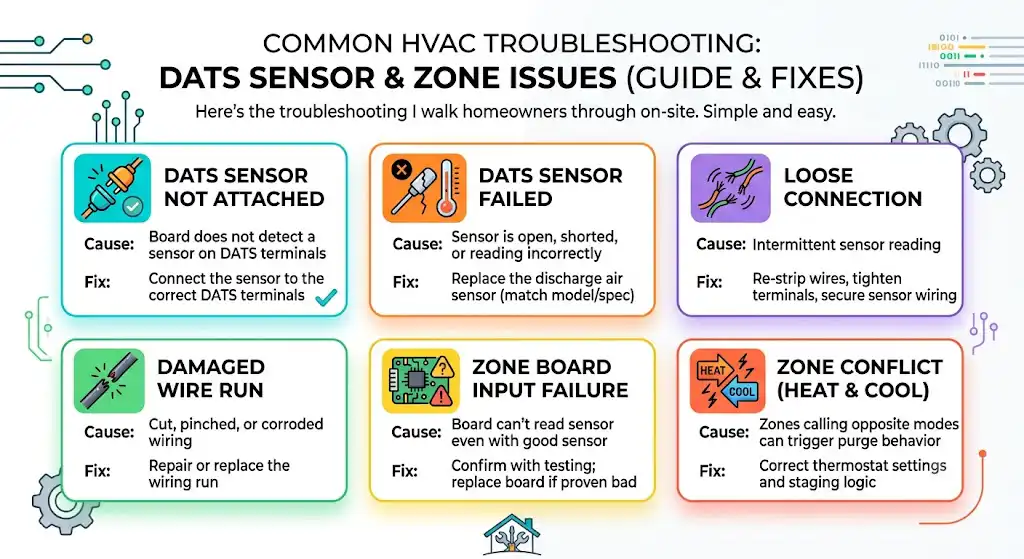
Here’s the same troubleshooting I walk homeowners through on-site.
| DATS sensor not attached | Board does not detect a sensor on DATS terminals | Connect the sensor to the correct DATS terminals |
| DATS sensor failed | Sensor is open, shorted, or reading incorrectly | Replace the discharge air sensor (match model/spec) |
| Loose connection | Intermittent sensor reading | Re-strip wires, tighten terminals, secure sensor wiring |
| Damaged wire run | Cut, pinched, or corroded wiring | Repair or replace the wiring run |
| Zone board input failure | Board can’t read sensor even with good sensor | Confirm with testing; replace board if proven bad |
| Zone conflict (heat and cool calls) | Zones calling opposite modes can trigger purge behavior | Correct thermostat settings and staging logic |
Step by step: How I troubleshoot a blinking PURGE light

This is the clean, safe order that prevents guessing and avoids replacing parts you don’t need.
Step 1: Look for the DATS terminals and confirm a sensor is actually wired in
On most Honeywell TrueZONE panels, you’ll see terminals labeled something like DATS.
- Make sure two wires are landed firmly.
- Tug gently to confirm they’re tight.
- Look for corrosion, broken copper, or a thermostat wire that’s barely pinched under the screw.
If nothing is connected at DATS, that alone can explain the blinking PURGE light.
Step 2: Confirm the sensor is mounted in the right place
A DATS sensor should typically be installed in the supply duct where it can read true discharge air temperature.
In the field, I often find sensors hanging loose, taped to the outside of the duct, or shoved into return air by mistake. That can create weird readings and nuisance faults.
If you’re not sure, check your board manual for the recommended placement. Honeywell’s discharge air sensors also come with their own installation instructions (example: Honeywell duct sensor installation docs).
Step 3: Power cycle the zone board to see if it clears (only after you check wiring)
Once you’ve checked connections:
- Turn off the power to the HVAC system (switch near furnace or breaker)
- Wait about 60 seconds.
- Turn the power back on.
If the light stops blinking after a power cycle, it may have been a temporary read error. If it starts blinking again, you likely still have a sensor circuit issue.
Step 4: Test the DATS sensor’s basic health (no advanced numbers needed)
You do not need to be an engineer to do a basic sensor check if you have a multimeter.
What I look for:
- The sensor circuit is not open (infinite resistance)
- The sensor circuit is not shorted (near zero resistance)
- Resistance changes smoothly when warmed by your hand.
If it reads open or shorted, replace it. If it’s changing smoothly, the sensor may be OK, and the issue may be wiring or the board.
Note: Different Honeywell sensors have different resistance curves. The correct method is comparing readings to the sensor’s chart in its instructions, but the quick health check above catches the most common failures.
Step 5: Inspect the wiring run back to the board
This is a big one. I’ve seen plenty of DATS wires:
- nicked by sheet metal
- stapled too tight
- chewed by rodents
- spliced poorly and oxidized
If the wiring is damaged, you can replace the run with standard thermostat wire, but keep it neat and away from high voltage.
Step 6: If the sensor and wiring are good, suspect the board (less common)
A bad zone board is not the first thing I replace. But if:
- The DATS sensor tests well
- The wiring is solid
- The board still shows a DATS fault (blinking purge)
Then yes, the input circuit on the panel could be failed.
At that point, I recommend a professional diagnosis unless you’re very comfortable verifying low voltage control circuits.
Another scenario: PURGE light due to zoning changeover or conflicting calls
Sometimes you’ll see purge behavior when the system is doing what it’s supposed to do.
Example I see often
- The upstairs thermostat is calling for cooling.
- Downstairs thermostat is calling for heat (or still set to heat)
Some zoning systems must resolve the conflict, and depending on the panel logic, you may see purge activity between calls.
What you should do:
- Confirm all thermostats are set to the same mode (Heat or Cool)
- If you use Auto changeover, consider temporarily locking to one mode during extreme seasons.
How to use the PURGE OVERRIDE button (and what it tells you)
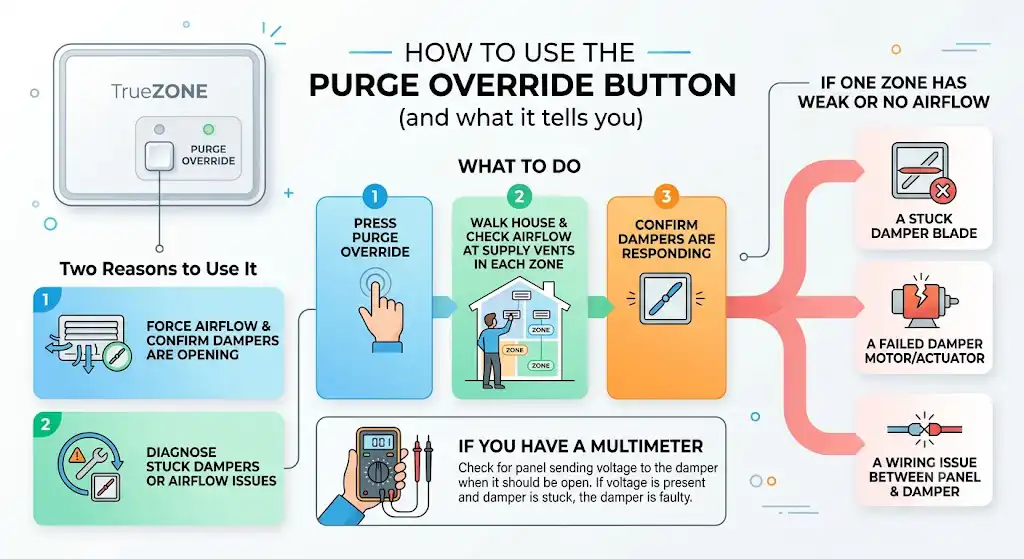
Most TrueZONE panels have a Purge Override button.
I use it for two reasons:
- To force airflow and confirm dampers are opening
- To help diagnose a stuck damper or airflow issue
What to do
- Press Purge Override
- Walk the house and check airflow at supply vents in each zone.
- Confirm dampers are responding.
If one zone has weak or no airflow
You may have:
- a stuck damper blade
- a failed damper motor/actuator
- a wiring issue between the panel and the damper
If you have a multimeter, you can check whether the panel is sending voltage to that damper when it should be open. If it is, and the damper doesn’t move, the damper actuator is likely the issue.
When the system runs, but the blinking PURGE light is still a problem.
A lot of homeowners tell me, “Everything still heats and cools, so do I really need to fix it?”
My advice: fix it soon.
Without DATS limit protection, you increase the chance of problems like:
- Frozen evaporator coil in cooling (low airflow plus closed zones)
- Furnace overheating trips in heating (especially with restrictive filters or closed dampers)
- Short cycling and comfort issues
ENERGY STAR also recommends replacing or cleaning HVAC filters regularly because restricted airflow is one of the most common causes of HVAC performance problems. As a practical guideline, many homes need filters checked every 1 to 3 months, depending on pets, dust, and runtime.
Normal purge timing: what you should expect (table)
Sometimes, a purge is normal. Sometimes it’s not.
| Fan runs after a call ends for 30 seconds to a few minutes | Yes, common purge/post run behavior | Not usually |
| PURGE light on solid during brief airflow flush | Can be normal depending on board logic | Not usually |
| PURGE light blinking continuously | Not typical | Yes, usually sensor circuit fault |
| Purge repeats constantly with comfort swings | Not typical | Yes, could be control, airflow, or damper issue |
Most systems purge for a short period, often roughly 30 seconds to 3 minutes, depending on control settings and equipment.
Fast homeowner checklist (no tools)
If you want the quickest practical checklist before calling someone, do this:
- Set all thermostats to the same mode (Heat or Cool)
- Replace the air filter if it’s even slightly questionable.
- Make sure supply vents are open and not blocked
- Check that the DATS sensor is connected to the DATS terminals.
- Power cycle the system and see if the blinking returns
If the PURGE light keeps blinking after that, you’re very likely looking at a bad sensor, wiring fault, or board issue.
When I recommend calling a pro
Call an HVAC tech if any of these are true:
- You don’t see a DATS sensor installed, and you’re not sure what to buy.
- The sensor wiring disappears into the ductwork, and you can’t trace it
- You tested the sensor, and the readings look wrong or inconsistent.
- You suspect a bad zone panel.
- You have freezing, overheating, burning smell, or repeated shutdowns.
A good tech will verify the sensor curve, confirm voltage and input readings at the board, and confirm damper operation under purge.
Preventing this from happening again
Here’s what actually reduces repeat issues in the real world:
- Change filters regularly (restricted airflow creates zoning headaches)
- Keep return grilles open and unblocked.
- Do not close too many supply vents in a zoned home.
- During seasonal change, confirm thermostats aren’t fighting each other.
- Have zoning and limits checked during annual maintenance.
FAQs: Honeywell purge light blinking
Does a blinking purge light mean my furnace is unsafe?
Not automatically. On a Honeywell zone board, blinking purge usually means the DATS sensor is missing or failed. The system may still run, but the safety temperature limiting feature may not be working, which can raise risk over time.
Can I reset the purge light
You can power cycle the system, but if the underlying issue is a bad or disconnected DATS sensor, the purge light will come back.
What part usually fixes it
Most commonly, it’s reconnecting a loose DATS wire or replacing the discharge air temperature sensor. Less commonly, it’s a damaged wire run or a failed zone panel.
Why does purge show up when two zones call differently
If one thermostat calls for heat and another calls for cool, zoning logic has to resolve it. Some systems purge between calls or during changeover behavior. Align thermostat modes to reduce this.
Bottom line
When your Honeywell PURGE light is blinking, treat it like a helpful warning, not something to ignore. In my experience, it’s usually a straightforward fix tied to the discharge air temperature sensor and its wiring. Once that sensor circuit is restored, the purge light behavior almost always returns to normal, and your system gets its temperature limit protection back.
If you tell me your zone board model (HZ311, HZ322, HZ432) a