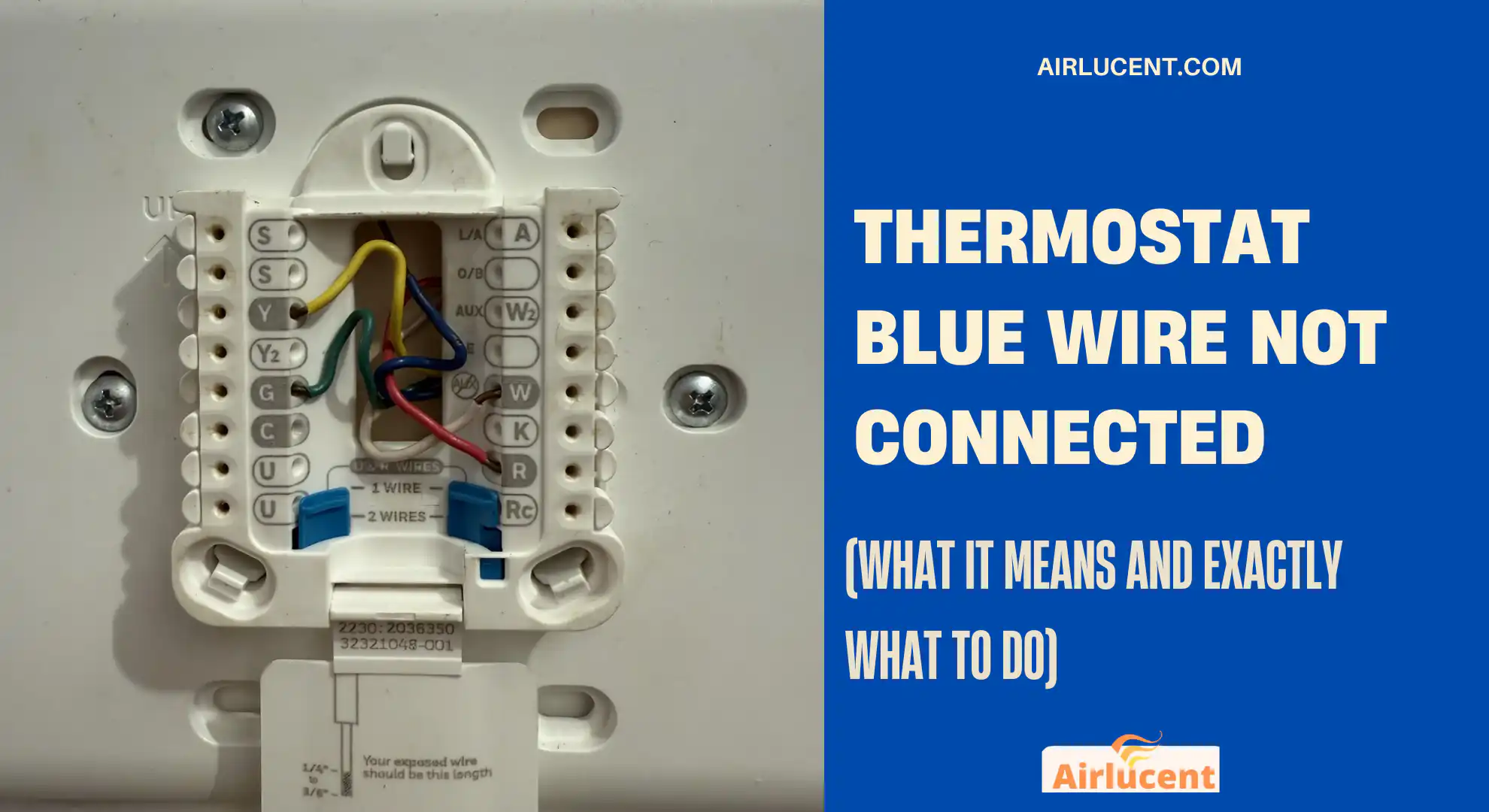
Hi, I’m Nathan. I’ve worked as an HVAC technician for over 10 years, and I’ve seen this exact situation in thousands of homes: you pull the thermostat off the wall to install a new one and find a blue wire that isn’t connected to anything.
Most of the time, that blue wire is not a problem. It’s simply an extra conductor in the thermostat cable that was never used. But in many modern installs, that same blue wire can be the key to powering a smart thermostat properly because it’s commonly used as the C wire (Common wire).
In this guide, I’m going to walk you through what the blue wire usually is, when it matters, how to connect it safely at both ends, and what to do if you don’t have a usable C wire.
- Quick answer: Why is the blue wire not connected?
- What the blue wire is “supposed” to do (C wire explained)
- Important: Blue wire does not always mean C wire
- Thermostat wire color chart (common conventions)
- Signs your blue wire should be connected (especially for smart thermostats)
- How to safely connect the blue wire as a C wire (step-by-step)
- Tools I recommend (simple homeowner kit)
- Step 1: Turn off power (do not skip this)
- Step 2: Confirm you actually have a spare blue wire at the thermostat
- Step 3: Check the furnace or air handler control board (this is the part most people miss)
- Step 4: Connect the blue wire at the thermostat
- Step 5 (Recommended): Verify power the right way
- What if the blue wire exists but is NOT connected at the other end?
- What if you don’t have a usable C wire? (Best alternatives)
- Common mistakes I see homeowners make (avoid these)
- Troubleshooting: If you connected the blue wire and things still don’t work
- Real-world wiring examples (what I usually see)
- Safety notes from the field
- Frequently asked questions
- My recommended approach (simple and reliable)
Quick answer: Why is the blue wire not connected?
In most homes, an unconnected blue wire at the thermostat is:
- A spare wire in a 5-wire (or 8-wire) thermostat bundle, or
- A wire intended to be used as the C wire, but it was never connected at the furnace/air handler end
Why it matters now
Older battery thermostats didn’t always need a C wire. Many smart thermostats often need continuous 24V power, and the most reliable way to provide it is with a properly connected C wire.
What the blue wire is “supposed” to do (C wire explained)
Your HVAC system typically uses 24-volt AC control wiring known as low voltage. The thermostat is basically a switchboard telling the furnace, air handler, AC, or heat pump what to do.
The C wire (Common) completes the 24V circuit so your thermostat can draw steady power.
What you get with a real C wire connection
- More reliable smart thermostat performance
- Fewer “low battery” alerts
- Less random rebooting or Wi-Fi drops
- Fewer strange issues like the system short-cycling (in some setups)
Important: Blue wire does not always mean C wire
This is where homeowners get tripped up.
Wire color is a common convention, not a rule. I’ve opened walls where blue was used as Y, white was used as G, and everything in between. So you always want to confirm where that wire goes and what it’s connected to at the equipment.
Blue wire can also be used as “B” in some heat pump systems
Some thermostats and systems use a B terminal (reversing valve on certain brands/configurations). If you have a heat pump, don’t assume blue automatically equals C.
Thermostat wire color chart (common conventions)
Here’s the “most common” setup I see in the field. Treat this as a starting point, not a guarantee.
| R / Rc / Rh | Red | 24V power from transformer |
| C | Blue or Black | 24V Common (continuous return path) |
| W / W1 | White | Heat call (furnace/boiler) |
| Y / Y1 | Yellow | Cooling call (compressor contactor) |
| G | Green | Indoor fan |
| O/B | Orange (O) / Blue (B sometimes) | Heat pump reversing valve |
| W2 / Aux | Brown or other | 2nd stage heat / auxiliary heat |
Signs your blue wire should be connected (especially for smart thermostats)
If you’re installing a smart thermostat (Nest, Ecobee, Honeywell Home, etc.), you may notice:
- Thermostat says “No C wire”
- It won’t power on without batteries
- It reboots when the heat or AC starts
- Wi-Fi randomly disconnects
- You get “power stealing” related errors or warnings
If any of that is happening and you have an unused blue wire, there’s a good chance you can use it as C, as long as it’s connected at the HVAC equipment too.
How to safely connect the blue wire as a C wire (step-by-step)

Tools I recommend (simple homeowner kit)
- Small screwdriver (Phillips or flathead)
- Wire stripper (or a careful utility knife)
- Flashlight
- Optional but helpful: multimeter (to verify 24V)
Step 1: Turn off power (do not skip this)
Even though thermostat wiring is low voltage, you can still:
- Blow a fuse on the control board
- Short the transformer
- Cause the system to stop working until repaired
Step 2: Confirm you actually have a spare blue wire at the thermostat
Pull the thermostat off its base and look at the wire bundle.
- If the blue wire is present but tucked back and unused, that’s a good sign.
- Make sure it’s the same cable bundle as the other thermostat wires (not from a different accessory).
Pro tip from my field experience
If the blue wire is cut too short, don’t try to “barely” land it on the terminal. A loose C wire causes intermittent power issues that are a nightmare later.
Step 3: Check the furnace or air handler control board (this is the part most people miss)
Your blue wire must be connected at the equipment end too. If it’s only connected at the thermostat, it does nothing.
What to do
- Make sure power is OFF.
- Remove the front panel on your furnace or air handler.
- Find the control board with a low-voltage terminal strip labeled something like:
- R, C, W, Y, G (and maybe O/B, AUX, etc.)
- Look for the thermostat cable coming into the unit.
- See if the blue wire is connected, capped off, or tucked back.
If the blue wire is loose or unused
- Strip about 1/4 inch of insulation
- Land it on the C terminal
- Tighten firmly (but don’t crush the wire)
If there’s already a wire on C
That’s normal. You can usually have multiple wires on the C terminal (for example: thermostat, condenser, humidifier). If the terminal can’t physically hold two wires safely, you may need a proper splice with a wire nut or a small terminal accessory.
Step 4: Connect the blue wire at the thermostat
Once it’s connected to C at the furnace/air handler:
- Go back to the thermostat wiring
- Strip a small amount of insulation
- Insert blue into the thermostat C terminal
- Reinstall thermostat
- Restore power at the breaker
Step 5 (Recommended): Verify power the right way
If you have a multimeter, check for about 24VAC between R and C at the control board.
- If you read ~24VAC, the transformer and common are present
- If you read 0V or something weird, stop and re-check wiring
What if the blue wire exists but is NOT connected at the other end?
This happens constantly: the installer used only 4 wires and left the blue coiled up in the wall and at the furnace.
Your fix
Connect it at both ends:
- Blue to C at the furnace/air handler
- Blue to C at the thermostat
If you can’t find the blue wire at the furnace end, it may be:
- Cut off too short inside the cabinet
- Spliced somewhere (older homes)
- Not actually part of the thermostat cable you think it is
If it’s missing, skip to the alternatives below.
What if you don’t have a usable C wire? (Best alternatives)

If you only have 2, 3, or 4 conductors available, you still have options.
Option 1: Use a C-wire adapter (Add-a-Wire / Power Extender Kit)
This is one of the most common solutions I recommend when running a new cable is hard.
Many smart thermostat brands offer a Power Extender Kit (PEK) or you can buy an Add-a-Wire style adapter.
Pros
- No need to fish a new thermostat cable through walls
- Usually very reliable when installed correctly
Cons
- Requires wiring changes at the air handler control board
- Not compatible with every HVAC setup (especially some multi-stage or heat pump configurations)
Option 2: Run a new thermostat cable (best long-term fix)
If you can run a new 18/5 or 18/8 thermostat wire, that’s the cleanest solution.
Pros
- Most future-proof
- Supports accessories (humidifier, dehumidifier, ventilator) later
Cons
- Can be difficult in finished walls
Option 3: External 24V transformer (works well in specific situations)
Sometimes you can power the thermostat with a plug-in 24V transformer and connect it to Rc and C (depending on thermostat model and system setup).
Pros
- No need to open the furnace in some cases
- Works when you truly cannot access C easily
Cons
- Needs a nearby outlet
- Must be wired correctly to avoid damaging equipment
Common mistakes I see homeowners make (avoid these)
Mistake 1: Connecting blue to C at the thermostat only
It won’t work unless it’s connected to C at the furnace/air handler too.
Mistake 2: Assuming color equals function
Always confirm where each wire lands on the control board.
Mistake 3: Blowing the low-voltage fuse
If you accidentally touch R to C (or R to any terminal) you can pop the 3A or 5A fuse on the control board. The system will appear “dead” until that fuse is replaced.
Mistake 4: Confusing O/B with C on heat pumps
If you have a heat pump, miswiring O/B can cause:
- Heat when you want cool
- Cool when you want heat
- Short cycling and comfort problems

Troubleshooting: If you connected the blue wire and things still don’t work
Symptom: Thermostat still says “No C wire”
Check:
- Blue is truly seated in C at the thermostat base
- Blue is truly on C at the control board.
- No broken conductor in the thermostat cable
Symptom: HVAC won’t turn on after wiring changes
Check:
- You restored power at the breaker.
- The furnace door switch is pressed (panel seated properly)
- The low-voltage fuse on the board is not blown.
Symptom: You measure no 24V between R and C
Possible causes:
- Transformer issue
- Board issue
- Blown fuse
- Power not actually off/on correctly (yes, it happens)
Real-world wiring examples (what I usually see)
Example 1: Standard furnace + AC (most common)
- R: red
- W: white
- Y: yellow
- G: green
- C: blue (often unused)
In this case, the blue wire is very often a perfect C wire candidate.
Example 2: Heat pump system
You might see:
- R, C, Y, G, O/B, Aux
Blue might be C or might be B depending on how it was installed and labeled. Confirm at the air handler and thermostat terminals.
Safety notes from the field
I’ll be straight with you: most homeowners can connect a C wire safely if they go slow and shut power off. But you should call a pro if:
- You can’t confidently identify the control board terminals.
- You have a heat pump, and the wiring doesn’t match normal patterns.
- The system stops working, and you suspect a blown fuse or transformer issue.
- Your HVAC has multiple stages, zoning, or unusual accessory wiring.
Reference table: Where to connect the blue wire (most typical use)
| Furnace / Air handler control board | C | Establish Common at equipment |
| Thermostat base | C | Provide continuous power to thermostat |
Frequently asked questions
Can I connect the blue wire to something else?
Only if you’re 100 percent sure what it is supposed to do in your system. In most conventional systems, blue is best used as C. In some heat pump setups, blue might be used differently, so confirm at the control board.
What happens if I connect the blue wire wrong?
Best case: thermostat doesn’t power up. Worst case: you blow a fuse or damage the transformer/control board. That’s why power off and correct terminal identification matter.
Do all smart thermostats require a C wire?
Not all, but many strongly prefer it. Even when the manufacturer says “no C wire required,” I’ve seen plenty of systems behave better with a real C connection.
My recommended approach (simple and reliable)
If you’re staring at an unconnected blue wire, here’s what I recommend you do in order:
- Turn the power off
- Check for a C terminal on the furnace/air handler board.
- If the blue wire is present at the equipment, connect it to C.
- Connect the same blue wire to C at the thermostat.
- Restore power and test.
- If no spare wire exists, use a Power Extender Kit or run a new cable