I’m Nathan. I’ve been an HVAC technician for over 10 years, and if there’s one thing I’ve learned from service calls, it’s this: most thermostat problems get solved a lot faster when you’re looking at the correct manual for the exact model on your wall.
Emerson thermostats are a little tricky because many “Emerson thermostat” manuals are now hosted under Copeland (Emerson’s thermostat brand transitioned under Copeland), and there are also sub-brands and lines like Sensi smart thermostats and White-Rodgers traditional thermostats.
This guide shows you exactly how to find and download the right Emerson thermostat manual PDF, plus what to do if your model is older, missing from the official library, or you’re not sure which manual you need.
- Why the Exact Emerson Thermostat Manual Matters
- Step 1: Find Your Emerson Thermostat Model Number (This Is the Key)
- Step 2: Download the Manual from the Official Copeland Thermostat Manual Library
- Step 3: If You Have a Sensi Thermostat, Use Sensi Support First
- Step 4: If You Can’t Find It Officially, Use These Reputable Manual Directories
- Quick “Where to Download” Reference Table
- Download Emerson 80 series Manual
- What Manual Do You Actually Need: User vs Installation vs Technical?
- Common Thermostat Terminal Labels (So the Manual Makes Sense)
- Troubleshooting: What I’d Check Before You Assume the Thermostat Is Bad
- If You Still Can’t Find Your Emerson Thermostat Manual PDF
- Safety Note From a Tech (Please Read)
- FAQ: Emerson Thermostat Manual PDF
- Bottom Line
Why the Exact Emerson Thermostat Manual Matters
I’ve walked into plenty of homes where someone downloaded “an Emerson thermostat manual” that looked close, but the terminal labels, wiring diagram, or installer settings didn’t match their unit.
That mismatch can lead to:
- Heating running when you call for cooling
- Heat pump reversing valve set wrong (O/B setting)
- Short cycling from wrong system type selection
- A blank screen because the manual assumed batteries, but your model needs a C wire
Getting the correct PDF saves time and prevents expensive mistakes.
Step 1: Find Your Emerson Thermostat Model Number (This Is the Key)
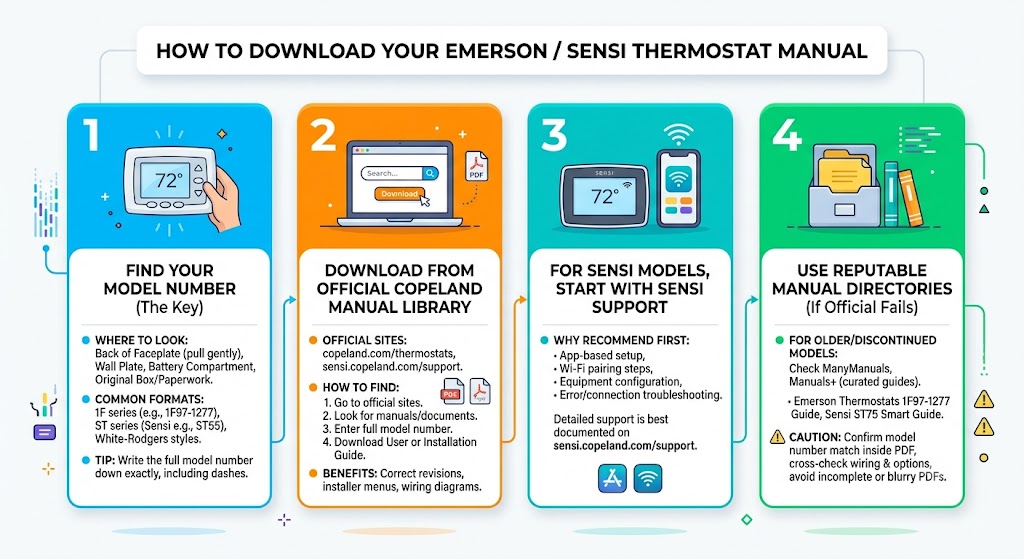
To download the correct manual, you need the full model number exactly as printed on the thermostat label.
Where to look (most common spots)
In my experience, the model number is usually in one of these places:
| Back of the faceplate | Gently pull the thermostat straight off the wall plate | Model number, wiring diagram, sometimes date code |
| Wall plate (mounted to wall) | If the faceplate comes off, check the fixed plate | Model number and terminal labels |
| Inside battery compartment | Remove batteries if present | Model sticker |
| Original box or paperwork | If you still have it | Full model and sometimes a QR code |
Examples of common Emerson model formats
- 1F series like 1F97-1277
- ST series (Sensi) like ST55 or ST75
- White-Rodgers style formats (often still referenced in manuals)
Tip from the field: write the model number down exactly, including dashes. One missing digit can pull the wrong PDF.
Step 2: Download the Manual from the Official Copeland Thermostat Manual Library
For most homeowners, the fastest and most accurate place to get an Emerson thermostat manual PDF is the official Copeland thermostat manuals area.
Official sites (start here)
- Copeland thermostats product area:
https://www.copeland.com/en-us/products/thermostats - Sensi support (for Sensi smart thermostats):
https://sensi.copeland.com/en-us/support
How to find your PDF in the Copeland library
- Go to the Copeland thermostat pages.
- Look for manuals, documents, or support resources.
- Enter your full model number (example: 1F97-1277).
- Download the User Guide (operations) and/or Installation Guide (wiring and setup).
What I like about using the official library is that you’re more likely to get the correct revision of the manual, including the right installer menu options and wiring diagrams.
Step 3: If You Have a Sensi Thermostat, Use Sensi Support First
If your thermostat says Sensi on it, treat it like its own category.
Why I recommend Sensi support first
Sensi models rely heavily on:
- App-based setup
- Wi-Fi pairing steps
- Equipment configuration in the app
- Error and connection troubleshooting
Those details are usually best documented on the official Sensi support site:
Examples of Sensi manuals commonly available online
From user guide directories (like Manuals+), you’ll often see:
- Sensi ST75 Smart Thermostat User Manual
- Sensi ST55 Smart Thermostat Installation Guide
If you’re standing in front of your thermostat right now and you’re unsure whether it’s Sensi, check the front cover branding and the model number on the back.
Step 4: If You Can’t Find It Officially, Use These Reputable Manual Directories
Some older Emerson and White-Rodgers thermostat manuals are easier to find in third-party libraries, especially discontinued models.
Here are the main places I’d check next.
ManyManuals Emerson Thermostat directory
Good for browsing older models when you don’t have a direct link.
Manuals+ (including user-submitted and curated guides)
Manuals+ often has specific guides listed under Emerson categories, including:
- Emerson Thermostats 1F97-1277 Touchscreen 7-Day Programmable User Guide
- Emerson 1F98EZ-1621 Blue Wireless Easy Install Thermostat Installation Instructions
- Various Sensi model guides
Scribd and other document hosts (use caution)
You may find “manual control” documents hosted on sites like Scribd. These can be helpful when nothing else is available, but here’s my professional advice:
- Confirm the model number match inside the PDF
- Cross-check wiring terminals and installer options
- Avoid any PDF that looks incomplete, blurry, or “stitched together”
Quick “Where to Download” Reference Table
| Emerson under Copeland (most newer) | Copeland thermostat resources | Manuals+ or ManyManuals |
| Sensi smart thermostats | Sensi support site | Manuals+ |
| Older White-Rodgers style | Copeland resources (if listed) | ManyManuals, Manuals+ |
| Discontinued and hard-to-find | ManyManuals, Manuals+ | Scribd style hosts (verify carefully) |
Download Emerson 80 series Manual
What Manual Do You Actually Need: User vs Installation vs Technical?
A lot of people download the first PDF they see, but you may need a different one depending on what you’re doing.
| User Manual | Daily operation, scheduling, basic settings | Setting the clock, programming weekdays, using hold |
| Installation Manual | Wiring, setup menu, system type, heat pump settings | Adding a C wire, changing to heat pump mode |
| Technical sheet or spec sheet | Advanced troubleshooting, staging, compatibility | 2-stage heat settings, humidifier terminal use |
Common Thermostat Terminal Labels (So the Manual Makes Sense)

Even with the right PDF, the wiring page can look intimidating. Here’s the quick translation I give homeowners.
| R, Rc, Rh | 24V power | Some systems have one R, some have Rc and Rh |
| C | Common wire | Often required for smart thermostats |
| W, W1 | Heat | Gas or electric heat call |
| W2 | Second stage heat | For 2-stage systems |
| Y, Y1 | Cooling | Also used for heat pump compressor |
| Y2 | Second stage cooling | For 2-stage cooling |
| G | Fan | Runs indoor blower |
| O/B | Reversing valve | Heat pump setting that must match your equipment |
| AUX/E | Auxiliary or emergency heat | Heat pump systems |
Important: terminals can vary by model. Always confirm in your specific manual.
Troubleshooting: What I’d Check Before You Assume the Thermostat Is Bad
A huge number of “bad thermostat” calls I’ve handled were actually wiring, power, or configuration issues.
If the screen is blank
- Check if your model uses batteries. Replace them.
- Check your furnace or air handler door switch (a loose panel can cut power).
- Check the HVAC breaker.
- If it’s a smart thermostat, confirm you have a working C wire (common).
If heat works but AC doesn’t (or vice versa)
- Verify wiring on Y, W, and O/B (heat pump systems especially)
- Confirm system type in installer setup: furnace vs heat pump
- Check if you have Rc/Rh configured correctly
If the system short cycles (turns on and off quickly)
- Make sure the thermostat is configured for the correct equipment type and staging
- Check cycle rate or differential settings if your model allows it
- Dirty filters and airflow problems can mimic thermostat issues too
If you want, tell me your model number and what it’s doing, and I can tell you which settings page in the manual usually fixes it.
If You Still Can’t Find Your Emerson Thermostat Manual PDF
Here’s the process I use when a manual is missing or the model sticker is worn off:
- Pull the thermostat off the wall and look for any number printed on the circuit board or back label.
- Take a clear photo of:
- The front of the thermostat
- The wiring terminals with wires attached
- Any labels behind the faceplate
- Search using:
- Model number
- Brand + model + “installation manual PDF”
- If it’s still not showing up, use manufacturer support:
- Copeland contact and support options via their official thermostat pages
- Sensi support for Sensi models
If you’re in Canada, it can also help to check region-specific resources:
- Copeland Canada site (for Canadian-specific models and instructions)
Safety Note From a Tech (Please Read)
Thermostats are low voltage, but you can still damage transformers, blow fuses on control boards, or create equipment issues if wires are mis-landed.
Before moving wires:
- Turn off power to the furnace or air handler at the breaker
- Take a photo of the original wiring
- Label wires by terminal letter, not by wire color
Wire colors are not always standard in real homes. I see that mistake constantly.
FAQ: Emerson Thermostat Manual PDF
How do I know which Emerson thermostat manual is the right one?
Match the manual to your exact model number, including dashes. If the terminal labels or installer menu don’t match, you likely have the wrong PDF.
Are Emerson thermostat manuals now under Copeland?
Many of them are, yes. That’s why Copeland’s thermostat pages and Sensi support are often the most accurate sources.
Can I use a White-Rodgers manual for an Emerson thermostat?
Sometimes, depending on the model lineage. But don’t assume. Confirm the model number and terminals match exactly.
Bottom Line
To get the correct Emerson thermostat manual PDF:
- Find your exact model number (usually behind the faceplate).
- Search and download from Copeland’s official thermostat resources or Sensi support.
- If it’s older or discontinued, use reputable directories like ManyManuals or Manuals+ and verify the match carefully.