Hi, I’m Nathan. I’ve been an HVAC technician for over 10 years, and I can tell you this upfront: when a Honeywell thermostat keeps rebooting, it’s almost always a power problem first, and a thermostat problem second.
A thermostat rebooting over and over is usually your system telling you it’s losing steady 24 volt power. That can come from something simple like weak batteries, or something deeper like a failing transformer, a blown control-board fuse, loose wiring, or even a furnace safety (like a high limit switch) opening because the unit is overheating.
In this guide, I’m going to walk you through the same troubleshooting path I use in the field, in plain language, so you can fix it safely or know exactly what to ask a technician.
- What “rebooting” usually looks like (and what it means)
- Quick diagnosis table (what you see vs what it usually is)
- Step-by-step: How to stop a Honeywell thermostat from rebooting
- Step 1: Identify what powers your thermostat (this matters a lot)
- Step 2: Replace the batteries (even if they “seem fine”)
- Step 3: Check the easy power interruptions (breaker, switch, door panel)
- Step 4: Check for a blown low-voltage fuse (very common)
- Step 5: Confirm the thermostat has steady 24V power (C-wire problems are huge)
- Step 6: Inspect thermostat wiring (loose wires cause flicker and resets)
- A big one: Furnace overheating can trigger rebooting (dirty filter and high limit issues)
- Software glitches and reset options (especially on smart Honeywell models)
- Filter reminder reset (common confusion)
- Compatibility and installation mistakes (especially after a new thermostat install)
- When it’s actually a bad thermostat
- My quick troubleshooting checklist (in order)
- When you should call a professional (and it’s worth it)
- Frequently asked questions
- Final thoughts (from one homeowner-helper to another)
What “rebooting” usually looks like (and what it means)
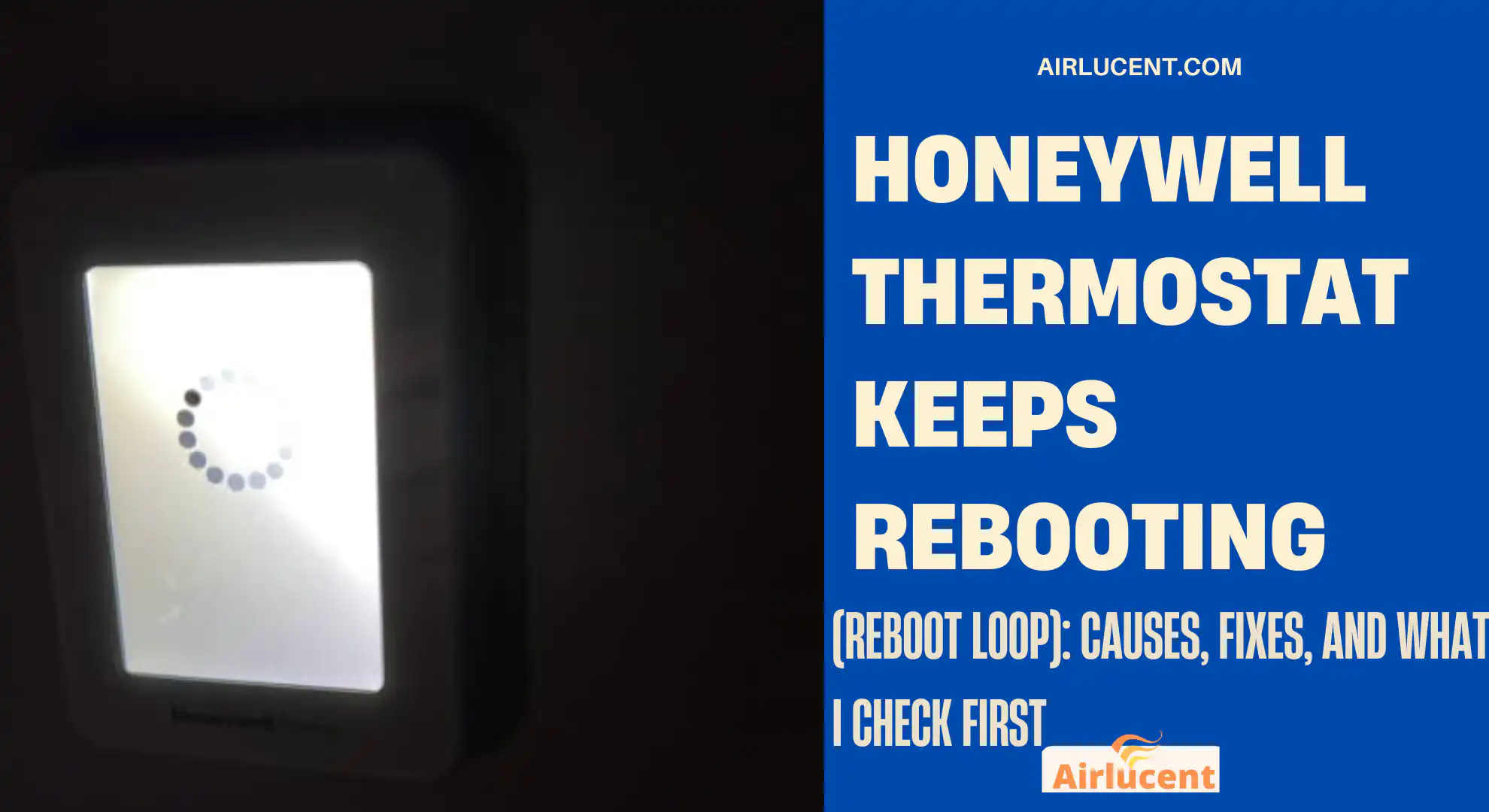
When homeowners tell me “it keeps rebooting,” they usually mean one of these:
- The Honeywell logo appears, then the screen goes blank, then it repeats
- The screen flashes on and off randomly
- The thermostat restarts when the heat or AC turns on
- It works for a bit, then resets to the startup screen
- It loses Wi-Fi and comes back repeatedly (smart models)
Quick diagnosis table (what you see vs what it usually is)
Here’s a fast reference you can use before diving into the detailed steps.
| Reboots every few minutes all day | Unstable 24V power (C-wire/transformer/fuse/loose connection) | Check furnace switch, breaker, door panel, 3A fuse | Medium |
| Reboots when heat turns on | Furnace overheating or safety opening (dirty filter, blower issue, limit switch) | Replace filter, open vents, check return airflow | Easy to Medium |
| Reboots when AC runs | Condensate drain/float switch tripping or low voltage short | Clear drain line, check float switch, inspect thermostat wires | Medium |
| Screen flickers, random resets | Loose wiring at thermostat or air handler | Tighten terminals, re-seat thermostat | Medium |
| Battery model reboots | Weak batteries or wrong battery type | Replace with fresh name-brand alkaline | Easy |
| Smart thermostat loses Wi-Fi then restarts | Power or firmware glitch | Update firmware, soft reset, verify C-wire | Easy to Medium |
| Reboots after you installed it | No C-wire, wrong wiring, incompatible setup | Verify wiring terminals and 24V | Medium |
Step-by-step: How to stop a Honeywell thermostat from rebooting
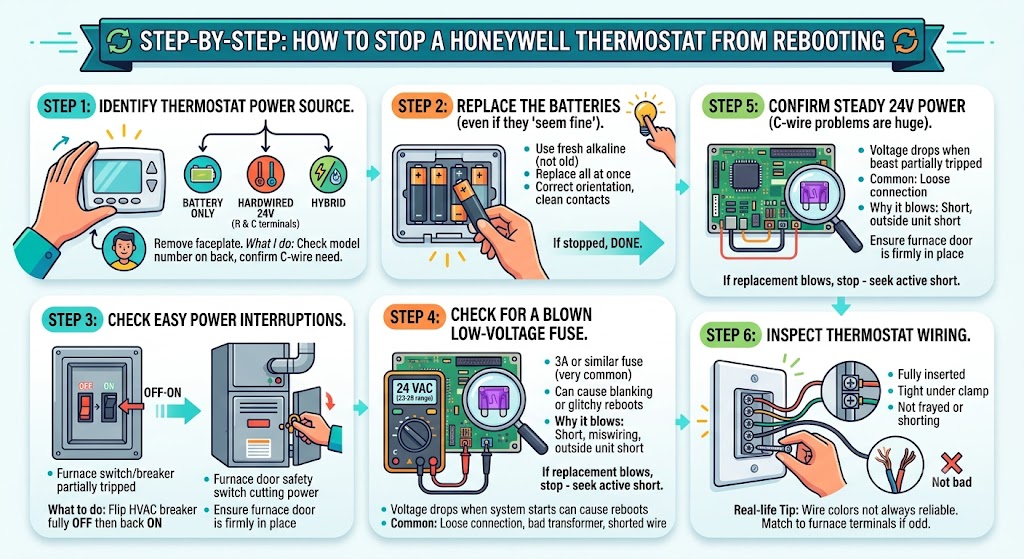
Step 1: Identify what powers your thermostat (this matters a lot)
Honeywell thermostats generally fall into three power setups:
- Battery only (common on basic models)
- Hardwired 24V from the HVAC system (R and C terminals power it)
- Hybrid (runs on 24V but uses batteries as backup)
If you remove the thermostat faceplate and see batteries, don’t assume it’s battery-only. Many models still need stable 24V for consistent operation.
What I do: I check the model number on the back of the faceplate, then confirm whether it requires a C-wire.
Step 2: Replace the batteries (even if they “seem fine”)
If your model uses batteries, replace them first. Reboot loops can happen when battery voltage dips under load.
Tips I use in the field:
- Use fresh alkaline batteries (not old stock from a drawer)
- Replace all batteries at the same time
- Confirm battery orientation and clean contacts if you see corrosion
If the rebooting stops after this, you’re done.
If it continues, move on
Step 3: Check the easy power interruptions (breaker, switch, door panel)
This sounds basic, but I can’t tell you how often I’ve found one of these:
- Furnace/air handler service switch turned off (looks like a light switch)
- Furnace door panel not seated, so the door safety switch is cutting power
- Breaker partially tripped (looks “on” but isn’t fully latched)
What you should do:
- Flip the HVAC breaker fully OFF then back ON
- Make sure the furnace door is firmly in place
If the thermostat is powered from the furnace control board, anything that interrupts the furnace power can drop the thermostat power too.
Step 4: Check for a blown low-voltage fuse (very common)
Many furnaces/air handlers have a small automotive-style fuse on the control board (often 3 amp, sometimes purple).
If that fuse is blown:
- The thermostat may go blank
- Or it may “half power,” glitch, and reboot
Why it blows:
- Thermostat wire short (staple through wire, rubbed insulation, wet wire)
- Miswiring during thermostat install
- Shorted contactor outside (AC unit) pulling too much
If you’re comfortable:
- Turn power off
- Pull the fuse and visually inspect it (or test continuity)
- Replace with the same exact amp rating
If the new fuse blows again, stop. That means there’s an active short that needs proper troubleshooting.
Step 5: Confirm the thermostat has steady 24V power (C-wire problems are huge)
A lot of rebooting issues come down to one thing:
The thermostat is not getting stable power between R and C.
What I look for
- A connected C-wire at the thermostat AND at the furnace/air handler board
- A secure connection (not barely pinched under a terminal)
- No corrosion or loose strands touching other terminals
If you have a multimeter (best test)
With the system powered on, measure:
- R to C should typically read about 24 VAC (often in the 22 to 28 VAC range)
If that voltage is low or drops when the system starts, the thermostat can reboot.
Common reasons voltage drops:
- Loose connection at the control board
- Failing transformer
- Shorted wire or component dragging voltage down
If you do not have a C-wire and your thermostat is trying to “power steal” through other circuits, that can also cause rebooting, especially on some HVAC setps.
Step 6: Inspect thermostat wiring (loose wires cause flicker and resets)
If you’ve ever bumped the thermostat, painted near it, or had work done, the wiring behind it might be loose.
What to do:
- Turn off HVAC power
- Pull the thermostat off the wall plate
- Check that each wire is:
- Fully inserted
- Tight under the terminal clamp
- Not frayed or touching another terminal
Also check the wire sheath. If the outer jacket is stripped too far back, bare copper can touch and create intermittent shorts.
Important note from real life: wire colors are not always reliable. I’ve seen a blue wire used as W, and white used as C. Always match wires to the terminals they’re actually connected to at the air handler if something looks odd.
A big one: Furnace overheating can trigger rebooting (dirty filter and high limit issues)

Step 7: Replace your air filter (do this even if you’re not sure)
A dirty filter restricts airflow. Restricted airflow raises furnace temperature. High temperature can trip the high limit switch.
Quick rule I give homeowners:
If you can’t remember the last time you replaced the filter, replace it now.
Filter change intervals (realistic guide)
| 1-inch fiberglass | Every 30 days | Cheap, clogs fast |
| 1-inch pleated | Every 30 to 90 days | Depends on pets, dust, runtime |
| 4-inch media filter | Every 6 to 12 months | Better capacity, still needs checking |
If you have pets, ongoing remodeling, or allergies, expect shorter intervals.
Step 8: Check airflow basics (this prevents limit trips)
If the furnace is overheating, these help immediately:
- Make sure supply vents are open
- Make sure at least one large return grille is not blocked
- Replace filter
- If you have multiple returns, make sure they are not covered by furniture
If rebooting happens mainly during heating calls, overheating is high on my suspect list.
Step 9: High limit switch (what it is and how it relates)
The high limit switch is a safety device that shuts the furnace down if temperatures get too high. If it’s faulty, or if the furnace is truly overheating, it can cause repeated shutoffs and erratic behavior that homeowners describe as thermostat rebooting.
If you’re experienced with a multimeter, you can test continuity, but I’ll be honest: at this point, most homeowners are better off calling a technician because overheating can also be caused by:
- Weak blower motor or failing capacitor
- Dirty evaporator coil (yes, even on heating, airflow matters)
- Oversized furnace or duct issues
- Cracked heat exchanger concerns (serious)
Software glitches and reset options (especially on smart Honeywell models)
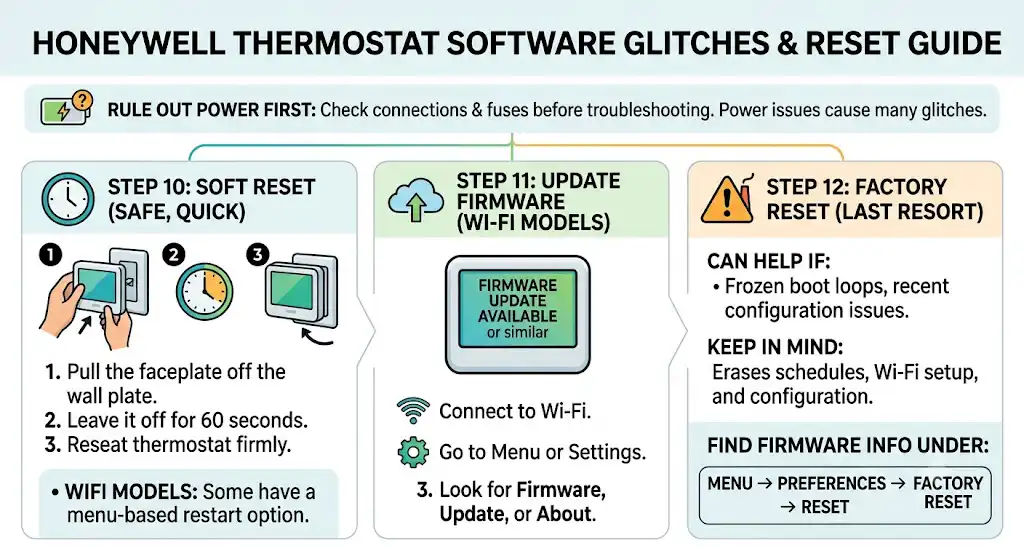
Not every reboot is electrical, but power is still the first thing I rule out.
Step 10: Do a soft reset (safe, quick)
A simple soft reset that works on many Honeywell models:
- Pull the thermostat faceplate off the wall plate
- Leave it off for 60 seconds
- Re-seat it firmly
Some Wi-Fi models also have a menu-based restart.
Step 11: Update firmware (Wi-Fi models)
If your thermostat supports updates:
- Connect to Wi-Fi
- Go to Menu or Settings
- Look for Firmware, Update, or About
Step 12: Factory reset (last resort)
A factory reset can help if:
- The thermostat is frozen in a boot loop due to corrupted settings
- You recently changed equipment settings and it started acting up
Keep in mind: a factory reset will erase schedules, Wi-Fi setup, and configuration.
The exact reset steps vary by model, but many Honeywell Home units have a reset option under:
- Menu
- Preferences
- Reset
- Factory reset
Filter reminder reset (common confusion)
Here are common ways Honeywell filter reminders are cleared (varies by model):
| Basic touchscreen and FocusPRO | Press and hold the upper-left and lower-right touch areas for about 5 seconds (common method) |
| T-Series (T5, T6 Pro) | Menu → Alerts or Reminders → Clear or Dismiss |
| VisionPRO | Press and hold the Filter button 5 to 10 seconds |
| Some smart Wi-Fi models | Menu → Preferences or Reset area to clear the timer, or soft reset by removing the faceplate briefly |
If you tell me your exact model number, I can point you to the exact sequence.
Compatibility and installation mistakes (especially after a new thermostat install)
If the rebooting started right after you installed the thermostat, I’d focus here:
Common setup issues I see
- No C-wire connected (or connected at thermostat but not at the furnace board)
- Wires landed on the wrong terminals
- Old jumper left in place when it shouldn’t be (depends on model)
- Thermostat configured for the wrong system type (heat pump vs conventional)
Even a “mostly correct” install can cause rebooting once the system calls for heat or cool.
When it’s actually a bad thermostat
After you confirm:
- Stable 24V between R and C
- No shorts
- No overheating issues
- Wiring is tight and correct
…and it still reboots, then yes, the thermostat itself can be failing.
In the field, common internal failures include:
- Weak internal power regulator
- Failing relay
- Bad temperature sensor causing the board to behave erratically
If the thermostat is under warranty, Honeywell support may replace it after basic diagnostics.
My quick troubleshooting checklist (in order)
If you want the shortest path I use on calls, here it is:
- Replace batteries (if applicable)
- Confirm furnace/air handler has power, door is on, breaker is solid
- Check control board fuse
- Verify 24VAC between R and C
- Inspect thermostat wiring for looseness/shorts
- Replace air filter and confirm airflow
- Check condensate drain and float switch (AC season)
- Soft reset, then firmware update
- Factory reset
- If all good: suspect thermostat hardware or transformer/control board
\
When you should call a professional (and it’s worth it)
Call an HVAC technician if:
- The fuse keeps blowing
- You measure low voltage and don’t know why
- The furnace is overheating or short-cycling
- You smell burning or see melted wiring
- You’re not comfortable working around electrical components
Frequently asked questions
Why does my Honeywell thermostat keep rebooting when the AC turns on?
Most often it’s a condensate float switch cutting power (clogged drain) or a low-voltage short that shows up only when the outdoor unit contactor energizes. Check your drain line and float switch if you have one.
Can low batteries cause a thermostat to reboot even if it’s wired?
Yes. On some models, weak backup batteries can still cause unstable behavior. I replace them early in the process because it’s fast and cheap.
How often should I check for thermostat updates?
For Wi-Fi models, I recommend checking every few months, or anytime you notice connectivity glitches. But again, updates won’t fix power drops.
Is a dirty filter really enough to cause thermostat issues?
Indirectly, yes. A dirty filter can cause furnace overheating, which triggers safeties and repeated cycling. Homeowners often experience it as “the thermostat keeps restarting” because comfort is interrupted and the system keeps resetting.
Final thoughts (from one homeowner-helper to another)
If your Honeywell thermostat keeps rebooting, don’t start by assuming the thermostat is junk. In my experience, the thermostat is usually reacting to a problem in the power supply, wiring, or HVAC safeties.
Start with the simple wins:
- batteries
- filter
- power checks
- wiring tightness
Then move into:
- 24V testing (R to C)
- fuse and transformer checks
- overheating and safety diagnostics