I’m Nathan. I’ve been an HVAC technician for over 10 years, and I can’t tell you how many times I’ve shown up to a home where the thermostat is locked and nobody knows the PIN. The good news is that most Honeywell Home and Honeywell ProSeries thermostats can be unlocked without the original code using a few proven methods.
In this guide, I’ll walk you through the exact steps I use in the field, including the default PINs, the date code master unlock trick (the one that works on many newer Pro models), and when a factory reset makes sense.
- Quick answer (what to try first)
- Why do Honeywell thermostats get locked in the first place
- Method 1: Try the default Honeywell unlock codes (fastest)
- Method 2: Unlock without the PIN using the “date code + 1234” master code trick (very effective on newer Pro models)
- Method 3: Factory reset (last resort, but it works)
- Which method should you use? (model-based cheat sheet)
- How to tell if it’s actually locked (or something else)
- After you unlock it: what I recommend you do next
- Troubleshooting: if none of these methods work
- FAQ: Honeywell Home thermostat unlock code without code
Quick answer (what to try first)
- Try the default unlock codes: 1234 and 0000
- If it’s a newer Pro model (commonly T6 Pro), use the date code + 1234 master code trick
- If nothing works, do a factory reset (this wipes schedules and settings)
Before you start: only unlock a thermostat you own or have permission to access (like your own home, a rental you manage, or a system you’re authorized to service).
Why do Honeywell thermostats get locked in the first place
In real homes, I usually see locks for these reasons:
- A previous homeowner set a PIN and forgot it
- A landlord or property manager locked it to prevent extreme temperature changes.
- A commercial space used a lockout to reduce energy waste.
- Someone accidentally enabled a keypad lock in the menu.
Common lock types you might be dealing with
| Keypad lock | Blocks menu and temperature changes without a PIN | Padlock icon, passcode prompt |
| Temperature range lock | Lets you adjust temp only within a set range | You can change temp but it stops at limits |
| Full lockout | Prevents almost all changes | постоян lock icon and no adjustment |
| Partial lock | Allows limited changes, blocks advanced menus | Some controls work, others ask for code |
Method 1: Try the default Honeywell unlock codes (fastest)
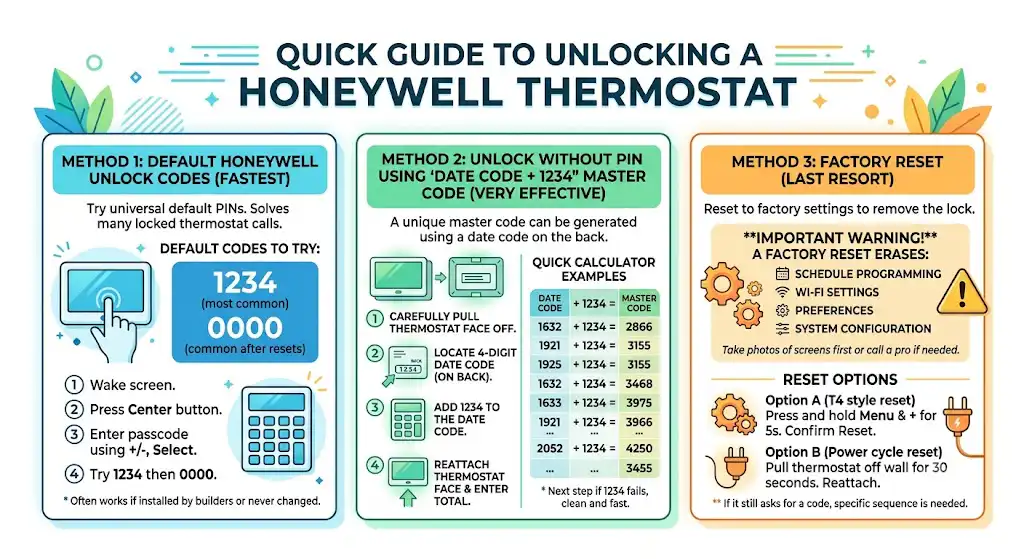
Most Honeywell thermostats ship with a universal default PIN. In the field, this solves a big chunk of “locked thermostat” calls in under a minute.
Default codes to try
- 1234 (most common)
- 0000 (common on some models or after resets)
Steps (work on many Honeywell Home and ProSeries models)
- Wake the thermostat screen (tap it if needed).
- Press the Center button (sometimes labeled Select).
- When it asks for a passcode:
- Use + / – to change each digit
- Press Select/Next to move through digits (depends on model)
- Enter 1234 and confirm with Select or Done
- If that fails, repeat with 0000
What I see most often
If the thermostat was installed by a builder, maintenance team, or previous homeowner who never changed anything, 1234 is the first thing I try.
Method 2: Unlock without the PIN using the “date code + 1234” master code trick (very effective on newer Pro models)
If you have a Honeywell ProSeries model like the T6 Pro, you can often unlock it even when the original PIN is unknown.
How it works (in plain English)
Honeywell prints a 4-digit date code on the back of many thermostat faces. You add 1234 to that number to generate a one-time master unlock code.
Step-by-step
- Carefully pull the thermostat face straight off the wall plate.
- You’re not removing wires for this step, just the front display.
- Flip the thermostat over and look for a 4-digit number labeled as a date code (or shown near the model information).
- Add 1234 to that 4-digit number.
- Snap the thermostat back onto the wall plate.
- Enter the new total as the unlock code.
Example
If the date code is 1632:
1632 + 1234 = 2866
Your unlock code becomes 2866.
Quick calculator table (examples)
| 1000 | +1234 | 2234 |
| 1632 | +1234 | 2866 |
| 1921 | +1234 | 3155 |
| 2005 | +1234 | 3239 |
My technician tip
When people tell me “it’s definitely not 1234,” this method is the next thing I do—especially on Pro installs. It’s clean, fast, and avoids disrupting the homeowner’s schedule (which a reset will).
Method 3: Factory reset (last resort, but it works)
If the default codes fail and the date-code trick doesn’t apply to your model, you can reset the thermostat to factory settings to remove the lock.
Important warning before you reset
A factory reset can erase:
- Your schedule programming
- Wi-Fi connection settings
- Home/Away preferences
- System configuration settings (on some installs)
If you have a heat pump, dual fuel, humidifier, or any advanced setup and you’re not comfortable reconfiguring it, consider taking photos of every settings screen first or call a pro.
Reset options (common Honeywell approaches)
Because Honeywell has many models, reset paths vary. Here are two common ones that match what I see most often.
Option A: T4 style reset (common approach)
- Press and hold Menu and + together for about 5 seconds
- Look for Reset options.
- Confirm the reset and let the thermostat reboot.
Option B: Power cycle reset (basic, sometimes helps)
- Pull the thermostat off the wall plate.
- Leave it off for 30 seconds.
- Snap it back on and check if the lock cleared.
If you reset and it still asks for a code, your model likely requires a specific reset sequence inside the installer menu.
Which method should you use? (model-based cheat sheet)
Here’s the practical way I decide what to try, based on what I typically see installed.
| Honeywell ProSeries (common contractor installs) | 1234, then date-code trick | Date-code trick is often the winner |
| Honeywell Home basic/non-Wi-Fi | 1234 or 0000 | Default code frequently works |
| Newer connected models | 1234, then check back for codes | Depends heavily on model; reset sometimes required |
| Unknown model | Look for lock icon, try 1234, check back for date code | One of the three methods in this article |
How to tell if it’s actually locked (or something else)
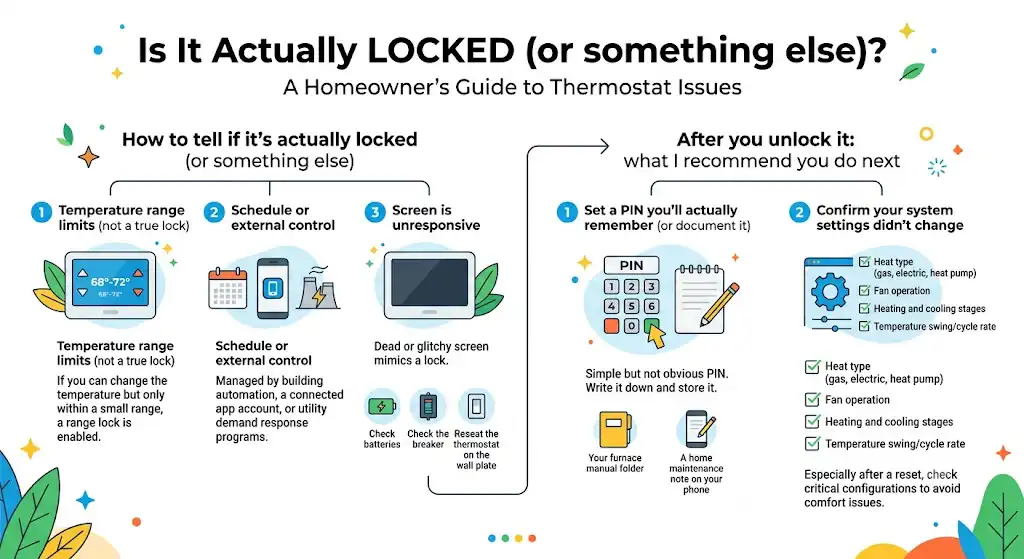
Sometimes homeowners think it’s “locked,” but it’s really one of these:
1) Temperature range limits (not a true lock)
If you can change the temperature but only within a small range, you may have a range lock enabled.
2) Schedule or external control
Some systems are controlled by:
- Building automation
- A connected app account
- Utility demand response programs
3) Screen is unresponsive
If the screen is dead or glitchy, it can mimic a lock.
- Check batteries (if your model uses them)
- Check the breaker (if it’s powered from the furnace transformer)
- Reseat the thermostat on the wall plat
After you unlock it: what I recommend you do next
Once you regain access, don’t just walk away. I always suggest homeowners do two things:
1) Set a PIN you’ll actually remember (or document it)
Use something simple but not obvious. Write it down and store it with:
- Your furnace manual folder
- A home maintenance note on your phone
2) Confirm your system settings didn’t change
Especially if you did a reset, confirm:
- Heat type (gas, electric, heat pump)
- Fan operation
- Heating and cooling stages
- Temperature swing/cycle rate settings (if accessible)
An incorrect configuration can cause comfort issues and, in some cases, increased energy use.
Troubleshooting: if none of these methods work
If you’ve tried 1234, 0000, the date-code + 1234 trick, and a reset, one of these is likely true:
- Your model uses a different master unlock method.
- It’s tied to an account or building control system.
- The thermostat is not seated correctly on the base.
- The screen is failing (rare, but I’ve replaced a few that acted “locked”)
What I’d do next (simple checks)
- Take a clear photo of the thermostat front and any model number you can find.
- Pull the face and look for labels like THXXXX or T6 Pro naming.
- Search the exact model’s manual for “lock” and “unlock” steps, or contact Honeywell Home support with the model number.
FAQ: Honeywell Home thermostat unlock code without code
What is the default Honeywell thermostat unlock code?
Most commonly 1234. The second most common is 0000.
Where is the date code located?
Usually on the back of the thermostat face after you pull it off the wall plate. It’s typically a 4-digit number.
Does the date-code trick work on every Honeywell thermostat?
No. I see it work most often on newer ProSeries installs. Some Honeywell Home models use different security logic.