I’m Nathan. I’ve worked as an HVAC technician for over 10 years, and one of the most common service calls I get is something that looks “serious” but usually isn’t: a Honeywell thermostat flashing Change Filter or Filter.
Here’s the key thing I tell homeowners on day one:
Your thermostat is not measuring how dirty your filter is. It’s running a timer. When the timer expires, you get the reminder. After you replace or clean the filter, you reset the reminder so the timer starts over.
In this guide, I’ll show you exactly how to reset the filter reminder on Honeywell Pro Series thermostats and what to do on other Honeywell models, plus how to replace the filter the right way and what it means if the message keeps coming back.
- Why the Honeywell “Change Filter” Reminder Matters (And What It Actually Means)
- Before You Reset the Filter Light: Replace or Clean the Filter First
- How to Reset Filter Reminder on a Honeywell Pro Series Thermostat
- Honeywell Filter Reset for Other Models (T-Series, 5000, 6000, 8000, Touchscreen Models)
- Honeywell Filter Reset Instructions by Thermostat Type (Quick Table)
- How to Replace Your Furnace or Air Handler Filter (The Way I Do It)
- How Often Should You Replace the Filter? (Realistic Schedule Table)
- Why It Still Says “Change Filter” After You Changed It
- Extra HVAC Tip: Can a Dirty Filter Cause the Thermostat to Reset or Reboot?
- Honeywell Thermostat Filter Reset Troubleshooting Checklist
- Frequently Asked Questions
- Final Thoughts (From the Field)
Why the Honeywell “Change Filter” Reminder Matters (And What It Actually Means)
Most Honeywell thermostats track run time or days since the last reset. The reminder is meant to protect your system from restricted airflow and protect your comfort.
A clogged filter can cause:
- Higher energy bills (dirty filters commonly increase HVAC energy use, often cited in the 5 to 15 percent range depending on restriction and runtime)
- Weak airflow and uneven temperatures
- Frozen AC coils in cooling season
- Furnace overheating and safety shutdowns in heating season
Also, heating and cooling is typically the biggest energy load in a home. The U.S. Department of Energy commonly estimates HVAC makes up around half of household energy use in many homes. So small airflow problems can turn into noticeable money.
Before You Reset the Filter Light: Replace or Clean the Filter First
I don’t recommend resetting the reminder “for later.” In the real world, later turns into forgotten, and I end up at your house for an overheated furnace or an iced-up coil.
Quick check: is your filter actually dirty?
Pull the filter out and look at it in bright light.
- If you can’t see much light through it, it’s time.
- If it’s bowed in or gray and fuzzy, it’s past time.
How to Reset Filter Reminder on a Honeywell Pro Series Thermostat

Many Honeywell Pro Series models use the same alert menu structure.
Steps (Pro Series filter reset)
- Press Menu
- Press the arrow buttons until you see ALRT (alerts)
- Press Select to view active alert(s)
- Look for REPL or Replace Air Filter
- Press Select
- Press the arrow until you see CLER (clear)
- Press Select again to clear the air filter reminder
After that, the filter reminder should disappear and the timer should restart.
If you don’t see “ALRT”
On some versions you may need to scroll further, or you may see wording like:
- Alerts
- Reminders
- Maintenance
If your thermostat is a true Pro Series and you still don’t see it, it may be a model that uses an on-screen Reset button instead (I cover that below).
Honeywell Filter Reset for Other Models (T-Series, 5000, 6000, 8000, Touchscreen Models)
Honeywell has a lot of families, and the reset method depends on the interface.
The most common method: a “Reset” key appears
On many Honeywell thermostats, when the Change Filter message appears, you’ll also see an on-screen option such as:
- Reset
- Dismiss
- Clear
Tap that and confirm.
If you don’t see a Reset option: try “More”
Some touchscreen models hide the reset inside an extra menu.
- Tap More
- Find Reminders or Maintenance
- Select Filter
- Tap Reset
Honeywell Filter Reset Instructions by Thermostat Type (Quick Table)
This table reflects what I see most often in the field. Your exact button names may vary slightly.
| Pro Series (many models) | Menu-based alerts | Menu → scroll to ALRT → Select → REPL → Select → CLER → Select |
| Touchscreen models | “Change Filter” with a button | Press Reset/Clear on the screen |
| Models with “More” menu | Reminder is hidden | More → Maintenance/Reminders → Filter → Reset |
| Older basic models | Sometimes no reminder feature | Some don’t have a filter timer at all; reminder may be in equipment controls, not thermostat |
If you tell me your model number (usually inside the faceplate or on the back when you pull it off the wall), I can point you to the exact sequence.
How to Replace Your Furnace or Air Handler Filter (The Way I Do It)

Even if you’ve changed filters before, these small details matter.
Step 1: Locate your system
Most filters are at one of these locations:
- Behind a return grille (wall or ceiling)
- In a filter slot next to the furnace/air handler
- In a media filter cabinet (thicker 4 to 5 inch filter)
Step 2: Turn off the equipment
I recommend shutting it off at:
- The furnace switch (often looks like a light switch), or
- The thermostat (set system to Off), or
- The breaker if you’re unsure
This prevents the blower from pulling unfiltered dust while the filter is out.
Step 3: Remove the old filter and note the size
Common sizes look like: 16x25x1 or 20x20x1.
- Write it down or snap a photo.
- Check the airflow arrow on the frame before you toss it.
Step 4: Install the new filter with correct airflow direction
There’s an arrow on the filter. The arrow should point:
- Toward the furnace/air handler
- In the direction air is moving into the equipment
Step 5: Turn the system back on
Then reset the thermostat reminder.
How Often Should You Replace the Filter? (Realistic Schedule Table)
In my experience, filter interval depends more on your home and lifestyle than the thermostat timer.
| No pets, low dust, 1 to 2 occupants | Every 60 to 90 days |
| One pet or moderate dust | Every 45 to 60 days |
| Multiple pets, allergies, dusty area, renovations | Every 30 days |
| Thick media filters (4 to 5 inch) | Often 6 to 12 months (check monthly anyway) |
If your system struggles with airflow, don’t “upgrade” to the highest MERV you can find without checking compatibility. Some systems can’t handle very restrictive filters.
Why It Still Says “Change Filter” After You Changed It
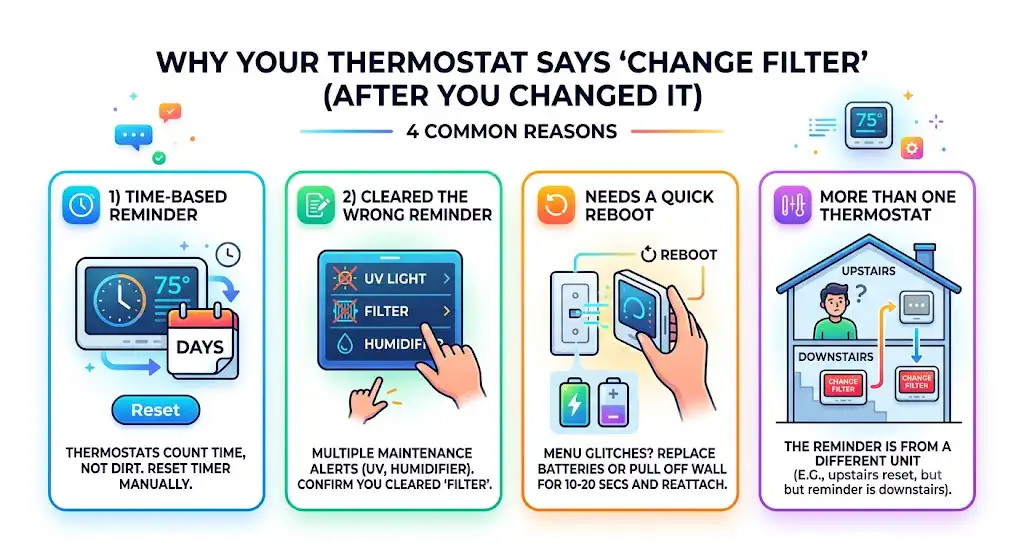
This is extremely common, and it’s usually one of these:
1) The reminder is time-based, not dirt-based
Your thermostat does not detect dirt. If the timer wasn’t reset, the message stays.
2) You cleared the wrong reminder
Some thermostats have multiple maintenance reminders (filter, UV light, humidifier pad).
Make sure you’re clearing Filter specifically.
3) The thermostat needs a quick reboot
If the menu is glitchy:
- Replace batteries if your model has them
- Or pull the thermostat off the wall plate for 10 to 20 seconds and snap it back on (only if you’re comfortable doing so)
4) You have more than one thermostat
I’ve seen homeowners change the filter and reset the upstairs thermostat, but the reminder is coming from the downstairs unit (or vice versa).
Extra HVAC Tip: Can a Dirty Filter Cause the Thermostat to Reset or Reboot?
Yes, in certain setups.
Here’s what can happen (I see it mostly in heating season):
- Filter gets clogged
- Airflow drops
- Furnace heat exchanger gets too hot
- The high-limit safety switch trips
- Furnace shuts off abruptly
- Some systems interrupt power to the thermostat circuit, and the thermostat appears to restart
If your thermostat is rebooting, I typically check these in order:
- Batteries (if applicable)
- Loose wiring at thermostat terminals (especially R and C if you have a C-wire)
- Dirty filter and airflow restrictions
- Equipment safety switches or control board issues
If replacing the filter stops the rebooting, you probably just saved yourself a service call.
Honeywell Thermostat Filter Reset Troubleshooting Checklist
If the reminder won’t clear, run this quick checklist:
- Confirm the filter is replaced and installed correctly (airflow arrow correct)
- Confirm you’re in the right menu (Alerts/Reminders/Maintenance)
- Clear the filter reminder (not UV/humidifier reminders)
- Replace thermostat batteries (if it uses batteries)
- Power-cycle the thermostat (remove from wall plate briefly)
- Look up the exact model manual if button names don’t match your screen
Frequently Asked Questions
Do I really need to replace the air filter regularly?
Yes. A clogged filter can lead to:
Furnace overheating and shutting down
AC coil freeze-ups
Poor airflow and comfort complaints
Higher operating cost
It’s one of the cheapest ways to protect the most expensive equipment in your home.
Can I reset the filter light without changing the filter?
You can, but I don’t recommend it. If you reset it “just to stop the flashing,” you’re very likely to forget and run the system with restricted airflow.
How do I know which Honeywell thermostat model I have?
Usually:
Remove the thermostat face (most pull straight off)
Look for a label on the back or inside the cover with a model like THxxxx or RTHxxxx
If you share that model number, I can give you the exact reset steps.
Why does my thermostat remind me every 30 or 90 days even if the filter looks clean?
Because it’s a timer. If your home is low dust and you use a thicker or higher-capacity filter, you may be able to extend the interval safely. If your home is dusty or you have pets, you may need to shorten it.
Final Thoughts (From the Field)
Resetting the Honeywell filter reminder is usually a simple menu clear, especially on Pro Series thermostats. The bigger win is making sure you actually changed the filter first, installed it with the arrow pointing the right direction, and set a replacement schedule that matches your home.