One of the most common “my thermostat is broken” calls I get is actually just a locked thermostat. With Sensi thermostats, that confusion happens a lot because the lock is usually controlled from the app, not from the thermostat screen.
In this guide, I’ll walk you through the real-world ways to unlock a Sensi thermostat, what the lock icon actually means, and what to do if you don’t have access to the Sensi account.
- Quick answer: How do you unlock a Sensi thermostat?
- Before you start: What the lock icon really means
- Method 1 (Most reliable): Unlock using the Sensi app
- Method 2 (Only on some models): Try unlocking directly on the thermostat
- What if you don’t have access to the Sensi app/account?
- Will a factory reset unlock a Sensi thermostat?
- Troubleshooting: When it still won’t unlock
- Why Sensi lockouts are so common (and why people enable them)
- FAQ: Unlocking a Sensi thermostat
Quick answer: How do you unlock a Sensi thermostat?
Most of the time, you unlock it in the Sensi app:
- Open the Sensi app
- Select your thermostat on the dashboard
- Tap the thermostat name
- Tap Settings (gear icon or menu)
- Tap System settings
- Turn Keypad Lockout to Off
When it’s off, the lock icon disappears and the physical buttons work again.
Before you start: What the lock icon really means
When Keypad Lockout is enabled:
- The thermostat’s physical buttons stop working (by design)
- Usually the backlight button still works
- You’ll see a small lock icon on the thermostat display (and often in the app)
This is not a “thermostat failure.” In my experience, if the screen is on, the temperature is showing, and the buttons do nothing, it’s locked far more often than it’s broken.
Keypad lockout vs. Sensi “Security Code” (don’t mix these up)
A lot of homeowners get tripped up here:
| Keypad Lockout | Prevents button changes on the thermostat | Yes, when turned off |
| Security Code (setup card/sticker) | Used to connect the thermostat to the app/Wi‑Fi during setup | No |
That printed “Security Code” is for pairing to your account during installation, not for unlocking a locked keypad.
Method 1 (Most reliable): Unlock using the Sensi app
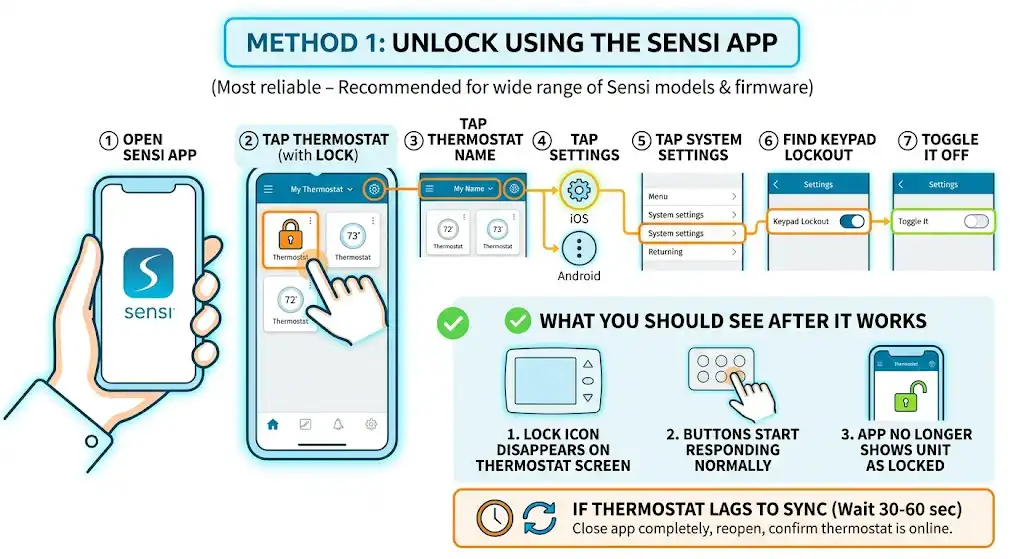
This is the method I recommend first because it works across the widest range of Sensi models and firmware versions.
Step-by-step (works for iPhone and Android)
- Open the Sensi app on your phone.
- On the dashboard, tap your thermostat (the one showing the lock).
- Tap the thermostat name (usually at the top).
- Tap Settings
- iOS is commonly a gear icon
- Android may show a menu icon depending on version
- Tap System settings
- Find Keypad Lockout
- Toggle it Off
What you should see after it works:
- The lock icon disappears on the thermostat screen
- The thermostat buttons start responding normally
- The app no longer shows the unit as locked
If the app and thermostat don’t match right away
Sensi thermostats can lag for a short moment while syncing over Wi‑Fi. If you unlocked it in the app but still see the lock on the thermostat:
- Wait 30 to 60 seconds
- Close the app completely and reopen it
- Confirm the thermostat is online in the app
Method 2 (Only on some models): Try unlocking directly on the thermostat
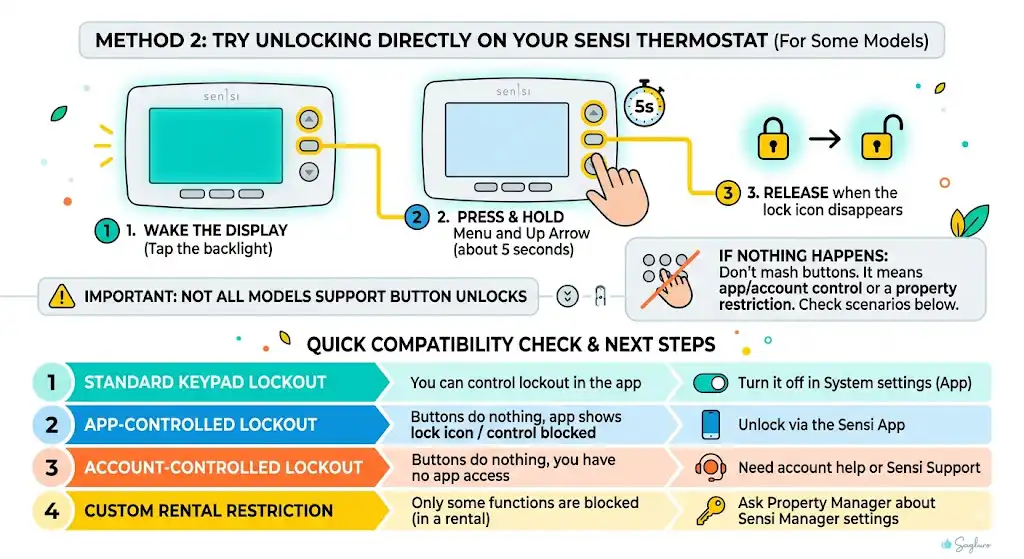
Here’s the honest, technician-to-homeowner truth: some people report unlocking certain Sensi models from the thermostat using buttons, while other Sensi setups are app-only.
If your thermostat has a Menu button and Up arrow, this is worth trying:
Button method (if your model supports it)
- Wake the display (tap the backlight if needed).
- Press and hold Menu and Up Arrow together for about 5 seconds.
- Release when the lock icon disappears.
If nothing happens
If holding the buttons does nothing, don’t keep mashing buttons. That usually means your lockout is controlled from the app/account side (or you’re dealing with a custom property-manager restriction). Go back to Method 1 or the “No app access” section below.
Compatibility reality check
I can’t promise this button method works on every Sensi, because Sensi has multiple models and app/firmware behaviors in the wild. Here’s how I tell homeowners to decide quickly:
| You can control lockout in the app | Standard keypad lockout | Turn it off in System settings |
| Buttons do nothing, app shows lock | App-controlled lockout | Unlock in app |
| Buttons do nothing, and you have no app access | Account-controlled lockout | You need account help or Sensi support |
| You’re in a rental and only some functions are blocked | Likely a custom restriction | Ask property manager about Sensi Manager settings |
What if you don’t have access to the Sensi app/account?
This is extremely common when:
- You bought a house and the previous owner set it up
- A landlord or property manager controls the thermostat
- An installer set it up and never transferred ownership
If you cannot log into the Sensi account, you usually cannot unlock the keypad from the thermostat itself (especially for the standard app lockout).
Your options (in order of fastest to slowest)
1. Ask the account owner to disable the lockout
The person who set it up can:
- Turn off Keypad Lockout from their app, or
- Share/transfer access so you can manage it
2. If you’re a tenant: check for Custom Keypad Lockout (property manager setup)
Some rentals use a more advanced setup that restricts specific functions (like temperature changes) rather than locking everything. This is often managed through a web dashboard (commonly referred to as a manager portal).
If you can’t change setpoint, mode, fan, or schedule, but the thermostat isn’t “fully frozen,” that’s a clue you’re under a custom restriction. Only the dashboard/account holder can change those permissions.
3. If you own it and truly lost access: contact Sensi support for account recovery
This is usually the cleanest path if you’re the rightful owner. In many cases, support can help you regain account access rather than wasting time trying random reset tricks.
Will a factory reset unlock a Sensi thermostat?
Sometimes people try a factory reset hoping it “wipes the lock.” Here’s what I’ve seen in the field:
- A factory reset can clear local settings
- But it does not reliably bypass an account-controlled lockout
- If the thermostat is still tied to someone else’s account, you may not even be able to re-register it properly
If you’re locked out because you don’t have account access, solving the account ownership problem is usually the real fix.
Troubleshooting: When it still won’t unlock
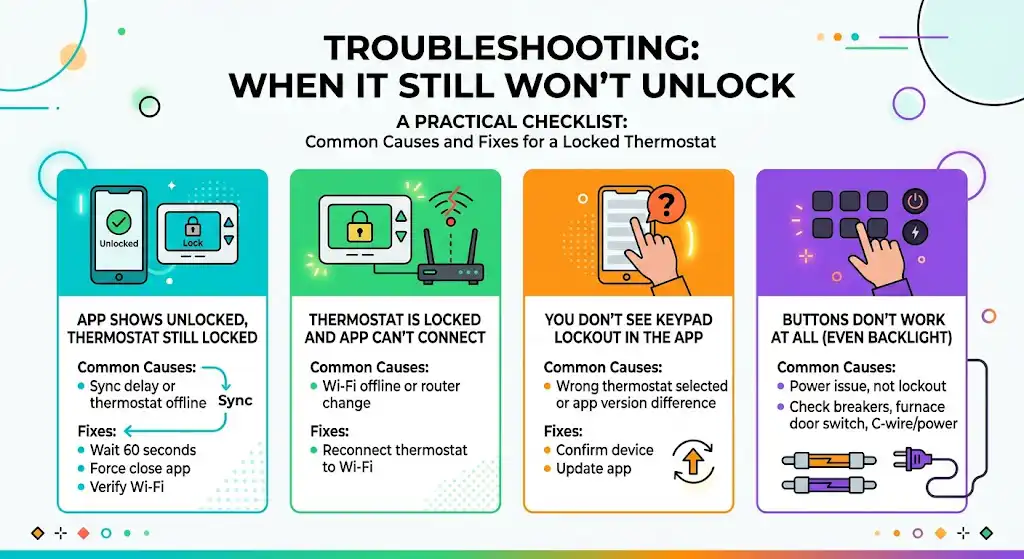
Here’s a practical checklist I use when a homeowner says, “I turned it off but it’s still locked.”
Common causes and fixes
| App shows unlocked but thermostat still shows lock | Sync delay or thermostat offline | Wait 60 seconds, force close app, verify Wi‑Fi |
| Thermostat is locked and app can’t connect | Wi‑Fi offline or router change | Reconnect thermostat to Wi‑Fi |
| You don’t see Keypad Lockout in the app | Wrong thermostat selected or app version difference | Confirm device, update app |
| Buttons don’t work at all (even backlight) | Power issue, not lockout | Check breakers, furnace door switch, C-wire/power |
Why Sensi lockouts are so common (and why people enable them)
From what I see on service calls, people enable keypad lockout for a few practical reasons:
- Prevent kids from cranking the temperature
- Keep guests from changing settings
- Stop accidental button presses
- Rental-property control
And to be fair, smart thermostats can actually reduce energy waste when configured correctly. ENERGY STAR has reported smart thermostat savings in the neighborhood of around 8 percent on heating and cooling for certified models, depending on usage patterns. Lockouts are one way people try to protect those settings.
FAQ: Unlocking a Sensi thermostat
Does a Sensi thermostat have a PIN to unlock it?
No. Sensi keypad lockout typically does not use a PIN. It’s generally a toggle inside the app (System settings). If you see PIN instructions online, they’re often for other thermostat brands.
What’s the difference between full lockout and a custom lockout used by landlords?
Full keypad lockout: Disables most physical controls on the thermostat.
Custom restrictions: May allow some functions but block others (temperature, mode, fan, schedule). These are commonly managed by whoever controls the account or a manager dashboard.
Why does the thermostat show a lock icon but the app doesn’t?
Usually it’s a sync delay or connectivity issue. Give it a minute, then reopen the app and confirm the thermostat is online.