If your Honeywell thermostat won’t turn on the AC, I know how miserable that feels. I’m Nathan, and I’ve worked as an HVAC technician for 10+ years. When a homeowner calls me with “the thermostat is on cool but nothing happens,” it’s usually something simple like a setting, a safety switch, a clogged drain, or a power issue, not an instant “replace the whole system” situation.
In this guide, I will tell you how you can fix this error.
- Quick 2-minute checklist (do this first)
- How your Honeywell thermostat actually turns on the AC (simple explanation)
- Troubleshooting: Honeywell thermostat won’t turn on AC (in the right order)
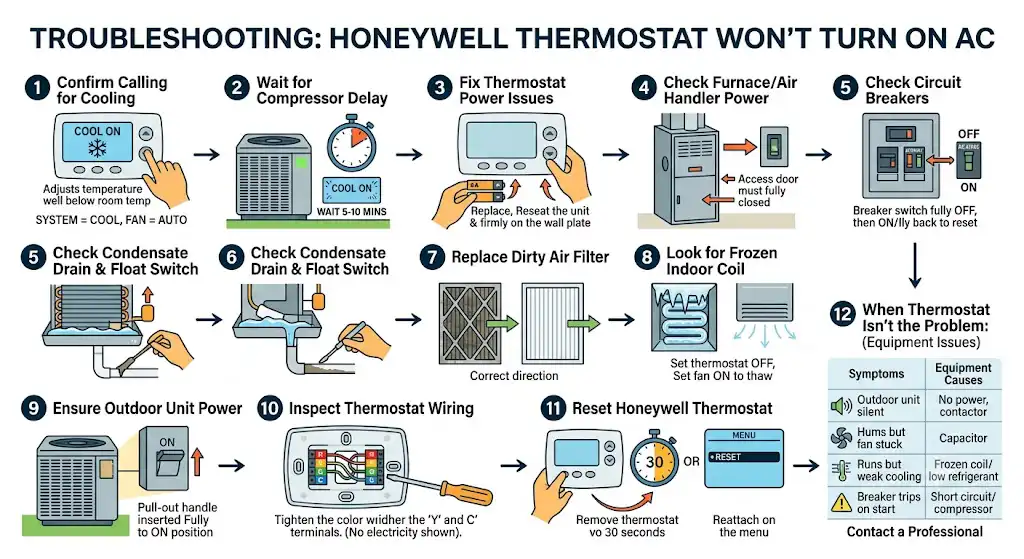
- 1) Confirm the thermostat is actually calling for cooling
- 2) Wait out the built in compressor delay (very common)
- 3) Fix thermostat power issues (blank screen or unresponsive)
- 4) Check the furnace or air handler power switch and door panel
- 5) Check circuit breakers (and make sure they are fully reset)
- 6) Check the condensate drain pan and float switch (a top cause)
- 7) Replace a dirty air filter (it can shut cooling down)
- 8) Look for a frozen indoor coil (ice = no cooling)
- 9) Make sure the outdoor unit has power (disconnects happen)
- 10) Inspect thermostat wiring (loose Y or C is a big deal)
- 11) Reset the Honeywell thermostat (fixes glitches)
- 12) When the thermostat isn’t the problem: contactor, capacitor, refrigerant, compressor
- When to call a professional (and why I recommend it)
- How to prevent this from happening again (simple maintenance plan)
- FAQ: Honeywell thermostat won’t turn on AC
Quick 2-minute checklist (do this first)
Before you open anything up, check these. This solves a lot of “won’t cool” situations.
- Mode: Set the thermostat to Cool
- Setpoint: Set the temperature at least 5°F lower than the room temperature
- Fan setting: Set Fan to Auto (not On)
- Delay: If you see “Cool On” blinking, wait 5 to 10 minutes
- Thermostat power: Replace batteries (if your model uses them) and confirm the screen is on
How your Honeywell thermostat actually turns on the AC (simple explanation)
Your Honeywell thermostat is basically a switchboard. When you set it to Cool and lower the temperature, the thermostat sends a signal to start cooling:
- The thermostat sends 24V control power through the Y wire (cooling call)
- Your indoor unit (furnace or air handler) then triggers the outdoor unit
- The outdoor unit’s contactor pulls in, and the compressor and fan should start.
Common thermostat terminals (helpful for troubleshooting)
| R / Rc | 24V power from system | Thermostat dead or won’t call properly |
| C | Common wire (continuous power) | Smart thermostat issues, reboots, blank screen |
| Y | Cooling signal to AC | Thermostat “calls” but AC never starts |
| G | Fan relay | Fan won’t run (or runs wrong) |
| W | Heat call | Heat issues (not AC), sometimes confusion with mode |
Not every system uses every terminal, but Y and R are critical for cooling, and C is critical for many newer Honeywell smart thermostats.
Troubleshooting: Honeywell thermostat won’t turn on AC (in the right order)
1) Confirm the thermostat is actually calling for cooling
This sounds obvious, but I check it on every call because it’s quick.
- Set System = Cool
- Set the temperature 5 to 8°F lower than room temp.
- Set Fan = Auto
- Cancel “Hold,” “Vacation,” or schedule overrides if you’ve been adjusting settings recently.
If your Honeywell shows “Cool On” or a snowflake icon, it is trying to cool. If it doesn’t, the issue may be a thermostat setting or thermostat power problem.
2) Wait out the built in compressor delay (very common)
Many Honeywell thermostats and HVAC control boards include a compressor protection delay. It prevents short cycling (which is hard on compressors).
What you’ll see:
- “Cool On” blinking
- Cooling symbol flashing
- Outdoor unit not starting right away
Fix:
- Wait 5 to 10 minutes with the thermostat set to Cool and the setpoint lowered.
If it starts after waiting, you’re good. If it never starts, continue.
3) Fix thermostat power issues (blank screen or unresponsive)
If the display is blank or acting weird, power is step one.
If your thermostat uses batteries:
- Replace them with fresh name brand AA or AAA (whatever your model takes)
- Re-seat the thermostat firmly on the wall plate
If it’s powered by the HVAC system (common with smart models):
- You may have lost 24V power due to a tripped switch, blown fuse, open door switch, or float switch (we’ll cover those next)
Pro tip from the field: A “dead thermostat” is often not the thermostat. It’s often the indoor unit not supplying power.
4) Check the furnace or air handler power switch and door panel
This one gets homeowners all the time.
- Look for a light switch near your furnace/air handler (often on the side of the unit or nearby wall)
- Make sure it’s On
- Make sure the access door is fully seated (many units have a safety interlock switch)
5) Check circuit breakers (and make sure they are fully reset)
If the thermostat is on but the AC won’t run, go to your electrical panel.
Check breakers labeled:
- AC
- Condenser
- Furnace
- Air Handler
- HVAC
How to reset correctly:
- Flip the breaker all the way Off
- Then flip it back On
If the breaker trips again soon after resetting, stop and call a pro. Repeated trips can indicate a failing capacitor, seized motor, shorted wiring, or compressor issues.
6) Check the condensate drain pan and float switch (a top cause)
In cooling season, your indoor coil removes humidity. That water drains away through a PVC line. If that drain clogs, many systems trigger a float switch and shut down cooling to prevent water damage.
What to check:
- Is the drain pan full of water?
- Is there a wet safety switch near the drain line?
- Any water around the indoor unit?
Fix you can do:
- Turn the system off
- Carefully clear obvious gunk at the drain opening
- If you have a shop vac, you can often clear the drain line from the outside drain termination
If the pan keeps filling, you likely have a stubborn clog or a drainage pitch issue.
7) Replace a dirty air filter (it can shut cooling down)
A clogged filter can restrict airflow badly enough to cause the evaporator coil to freeze, and then the system won’t cool correctly or may stop running.
Fix:
- Turn system off
- Replace the filter with the correct size
- Make sure the airflow arrow points toward the unit
8) Look for a frozen indoor coil (ice = no cooling)
If you have:
- weak airflow from vents
- indoor unit running but not cooling
- visible ice on refrigerant lines or coil area
Your coil may be frozen.
What to do:
- Set thermostat to Off
- Set fan to On to help thaw (or just let it thaw naturally)
- Give it a few hours (sometimes overnight if it’s heavily iced)
Common causes:
- Dirty filter
- Blower problem
- Closed vents/returns
- Low refrigerant (requires a licensed tech)
If it freezes again after a filter change and thaw, that’s a strong sign it needs professional diagnosis.
9) Make sure the outdoor unit has power (disconnects happen)
Even if your thermostat and indoor unit are fine, the outdoor condenser may not be powered.
Check:
- Outdoor disconnect box near the condenser (make sure it’s inserted/on)
- Any service switch turned off
- Tripped outdoor breaker (if present)
If the outdoor fan tries to start and hums, or starts then stops, that points toward capacitor/contactor/motor issues (pro territory).
10) Inspect thermostat wiring (loose Y or C is a big deal)
If you’re comfortable doing a simple visual inspection:
Safety first: Turn off power to the HVAC system at the breaker before removing the thermostat.
- Pull the thermostat straight off the wall plate
- Make sure wires are firmly seated
- Look closely at Y (cooling) and C (common) in particular
- Ensure no bare copper is touching another terminal
11) Reset the Honeywell thermostat (fixes glitches)
Sometimes the thermostat software gets “stuck,” especially after a power outage.
General reset approach (varies by model):
- Remove the thermostat from the wall plate for 30 seconds and reattach
- Or use the menu to choose Reset (Factory or Schedule reset options)
12) When the thermostat isn’t the problem: contactor, capacitor, refrigerant, compressor
If the thermostat is clearly calling for cooling but the outdoor unit won’t run, the issue may be in the AC equipment, not the thermostat.
Here’s a quick “symptom to likely cause” table I use:
| Thermostat says Cool On but outdoor unit silent | No power outside, bad contactor, float switch open | Check breakers/disconnect/pan, then call pro |
| Outdoor unit hums but fan doesn’t spin | Bad capacitor, failing fan motor | Call pro (capacitors are hazardous) |
| Indoor fan runs, little to no cooling | Frozen coil, low refrigerant, dirty filter | Replace filter, thaw coil, call pro if repeats |
| Breaker trips when cooling starts | Shorted capacitor, compressor issue, wiring short | Stop resetting and call pro |
| Thermostat keeps rebooting or goes blank | Missing C wire, low voltage issue, blown fuse | Check door switch/power; call pro if needed |
When to call a professional (and why I recommend it)
I’m all for DIY checks, but I also don’t want you getting hurt or causing a bigger failure.
Call an HVAC pro if:
- The breaker trips repeatedly
- You suspect low refrigerant or a refrigerant leak (licensed work)
- You see burn marks, melted wires, or smell electrical burning
- The coil freezes repeatedly after basic airflow fixes
- The outdoor unit needs electrical component testing (contactor/capacitor/compressor)
How to prevent this from happening again (simple maintenance plan)
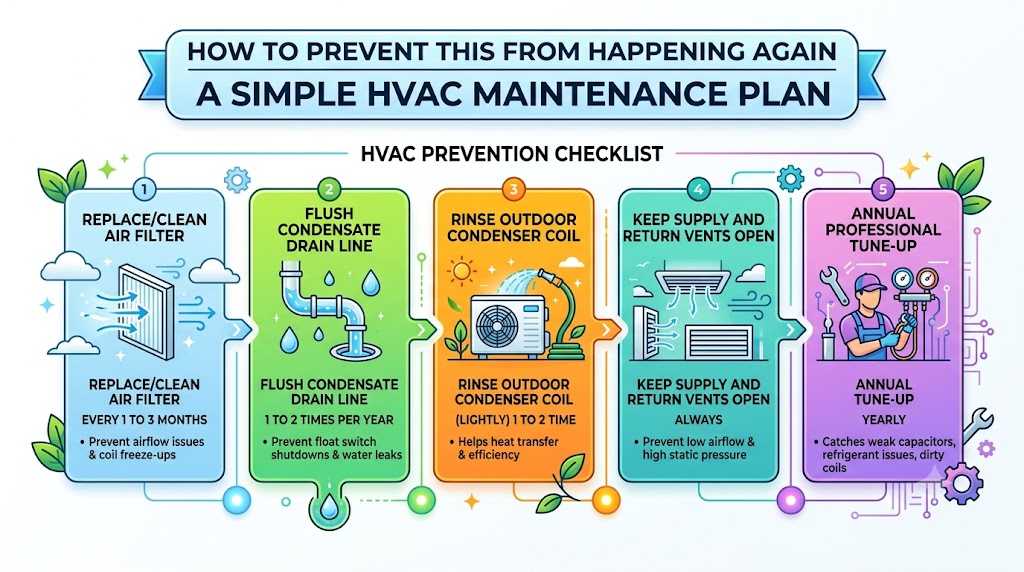
Most “no cool” calls I run could be reduced with basic upkeep.
HVAC prevention checklist
| Replace/clean air filter | Every 1 to 3 months | Prevent airflow issues and coil freeze ups |
| Flush condensate drain line | 1 to 2 times per year | Prevent float switch shutdowns and water leaks |
| Rinse outdoor condenser coil (lightly) | 1 to 2 times per year | Helps heat transfer and efficiency |
| Keep supply and return vents open | Always | Prevent low airflow and high static pressure |
| Annual professional tune-up | Yearly | Catches weak capacitors, refrigerant issues, dirty coils |
Energy note: Cooling and heating are often the biggest energy users in a home. Keeping airflow and coils clean is one of the easiest ways to avoid longer run times and higher bills.
FAQ: Honeywell thermostat won’t turn on AC
My Honeywell thermostat is blank. Is it dead?
Not necessarily. It could be:
dead batteries (if battery-powered)
the indoor unit’s power is off
a blown low-voltage fuse on the control board
an open door switch or float switch
How do I know if it’s the thermostat or the AC unit?
If the thermostat is calling for cooling (Cool On) but:
the outdoor unit doesn’t start, it’s often an equipment/power issue
the thermostat is blank or rebooting, it’s often a low-voltage/power/C-wire issue