Hi, I’m Nathan. I’ve worked as an HVAC technician for over 10 years, and this is one of those issues I see a lot when homeowners install a new Honeywell thermostat or after a reset or power outage.
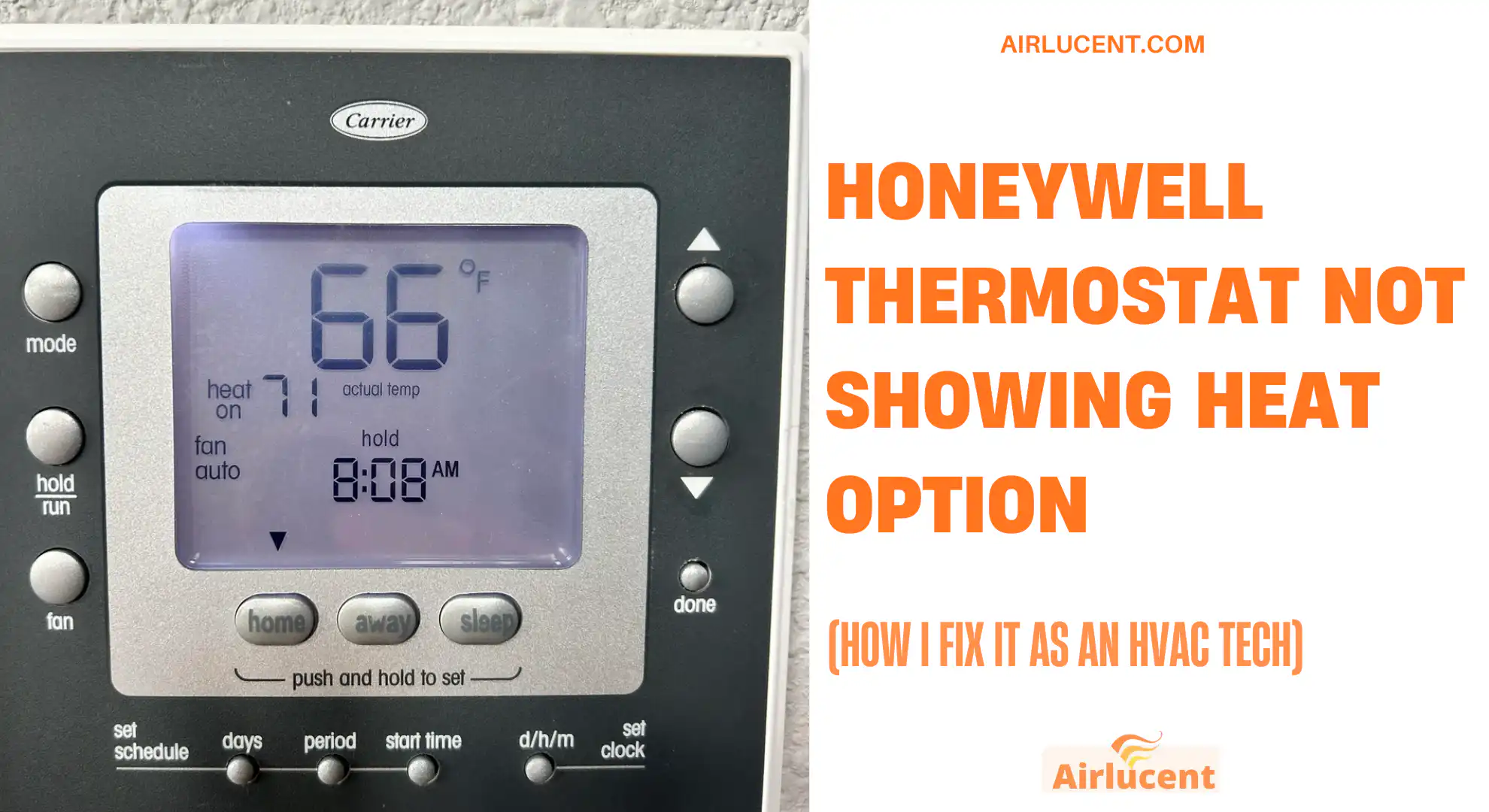
When your Honeywell thermostat is not showing the Heat option, it almost always means one of two things:
The thermostat thinks your system is cool only because of how it’s configured in Advanced Setup
- The thermostat is not detecting a heating wire (usually W or W1, or on heat pumps O B and AUX)
The good news is you can usually fix this in 10 to 30 minutes with basic checks.
- Quick fix (the most common solution)
- Before you touch anything (2 safety and success tips)
- Why the Heat option disappears on Honeywell thermostats
- Troubleshooting checklist (fastest path)
- Step 1: Confirm the thermostat is actually calling for heat
- Step 2: Do a quick reset (I do this before deeper steps)
- Step 3: Reconfigure Advanced Setup (this is the main fix)
- Step 4: Check thermostat wiring (most common physical cause)
- Step 5: Check the furnace or air handler control board (when thermostat wiring looks fine)
- Step 6: Smart thermostat firmware and app settings (T9, T10, Lyric)
- Step 7: Compatibility and special system setups (where homeowners get stuck)
- When I recommend calling a pro
- FAQ: Honeywell thermostat heat option missing
- Final thoughts (what I’d do in your house)
Quick fix (the most common solution)
If Heat disappeared from the Mode menu, go into Advanced Setup (ISU) and make sure the System Type is not set to Cool Only. Then confirm your heating wire is landed securely on W or W1 (or your heat pump terminals).
I’ll walk you through both, step by step.
Before you touch anything (2 safety and success tips)
- Turn off power to your HVAC system at the breaker or the furnace switch before checking wiring. Most thermostat wiring is low voltage (typically 24 volts), but you can still blow a fuse on the control board if you short wires.
- Take a photo of your current wiring before you move any wire. This saves you if a wire slips back into the wall.
Why the Heat option disappears on Honeywell thermostats
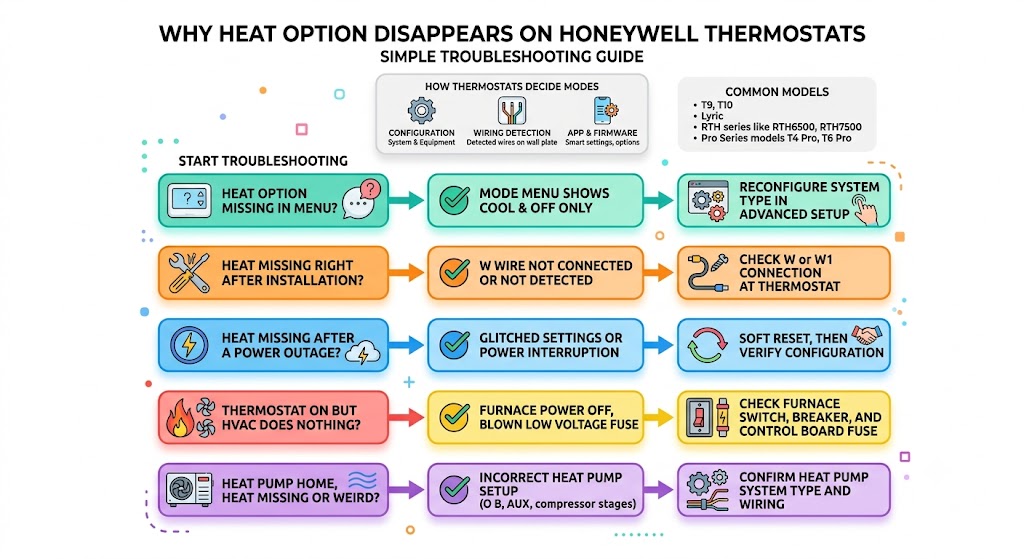
Honeywell thermostats decide which modes to show based on:
- How the thermostat is configured (system type and equipment type)
- Which wires it detects on the wall plate
- Sometimes on smart models, firmware and app settings
Common Honeywell models where I see this
This can happen on many models, including:
- Honeywell Home T9, T10
- Honeywell Lyric
- RTH series like RTH6500, RTH7500
- Honeywell Pro Series models (T4 Pro, T6 Pro)
Menus differ slightly, but the logic is the same.
Troubleshooting checklist (fastest path)
Use this table like a flow chart. Start at the top.
| Mode menu shows Cool and Off only | Advanced Setup set to Cool Only or None | Reconfigure System Type in Advanced Setup |
| Heat is missing right after installation | W wire not connected or not detected | Check W or W1 connection at thermostat |
| Heat is missing after a power outage | Glitched settings or power interruption | Soft reset, then verify configuration |
| Thermostat is on but HVAC does nothing | Furnace power off, blown low voltage fuse | Check furnace switch, breaker, and control board fuse |
| Heat pump home, Heat missing or weird | Incorrect heat pump setup (O B, AUX, compressor stages) | Confirm Heat Pump system type and wiring |
Step 1: Confirm the thermostat is actually calling for heat

This sounds basic, but it matters.
1. Make sure you are in the right Mode
- Tap Mode (or System)
- Look for Heat
- If Heat is missing, move to Step 3 (Advanced Setup)
If Heat exists but the house is not warming:
- Set the thermostat 5 degrees above room temperature
- Wait a couple minutes (some systems have built-in delays)
2. Check power to the HVAC equipment
Even if the thermostat screen is on, your furnace or air handler might be off.
Check:
- HVAC breaker is on
- Furnace switch (looks like a light switch near the furnace) is on
- Furnace door is properly closed (many have a door safety switch)
Step 2: Do a quick reset (I do this before deeper steps)
A reset clears small software hiccups and can bring the Mode options back.
Soft reset (safe and quick)
- Pull the thermostat off the wall plate (if it’s the pop-off type)
- Wait 10 seconds
- Snap it back on
Factory reset (use if settings got scrambled)
This varies by model, but often:
- Settings menu
- Reset
- Factory reset
Note: A factory reset can erase schedules, Wi-Fi settings, and equipment configuration, so be ready to reconfigure afterward.
Step 3: Reconfigure Advanced Setup (this is the main fix)
If your thermostat is configured as Cool Only, it will hide the Heat option because it assumes you have no heating equipment.
On many Honeywell models this is under:
- Menu
- Advanced Setup (or ISU)
- Modify configuration
How I navigate it on most touchscreen Honeywell models
- Tap Menu (often three horizontal lines)
- Scroll to Advanced Setup (or ISU / Installer Setup)
- Tap Modify configuration
- Step through until you see System Type and Equipment Type
- Set them to match your real system
- Tap Done to save
The two settings that matter most
On some Honeywell families (especially newer Pro style menus), you’ll see items similar to these.
| 2000 | System type | Conventional forced air heat, Heat pump, Radiant, or Cool only |
| 2010 | Equipment type | Gas, oil, electric, fan coil, geothermal, steam, etc |
My practical guidance (choose based on what you have)
Use this as a real-world cheat sheet:
| Gas furnace with AC | Conventional | Standard efficiency gas or high efficiency gas |
| Electric furnace or air handler with heat strips | Conventional | Electric forced air |
| Heat pump (outdoor unit heats and cools) | Heat pump | Air to air (most common) or geothermal |
| Boiler with baseboard radiators | Radiant | Hot water radiant |
| You truly have no heat equipment | Cool only | None |
If you select the right system type and equipment type, the thermostat should immediately offer Heat in Mode.
Reference: Honeywell and Resideo installation manuals describe this exact behavior, where installer setup determines what modes are available. One commonly referenced document is Resideo TechLit 33-00478 (model-family dependent), which covers installer setup logic and configuration options.
Step 4: Check thermostat wiring (most common physical cause)
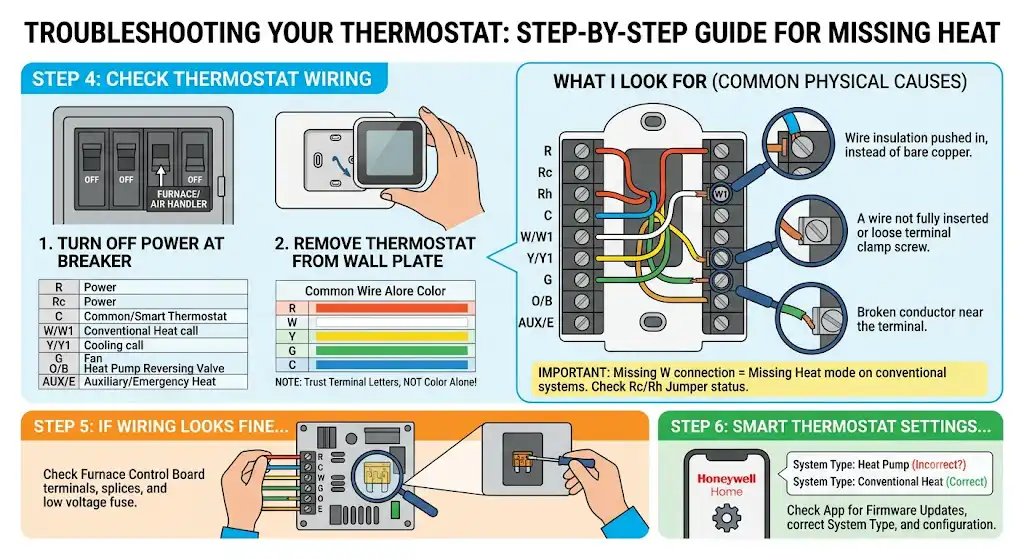
If configuration is correct but Heat still doesn’t show, the thermostat likely is not detecting the heating circuit.
Turn off power first
Flip the breaker off to the furnace or air handler.
Remove the thermostat from the wall plate
You should see terminals with letters. The heating terminal is usually:
- W or W1 for conventional heat
- O/B and often AUX/E for heat pumps (depends on system)
What I look for right away
- A wire not fully inserted (very common)
- A conductor that broke when the thermostat was pushed on
- Loose terminal clamp screw
- Wire insulation pushed into the terminal instead of bare copper
Typical thermostat terminal roles
| R, Rc, Rh | 24V power | Many systems use a single R. Some need Rc and Rh separated |
| C | Common | Often required for smart thermostats |
| W or W1 | Heat call | If this isn’t connected on conventional systems, Heat may disappear |
| Y or Y1 | Cooling call | Compressor contactor signal |
| G | Fan | Indoor blower command |
| O/B | Heat pump reversing valve | O and B differ by brand and setup |
| AUX/E | Auxiliary or emergency heat | Common on heat pumps |
Thermostat wire colors (common but not guaranteed)
In the field, colors are often consistent, but I never trust color alone. I trust the terminal labels and the furnace control board.
| Red | R | 24V power |
| White | W | Heat call |
| Yellow | Y | Cooling call |
| Green | G | Fan |
| Blue or black | C | Common |
Important: If you moved wires by color instead of by terminal letters when replacing a thermostat, it’s easy to end up missing W, which leads to missing Heat mode.
Jumper between Rc and Rh
If your thermostat has Rc and Rh and your system uses one transformer (most homes do), you may need:
- A built-in jumper (some models have it automatically)
- Or a physical jumper wire depending on model
If Rc and Rh are not correctly handled, you can get weird mode availability or system response.
Step 5: Check the furnace or air handler control board (when thermostat wiring looks fine)
If the thermostat is wired correctly but still acts like there is no heat, the issue may be on the equipment side.
What I check:
- The thermostat cable is connected to the control board terminals (R, C, W, Y, G)
- The low voltage fuse on the board (often 3A to 5A automotive-style blade fuse)
- Any loose splice connections near the furnace
If you are not comfortable here, this is a good point to call a technician. It’s easy to accidentally short R to C and pop the fuse.
Step 6: Smart thermostat firmware and app settings (T9, T10, Lyric)
If you have a smart Honeywell Home thermostat:
- Open the Honeywell Home app
- Check for firmware updates
- Confirm the thermostat is enrolled correctly and that system settings reflect your equipment type
Firmware issues are not the most common cause, but I have seen updates resolve missing options or odd Mode behavior.
Step 7: Compatibility and special system setups (where homeowners get stuck)
Heat pump with backup heat
If you have a heat pump and it’s configured as conventional (or wired incorrectly), Heat may disappear or behave incorrectly.
Common mistake:
- O/B not connected or configured wrong
- AUX/E not configured even though you have heat strips
Zoned systems
If you have a zone controller, the thermostat may not be the “boss.” The zone panel or master controller can restrict available modes. I’ve fixed a few cases where:
- The zone panel was set to cooling only
- A separate controller was locking out heat
When I recommend calling a pro
Call an HVAC tech if:
- You smell gas or suspect a combustion issue
- The furnace keeps tripping the breaker
- You find a blown control board fuse and it blows again after replacement
- You have a dual-fuel system (heat pump plus gas furnace) and are not sure how it’s staged
- You are not comfortable verifying 24V control wiring safely
FAQ: Honeywell thermostat heat option missing
Why does my Honeywell thermostat only show Cool and Off?
Most often the thermostat is configured as Cool Only in Advanced Setup, or it does not detect a W wire (or heat pump wiring). Fix by correcting the installer setup and confirming wiring connections.
Will a factory reset bring back Heat mode?
Sometimes, yes. But if the thermostat resets back to Cool Only or still doesn’t detect W, the Heat option will disappear again until the configuration and wiring match your system.
I connected the wires but Heat still doesn’t show. What now?
Recheck:
The wire is inserted fully and clamped
The correct terminal (W/W1 or O/B and AUX for heat pump)
The furnace control board connections and fuse
Advanced Setup system type and equipment type
Does low battery cause Heat to disappear?
Low battery can cause display glitches or erratic behavior on battery models, but in my experience it’s more likely to cause the thermostat to stop controlling properly rather than hide Heat entirely. Still, if your model uses batteries, replace them as a quick test.
Final thoughts (what I’d do in your house)
If you told me “Nathan, my Honeywell thermostat isn’t showing Heat,” I’d do this order every time:
- Check Mode and do a quick reset
- Go straight to Advanced Setup and confirm it is not set to Cool Only
- Confirm W or W1 is securely connected (or O/B and AUX on a heat pump)
- If still missing, check the furnace control board wiring and fuse