I’m Nathan, and I’ve worked as an HVAC technician for over 10 years. I’ve been in a lot of homes where the thermostat looks fine but one little symbol, like a blinking flame, has the homeowner worried something is failing.
Here’s the good news. On many Emerson thermostats (including Emerson Sensi and many White-Rodgers models made by Emerson), a blinking flame icon is often normal. But in some situations it can also be a warning that your heating system is struggling to start, short cycling, or going into a safety delay or lockout.
This guide breaks down exactly what the blinking flame means, how to tell which situation you’re in, and what I’d recommend you do next.
- Quick answer: What does the blinking flame icon mean?
- Emerson thermostat flame icon meanings (most common displays)
- Step 1: Figure out what kind of system you have (this changes everything)
- Scenario A: Flame icon blinking because Aux or Emergency heat is running
- Scenario B: Snowflake and flame are blinking together (compressor lockout or protective delay)
- Scenario C: Blinking flame, but the house is not heating (not normal)
- Troubleshooting: What I recommend you do (in order)
- 1) Wait out the built-in delay (5 to 10 minutes)
- 2) Confirm thermostat settings (easy but important)
- 3) Replace the thermostat batteries (if your model uses them)
- 4) Reset the thermostat (simple reset)
- 5) Check the furnace basics (you’d be surprised how often this fixes it)
- Check the furnace door
- Check the switch and breaker.
- Check the filter
- 6) Look for furnace error codes
- 7) Clean the flame sensor (for gas furnaces)
- What the flame sensor does
- Basic cleaning steps (homeowner-friendly if you’re careful)
- When the blinking flame means “call a pro”
- Preventive maintenance that reduces blinking flame issues
- FAQ: Emerson thermostat blinking flame icon
Quick answer: What does the blinking flame icon mean?
Most commonly, a blinking flame icon on an Emerson thermostat means one of these:
- The thermostat is calling for heat (heat request is active)
- Auxiliary or Emergency heat is running (common with heat pumps)
- A built-in time delay is active (protective pause before heating starts)
- The system is having trouble igniting or staying lit (furnace safety issue)
- Compressor lockout is active (often shown when snowflake and flame flash together on Auto systems)
Emerson thermostat flame icon meanings (most common displays)
This table covers the icon patterns I see most often on Emerson-family thermostats.
Thermostat icon guide
| Flame icon solid | Heat mode is running normally | Yes | No action needed |
| Flame icon blinking | Heat call active or Aux/E-Heat running or a heat delay | Usually yes | Verify you’re getting warm air and wait out delays |
| Snowflake and flame both solid | System is set to Auto (auto changeover between heat and cool) | Yes | No action needed |
| Snowflake and flame both blinking | Compressor lockout or changeover delay (protects compressor) | Yes, for a few minutes | Wait 5 minutes, then recheck |
| Flame blinking and you get no heat | Furnace ignition issue, lockout, or safety shutdown | No | Troubleshoot furnace basics or call a pro |
Note: Some Emerson models show Aux or Emergency heat as “Aux”, “E”, “E-Heat”, or similar text. Others only give you the flame behavior.
Step 1: Figure out what kind of system you have (this changes everything)

Before you troubleshoot, you need to know whether you have:
Heat pump system (very common)
- Usually has an outdoor unit that runs in winter
- Often uses auxiliary heat strips or backup heat
- Blinking flame commonly appears when Aux heat is helping
Gas furnace (also common)
- Indoor furnace with a burner and flame sensor
- Blinking flame can mean the thermostat is calling for heat, or that ignition is failing and the furnace is locking out
If you’re not sure, look outside. If you have an outdoor unit that runs during heating, you likely have a heat pump.
Scenario A: Flame icon blinking because Aux or Emergency heat is running
If you have a heat pump, the thermostat may kick on auxiliary heat when:
- It’s very cold outside
- The home temperature is far below the set temperature
- The heat pump is in defrost mode (briefly)
- The system can’t keep up due to airflow issues, refrigerant issues, or undersized equipment
What you’ll notice
- The system is heating, but maybe slower than usual
- Your electric bill may jump if Aux heat runs a lot (Aux heat is expensive compared to heat pump heating)
My real-world tip
If you raise the thermostat 4 to 6 degrees all at once on a cold day, many systems will bring on Aux heat automatically to catch up. If you want to avoid Aux heat, increase the temperature in smaller steps.
What to do
- Leave it for 10 to 15 minutes and confirm warm air is coming out
- Check your air filter (a clogged filter can force Aux heat to run more)
- Make sure supply vents are open and return vents are not blocked.
- If Aux heat runs constantly for hours, move to the troubleshooting section below.
Scenario B: Snowflake and flame are blinking together (compressor lockout or protective delay)
This is a common Emerson behavior when the thermostat is protecting your compressor from short cycling.
How long should this last?
Typically about 5 minutes.
Why it happens
A compressor should not restart immediately after stopping. Emerson thermostats may enforce a minimum off-time to prevent damage and extend compressor life.
What you should do
- Wait 5 minutes without changing settings
- Avoid flipping from heat to cool to heat rapidly.
- If it never stops blinking after 5 to 10 minutes, jump to the “When it’s not normal” section.
Scenario C: Blinking flame, but the house is not heating (not normal)
This is where you need to pay attention. If the flame icon is blinking and:
- You get cold air
- You get no air
- The furnace starts, then shuts off quickly
- It keeps trying repeatedly
Then the thermostat is calling for heat, but the heating equipment may not be completing a safe heat cycle.
Below are the most common causes I see in the field.
Common causes of a blinking flame include heat problems
| Furnace starts, runs 5 to 30 seconds, then shuts off | Dirty flame sensor is very common | Often yes |
| Furnace won’t start at all, thermostat shows call for heat | Door switch open, blown fuse, tripped safety, bad ignitor | Some checks yes |
| Heat turns on and off rapidly (short cycling) | Dirty filter, airflow restriction, overheating limit switch, oversize equipment | Basic checks yes |
| Thermostat acts weird or screen dims | Low batteries or power issue | Yes |
| System tries repeatedly then stops trying | Furnace lockout after failed ignition | Usually needs diagnosis |
Troubleshooting: What I recommend you do (in order)

These steps are safe for most homeowners and mirror what I check first on service calls.
1) Wait out the built-in delay (5 to 10 minutes)
Some Emerson thermostats delay heating or compressor operation to protect the system.
- Don’t keep changing the temperature while you wait.
- Watch for the system to engage and start producing warm air.
If nothing changes after 10 minutes, keep going.
2) Confirm thermostat settings (easy but important)
Make sure:
- Mode is set to Heat (or Auto, but test with Heat)
- Set temperature is at least 2 to 3 degrees above room temperature.
- Fan is set to Auto (not On, for testing)
If the thermostat is set wrong, you can chase “repairs” that aren’t real problems.
3) Replace the thermostat batteries (if your model uses them)
Low batteries can cause communication issues, relays not closing reliably, or random flashing icons.
- Replace with fresh name-brand batteries.
- Remove batteries for 60 seconds before reinstalling (quick “soft reset”)
4) Reset the thermostat (simple reset)
This clears glitches and sometimes clears a stuck call.
General method that works on many Emerson thermostats:
- Set thermostat to Off.
- Remove the thermostat from the wall plate or remove batteries.
- Wait 1 to 2 minutes
- Reinstall, then set to Heat again.
If your Emerson model has a menu reset option, you can use that too.
5) Check the furnace basics (you’d be surprised how often this fixes it)
Check the furnace door
Most furnaces will not run if the blower door isn’t seated properly. Even being slightly off can open the door safety switch.
Check the switch and breaker.
- Make sure the furnace power switch (often looks like a light switch near the unit) is On
- Check the circuit breaker isn’t tripped.
Check the filter
A dirty filter can cause overheating and shutdowns, which can look like thermostat problems.
As a general guideline, many homes need filters replaced every 1 to 3 months, depending on pets, dust, and filter thickness.
6) Look for furnace error codes
Most modern furnaces have a small viewing window with a blinking LED.
- Count the flashes
- Match to the chart on the furnace door panel.
This often tells you if the problem is the ignition, pressure switch, limit switch, etc.
7) Clean the flame sensor (for gas furnaces)
If your furnace lights briefly and shuts down, the flame sensor is one of the first things I check.
What the flame sensor does
It proves the burner flame is present. If it’s dirty, the furnace thinks there is no flame and shuts off the gas as a safety move.
Basic cleaning steps (homeowner-friendly if you’re careful)
- Turn off the power to the furnace at the switch or breaker.
- Locate the flame sensor (small metal rod with a porcelain base near the burners)
- Remove the screw and pull the sensor out gently.
- Clean the rod lightly with a fine abrasive pad or fine sandpaper.
- Wipe off dust, reinstall, and restore power.
When the blinking flame means “call a pro”
In my experience, you should stop DIY troubleshooting and schedule service if:
- You smell gas at any point (leave the home and contact your gas utility immediately)
- The furnace repeatedly tries to ignite and fails.
- You see water around the furnace (especially with high-efficiency units)
- The system trips the breaker repeatedly.
- You cleaned the flame sensor and replaced the filter, but it still short cycles
- The thermostat is calling for heat but the furnace shows an ignition or pressure switch code.
A furnace lockout condition can be caused by multiple underlying issues (ignitor, gas valve, venting, pressure switch, control board). Those are not guess-and-guess repairs.
Preventive maintenance that reduces blinking flame issues
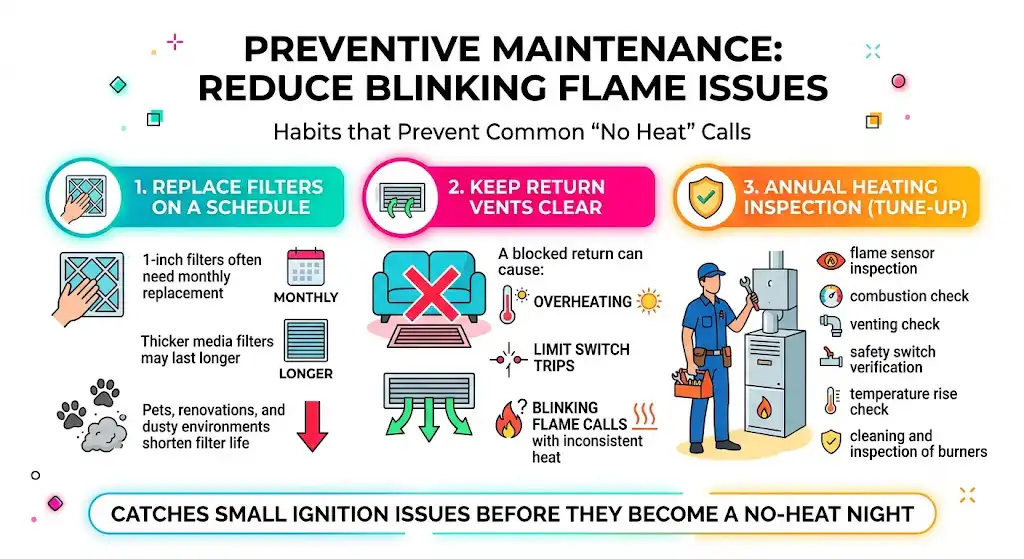
These are the habits I recommend to homeowners because they prevent the most common “no heat” calls.
Replace filters on a schedule.
- 1-inch filters often need monthly replacement
- Thicker media filters may last longer
- Pets, renovations, and dusty environments shorten filter life
Keep return vents clear.
A blocked return can cause overheating and limit switch trips, leading to blinking flame calls with inconsistent heat.
Annual heating inspection
A basic tune-up typically includes:
- flame sensor inspection
- combustion check
- venting check
- safety switch verification
- temperature rise check
- cleaning and inspection of burners
This is the kind of visit that catches small ignition issues before they become a no-heat night.
FAQ: Emerson thermostat blinking flame icon
How long does compressor lockout last on Emerson thermostats?
Most commonly, about 5 minutes. If the snowflake and flame keep blinking longer than 10 minutes, something else is going on, such as a power interruption, wiring issue, or the equipment not responding.
Can a bad temperature sensor cause the flame icon to blink?
Yes. If the thermostat’s sensor is inaccurate, it can trigger odd heat calls, short cycling, or behavior that looks like “random blinking.” That said, sensor issues are less common than airflow problems, battery issues, or furnace ignition problems.
Is a blinking flame always a problem?
No. On many Emerson models, blinking simply means there is an active call for heat, or Aux heat is assisting. It becomes a concern when you are not getting steady warm air, or the system is cycling abnormally.
Why is my electric bill higher when the flame icon blinks a lot?
If you have a heat pump, a blinking flame often lines up with auxiliary heat operation. Electric resistance heat strips use much more power than normal heat pump operation. If Aux heat runs frequently, it’s worth checking filter airflow, thermostat setup, outdoor unit operation, and whether the heat pump is keeping up.