I’m Nathan. I’ve worked as an HVAC technician for over 10 years, and Eco Mode is one of those Nest features that’s genuinely useful when it’s set up right and unbelievably annoying when it’s not.
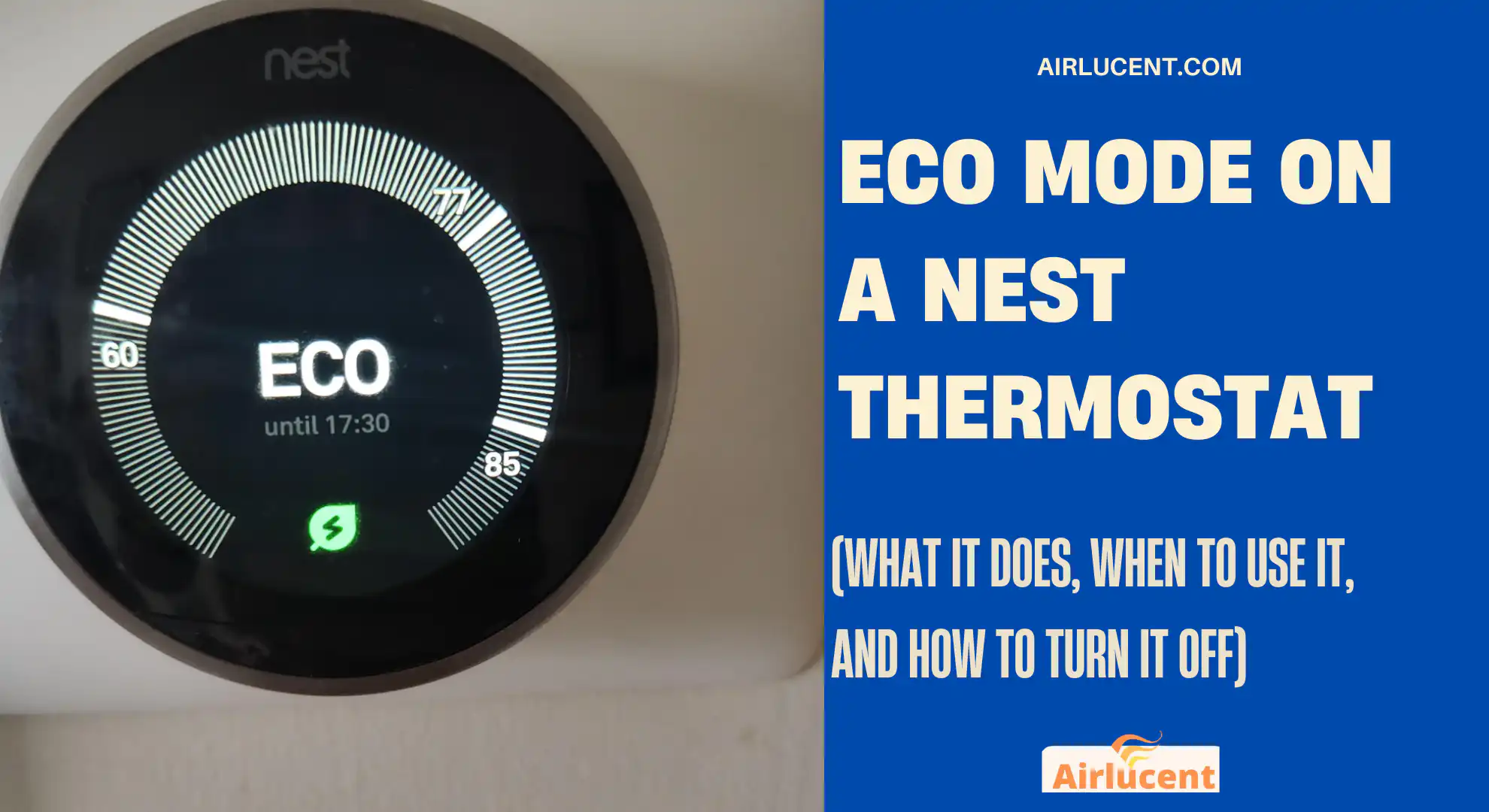
If your Nest keeps flipping to Eco when you’re home, or Eco makes the house too hot or too cold, the fix is usually simple. The key is understanding what Eco Mode actually changes, what triggers it, and where to adjust your Eco temperatures.
- What Eco Mode is (in plain English)
- Eco Mode vs Schedule vs Away mode (people mix these up)
- How Eco Mode works (what the thermostat is doing)
- Recommended Eco temperature settings (field-tested starting points)
- Benefits of Eco Mode (what you can realistically expect)
- How to turn Eco Mode on or off (all common Nest models)
- How to change your Eco Temperatures (this is the comfort fix)
- Why Eco Mode keeps turning on (and how to stop it)
- Safety Temperatures vs Eco Mode (important for vacant homes)
- Eco Mode and HVAC equipment types (what I watch for as a tech)
- Troubleshooting Eco Mode problems (fast checks)
- My best-practice Eco setup (what I do in real homes)
- FAQs
- References (official and high-authority)
What Eco Mode is (in plain English)
Eco Mode is not “turn the HVAC off.” It’s more like:
- “Don’t heat or cool as aggressively”
- “Only run the system if the house drifts outside this energy-saving range”
Eco Mode uses two numbers called Eco Temperatures.
- Eco Heat: the lowest temp you’ll allow before heat runs
- Eco Cool: the highest temp you’ll allow before AC runs
So Eco is basically a guardrail. It saves energy because your system cycles less.
Eco Mode vs Schedule vs Away mode (people mix these up)
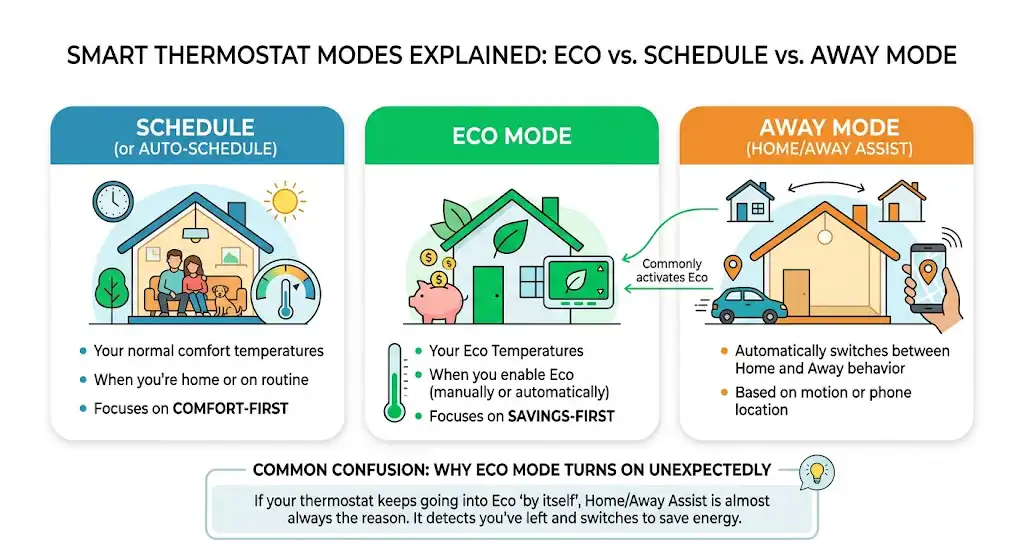
Here’s how I explain it at service calls:
| Schedule (or Auto-Schedule) | Your normal comfort temps | When you’re home or on routine | Comfort-first |
| Eco Mode | Your Eco Temperatures | When you enable Eco (manually or automatically) | Savings-first |
| Home Away Assist | Automatically switches between home and away behavior | Based on motion/phone location | The most common reason Eco “randomly” turns on |
If your Nest keeps going into Eco “by itself,” Home Away Assist is almost always the reason.
How Eco Mode works (what the thermostat is doing)
When Eco is active, the Nest will:
- Read the indoor temperature
- Compare it to your Eco Heat and Eco Cool thresholds.
- Run heating or cooling only if needed to stay within that band.
What Eco Mode does not do
- It does not permanently change your wiring or HVAC configuration.
- It does not disable safety protections (more on that below)
- It does not mean the previous owner is controlling your thermostat (unless it’s still linked to their account)
Recommended Eco temperature settings (field-tested starting points)
Nest commonly suggests energy-saving ranges around:
- Heat no higher than 64°F (18°C)
- Cool no lower than 76°F (24°C)
A practical starter table
| Winter (typical) | 60 to 64°F | Off (or 80°F) | Most furnaces/boilers |
| Summer (typical) | Off (or 60°F) | 76 to 80°F | Most central AC |
| Heat pump homes (gentler setback) | 62 to 66°F | 76 to 78°F | Reduces “recovery” strain and aux heat use |
My HVAC tech note: Heat pumps often hate deep setbacks. If you drop the temp too far, the system may kick on aux heat to catch up, which can erase savings fast.
Benefits of Eco Mode (what you can realistically expect)
Eco Mode can save real money, but the thermostat isn’t magic. Savings come from less runtime, especially when you’re away or asleep.
Quick “back of the napkin” savings estimator
| $1,200/year | $120/year |
| $2,000/year | $200/year |
| $3,000/year | $300/year |
How to turn Eco Mode on or off (all common Nest models)
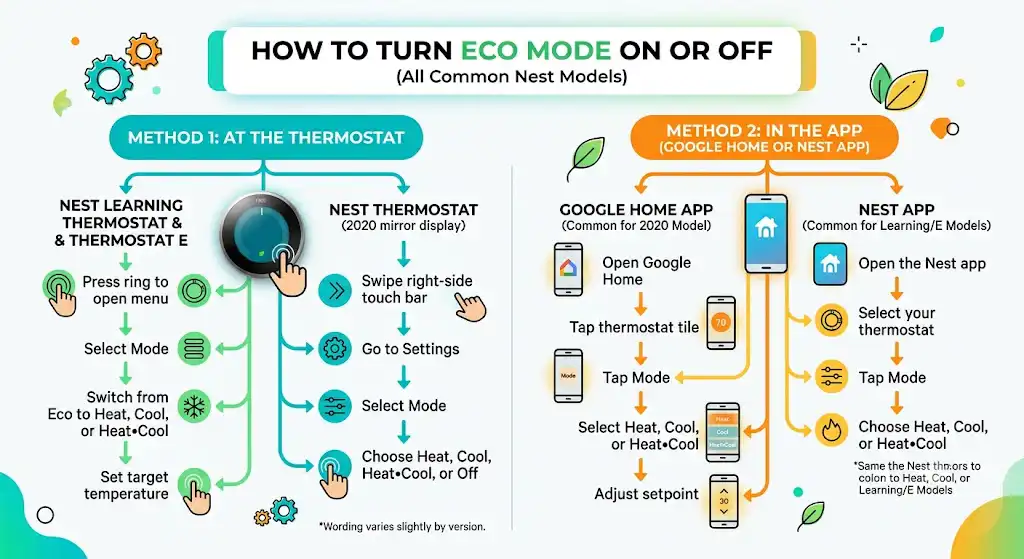
Method 1: Turn Eco off at the thermostat itself
This is the fastest fix when you’re standing in front of it.
Nest Learning Thermostat (round metal ring) and Nest Thermostat E
- Press the thermostat ring to open the menu.
- Select Mode
- Switch from Eco to Heat, Cool, or Heat Cool
- Set your target temperature.
Nest Thermostat (2020 mirror display with touch bar)
- Swipe on the right-side touch bar to open the menu.
- Go to Settings
- Select Mode
- Choose Heat, Cool, Heat Cool, or Off (instead of Eco)
Wording can vary slightly by software version, but Mode is the menu you want.
Method 2: Turn Eco off in the app (Google Home or Nest app)
Google Home app (common for Nest Thermostat 2020)
- Open Google Home
- Tap your thermostat tile.
- Tap Mode
- Select Heat, Cool, or Heat Cool to exit Eco
- Adjust setpoint as needed.
Nest app (common for Learning Thermostat and Thermostat E)
- Open the Nest app
- Select your thermostat
- Tap Mode
- Choose Heat, Cool, or Heat Cool
How to change your Eco Temperatures (this is the comfort fix)
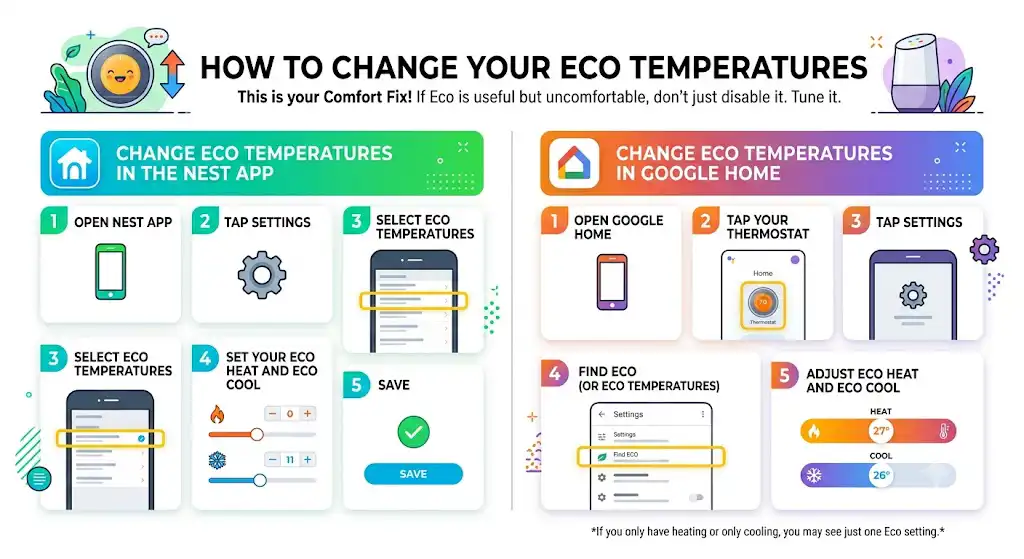
If Eco is useful but uncomfortable, don’t just disable it. Tune it.
Change Eco Temperatures in the Nest app
- Open Nest app
- Tap Settings
- Select Eco Temperatures
- Set your Eco Heat and Eco Cool
- Save
Change Eco Temperatures in Google Home
- Open Google Home
- Tap your thermostat
- Tap Settings
- Find Eco (or Eco Temperatures)
- Adjust Eco Heat and Eco Cool
If you only have heating or only cooling, you may see just one Eco setting.
Why Eco Mode keeps turning on (and how to stop it)
This is the number one complaint I hear.
Common causes and fixes
| Eco turns on while you’re home | Home Away Assist thinks you’re away | Check presence sensing, phone location, household members |
| Eco turns on at the same times daily | Schedule or routine behavior | Review schedule and any Home app automations |
| Eco turns on after you leave but doesn’t turn off when you return | Phone geofencing not working | Update location permissions, battery optimization settings |
| Eco toggles randomly | Motion sensor doesn’t see activity | Thermostat location issue or low-traffic area |
Step-by-step: stop automatic Eco triggers (presence sensing)
If Eco is correct when you’re away but wrong when you’re home, focus here:
- Verify everyone is added properly in Google Home (Household members)
- Ensure the Google Home app has:
- Location permission set to Always (or equivalent)
- Precise location enabled (if available)
- Disable aggressive battery restrictions for Google Home (Android especially)
- In Nest/Google settings, review Home Away Assist and confirm whether it uses:
- Phone location
- Thermostat sensors
- Both
Safety Temperatures vs Eco Mode (important for vacant homes)
Nest has Safety Temperature limits designed to help prevent:
- Frozen pipes in winter
- Excessive heat in summer
Even if you set Eco extremely wide, safety limits can still kick in depending on your configuration.
My recommendation
If you travel or own a rental:
- Keep Eco conservative enough to protect your home.
- Double-check the safety temperature settings after any reset or ownership transfer
Eco Mode and HVAC equipment types (what I watch for as a tech)
Heat pumps
- Too big of a setback can cause long recovery times
- May trigger auxiliary heat (more expensive)
- Use gentler Eco Heat (often 62 to 66°F)
Boilers and radiators
- Slow response is normal.
- Big setbacks may not “save” as much if recovery takes forever.
- Aim for a modest Eco Heat drop, not extreme.
Two-stage or variable systems
- Eco can still work well, but comfort swings feel more noticeable if settings are too aggressive.
- Focus on the tighter Eco range.
Troubleshooting Eco Mode problems (fast checks)
Eco won’t turn off
- Make sure you’re switching Mode (Eco to Heat/Cool), not just changing the setpoint.
- Restart the thermostat if the UI is stuck.
- If app control is broken, confirm the device is linked to your account and Wi-Fi.
Eco is on, but the house is still uncomfortable.
- Adjust Eco Heat/Eco Cool closer to your comfort range.
- Check airflow issues (dirty filter, closed registers) because weak airflow makes any setback strategy feel worse.
Eco never turns on
- Presence sensing may be off.
- The thermostat may not be connected to Wi-Fi.
- Eco Temperatures might not be set (or set too close to the current temp to notice behavior)
My best-practice Eco setup (what I do in real homes)
If you want a setup that saves money without complaints from your family, here’s my standard approach:
- Set Eco Temperatures first
- Don’t accept defaults blindly.
- Use phone location for presence.
- Add all household members.
- Keep setbacks reasonable
- Especially with heat pumps
- Test it for 2 to 3 days
- Then tighten or loosen the Eco band
FAQs
Does Eco Mode actually save money?
Usually yes, especially if you’re away for long stretches. Savings depend on insulation, weather, equipment efficiency, and how aggressive your Eco temps are.
Can I use Eco Mode while I’m home?
Yes. I see people use it during:
Sleeping hours
Days when they want “light conditioning” without full comfort settings
Will Eco Mode turn my HVAC off completely?
No. It holds the home within your Eco temperature limits. Your system will still run if the house drifts too far.
Why does my Nest show Eco but I didn’t enable it?
Most of the time it’s Home Away Assist or a presence-based automation. Less commonly, someone else in your Google Home household changed it.
References (official and high-authority)
- Google Nest: Energy savings claims for Nest thermostats (Learning Thermostat averages)
https://store.google.com/product/nest_learning_thermostat - U.S. Department of Energy: Thermostat setback guidance and potential savings
https://www.energy.gov/energysaver/thermostats - Google Nest Help: Thermostat Eco temperatures and modes (support documentation varies by model/app)
https://support.google.com/googlenest/