Hi, I’m Nathan. I’ve been an HVAC technician for over 10 years, and I’ve installed and serviced a lot of Nest thermostats in real homes with real internet problems. If you’re asking, “Can my Nest Thermostat work without WiFi?” you’re usually dealing with one of these situations:
- Your internet provider is down.
- Your router is acting up.
- You’re moving into a new place, and WiFi isn’t set up yet.
- You want a smart thermostat, but you don’t want to rely on the internet
- Quick answer: Yes, a Nest thermostat works without WiFi, but it becomes a “regular” thermostat
- WiFi vs Internet vs Power (this is where people get tripped up)
- What still works without WiFi (offline features that matter)
- What does NOT work without WiFi (the stuff people actually miss)
- Will your Nest still follow the schedule without WiFi?
- Home Away Assist and Eco mode without WiFi: what happens?
- Can you use a Nest thermostat without WiFi permanently?
- How to control Nest without WiFi (step-by-step)
- “No WiFi” troubleshooting checklist (what I check in the field)
- Preparing for internet outages (what I recommend homeowners do)
- What about “local control” smart homes (Matter and local networks)?
- When “offline” is normal vs when it’s a problem
- FAQ: Can Nest Thermostat work without WiFi?
- Bottom line (how I explain it to my customers)
Quick answer: Yes, a Nest thermostat works without WiFi, but it becomes a “regular” thermostat
Your Nest Thermostat will still heat and cool your home without WiFi. You can still walk up to it and change the temperature, switch modes, and (in most cases) keep running your schedule.
What you lose without WiFi is everything that depends on the cloud: app control, remote changes, alerts, voice control, and some “smart” automation.
WiFi vs Internet vs Power (this is where people get tripped up)
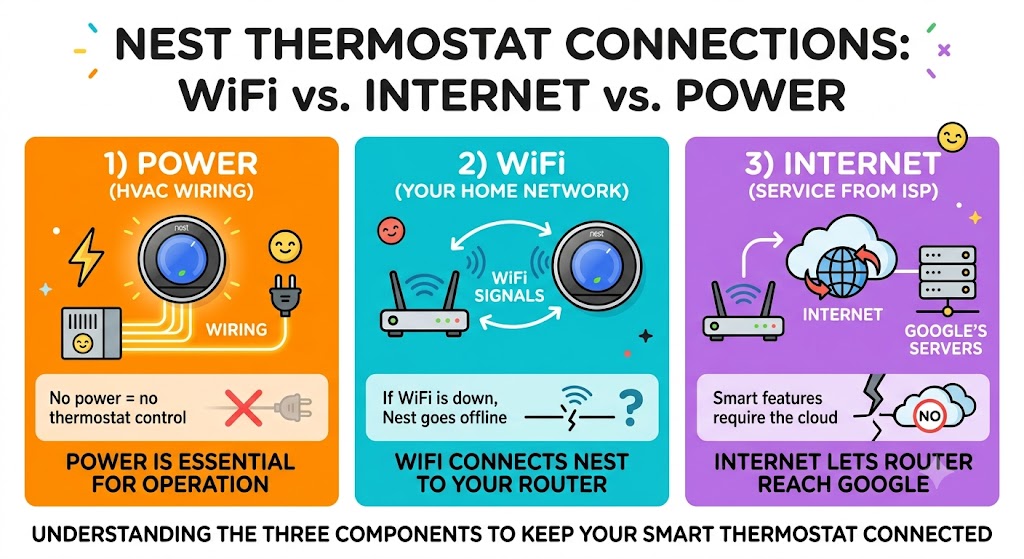
Before we go deeper, you need to separate three different things:
1) Power
Your Nest must have power to operate. Typically, it gets power from your HVAC wiring (often through a C wire, or power-stealing on some systems).
- No power = no thermostat control, smart or not.
- If you lose electrical power to the home, your HVAC equipment usually can’t run anyway (gas furnaces still need electricity for controls and blower).
2) WiFi (your home network)
WiFi is the connection between your Nest and your router.
- If WiFi is down (router unplugged, bad signal, router crashed), Nest goes offline.
3) Internet (service from your ISP)
The Internet is what your router uses to reach Google’s servers.
- If the internet is down but your WiFi network is still working, the Nest may still show connected to WiFi, but smart features that require the cloud will not work.
What still works without WiFi (offline features that matter)
In my experience, the biggest surprise for homeowners is that Nest doesn’t “stop working” when the internet goes out. It keeps controlling the temperature locally.
These features typically still work without WiFi
- Manual temperature changes at the thermostat
- Heat, Cool, Heat-Cool, Off, and Eco mode selection (depending on model and setup)
- Running your existing schedule
- Basic fan control (if your system wiring supports fan control)
- Occupancy sensing at the thermostat (this can still work locally, but phone-based location features won’t)
Offline capability table (simple and honest)
| Change temp on the thermostat | Yes | Yes |
| Run existing schedules | Yes | Yes |
| Create or edit schedule in app | Yes | No |
| Create or edit schedule on thermostat | Yes | Usually yes |
| Remote control from phone (Google Home/Nest app) | Yes | No |
| Voice control (Google Assistant/Alexa) | Yes | No |
| Notifications and alerts | Yes | No |
| Software/firmware updates | Yes | No |
| Energy history reports | Yes | Limited or no |
| Weather-based features | Yes | No |
What does NOT work without WiFi (the stuff people actually miss)
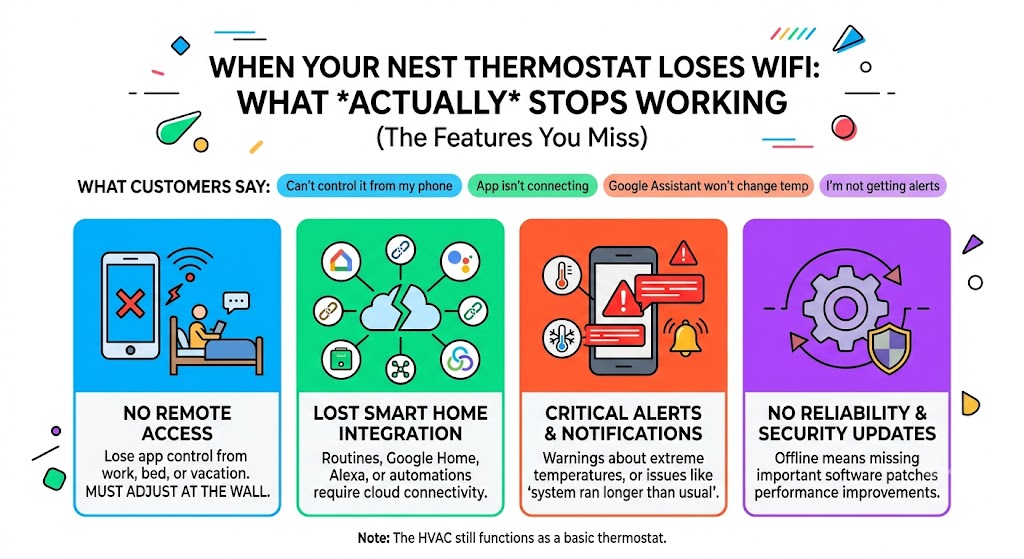
When a customer calls me about “Nest not working,” half the time the HVAC is running fine. What they really mean is:
- “I can’t control it from my phone”
- “My app isn’t connecting”
- “Google Assistant won’t change the temperature”
- “I’m not getting alerts”
Without WiFi (or without internet), you should expect to lose:
Remote access
No app control from work, bed, or vacation. You must adjust it at the wall.
Smart home integration
If you use Google Home routines, Alexa, home automation, etc., those typically require cloud connectivity.
Alerts and safety notifications
Things like “your home is getting too cold” or “system ran longer than usual” usually require the thermostat to be online.
Updates
Nest thermostats get reliability and security updates over time. Offline means no updates until it reconnects.
Will your Nest still follow the schedule without WiFi?
In most cases, yes.
Real-world example I see on service calls
During ISP outages, homeowners tell me:
- The house stayed comfortable overnight.
- The schedule still hit morning warm-up.
- But their phone app showed the thermostat as offline.
That’s exactly what should happen.
One important limitation
If your schedule relies heavily on cloud-based automations (like phone geofencing through your account), that part can break while offline.
Home Away Assist and Eco mode without WiFi: what happens?
This depends on how you’ve set it up.
If you rely on the thermostat’s built-in sensors
Many Nest models can use motion/occupancy sensing at the thermostat. That can still work offline because it’s local.
If you rely on your phone location
If your Home Away Assist is based on your phone’s location (geofencing), that typically needs internet/app connectivity to work properly.
My advice as a technician: if you live somewhere with unreliable internet, don’t rely exclusively on phone-based automation. Keep a solid schedule as your “fallback.”
Can you use a Nest thermostat without WiFi permanently?
Yes, you can run it long-term like a traditional thermostat, but I only recommend that if you’re okay with losing the core “smart” benefits.
If you bought Nest mainly for:
- Remote control
- Energy reports
- Alerts
- Voice control
- Smart home routines
Then, WiFi is a big part of the value.
If you bought it for:
- A clean thermostat with good scheduling
- Local occupancy features
- A solid interface
Then you can absolutely live without WiFi.
How to control Nest without WiFi (step-by-step)
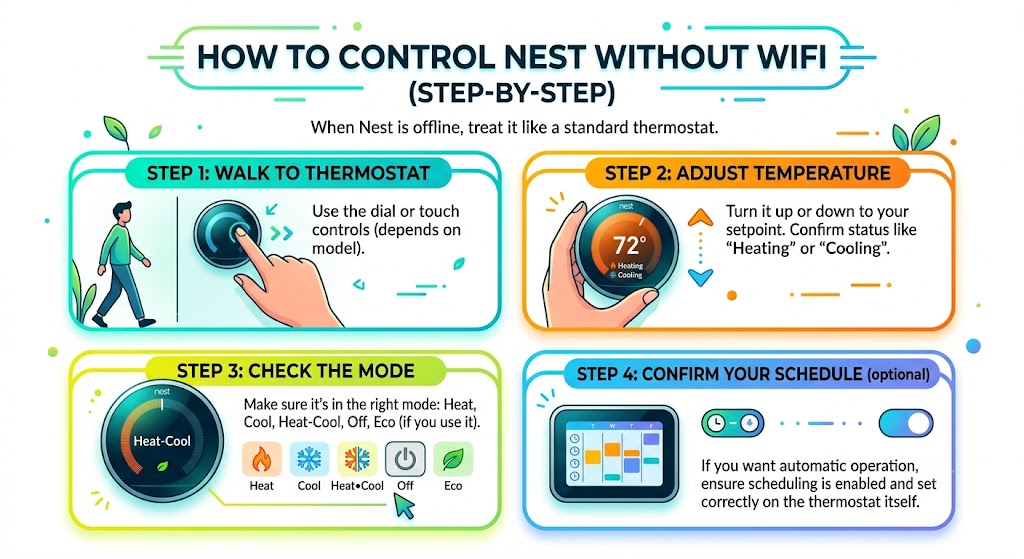
When your Nest is offline, treat it like a standard thermostat.
Step 1: Walk up to the thermostat
Use the dial or touch controls (depends on model).
Step 2: Adjust temperature
- Turn it up or down to the setpoint you want
- Confirm it calls for heat or cool (you should see status like “Heating” or “Cooling”)
Step 3: Check the mode
Make sure it’s in the right mode:
- Heat
- Cool
- Heat-Cool
- Off
- Eco (if you use it)
Step 4: Confirm your schedule (optional)
If you want the thermostat to run automatically, make sure scheduling is enabled and set correctly on the thermostat itself.
“No WiFi” troubleshooting checklist (what I check in the field)
If your HVAC runs fine but the thermostat is offline, run through this.
Basic checks
- Is the router powered on?
- Can other devices connect to WiFi?
- Is it only the internet that’s down (WiFi works, websites don’t load)?
- Did you change your WiFi name or password recently?
If yes, you’ll need to reconnect the thermostat.
Signal and placement checks
- Thick plaster walls, metal duct chases, and basements can weaken WiFi.
- If the thermostat is far from the router, you may need a mesh system or better placement.
Thermostat-specific red flags
If the Nest repeatedly drops WiFi or never sees networks, that can be:
- A router compatibility/security setting issue
- A failing WiFi chip (rare, but I’ve seen it)
- Firmware that’s outdated (can’t update if it never stays online)
Preparing for internet outages (what I recommend homeowners do)
If you want peace of mind, do these before you need them.
1) Set a stable schedule you can live with
Even if you love auto-learning features, create a basic schedule that keeps your home safe and comfortable.
2) Know your “safe temps”
In cold climates, I tell homeowners:
- Pick a minimum temp that helps prevent frozen pipes during winter.
- If you travel, avoid setting it too low without monitoring.
3) Keep the router on a small battery backup (optional but helpful)
A basic UPS can keep your router running through short outages. This doesn’t help if the ISP is down, but it helps if you lose power briefly and want your network back quickly.
4) Make sure your system wiring is solid
This is more HVAC than “WiFi,” but it matters: unstable power at the thermostat can cause weird behavior.
If your Nest is frequently rebooting, going blank, or acting glitchy, have an HVAC tech check:
- Low-voltage connections (R, C, Y, W, G)
- Loose wire ends
- Transformer health
- Condensate safety switch trips (common on AC systems)
What about “local control” smart homes (Matter and local networks)?
Some newer smart home setups can keep devices working on a local network even when the internet is down, depending on the device and platform.
A few important notes from a practical standpoint:
- Many smart features still depend on cloud services.
- “Local control” varies by model and ecosystem.
- If offline smart home control is a priority for you, confirm your exact thermostat model and compatibility before buying based on that feature.
When “offline” is normal vs when it’s a problem
Offline is normal when:
- Your ISP is down
- Your router is unplugged.
- You changed WiFi credentials and haven’t reconnected the thermostat yet.
Offline is a problem when:
- The thermostat never reconnects, even after you confirm that WiFi works.
- It drops offline daily.
- The thermostat can’t see any networks.
- You’re seeing repeated connectivity errors plus random reboots.
FAQ: Can Nest Thermostat work without WiFi?
Can a Nest Thermostat control heating and cooling without WiFi?
Yes. It will still control your HVAC system and maintain temperature like a regular thermostat.
Can I change the temperature without WiFi?
Yes. You can change the temperature directly on the thermostat.
Will my schedule still work without WiFi?
Usually yes. The thermostat stores schedules locally, so it can keep running them even during internet outages.
Can I use the Nest app or Google Home app without WiFi?
No. Without WiFi or internet connectivity, remote app control won’t work.
Will Google Assistant still work without internet?
In most homes, no. Voice assistants and routines usually require internet/cloud connectivity.
Bottom line (how I explain it to my customers)
If your WiFi goes out, your Nest thermostat doesn’t become useless. It keeps doing the most important job: heating and cooling your house. But it won’t feel “smart” until it’s back online.