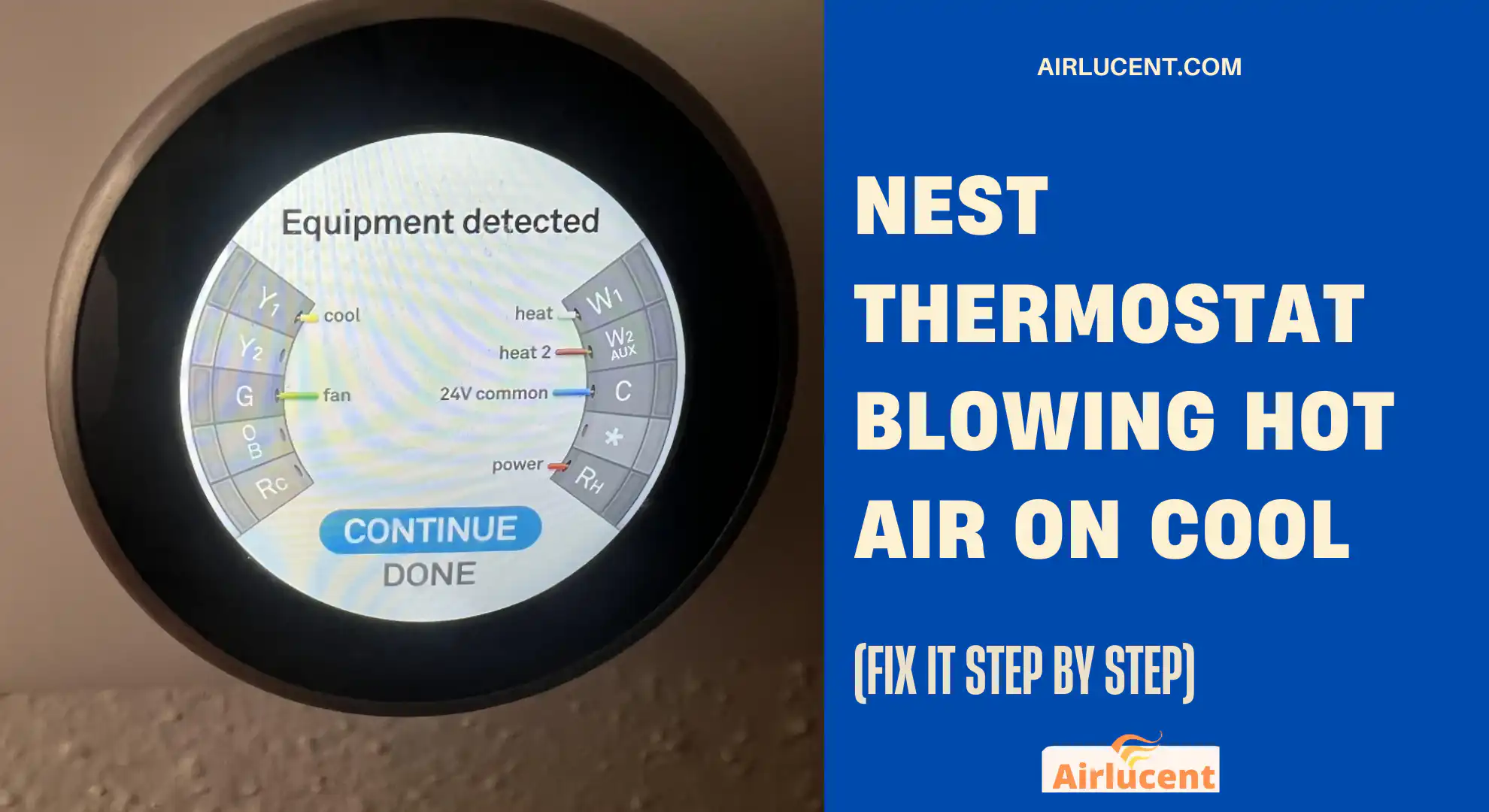
I’m Nathan, and I’ve been working as an HVAC technician for over 10 years. When a homeowner tells me, “My Nest is set to cool but it’s blowing hot air,” I treat it like a simple troubleshooting job first, not an automatic “your system is ruined” situation.
Below I’ll walk you through exactly how I diagnose it in the field, in the same order that saves you the most time and money.
- Quick “What’s most likely?” table
- Before you change anything: 2 fast checks that prevent wrong turns
- A simple diagnostic test (the one I use on service calls)
- Fix 1: Nest isn’t actually set to Cool (or settings are fighting you)
- Fix 2: You have a conventional heating setup (and cooling depends on the AC equipment)
- Fix 3: Wrong Heat Pump O/B orientation setting (most common “hot on cool” cause)
- Fix 4: Reversing valve stuck (or solenoid coil failed)
- Fix 5: Wrong thermostat wiring or a loose connection
- Don’t skip this: cooling can shut off because of a safety switch
- My 10-minute troubleshooting order (the exact order I’d do at your thermostat)
- When you should call an HVAC technician (and why)
- FAQs
- Final thoughts
Quick “What’s most likely?” table
| Hot air on Cool and cool air on Heat | Heat pump O/B orientation wrong | Switch O to B (or B to O) in Nest settings |
| Hot air on Cool only (never cools) | Outdoor unit not running, AC problem, wiring issue | Confirm outdoor unit runs, then check Y, O/B, Rc, C wiring |
| Heat works fine, cooling never starts | AC power issue, float switch, condensate safety, breaker | Check breakers, condensate drain safety switch, disconnect |
| Air is “not cold enough” (but not hot) | Normal delays, dirty filter, low refrigerant, airflow issue | Check temp drop, filter, vents; call pro if low charge suspected |
| System is a furnace only | No heat pump present | You need a working AC system for cooling |
Before you change anything: 2 fast checks that prevent wrong turns
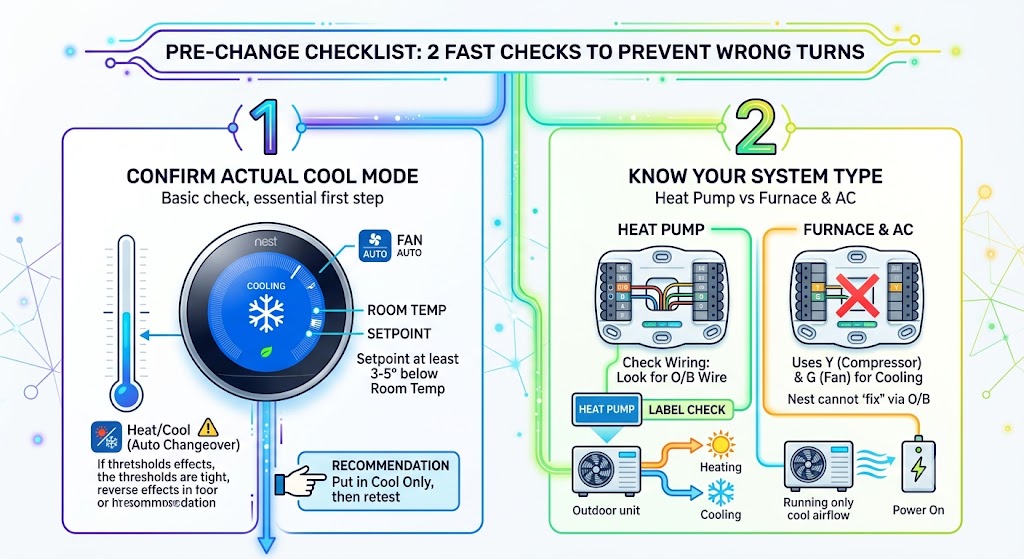
1) Confirm you’re in actual Cool mode
This sounds basic, but I can’t tell you how many service calls end right here.
What to look for:
- Nest shows Cool mode (snowflake icon)
- Fan is on Auto (for testing)
- Setpoint is at least 3 to 5 degrees below room temperature
If it’s on Heat Cool (auto changeover), it can do things that feel backwards if the thresholds are set tight.
My recommendation for testing: put it in Cool only, then retest.
2) Know your system type: Heat pump vs Furnace and AC
This matters because O/B settings only apply to heat pumps.
How I tell in under 60 seconds
- Look at thermostat wiring: If you have a wire on O/B, you probably have a heat pump.
- Check the outdoor unit label: many will literally say “Heat Pump.”
- Test behavior: With a heat pump, the outdoor unit typically runs in both heating and cooling (unless you have special backup heat behavior or extreme conditions).
If you do not have a heat pump, your Nest cannot “fix” cooling by changing O/B. Cooling is controlled mainly by Y (compressor) and G (fan), and the outdoor unit needs power and a proper call for cooling.
A simple diagnostic test (the one I use on service calls)
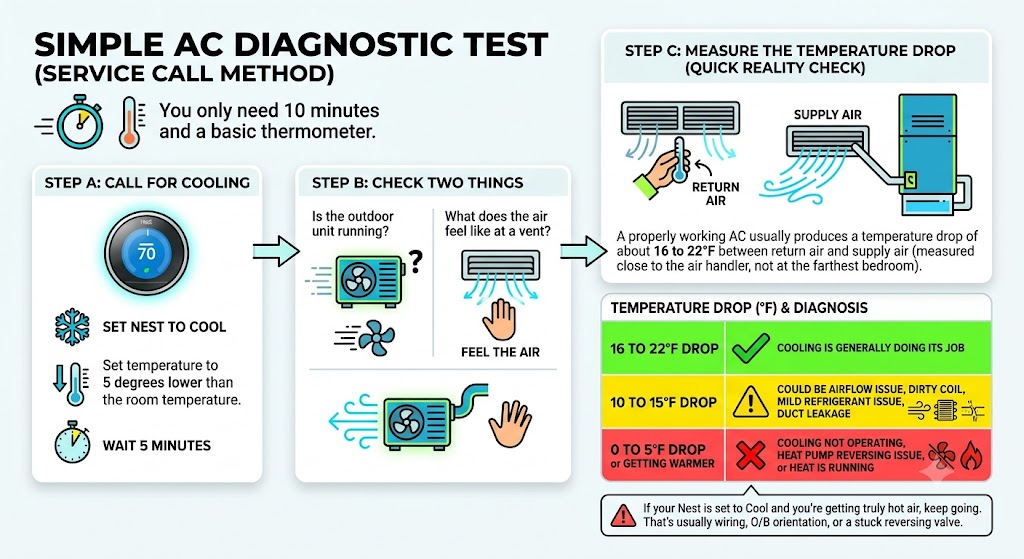
You only need 10 minutes and a basic thermometer.
Step A: Call for cooling
- Set Nest to Cool
- Set the temperature to 5 degrees lower than the room temperature.
- Wait 5 minutes
Step B: Check two things
- Is the outdoor unit running? (condenser or heat pump outside)
- What does the air feel like at a vent?
Step C: Measure the temperature drop (quick reality check)
A properly working AC usually produces a temperature drop of about 16 to 22°F between return air and supply air (measured close to the air handler, not at the farthest bedroom).
| 16 to 22°F drop | Cooling is generally doing its job |
| 10 to 15°F drop | Could be airflow issue, dirty coil, mild refrigerant issue, duct leakage |
| 0 to 5°F drop or getting warmer | Cooling not operating, heat pump reversing issue, or heat is running |
If your Nest is set to Cool and you’re getting truly hot air, keep going. That’s usually wiring, O/B orientation, or a stuck reversing valve.
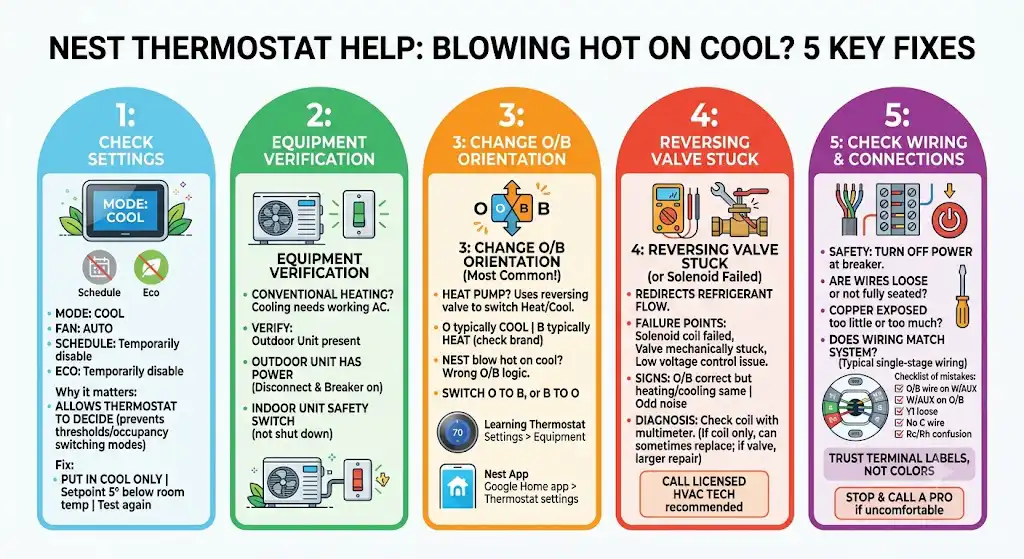
Fix 1: Nest isn’t actually set to Cool (or settings are fighting you)
What to check on the Nest itself
- Mode: Cool
- Fan: Auto
- Schedule: temporarily disable for testing
- Eco: temporarily disable for testing
Why this matters
If the thermostat is allowed to decide (Heat Cool mode, Eco, schedules), it can switch modes based on thresholds and occupancy logic. That can feel like the thermostat is disobeying you, when it’s really following rules you forgot were enabled.
Fix:
- Put it in Cool only
- Setpoint 5 degrees below room temp
- Test again
Fix 2: You have a conventional heating setup (and cooling depends on the AC equipment)
Here’s the truth I explain to homeowners:
If you have a furnace-only heating system, cooling doesn’t magically happen unless you also have a working air conditioner (outdoor condenser) or heat pump.
What to verify
- You have an outdoor AC unit
- The outdoor unit has power (disconnect on, breaker on)
- The indoor unit isn’t shutting cooling down due to a safety switch (more on that below)
If your Nest is calling for Cool but your outdoor unit is not running, the system might be defaulting to fan-only or even heat, depending on wiring and controls.
Fix 3: Wrong Heat Pump O/B orientation setting (most common “hot on cool” cause)
If your Nest blows hot on Cool and cool on Heat, this is the first place I go.
What O and B mean in plain English
Heat pumps use a reversing valve to switch between heating and cooling.
- O typically energizes the reversing valve in cooling (common on many brands)
- B typically energizes the reversing valve in heating (common on some brands)
If Nest is set wrong, it will command the opposite of what you want.
How to change O/B on Nest Learning Thermostat and Thermostat E
- On the thermostat, go to Settings
- Select Equipment
- Select Continue, then Continue
- Select Heat Pump
- Find O/B
- Switch it:
- If O is selected, try B
- If B is selected, try O
- Test heating and cooling again
How to change O/B on the Google Nest Thermostat (mirror display model)
- Open the Google Home app
- Tap your thermostat
- Tap Settings
- Tap Thermostat
- Scroll to Heat pump
- Switch:
- If O is selected, try B
- If B is selected, try O
- Test again
What you should see after the fix
- Cool mode produces cool air
- Heat mode produces warm air
- The outdoor unit runs appropriately.
If changing O/B fixes it, you’re done. No parts needed.
Fix 4: Reversing valve stuck (or solenoid coil failed)
If O/B is correct and you still get hot air on Cool (or it’s stuck in one mode), the heat pump’s reversing valve may not be shifting.
What the reversing valve does
It redirects refrigerant flow so the heat pump can act like an air conditioner in summer and a heater in winter.
Common failure points I see
- Solenoid coil failed (open or burned)
- Valve mechanically stuck (less common, but it happens)
- Low voltage control issue preventing the valve from energizing
Signs that point toward a reversing valve problem
- O/B is correctly set but heating and cooling stay the same
- The outdoor unit runs, but the air temperature never matches the mode.
- You hear odd changes or no change at all when switching modes (not always reliable)
What to do:
- This is where I recommend calling a licensed HVAC tech.
- Diagnosis is usually done with a multimeter to confirm the solenoid is being energized and whether the coil is intact.
If it’s only the coil, it can sometimes be replaced without opening the refrigerant system. If it’s the valve itself, that’s a bigger repair.
Fix 5: Wrong thermostat wiring or a loose connection
Wiring problems can absolutely cause “hot on cool,” especially on heat pumps, where O/B and W/AUX get mixed up or a wire isn’t fully seated.
Safety first
Before you pull the Nest off the wall:
- Turn off the power to your HVAC system at the breaker.
- Confirm system is off
What I check first
- Are any wires loose or not fully inserted?
- Is copper exposed too little (doesn’t make contact) or too much (can short)?
- Does the wiring match the system type?
Typical Nest heat pump wiring (single stage) overview
These are the most common terminals and what they do:
| Y1 | Compressor stage 1 |
| G | Indoor fan |
| O/B | Reversing valve control |
| Rc | 24V power (cooling side) |
| C | Common wire (power stability) |
| W2/AUX | Auxiliary heat (if present) |
Two stage heat pump additions
| Y2 | Compressor stage 2 |
Important note about wire colors
Wire colors are not guaranteed. I’ve walked into plenty of homes where someone used whatever color they had on the truck. Always trust the terminal labels, not the color.
A fast wiring mistake checklist (based on what I see most)
- O/B wire accidentally landed on W or AUX
- W/AUX wire landed where O/B should be
- Y1 loose, so the compressor never starts.
- No C wire and the thermostat is power-starving, acting flaky
- Rc and Rh confusion on older systems (Nest usually handles this, but miswiring can still happen)
If you’re not comfortable verifying wiring, this is a good stopping point to call a pro. A small wiring error can blow a fuse on the control board.
Don’t skip this: cooling can shut off because of a safety switch
If your Nest is calling for Cool and you get weird behavior, your system might be protecting itself.
Common “cooling lockout” causes
- Clogged condensate drain
- Tripped float switch in the drain pan
- Blown low-voltage fuse on the furnace/air handler board
- Outdoor disconnect pulled, or breaker tripped.
Quick homeowner check
- Look for standing water around the indoor unit.
- Check the filter (a severely clogged filter can cause icing and water issues)
- Check breakers and the outdoor disconnect.
If you suspect a drain or float switch issue and you’re not sure, get it serviced. Water damage is not worth guessing.
My 10-minute troubleshooting order (the exact order I’d do at your thermostat)
- Set Nest to Cool only.
- Lower setpoint 5 degrees, fan Auto
- Confirm the outdoor unit runs.
- If the heat pump and air are backwards, change the O/B orientation.
- Inspect the air filter and airflow.
- Check thermostat wiring seating (power off)
- Check breakers, drain safety switch, and outdoor disconnect.
- If still hot on cool with correct O/B, suspect reversing valve or control issue.
When you should call an HVAC technician (and why)
Call a pro if:
- You changed O/B and the wiring looks correct, but the mode still won’t switch
- Outdoor unit runs, but the temperature never changes.
- You suspect a reversing valve or refrigerant issue.
- You see ice on the lines or indoor coil.
- Breakers keep tripping or fuses keep blowing.
In my experience, once you’re past settings, O/B, and basic wiring checks, the remaining causes often require a meter, deeper electrical testing, or sealed-system work.
FAQs
If it’s blowing hot, does that mean my Nest is bad?
Not usually. Most of the time, Nest is doing what it’s told based on wiring and equipment configuration. The thermostat is rarely the root cause.
I changed O/B and now heat works but cool doesn’t (or vice versa). What now?
That usually points to either:
Wiring not match the system.
A reversing valve problem
A staging or auxiliary heat setup issue
At that point, it’s worth having a tech verify the wiring diagram for your exact air handler and outdoor unit models.
Final thoughts
When your Nest thermostat is blowing hot air on Cool, don’t panic. In the real world, the most common fix I’ve seen is simply correcting Cool mode or switching the heat pump O/B orientation. After that, it’s wiring integrity and then true equipment issues like a reversing valve.