Hi, I’m Nathan. I’ve worked as an HVAC technician for over 10 years, and I’ve helped a lot of homeowners track down weird thermostat noises. A Nest thermostat should be basically silent, so if you’re hearing a buzzing, humming, fizzing, or chattering sound, something is off.
The good news is that most Nest buzzing issues come down to power or wiring, and many are fixable in under 30 minutes if you’re comfortable doing basic checks safely.
- Safety first (please do this)
- Step 1: Make sure the buzzing is really the Nest
- Common causes of a buzzing Nest thermostat (with fixes)
- Cause 1: Loose wires at the Nest base (very common)
- Cause 2: Dirty or oxidized contacts (buzzing from electrical arcing)
- Cause 3: Low battery or low power (missing C-wire is a big one)
- Cause 4: The buzzing is not the Nest: a relay, contactor, or transformer is humming
- Cause 5: Software or firmware glitch (less common, but easy to rule out)
- Cause 6: Electrical interference or mounting issues
- My real-world “most common causes” snapshot
- When you should call a professional right away
- Preventing Nest thermostat buzzing in the future
Safety first (please do this)
Before you touch any thermostat wiring:
- Turn off your HVAC system at the breaker (not just “off” on the thermostat).
- Confirm your system is off (no blower, no heat, no outdoor unit).
- If you see scorched wires, melting, or smell burning, stop and call a pro.
Step 1: Make sure the buzzing is really the Nest
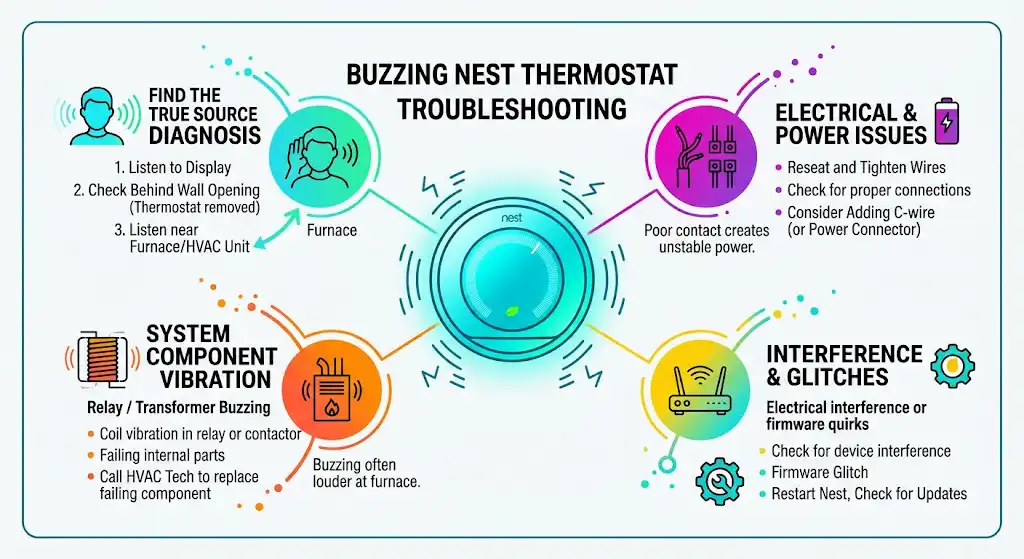
A lot of people say my Nest is buzzing, but the sound is actually coming from inside the wall, the air handler, or even a relay on the furnace control board.
Quick location test
- Put your ear close to the Nest display.
- Then put your ear near the wall opening behind it (after removing the display).
- Finally, listen near the furnace/air handler and outdoor unit.
Common causes of a buzzing Nest thermostat (with fixes)
Here’s a practical troubleshooting table I use in the field.
Troubleshooting table
| Buzzing right at the Nest, especially when heating/cooling kicks on | Loose wire at terminal | Poor electrical contact can create noise and unstable power | Turn off breaker, reseat and tighten wires |
| Buzzing + Nest battery warnings, frequent disconnects, screen dimming | Low power, missing C-wire, power-stealing issues | Nest can “sip” power, but unstable voltage can cause odd behavior | Check power info, consider adding C-wire or Nest Power Connector |
| Buzzing started after remodeling, drywall sanding, dust | Dirty/contaminated contacts | Dust/oxidation can worsen connection quality and cause arcing-like noise | Clean carefully, reseat wires |
| Buzzing is louder at furnace/air handler than at thermostat | Relay/contactor/transformer buzzing | Coil vibration in a relay or contactor can hum/buzz | HVAC tech should diagnose and replace failing part |
| Buzzing is intermittent and Nest otherwise works | Firmware glitch or restart needed | Rare, but a reboot can clear odd states | Restart Nest, check updates |
| Buzzing happens near certain appliances or routers | Electrical interference | EM noise can sometimes cause audible or operational quirks | Try relocating router/device, check grounding |
Cause 1: Loose wires at the Nest base (very common)
In my experience, a slightly loose thermostat wire is one of the most common “mystery” issues. Nest bases rely on spring terminals and solid copper contact. If a wire isn’t fully seated, you can get intermittent power, chatter, or buzzing.
How to fix it (step by step)
- Turn off HVAC power at the breaker.
- Pull the Nest display straight off the base.
- Take a picture of the wiring (seriously, do this first).
- One wire at a time:
- Press the terminal button
- Remove the wire
- Cut and re-strip clean copper (about 1/4 inch)
- Reinsert fully so no bare copper is exposed outside the terminal
- Gently tug each wire to confirm it’s secure.
- Reattach the display, restore power, test heat and cooling.
Quick wiring sanity check
Most Nest systems use terminals like these:
| R / Rc / Rh | Red | 24V power from transformer |
| C | Blue/Black | Common wire (steady power return) |
| W / W1 | White | Heat call |
| Y / Y1 | Yellow | Cooling call |
| G | Green | Fan |
| O/B | Orange/Dark blue | Heat pump reversing valve |
If you don’t have a C wire connected, don’t panic, but it’s relevant for Cause 3.
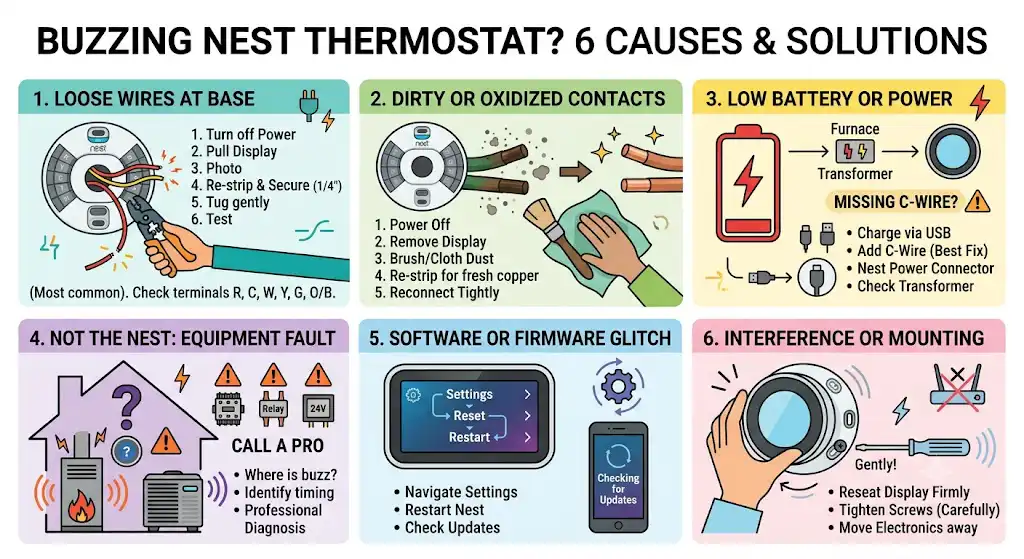
Cause 2: Dirty or oxidized contacts (buzzing from electrical arcing)
A common reason thermostats buzz is dirty switch contacts and electrical arcing as contacts close. Even though Nest is electronic, it still depends on clean, stable wire connections and low voltage control signals.
This can be more likely if:
- You recently renovated (drywall dust is brutal)
- The thermostat has been off the wall
- The copper is old/oxidized
- The wall cavity is dusty
A Honeywell knowledge article (for a different thermostat model) explains buzzing as contact arcing when contacts get dirty, and that it tends to get worse over time if the underlying cause isn’t addressed. The same general electrical principle applies: bad contact increases resistance and instability.
What I do in homes
- I don’t “wash” a thermostat or spray liquids into it.
- I clean dust and re-strip wires to fresh copper.
Safe cleaning method
- Turn off power at the breaker.
- Remove the Nest display.
- Use a dry, soft brush or dry microfiber cloth to remove dust around terminals.
- Re-strip wire ends back to clean copper if they look dark or dull.
- Reconnect tightly.
Avoid liquid cleaners and avoid sanding contacts inside the Nest.
Cause 3: Low battery or low power (missing C-wire is a big one)
Many Nest models can run without a C-wire by “power stealing” (drawing tiny amounts of power through the HVAC control circuit). Some systems tolerate this fine. Others don’t, especially with older control boards, certain zone systems, or marginal transformers.
When power is unstable, you may see:
- Buzzing or faint hum
- Nest restarting or freezing.
- Wi-Fi disconnects
- “Low battery” warnings
- HVAC short cycling or clicking
What to check on the Nest
On most Nest thermostats:
- Go to Settings
- Look for Power (or Technical Info)
- Check Battery and Vin / Voc readings (labels vary by model)
If you see consistently low battery or unstable voltage readings, power is your likely culprit.
Fix options (from easiest to best)
- Charge the Nest (temporary test)
- Remove the display and charge via USB for 30–60 minutes.
- If buzzing stops briefly and then comes back later, you likely need a better постоян power setup.
- Add a C-wire (best long-term fix)
- If you have an unused wire in the wall, you may be able to connect it to C at the furnace control board and at the Nest.
- Use the Nest Power Connector
- This is designed for systems without a C-wire, where running new wire is difficult.
- Have an HVAC tech check the transformer.
- A weak 24V transformer can cause all sorts of weird symptoms, including relay chatter and unstable Nest power.
Cause 4: The buzzing is not the Nest: a relay, contactor, or transformer is humming
If the buzzing is louder at your furnace/air handler or outdoor unit, your Nest may be doing its job, and a component is complaining.
Common noisy parts:
- Contactor (outdoor unit): buzzing/humming when energized, can be a sign of a failing coil or pitted contacts
- Relay on a control board: can chatter or buzz if the voltage is unstable
- 24V transformer: can hum if failing or overloaded
What you can do
- Confirm when it happens: only during cooling? Only during heat? Only when fan runs?
- If it’s coming from the equipment, I recommend a professional diagnosis. Replacing a contactor or transformer is usually straightforward for a tech, but you don’t want to guess with electrical parts.
Cause 5: Software or firmware glitch (less common, but easy to rule out)
Sometimes a reboot clears strange behavior.
Restart your Nest
- Settings
- Reset
- Restart
Then check for updates in the Nest app or thermostat settings.
If restarting stops the buzz for a day and it returns, I usually go back to power or wiring as the real cause.
Cause 6: Electrical interference or mounting issues
This is not the first thing I suspect, but it does happen:
- A router, speaker, or appliance very close to the thermostat
- The Nest display is not seated perfectly on the base (a slight vibration can sound like buzzing in a quiet room)
- A loose wall plate or vibrating drywall
What to try
- Reseat the display firmly.
- Tighten base screws gently (do not overtighten and crack drywall).
- If you have a large router or smart hub right beside the thermostat, move it a few feet away as a test.
My real-world “most common causes” snapshot
This is not a global study, just what I personally see most often on service calls related to buzzing or weird Nest behavior:
| Loose/poor thermostat wire connection | Very common |
| Low power due to missing C-wire or marginal power | Very common |
| Buzzing actually from furnace relay/contactor/transformer | Common |
| Nest software glitch | Occasional |
| Electromagnetic interference or mounting vibration | Rare |
When you should call a professional right away
Call an HVAC technician or electrician if:
- You smell burning or see discoloration on wires.
- The breaker trips
- Buzzing is coming from the electrical panel, furnace control board, or outdoor unit.
- You have a complex system (multi-zone, heat pump with auxiliary heat, humidifier integration)
- You’re not comfortable working around wiring.
Preventing Nest thermostat buzzing in the future
A few habits that genuinely help:
- Keep thermostat wiring tight and neatly seated.
- If you renovate, cover the thermostat to keep drywall dust out of the wall cavity.
- Consider adding a C-wire (or Power Connector) for stable smart thermostat power.
- If buzzing comes from equipment, don’t ignore it. Relays and contactors usually get worse, not better