I’m Nathan. I’ve been an HVAC technician for over 10 years, and I can tell you this is one of the most common “thermostat problems” I get called for.
When someone says, “My thermostat won’t go above 70,” it’s usually one of two situations:
- The thermostat won’t let you select a temperature higher than 70 (it stops, grays out, beeps, or jumps back).
- You can set it higher than 70, but the house never warms past ~70 (the system runs, but the temperature stalls).
Those are totally different problems. I’ll walk you through both, step by step, the same way I do in the field.
- Quick Answer (What’s most likely happening)
- Step 1: Identify Which Problem You Have (30-second test)
- Most Common Causes and Fixes (Cheat Table)
- Step 2: Check for a Schedule or “Eco Mode” Override
- Step 3: Look for a Keypad Lock (Common in Rentals)
- Step 4: Check the Maximum Heat Setpoint Limit (The Real “Hard Stop”)
- Step 5: If the Thermostat Goes Above 70 But the House Won’t: Check These HVAC Reality Checks
- 1) Check your air filter and airflow (fastest win)
- 2) Duct leakage and insulation losses are extremely common
- Quick signs of duct/insulation issues
- 3) Your system may be undersized (or conditions changed)
- 4) Heat pumps have limits (especially in colder weather)
- Step 6: Check Thermostat Accuracy (Calibration and Location)
- Quick calibration check (2 minutes)
- Location problems I see all the time
- When It’s Not the Thermostat: Equipment Problems That Mimic a 70°F Ceiling
- Troubleshooting Checklist (Print This)
- FAQs
- Why would a thermostat be limited to 70?
- Will turning it off and on fix it?
- Is it bad to set my heat above 70?
- If You Tell Me Your Thermostat Model, I’ll Give You the Exact Steps
Quick Answer (What’s most likely happening)
If your thermostat will not adjust above 70°F, the most common causes are:
- A maximum heat setpoint limit set in installer/advanced settings
- A schedule, eco mode, or “away” program overriding your manual change
- A keypad lock (common in rentals, hotels, and some households)
- A thermostat calibration or sensor issue (thermostat thinks it’s warmer than it is)
If your thermostat can be set above 70 but the home won’t reach it, then the issue is usually with:
- Heating system capacity (undersized or heat pump struggling in cold snaps)
- Airflow restrictions (dirty filter, closed vents, duct issues)
- Heat loss (insulation gaps, leaky ductwork, drafty home)
- Equipment fault (furnace/heat pump not producing enough heat)
Step 1: Identify Which Problem You Have (30-second test)
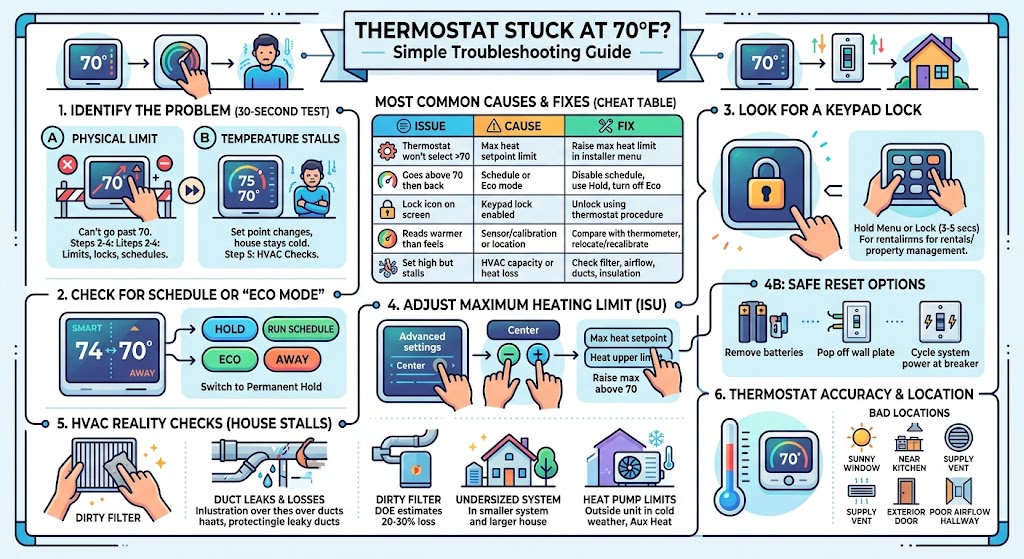
A. Does the thermostat physically stop you at 70?
- You try to raise the setpoint and it won’t go past 70, or it snaps back.
If yes, skip to Step 2: Limits, locks, schedules.
B. Can you set it to 72, 75, 78… but the room stays around 70?
- The setpoint changes, but indoor temp never catches up.
If yes, skip to Step 5: Heating system can’t reach set temperature.
Most Common Causes and Fixes (Cheat Table)
| Thermostat won’t select above 70 | Max heat setpoint limit in advanced settings | Raise the max heat limit in installer/ISU menu |
| It goes above 70, then changes back later | Schedule or eco/away mode | Disable schedule, use Hold, turn off Eco mode |
| Lock icon on screen | Keypad lock enabled | Unlock using the thermostat’s lock procedure |
| Thermostat reads warmer than it feels | Sensor/calibration or poor location | Compare with a thermometer, relocate or recalibrate |
| Set to 74 but home stalls at 70 | HVAC capacity or heat loss issue | Check filter, airflow, system output, insulation/duct leaks |
Step 2: Check for a Schedule or “Eco Mode” Override
This one gets homeowners all the time, especially with smart thermostats.
What it looks like
- You raise the temperature to 74
- A few minutes later it drops back to 70
- Or it says Schedule, Eco, Away, Hold ended, etc.
What to do
- Look for buttons or menu items like:
- Hold
- Run schedule
- Eco mode
- Away
- Smart response
- Temporarily switch to Hold (or “Permanent Hold”) to see if it stays.
If it stays once you hold it, your thermostat wasn’t “broken” at all. It was just obeying the program.
Honeywell support note: Honeywell has model-specific instructions for bypassing schedules (example resource: Honeywell Home support for TH2210/TH2110 schedule bypass).
Step 3: Look for a Keypad Lock (Common in Rentals)
If you see a lock icon, or the buttons don’t respond normally, the thermostat may be locked.
What I see in the field
In rentals and some family homes, the thermostat is intentionally locked so the temperature can’t be pushed above a set point.
What you can do
- Check your thermostat screen for:
- a lock symbol
- “Locked”
- “Keypad locked”
- Try the common unlock action:
- Press and hold Menu or Lock for 3–5 seconds (varies by model)
- If it’s a rental/hotel style restriction, you may need the property manager’s code.
Step 4: Check the Maximum Heat Setpoint Limit (The Real “Hard Stop”)
Many thermostats have installer setup limits that cap your max heating setpoint. On several Honeywell models, this lives in the ISU (Installer Setup) area. On some setups, techs set it during installation, or it gets changed accidentally.
Typical thermostat setpoint ranges
Most residential thermostats allow something like 40°F to 90°F, but installers can restrict that.
Honeywell Pro Series style thermostats (common approach)
On many Honeywell Pro models, you can access advanced setup like this:
- Press and hold Center and + together for about 3 seconds
- Press Select to enter setup (often labeled ISU/Installer Setup)
- Scroll through options until you find a setting related to:
- Max heat setpoint
- Heat upper limit
- Raise the maximum above 70
- Press Home to save and exit
Important: The exact option number varies by model. On some Honeywell installer setups, the max heat setpoint is referenced by an ISU code (often cited as 431 on certain models), but not every Honeywell uses the same numbering.
If you don’t see it
- Try looking for menu items like:
- Temperature limits
- Setpoint limits
- Range stop
- Heat setpoint max
If you tell me your thermostat brand and model, I can give you the exact button sequence and menu labels.
Step 4B: Reset the Thermostat (If it’s glitching)
If your thermostat is acting “stuck,” I usually try a reset before anything drastic.
Safe reset options you can try
- Battery-powered thermostat: remove batteries for 5 minutes, reinstall
- Thermostat on wall plate: gently remove it from the base (if it’s designed to pop off), wait a minute, reinstall
- System power cycle: turn the HVAC system off at the breaker for 2–3 minutes, then back on
If it was a software hiccup, this often clears it.
Step 5: If the Thermostat Goes Above 70 But the House Won’t: Check These HVAC Reality Checks
This is where homeowners get frustrated, because it feels like “the thermostat isn’t listening,” but what’s actually happening is the system can’t deliver enough heat (or it’s losing it too fast).
1) Check your air filter and airflow (fastest win)
A clogged filter can reduce airflow enough that heating performance drops.
What I tell homeowners:
- Replace the filter if you can’t remember the last time you did
- Make sure supply vents aren’t closed
- Make sure returns aren’t blocked by furniture or rugs
2) Duct leakage and insulation losses are extremely common
Here’s a real-world stat I reference a lot:
- The U.S. Department of Energy notes that typical duct systems can lose roughly 20 to 30 percent of the air moving through them due to leaks, holes, and poor connections.
That means you can be paying to heat your house… and a big chunk of that heat is ending up in the attic, crawlspace, or walls.
Quick signs of duct/insulation issues
- Some rooms are always colder than others
- You feel drafts near baseboards or windows
- The system runs a long time but doesn’t “catch up”
- You notice dusty air or weak airflow
3) Your system may be undersized (or conditions changed)
I’ve seen plenty of homes where:
- The builder installed the minimum size system
- The homeowner later finished a basement, enclosed a porch, or added square footage
When the load increases, the system can stall at a temperature like 68–70 on colder days.
4) Heat pumps have limits (especially in colder weather)
If you have a heat pump, there’s a point where:
- It may struggle without auxiliary heat
- A faulty sensor, defrost issue, or locked-out heat strips can keep you stuck around 70
If the outdoor unit is running constantly and indoor air feels lukewarm, this is worth investigating.
Step 6: Check Thermostat Accuracy (Calibration and Location)
Sometimes the thermostat won’t go above 70 because it thinks your home is already warmer than it is.
Quick calibration check (2 minutes)
- Place a reliable thermometer near the thermostat (not in direct sunlight)
- Wait 10–15 minutes
- Compare readings
If your thermostat reads 70 but the thermometer says 66, your thermostat may be misreading.
Location problems I see all the time
Your thermostat will lie to you if it’s installed:
- near a sunny window
- near a kitchen
- near a supply vent
- near an exterior door
- in a hallway with poor airflow
Even a few degrees of error can make it look like the house “won’t go above 70.”
When It’s Not the Thermostat: Equipment Problems That Mimic a 70°F Ceiling
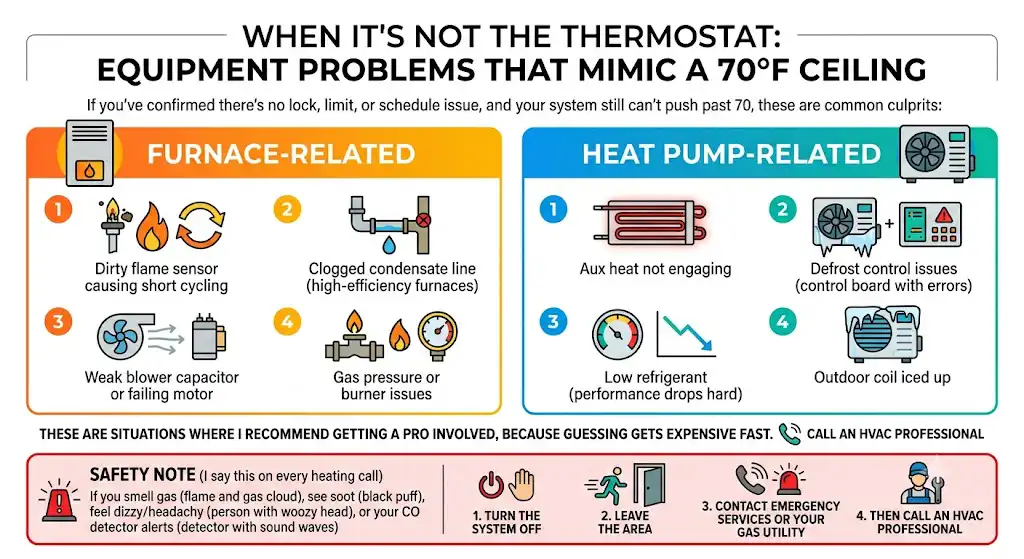
If you’ve confirmed there’s no lock, limit, or schedule issue, and your system still can’t push past 70, these are common culprits:
Furnace-related
- Dirty flame sensor causing short cycling
- Clogged condensate line (high-efficiency furnaces)
- Weak blower capacitor or failing motor
- Gas pressure or burner issues
Heat pump-related
- Aux heat not engaging
- Defrost control issues
- Low refrigerant (performance drops hard)
- Outdoor coil iced up
These are situations where I recommend getting a pro involved, because guessing gets expensive fast.
Safety Note (I say this on every heating call)
If you smell gas, see soot, feel dizzy/headachy, or your CO detector alerts:
- Turn the system off
- Leave the area
- Contact emergency services or your gas utility
- Then call an HVAC professional
Troubleshooting Checklist (Print This)
| Thermostat lock icon | Keypad locked | Yes |
| Schedule/Eco/Away | Setpoint keeps reverting | Yes |
| Max heat limit | Hard stop at 70 | Yes, if you can access installer menu |
| Reset thermostat | Stuck software or glitch | Yes |
| Filter and vents | Restricted airflow | Yes |
| Thermostat accuracy | Miscalibration or bad location | Mostly |
| HVAC output | System not producing enough heat | Sometimes (best with a tech) |
FAQs
Why would a thermostat be limited to 70?
Because someone set temperature limits in installer settings, enabled a temperature limiter, or locked the keypad. This is very common in rentals and sometimes happens accidentally after setup changes.
Will turning it off and on fix it?
Sometimes. A reset can clear a thermostat glitch, but it won’t override an intentional lock or max setpoint limit.
Is it bad to set my heat above 70?
Not inherently. Comfort is personal. Energy-wise, the U.S. Department of Energy commonly recommends 68°F when you’re home and awake in winter, but that’s a cost-saving guideline, not a rule. If your home needs 72–74 to feel comfortable, that’s your call.
If You Tell Me Your Thermostat Model, I’ll Give You the Exact Steps
Reply with:
- Brand (Honeywell, Nest, Ecobee, Emerson, etc.)
- Model number (usually inside the front cover or on the back plate)
- A photo of the thermostat screen (optional)