Hi, I’m Nathan. I’ve worked as an HVAC technician for over 10 years, and one of the most common calls I get is some version of “my Bradford White water heater quit and I don’t have hot water.” A lot of the time, the fix is simple: the high limit safety tripped, and you just need to press the red reset button.
In this guide, I’ll show you exactly where that reset button is on Bradford White electric and gas models, how to reset it safely, and what to check if it keeps tripping (because a reset button that trips repeatedly is usually a symptom, not the real problem).
- What the Bradford White reset button actually does
- Where is the reset button on a Bradford White water heater?
- How to reset a Bradford White electric water heater (step by step)
- How to reset a Bradford White gas water heater (pilot reset and re-light)
- Resetting a tripped thermal safety switch (some gas Defender systems)
- Why the reset button keeps tripping (this is the part that saves you money)
- Recommended temperature setting (with real-world safety context)
- A simple troubleshooting checklist before you reset again
- When I recommend calling a pro (no guesswork situations)
- Maintenance that helps prevent nuisance trips
What the Bradford White reset button actually does
On electric water heaters, the red button is usually the high limit reset (also called the ECO, energy cut off). It trips when water temperature gets too high or when the heater “thinks” it’s overheating due to a control or wiring problem.
On many gas Bradford White heaters, there isn’t a big obvious “reset button” like electric units. What most people call a reset is actually one of these:
- Pilot reset and re-light procedure on the gas control valve
- A thermal safety switch reset on certain models
Where is the reset button on a Bradford White water heater?
Electric models (most common reset button)
On electric Bradford White tanks, the reset is almost always:
- Behind the upper access panel
- On the upper thermostat
- A small red button above the temperature dial
Gas models (what you reset depends on the issue)
On gas units you’ll typically deal with:
- The gas control valve knob (OFF, PILOT, ON or temperature settings)
- The pilot button (often red) and igniter
- On some Defender-style systems, a small red thermal reset near the burner chamber area
Here’s a simple comparison.
Table: Electric vs Gas reset locations and what you’re resetting
| Electric tank | High limit (ECO) | Behind the upper access panel on the upper thermostat | Small red button, usually labeled reset |
| Gas tank (standard) | Pilot system | At the gas control valve | Control knob plus pilot button and igniter |
| Gas tank (Defender / sealed burner safety) | Thermal safety device | Near the sealed burner chamber area (varies by model) | Small red button or resettable safety switch |
If you tell me your model or snap a photo of the rating label, I can usually point you to the exact reset location faster.
How to reset a Bradford White electric water heater (step by step)
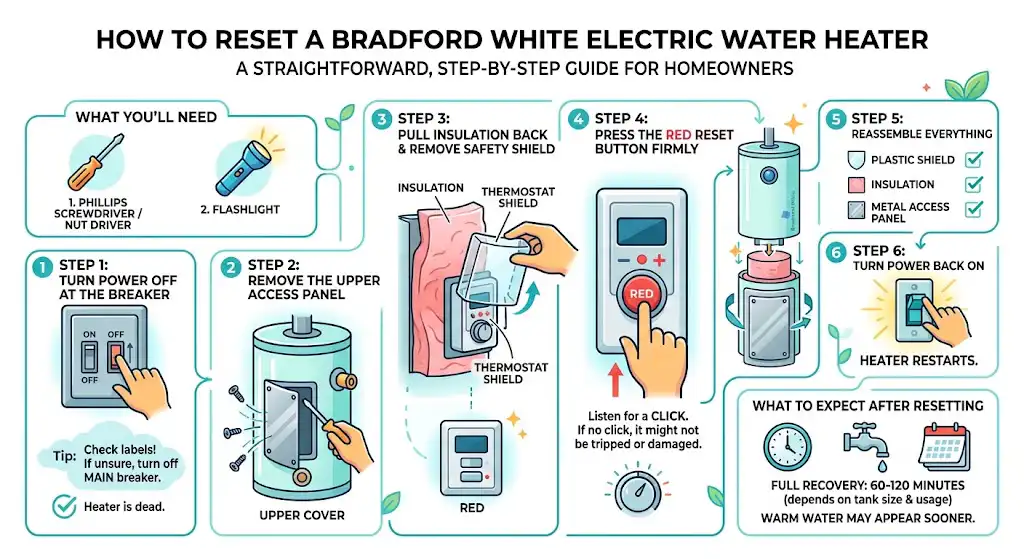
This is the most straightforward reset, and it’s the one I see homeowners successfully do all the time.
What you’ll need
- A screwdriver (usually 1/4 inch nut driver or Phillips)
- A flashlight
Step 1: Turn power OFF at the breaker
Go to your electrical panel and switch OFF the breaker labeled water heater.
Tip from the field: Many panels are mislabeled. If you’re not sure, shut off the main breaker and confirm the heater is dead before touching anything.
Step 2: Remove the upper access panel
On the side of the tank, remove the upper metal cover.
Behind it you’ll typically see insulation.
Step 3: Pull insulation back and remove the safety shield
- Fold the insulation out of the way.
- Many Bradford White electrics have a plastic safety cover over the thermostat. Remove it carefully.
Step 4: Press the red reset button firmly
Press the small red button above the upper thermostat dial.
- You should feel or hear a click
- If it does not click, it may not have been tripped (or the button/thermostat may be damaged)
Step 5: Reassemble everything
Put back:
- The plastic shield
- The insulation
- The metal access panel
Step 6: Turn power back ON
Flip the breaker back on.
What to expect after resetting
Most tanks take:
- 60 to 120 minutes to fully recover depending on tank size and water usage
- You may feel warm water sooner, but full recovery takes time
How to reset a Bradford White gas water heater (pilot reset and re-light)
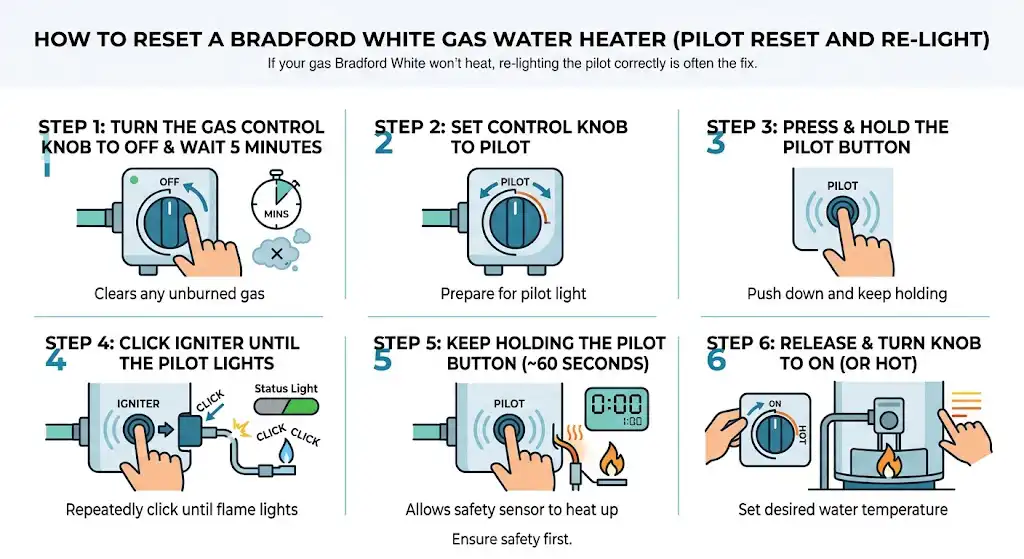
If your gas Bradford White won’t heat, the “reset” is often simply re-lighting the pilot correctly.
Step 1: Turn the gas control knob to OFF and wait 5 minutes
This clears any unburned gas.
Step 2: Turn knob to PILOT
Set the control knob to PILOT.
Step 3: Press and hold the pilot button
Push and hold the pilot button down.
Step 4: Click the igniter until the pilot lights
While holding the pilot button:
- Press the igniter repeatedly until the pilot lights
- Many models show a status light behavior change when the pilot is established
Step 5: Keep holding the pilot button for about 60 seconds
This allows the safety sensor to heat up and “prove” flame.
Step 6: Release and turn the knob to ON (or HOT)
If the pilot stays lit, turn the knob to your desired temperature setting.
If the pilot will not stay lit, do not keep forcing it. Jump to What to do if it won’t reset or won’t stay lit.
Resetting a tripped thermal safety switch (some gas Defender systems)
Bradford White’s Defender Safety System is designed to shut down combustion if unsafe conditions occur (like overheating or restricted airflow).
If the burner won’t fire and you suspect a tripped safety:
- Look for a small red reset on or near the thermal cutoff device (location varies by model)
- Press until it clicks
Important: If that thermal safety tripped, I treat it as a serious clue. In real service work, I always check airflow, burner door condition, venting, and combustion air before I walk away.
Why the reset button keeps tripping (this is the part that saves you money)
A one-time trip can happen after a power event or unusual condition. But if you reset it and it trips again, something is causing overheating or an electrical fault.
Most common causes I see in the field
Electric Bradford White causes
- Bad thermostat (sticking “on” and overheating)
- Shorted heating element
- Loose or burned wiring
- Sediment buildup causing hot spots on the element
- Incorrect wiring after a repair
Gas Bradford White causes
- Pilot/thermocouple or flame sensing issues
- Restricted airflow to the burner (lint, dust, tight closet install)
- Flue or venting issues (draft problems, blockage)
- Overheating that trips a safety device
- Gas control valve problems
Table: Symptoms and what I check first
| Electric reset clicks but trips again within hours | Thermostat or element issue | Look for burned wires, listen for boiling sounds, consider element/thermostat testing |
| Water is scalding hot | Upper thermostat stuck | Turn breaker off and call for service if temps are unsafe |
| No hot water at all (electric) | Tripped high limit, failed element | Reset first, then test elements if comfortable |
| Pilot won’t stay lit | Thermocouple/flame sensor, dirty pilot, gas control | Check for draft, follow proper lighting steps, call a pro if it won’t hold |
| Status light error patterns (gas) | Safety lockout conditions | Check manual for code meaning, inspect venting and airflow |
Recommended temperature setting (with real-world safety context)
In most homes I service, I recommend 120°F (49°C) unless there’s a specific need for hotter water.
Why 120°F:
- Reduces scald risk
- Saves energy
- Still provides comfortable hot water for most households
Scald risk chart (why temperature matters)
These time-to-burn ranges are widely cited in plumbing safety guidance and are a big reason I encourage 120°F for families.
| 120°F (49°C) | About 5 minutes |
| 130°F (54°C) | About 30 seconds |
| 140°F (60°C) | About 5 seconds |
| 150°F (66°C) | About 2 seconds |
A simple troubleshooting checklist before you reset again
If you already pressed reset once and it came back, do this quick check:
Electric checklist
- Did you reinstall insulation and covers properly (no exposed wiring)?
- Any burnt smell or discolored wire nuts?
- Any signs of water leak dripping onto electrical parts?
- Do you hear popping or rumbling (sediment)?
- Is your thermostat set way above 120°F?
Gas checklist
- Is the gas shutoff valve fully open?
- Any strong draft blowing out the pilot area?
- Is the burner area clogged with lint (common in laundry rooms)?
- Is venting intact and not blocked?
- Did you hold the pilot button long enough (usually about 60 seconds)?
If any of this feels uncertain, it’s smarter to stop. Repeated resets without diagnosing can damage parts or create unsafe conditions.
When I recommend calling a pro (no guesswork situations)
Call a licensed plumber or HVAC tech if:
- The reset trips more than once
- You see melted wiring or scorching
- There’s water leaking onto electrical components
- You smell gas or suspect venting issues
- The pilot will not stay lit after correct lighting steps
- Your water is dangerously hot at normal settings
From my experience, the reset button is often the first sign of a thermostat, element, or safety problem that will not fix itself.
Maintenance that helps prevent nuisance trips
If you want fewer shutdowns and longer water heater life, these are the habits I’ve seen make the biggest difference:
- Flush the tank at least once per year (more if you have hard water)
- Keep the area around the heater clean and clear for airflow
- Check for small leaks early (valves, fittings, TPR discharge)
- Consider checking or replacing the anode rod every few years if you want maximum tank life
FAQs
Where is the reset button on a Bradford White electric water heater?
Behind the upper access panel, on the upper thermostat. It’s a small red button above the thermostat dial.
How do I reset my Bradford White water heater?
Electric: power off at breaker, open upper panel, press red reset until it clicks, reassemble, restore power.
Gas: turn gas control to OFF (wait 5 minutes), then PILOT, hold pilot button and ignite, hold about 60 seconds, then turn to ON.