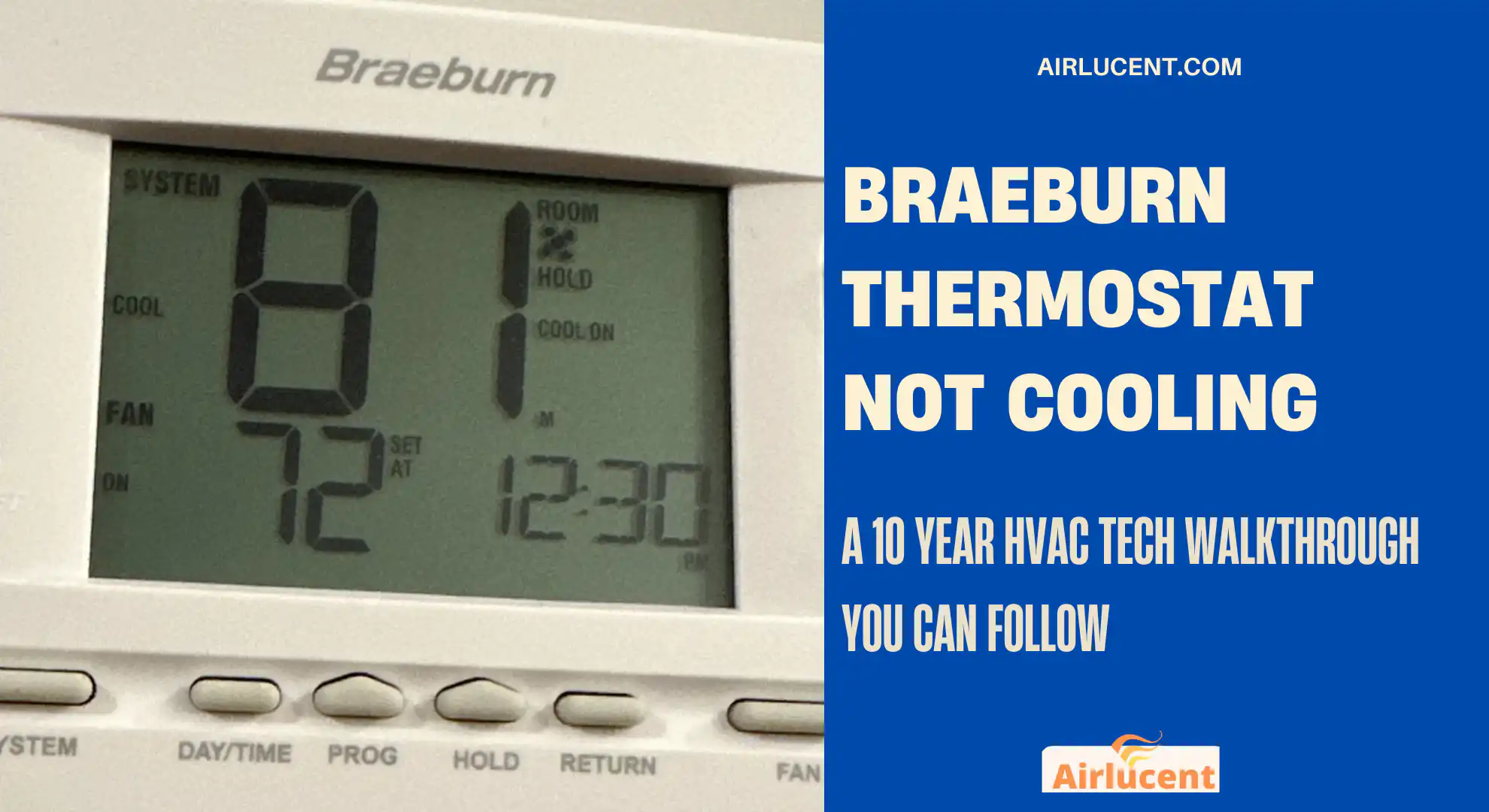
I’m Nathan. I’ve worked as an HVAC technician for over 10 years, and I’ve been on a lot of summer no cooling calls where the homeowner swore the thermostat was the problem. Sometimes it is. A lot of times, the thermostat is doing exactly what it should, but something else in the system is stopping cooling from happening.
This guide walks you through the same step by step checks I use in the field for a Braeburn thermostat that won’t cool.
If you follow this in order, you will either get your AC running again or you’ll confidently know what needs a pro.
- First, what you should know about how cooling is supposed to work
- Quick fixes first. 90 percent of thermostat related issues are here
- 1) Confirm the system mode is set to Cool
- 2) Lower the set temperature at least 5°F below room temperature
- 3) Use Hold to override schedules
- 4) Look for a blinking snowflake or blinking Cool
- 5) Replace the batteries (even if the display still works)
- 6) Make sure your utility saver or demand response switch is not active
- Quick troubleshooting table
- Step by step deeper checks (what I do on service calls)
- Thermostat wiring check (simple and safe if you’re careful)
- Reset options (in the right order)
- When it is not the thermostat (but it looks like it is)
- My fast diagnosis checklist (printable style)
- When to call a pro (and what to tell them)
- Should you replace the thermostat
- FAQ
- Final thoughts from Nathan
First, what you should know about how cooling is supposed to work
If any safety switch is open, power is missing, wiring is loose, the system is in delay, or the outdoor unit cannot start, you get the classic complaint:
- Thermostat says Cool, but it is not cooling
- Fan runs but air is warm
- Cool is blinking and nothing happens
Also, quick context that matters for troubleshooting:
- Many systems have a built in compressor protection delay, commonly around 5 minutes.
- Many homes have a float switch that shuts cooling off when the drain pan is full.
- Thermostat batteries and settings can stop cooling calls from being sent correctly.
Quick fixes first. 90 percent of thermostat related issues are here
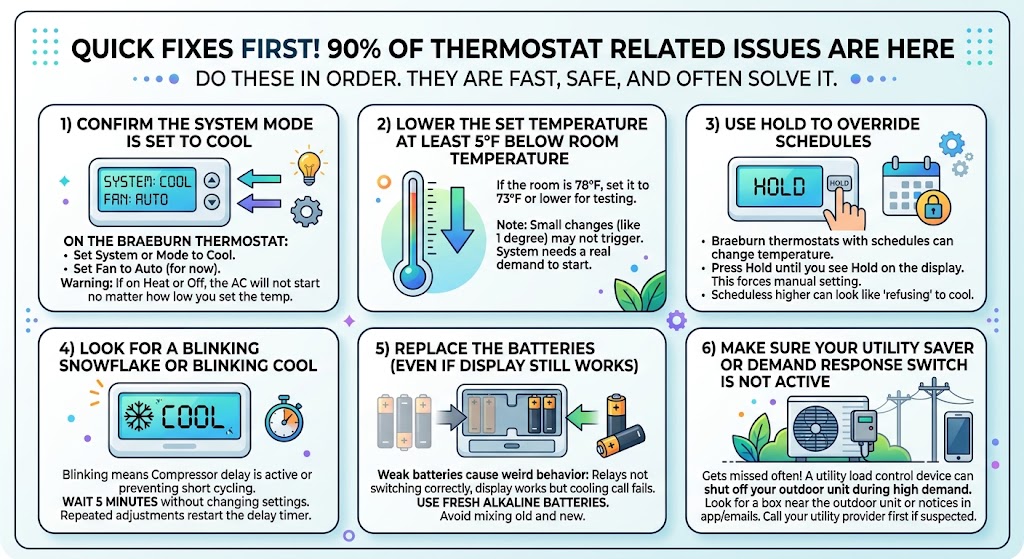
Do these in order. They are fast, safe, and often solve it.
1) Confirm the system mode is set to Cool
On the Braeburn thermostat:
- Set System or Mode to Cool
- Set Fan to Auto (for now)
If it is on Heat or Off, the AC will not start no matter how low you set the temp.
2) Lower the set temperature at least 5°F below room temperature
If the room is 78°F, set it to 73°F or lower for testing.
Some people set it 1 degree lower and expect instant cold air. Your system needs a real demand to trigger.
3) Use Hold to override schedules
Braeburn thermostats that are programmed can change temperature on you.
Press Hold until you see Hold on the display. This forces the thermostat to follow your manual setting.
If your thermostat is following a schedule that is set higher, it may look like it “refuses” to cool.
4) Look for a blinking snowflake or blinking Cool
If the snowflake icon is blinking, or Cool is blinking, it usually means one of these:
- Compressor delay is active
- The thermostat is preventing short cycling
Wait 5 minutes without changing settings. If you keep adjusting the temperature repeatedly, you can restart the delay timer.
5) Replace the batteries (even if the display still works)
Weak batteries can cause weird behavior like:
- Relays not switching correctly
- Display works but cooling call does not
Use fresh alkaline batteries. Avoid mixing old and new.
6) Make sure your utility saver or demand response switch is not active
This one gets missed all the time.
Some utility companies install a load control device that can temporarily shut off your outdoor unit during high demand times. If that device is active, your thermostat can be “calling” for cooling but the AC will not start.
What to look for:
- A small box near the outdoor unit from your power company
- A notice in your utility program emails or app
If you suspect this, call your utility provider first before replacing parts.
Quick troubleshooting table
| Thermostat set to Cool but nothing happens | Wrong mode, delay, no power, or safety switch open | Verify Cool, wait 5 minutes, check breakers and float switch |
| Fan runs but air is warm | Outdoor unit not running, compressor issue, refrigerant issue | Check outdoor unit power and whether it starts |
| Cool or snowflake blinking | Compressor protection delay | Wait 5 minutes without changing settings |
| Thermostat screen dim or acting odd | Low batteries | Replace batteries |
| Works sometimes, then stops | Drain safety switch, intermittent power, dirty condenser, failing capacitor | Check drain pan and outdoor unit operation |
Step by step deeper checks (what I do on service calls)
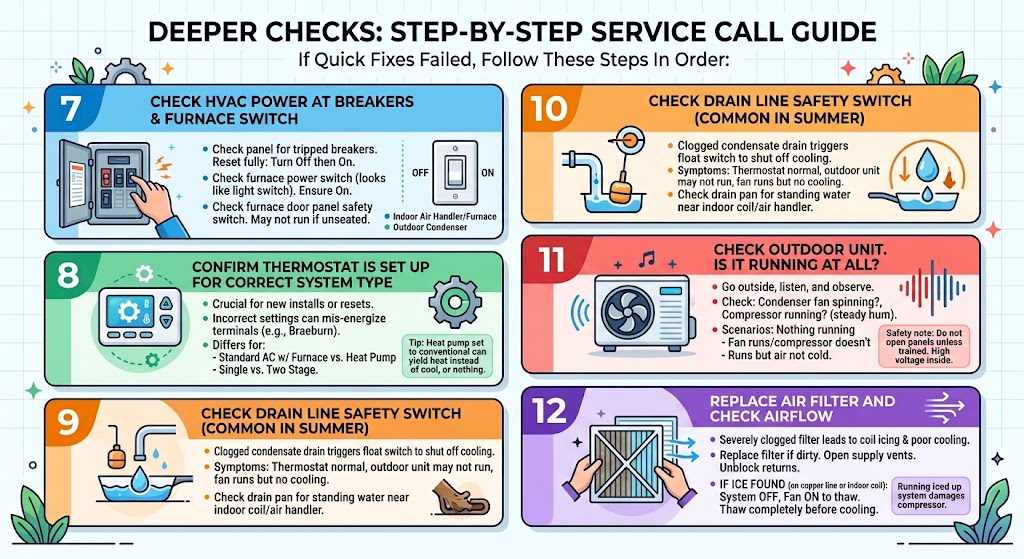
If the quick fixes did not solve it, move through these in order.
7) Check HVAC power at the breakers and furnace switch
You typically have two power points involved:
- Breaker for the indoor air handler or furnace
- Breaker for the outdoor condenser
What to do:
- Check the electrical panel for any tripped breakers.
- Reset fully by turning Off then On.
- Check the furnace power switch. It looks like a light switch near the furnace or air handler. Make sure it is On.
Also check the furnace door panel. Many systems have a door safety switch. If the panel is not seated, the system may not run correctly.
8) Confirm the thermostat is set up for the correct system type
This matters a lot on new installations or after a reset.
If the Braeburn is configured incorrectly, it may not energize the right terminals.
Examples:
- Standard AC with furnace is different than a heat pump setup.
- Single stage vs two stage systems matter.
If you recently installed the thermostat or changed settings, pull up your exact model manual and confirm the installer setup options match your equipment.
Tip from my experience:
If you have a heat pump and the thermostat is configured like a conventional system, you can get heat when you want cool, or nothing at all.
9) Check the drain line safety switch (very common in summer)
If your system has a clogged condensate drain, many installers add a float switch that shuts off cooling to prevent water damage.
Symptoms:
- Thermostat looks normal
- Outdoor unit may not run
- Sometimes indoor fan runs but no cooling
What you can check:
- Look at the drain pan near the indoor coil or air handler.
- If there is standing water, the float switch may be open.
10) Check the outdoor unit. Is it running at all
Go outside and listen.
You are checking two things:
- Is the condenser fan spinning
- Do you hear the compressor running (a steady hum, not loud clicking)
Common scenarios:
- Nothing is running outside: could be no power, disconnect off, contactor issue, thermostat not sending a call.
- Fan runs but compressor does not: often a capacitor, compressor protection, or compressor issue.
- Runs but air is not cold inside: could be refrigerant, airflow, dirty coil, or metering issues.
Safety note:
Do not open the outdoor unit panels unless you are trained. There is high voltage inside.
11) Replace your air filter and check airflow
A severely clogged filter can lead to coil icing and poor cooling.
Quick check:
- Replace the filter if it is dirty.
- Make sure supply vents are open.
- Make sure return vents are not blocked.
If you see ice on the indoor copper line or indoor coil area:
- Turn the system Off
- Set Fan to On to help thaw
- Let it thaw completely before running cooling again
Running an iced up system can damage the compressor.
Thermostat wiring check (simple and safe if you’re careful)
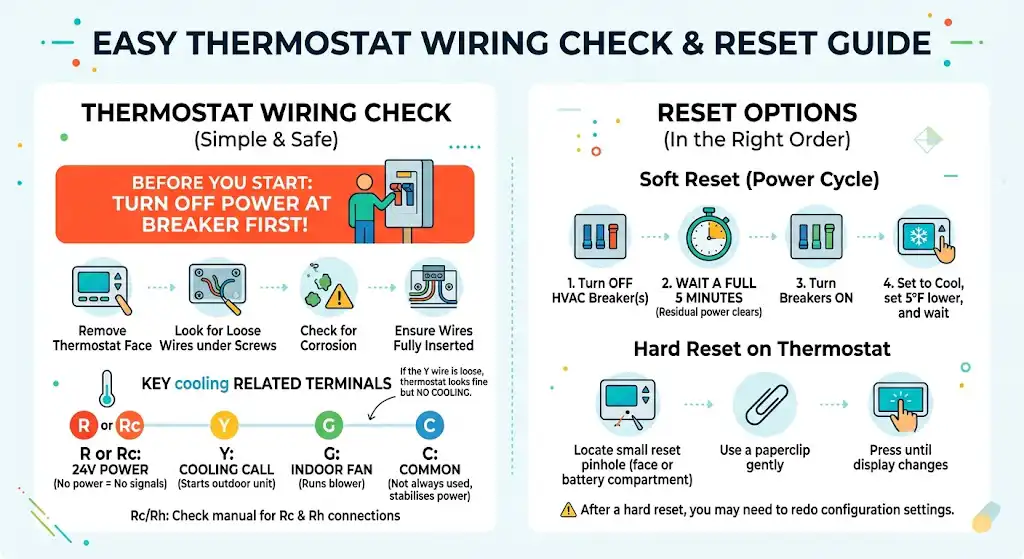
If you’re comfortable, you can inspect for loose thermostat wires. This is low risk if you shut power off first.
12) Inspect the R and Y connections
Turn off power to the indoor unit at the breaker before you remove the thermostat face.
Remove the thermostat from its base and look for:
- Loose wire under the terminal screws
- Corrosion
- Wires not fully inserted
The most important cooling related terminals are typically:
- R or Rc: 24V power
- Y: cooling call
- G: fan
- C: common (not always used, but common on smart stats)
Here is a quick reference table.
| R or Rc | 24V power | Without it, thermostat cannot send signals |
| Y | Compressor contact | Tells outdoor unit to run |
| G | Indoor fan | Runs blower, does not guarantee cooling |
| C | Common | Stabilizes power, common on advanced thermostats |
If the Y wire is loose, your thermostat can look perfectly fine and still never start cooling.
If your system uses a single R wire but the thermostat has Rc and Rh, check the manual. Some systems require a jumper, some models handle it internally.
Reset options (in the right order)
13) Soft reset by power cycling the HVAC system
This is my go to reset before touching thermostat programming.
- Turn off the HVAC breaker(s)
- Wait a full 5 minutes
- Turn them back on
- Set thermostat to Cool, set 5°F lower, and wait
Waiting matters because some control boards and compressors need time for residual power to clear.
14) Hard reset on the thermostat (if your model has it)
Many Braeburn models have a small reset pinhole on the face or inside the battery compartment.
Use a paperclip gently and reset until the display changes.
After a hard reset, you may need to redo configuration settings. That is why I usually do the soft reset first.
When it is not the thermostat (but it looks like it is)
Here are the big ones I see most often on no cooling calls.
Low refrigerant from a leak
If the system starts but does not cool well, or it cools a little then stops, you may have low refrigerant.
Important:
Refrigerant handling is regulated. In the US, you generally need EPA Section 608 certification to attach gauges and add refrigerant.
What you can look for:
- Ice on the evaporator coil or refrigerant line
- Hissing near the coil
- Oily residue at fittings
A proper repair means finding and fixing the leak, then charging to manufacturer specs.
Failed capacitor, contactor, or outdoor electrical issue
If the thermostat is calling for cooling but the outdoor unit does not run, it is often an electrical component outside.
Common signs:
- Outdoor unit clicks but does not start
- Fan tries to spin then stops
- Breaker trips when it tries to start
Those components are serviceable, but they involve high voltage. This is a good place to bring in a licensed tech.
My fast diagnosis checklist (printable style)
Thermostat checks
- System set to Cool
- Fan set to Auto
- Set temperature at least 5°F below room temp
- Hold enabled to bypass schedule
- Batteries replaced
- Wait 5 minutes for delay
System checks
- Indoor breaker on
- Outdoor breaker on
- Furnace switch on
- Furnace door panel seated
- Drain pan not full, float switch not tripped
- Filter clean
- Outdoor unit running
When to call a pro (and what to tell them)
Call a licensed HVAC technician if:
- Breakers trip repeatedly
- Outdoor unit will not start
- You see ice on the coil or lines
- You suspect refrigerant is low
- You smell burning or hear loud buzzing from the outdoor unit
What to tell the tech so you get faster help:
- Thermostat brand and model (Braeburn model number)
- Whether Cool is blinking
- Whether the outdoor unit runs at all
- Whether the indoor fan runs
- Any ice or water around the indoor unit
Should you replace the thermostat
In my experience, thermostat replacement makes sense when:
- The thermostat is older (around 8 to 10 years is a common lifespan range)
- The display or buttons are failing
- You have confirmed the HVAC equipment works when properly called
But I do not recommend replacing the thermostat as the first move. Most no cooling issues are power, drain safety, outdoor unit parts, airflow, or refrigerant related.
FAQ
Why is my Braeburn thermostat not cooling but the fan is running
Because the fan (G) and cooling (Y) are separate signals. You can have the blower running while the outdoor unit never starts due to a delay, wiring issue, safety switch, lack of power outside, or an outdoor unit failure.
How long is the cool delay on a Braeburn thermostat
Many systems and thermostats use a compressor protection delay around 5 minutes. If you see Cool blinking or a blinking snowflake, wait without changing settings.
Can low batteries stop cooling
Yes. I have seen weak batteries allow the display to work but prevent consistent switching of the internal relay for cooling.
What if everything looks right but it still will not cool
At that point, focus on the equipment, not the thermostat. Check outdoor unit operation, drain safety switches, and airflow. If the outdoor unit is not running or cooling is weak, it is time for a technician.
Final thoughts from Nathan
A Braeburn thermostat not cooling is usually a simple fix when it is actually thermostat related. Start with mode, setpoint, Hold, batteries, and delay. Then confirm power, drain safety, and outdoor operation.