I can tell you this from experience: when an Aprilaire thermostat starts acting weird, a reset fixes a large chunk of the “nothing makes sense” problems. Frozen screens, incorrect readings, schedules that won’t run, Wi-Fi glitches, humidity settings not behaving, random reminders that won’t clear. Most of the time, you don’t need a service call. You just need the right reset for your model.
In this guide, I’ll walk you through the safest and most reliable ways to reset an Aprilaire thermostat, what each reset actually does, and what to check if it still won’t cooperate after the reset.
- Why you might need to reset your Aprilaire thermostat
- Before you reset: do these 2 things (you’ll thank yourself)
- Types of Aprilaire thermostat resets (and what they actually do)
- Safety first: should you turn off the breaker?
- Step-by-step: How to reset an Aprilaire thermostat (generic method)
- Model-specific reset instructions (most common Aprilaire types)
- Aprilaire 8444 and 8463: reset options
- Option A: Pinhole Reset
- Option B: Power cycle (faceplate reboot)
- Option C: Battery flush (if equipped)
- Aprilaire 8000 Series: reset options
- Aprilaire 600 Series: reset options
- Aprilaire Wi-Fi thermostat: reset and reconnect
- Factory reset steps (typical)
- Wi-Fi reconnection tips (based on what I see in homes)
- How to confirm the reset worked (my quick checklist)
- Troubleshooting if problems continue after resetting
- Common mistakes I see when people reset Aprilaire thermostats
- What to do if your Aprilaire thermostat will not reset at all
- Keeping your Aprilaire thermostat running smoothly (real-world advice)
- FAQ
Why you might need to reset your Aprilaire thermostat
Here are the most common reasons I see in homes:
- Thermostat screen freezes or stops responding
- Temperature feels wrong (display doesn’t match how the house feels)
- HVAC won’t turn on or ignores schedule changes
- After a power outage the thermostat behaves strangely
- Wi-Fi issues (won’t reconnect, app can’t find it, keeps dropping)
- Accidentally changed settings and you want to go back to normal
- Service reminders won’t clear (filter, maintenance, water panel reminders)
A reset is often the fastest way to clear glitches and get your controls back.
Before you reset: do these 2 things (you’ll thank yourself)
1) Identify your thermostat model
Look for a model number on:
- the thermostat front bezel
- inside the faceplate (after you gently pull it off)
- your manual or invoice
Common Aprilaire thermostat families include:
- 600 series
- 8000 series
- 8444 / 8463 (very common in many homes)
- Aprilaire Wi-Fi capable models
2) Take a photo of your current settings
If you do a factory reset, you can lose:
- schedules
- humidity settings
- system type settings
- Wi-Fi pairing and app setup
A quick photo saves you a lot of rework.
Types of Aprilaire thermostat resets (and what they actually do)
Here’s the simple breakdown I use on service calls:
| Power cycle “reboot” | Pull faceplate off, wait, snap back | Minor glitches, frozen screen, random behavior | Nothing |
| Pinhole Reset button | Press Reset hole with paperclip 5 seconds | Software lockups, stuck screen, quick restart | Usually nothing |
| Battery power flush (if batteries) | Remove batteries 60 seconds, reinstall | Hard lockups, weird display issues | Sometimes time/date |
| Menu factory reset | Settings or Menu → Factory Reset | Bad settings, persistent issues, setup corruption | Schedules, custom config, often Wi-Fi |
| Clear service reminders | Menu → Service Reminders → Reset | “Filter” or maintenance lights | Nothing else |
Safety first: should you turn off the breaker?
In many cases you can reset the thermostat without touching wiring, but I still recommend this simple rule:
- If you’re only pulling the faceplate off: usually safe.
- If you’ll be opening covers near wiring, or you’re unsure: turn off power.
The safest method
- Turn off the HVAC system at the thermostat (set to Off).
- Turn off the HVAC circuit at the breaker if you’ll be accessing wiring.
- Proceed with the reset.
Step-by-step: How to reset an Aprilaire thermostat (generic method)
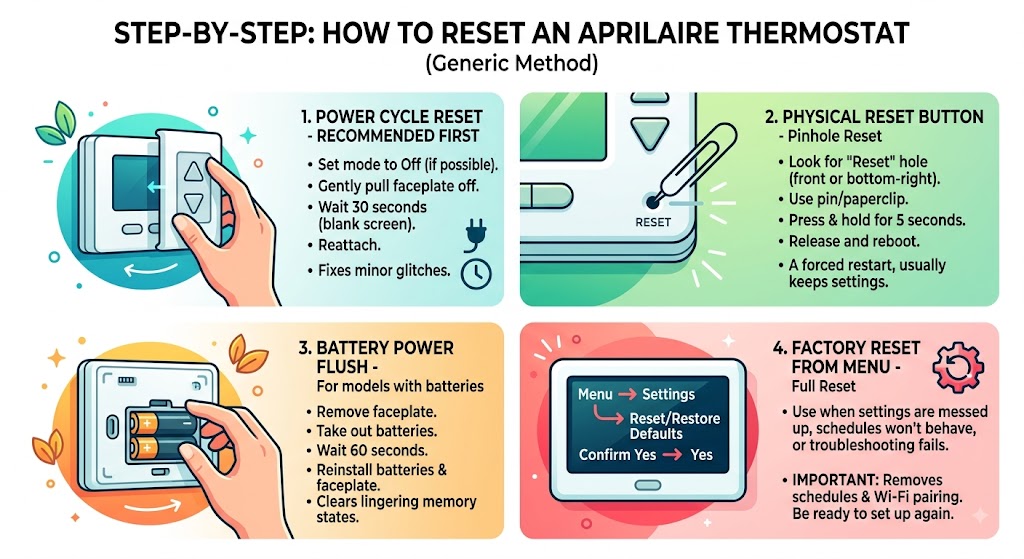
Step 1: Do a power cycle reset (recommended first)
This is my go-to because it’s simple and low risk.
- Set thermostat mode to Off (if possible).
- Gently pull the thermostat faceplate straight off the wall mount.
- Wait 30 seconds (let the screen go fully blank).
- Align it carefully and snap it back into place.
If your problem was a minor glitch, this often fixes it immediately.
Step 2: Use the physical Reset button (pinhole reset)
Many Aprilaire thermostats include a small recessed Reset hole.
- Look for a tiny hole labeled Reset (commonly front edge or bottom-right area on some models).
- Straighten a paperclip or use a pin.
- Press and hold for about 5 seconds.
- Release and wait for the thermostat to reboot.
This is like a forced restart. It’s stronger than a simple power cycle but usually does not erase your settings.
Step 3: Battery power flush (only for models with batteries)
Some Aprilaire thermostats (including common models like 8444/8463) may have batteries.
- Remove the faceplate (often by squeezing the sides or pulling gently).
- Remove the AA batteries.
- Wait 60 seconds.
- Reinstall batteries and reattach the faceplate.
If your thermostat was “stuck,” this can help clear lingering memory states.
Step 4: Factory reset from the menu (full reset)
Use this when:
- settings are messed up
- schedules won’t behave
- you want to return to defaults
- troubleshooting hasn’t worked
General path (wording varies by model):
- Press Menu or Settings
- Find Reset, Restore Defaults, or Factory Reset
- Confirm Yes
Important: A factory reset can remove schedules and Wi-Fi pairing, so be ready to set it up again.
Model-specific reset instructions (most common Aprilaire types)
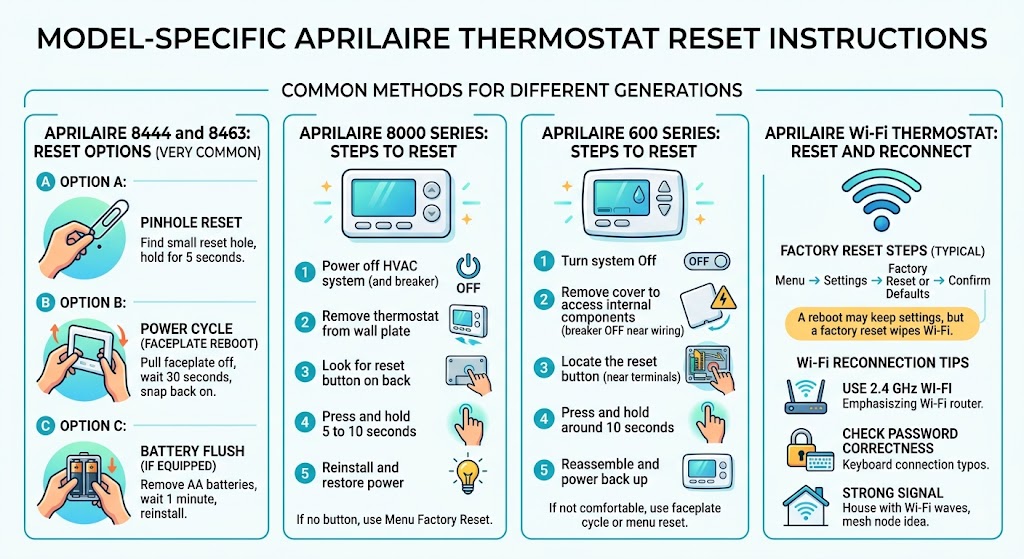
Because Aprilaire has multiple thermostat generations, the exact buttons can vary. Below are the reset methods I see most often.
Aprilaire 8444 and 8463: reset options
These are very common in the field.
Option A: Pinhole Reset
- Find the small Reset hole (often on the face or lower edge).
- Hold with a paperclip for 5 seconds.
Option B: Power cycle (faceplate reboot)
- Pull faceplate off → wait 30 seconds → snap back on.
Option C: Battery flush (if equipped)
- Remove AA batteries → wait 1 minute → reinstall.
Aprilaire 8000 Series: reset options
The 8000 series is known for a clean interface and solid controls.
Typical approach:
- Power off HVAC system (and breaker if you’re cautious).
- Remove thermostat from the wall plate.
- Look for a small reset button on the back (some versions have it).
- Press and hold 5 to 10 seconds.
- Reinstall and restore power.
If your model doesn’t have the physical reset button, use the menu factory reset instead.
Aprilaire 600 Series: reset options
These often come up in setups that also use humidity accessories.
Typical approach:
- Turn system Off.
- Remove cover to access internal components (turn off breaker if you’re going near wiring).
- Locate the reset button (often near wiring terminals on some versions).
- Press and hold for around 10 seconds.
- Reassemble and power back up.
If you’re not comfortable opening it, do the faceplate power cycle and the menu reset if available.
Aprilaire Wi-Fi thermostat: reset and reconnect
If your main issue is connectivity, make sure you know which reset you’re doing:
- A reboot may keep Wi-Fi settings.
- A factory reset often wipes Wi-Fi and you must re-pair it.
Factory reset steps (typical)
- Menu → Settings
- Factory Reset or Restore Defaults
- Confirm
- Reconnect to Wi-Fi and reconfigure schedules
Wi-Fi reconnection tips (based on what I see in homes)
- Use 2.4 GHz Wi-Fi if your router splits 2.4 and 5 GHz (many thermostats prefer 2.4).
- Make sure the password is correct (a single typo kills pairing).
- If the signal is weak at the thermostat, a mesh node or repositioning the router helps more than repeated resets.
How to confirm the reset worked (my quick checklist)
After the reset, check these:
- Screen is responsive and not flickering
- No persistent error code or warning icon
- You can change temperature and the system responds
- Heating and cooling modes work (test one at a time)
- Fan setting works (Auto vs On)
- If Wi-Fi model: it reconnects and stays connected
One note from the field: many systems have a built-in compressor protection delay. After changing settings, the AC may wait a few minutes before starting. That’s normal and not always a thermostat issue.
Troubleshooting if problems continue after resetting
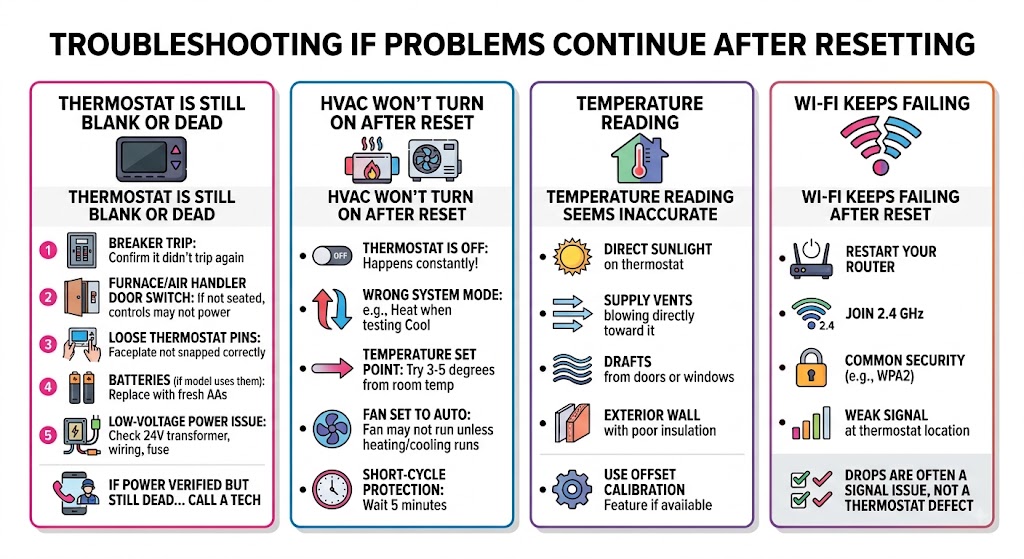
Thermostat is still blank or unresponsive
Here’s what I check in this order:
- Breaker: confirm it didn’t trip again
- Furnace/air handler door switch: if the door isn’t seated, controls may not power
- Loose thermostat pins: faceplate not snapped correctly
- Batteries (if your model uses them): replace with fresh AAs
- Low-voltage power issue (24V transformer, wiring, fuse on control board)
If you’ve verified power and it’s still dead, that’s usually when it’s time to call a tech.
HVAC won’t turn on after reset
Check these common homeowner gotchas:
- Thermostat is set to Off (happens constantly)
- System set to Heat but you’re testing cooling (or vice versa)
- Temperature isn’t far enough from room temp (try 3 to 5 degrees)
- Fan set to Auto (fan may not run unless heating or cooling runs)
- Short-cycle protection delay (wait 5 minutes)
Temperature reading seems inaccurate
Things that throw off thermostat readings more than people realize:
- direct sunlight on the thermostat
- supply vents blowing directly toward it
- drafts from doors or windows
- mounted on an exterior wall with poor insulation behind it
Many models allow a small temperature offset calibration inside settings. If you consistently see a mismatch, that feature can help.
Wi-Fi keeps failing after reset
Try this before you factory reset again:
- Restart your router
- Confirm you’re joining 2.4 GHz
- Make sure your network uses common security (WPA2 is typically safest)
- Check for weak signal at the thermostat location
If the thermostat connects but drops often, it’s frequently a signal strength issue, not a thermostat defect.
Common mistakes I see when people reset Aprilaire thermostats
- Doing a factory reset without saving settings
- Then they’re stuck rebuilding schedules and humidity control from memory.
- Not seating the faceplate properly
- It powers up but behaves erratically because pins aren’t aligned.
- Holding the reset too long or not long enough
- Most pinhole resets work around 5 seconds.
- Assuming the AC is broken because it doesn’t start instantly
- Compressor delays are normal and protective.
What to do if your Aprilaire thermostat will not reset at all
If none of the reset methods work, here’s the practical path:
- Confirm power
- Breaker on
- HVAC door switch engaged
- Batteries fresh (if applicable)
- Inspect for simple issues
- Faceplate seated correctly
- No visible corrosion in battery compartment
- Try a different reset type
- Power cycle → pinhole reset → factory reset (in that order)
- Look up your exact model manual
- Aprilaire sometimes changes menus between revisions
- Call support or a technician
- If the unit repeatedly locks up, there may be a power, wiring, or control-board problem.
Keeping your Aprilaire thermostat running smoothly (real-world advice)
Thermostats often get blamed for HVAC problems that actually start elsewhere. A few habits reduce issues a lot:
- Change filters regularly
- The U.S. Department of Energy notes that replacing a dirty, clogged filter can reduce an air conditioner’s energy use by 5 to 15 percent in many cases.
- Keep the thermostat area clean
- Dust buildup and airflow issues around the thermostat can contribute to odd readings.
- Avoid constant big swings
- Large rapid changes can cause comfort complaints and make systems run harder than necessary.
When you should call an HVAC technician
I’m all for DIY resets, but I also don’t want you wasting your weekend if the problem isn’t the thermostat.
Call a pro if:
- the thermostat is blank and you’ve confirmed power and batteries
- you smell burning or see signs of overheating
- the system short cycles (turns on and off rapidly)
- the same error returns immediately after reset
- you suspect low-voltage wiring or control board issues
FAQ
Will resetting my Aprilaire thermostat erase my schedule?
Power cycle or pinhole reset: usually no
Factory reset: yes, it typically wipes schedules and custom settings
How long should I press the Reset button?
Most models respond to about 5 seconds for a pinhole reset. Some internal reset buttons may suggest 5 to 10 seconds.
Why does my AC not start right after a reset?
Many systems have a built-in delay to protect the compressor. Waiting 5 minutes is normal.