If your phone charger has been living in the outlet for months, you’re not alone. In most homes I walk into, there are chargers everywhere. Bedside tables, kitchen counters, living room end tables, power strips behind TVs. It feels harmless because it’s “just a charger.”
But here’s the truth: unplugging chargers when you’re not using them is usually the smarter habit. Not because your house will instantly burn down if you don’t, and not because one charger will wreck your power bill. It’s because small risks and small waste add up, especially when you multiply them across a whole home.
In this guide, I will tell you all you need to know.
- Quick Answer: Yes, Unplug Them When You Can
- Why Unplugging Chargers Is Worth It
- How Much Electricity Does a Charger Use When Idle? (With Real Math)
- Table: Estimated Annual Cost of an Idle Charger (Plugged In, Not Charging)
- What this means in plain English
- 3) Surges and Spikes: Unplugging Reduces Exposure
- 4) Shock and “Live Tip” Risk (Especially With Kids and Pets)
- 5) Chargers Last Longer When They’re Not Heat-Soaked 24/7
- 6) It Builds the Right Habit for Truly Dangerous Items
- Which Chargers Should You Unplug vs Leave Plugged In?
- Charging Safety Rules I Tell Homeowners (Simple and Effective)
- “But It’s Annoying to Unplug” — Easy Ways to Make It Automatic
- Common Questions I Hear (And Straight Answers)
- My Bottom Line (What I Do at Home)
- Quick Checklist: When You Should Definitely Unplug
Quick Answer: Yes, Unplug Them When You Can
Yes, you should unplug chargers when they’re not in use, especially:
- older chargers and cables
- cheap no-name chargers
- fast chargers and laptop bricks
- chargers used in bedrooms on bedding or near curtains
- chargers in garages (dust, heat, flammables)
- anything charging large batteries (e-bikes, tools)
It’s usually okay to leave some chargers plugged in when:
- the device needs constant power (security camera, video doorbell, medical device)
- it’s a low-draw charger designed to stay docked (electric toothbrush base)
- the charger is high-quality, certified, in good condition, and in a ventilated spot
Why Unplugging Chargers Is Worth It
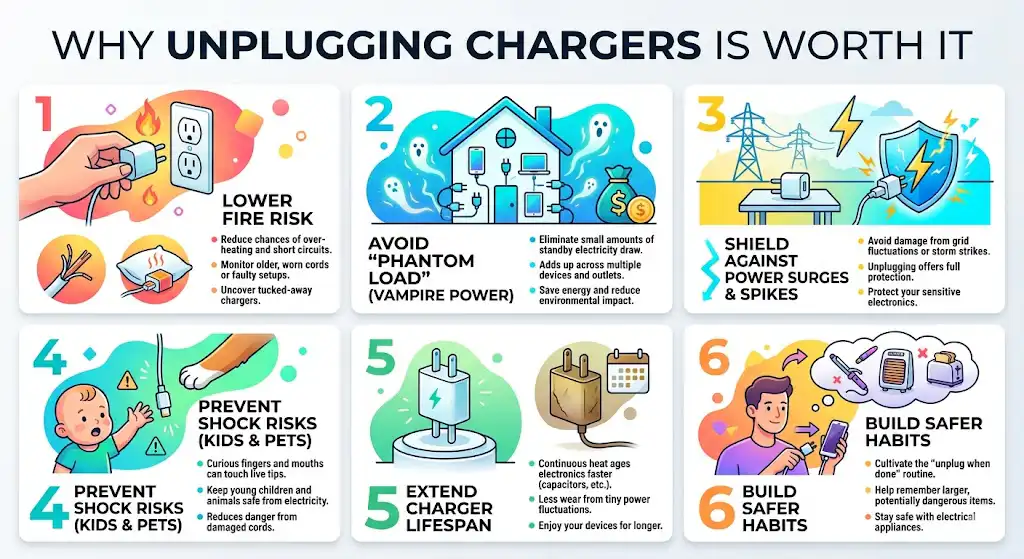
1) Fire Risk: Low for Good Chargers, Higher Than People Think for Bad Setups
Most modern, name-brand chargers are designed with safety features. But in real homes, people use:
- worn cords with cracked insulation
- off-brand bricks with poor internal protection
- loose outlets and overloaded power strips
- chargers tucked under pillows or behind furniture where heat can’t escape
That’s where problems start.
What I’ve personally seen on service calls:
- scorched outlet faces behind beds where chargers were always plugged in
- power strips that got warm because they were buried under clothes
- cords pinched by recliners and bed frames until the copper was exposed
A charger doesn’t have to burst into flames to be a problem. Heat damage builds over time, and once plastic starts discoloring or outlets get loose, risk goes up.
My rule: if a charger ever feels hot (not just warm) or the cord is damaged, stop using it and replace it.
2) Phantom Load: One Charger Is Tiny, a House Full Adds Up
Even when nothing is connected, many chargers still draw a small amount of electricity. That’s commonly called:
- phantom load
- standby power
- vampire power
The U.S. Department of Energy and researchers like Lawrence Berkeley National Laboratory have estimated that standby power can account for roughly 5 to 10 percent of residential electricity use, and in some situations it can be higher depending on how many devices you have and how efficient they are.
A single phone charger won’t move your bill much. But most homes don’t have one charger.
How Much Electricity Does a Charger Use When Idle? (With Real Math)
To keep this honest, I like to show the numbers in a simple way.
Formula
- Annual kWh = (Watts ÷ 1000) × 8760 hours
- Annual cost = Annual kWh × your electric rate
Below is a practical estimate using an average electricity price of $0.17 per kWh (your local rate may be higher or lower).
Table: Estimated Annual Cost of an Idle Charger (Plugged In, Not Charging)
| 0.1 W | 0.88 kWh | $0.15 | very efficient modern charger |
| 0.3 W | 2.63 kWh | $0.45 | common modern small charger |
| 0.5 W | 4.38 kWh | $0.74 | higher draw standby behavior |
| 2.0 W | 17.52 kWh | $2.98 | older adapters, some multi-port bricks |
| 5.0 W | 43.80 kWh | $7.45 | inefficient/older chargers, certain power supplies |
What this means in plain English
- If you have 10 chargers averaging 0.3 W idle, you’re around $4 to $5 per year.
- If you have a mix of laptop bricks, multi-port hubs, older adapters, the cost can climb.
- Unplugging isn’t just about dollars. It’s also about reducing unnecessary heat and wear.
3) Surges and Spikes: Unplugging Reduces Exposure
Power surges don’t only happen during lightning storms. They can also come from:
- utility switching
- neighborhood grid fluctuations
- large appliances cycling (HVAC, refrigerators)
- storms impacting lines nearby
I’ve seen sensitive boards fail in HVAC systems after power events, and while chargers are cheaper than a furnace control board, they’re still electronics.
If a charger is not plugged in, it’s not exposed.
If you don’t want to constantly unplug, the next best thing is using a quality surge protector (not a $6 power strip) in the right location.
4) Shock and “Live Tip” Risk (Especially With Kids and Pets)
A plugged-in charger is energized. Even if nothing is connected to it, the internal components are active, and a damaged cord can expose conductors.
If you have:
- toddlers who tug cords
- pets that chew wires
- chargers near the floor or dangling
…then unplugging is a simple safety move.
5) Chargers Last Longer When They’re Not Heat-Soaked 24/7
Electronics age faster with heat. That’s not an opinion, it’s basic component physics. Capacitors, solder joints, plastics — they all degrade faster when they spend years warm.
Leaving a charger plugged in all the time can:
- keep it slightly warm constantly
- increase wear from tiny power fluctuations
- shorten its useful life
Is it guaranteed? No. But it’s common enough that I treat unplugging as “cheap insurance.”
6) It Builds the Right Habit for Truly Dangerous Items
This one matters more than people realize.
If you never unplug chargers because it feels unnecessary, it’s easier to also forget:
- curling irons
- space heaters
- heated blankets
- portable cookers
Building the “unplug when done” habit on something easy (a phone charger) helps you stay safer with the stuff that actually burns houses down.
Which Chargers Should You Unplug vs Leave Plugged In?
Table: What I Recommend in Real Homes
| Phone charger (name brand, good condition) | Sometimes | Okay to leave if accessible and ventilated, but unplugging is better |
| Fast chargers (high watt USB-C, multi-port bricks) | Prefer unplug | Unplug when not in use; they’re more complex and can run warmer |
| Laptop chargers | Prefer unplug | Unplug when not charging; also reduces surge exposure |
| E-bike, e-scooter, hoverboard chargers | No | Unplug when not charging, and never charge unattended overnight |
| Power tool battery chargers | Prefer unplug | Unplug when done; garage environments add dust/heat risk |
| Electric toothbrush base | Usually yes | Generally fine to leave plugged in if it’s designed for docking |
| Smart home devices (doorbell cam, security cam hub) | Yes | Needs constant power; use surge protection |
| Medical or home health devices | Yes | Keep powered; use surge protection and follow manufacturer guidance |
| Old, loose, warm, or damaged chargers | No | Replace, don’t “manage” a failing charger |
Charging Safety Rules I Tell Homeowners (Simple and Effective)
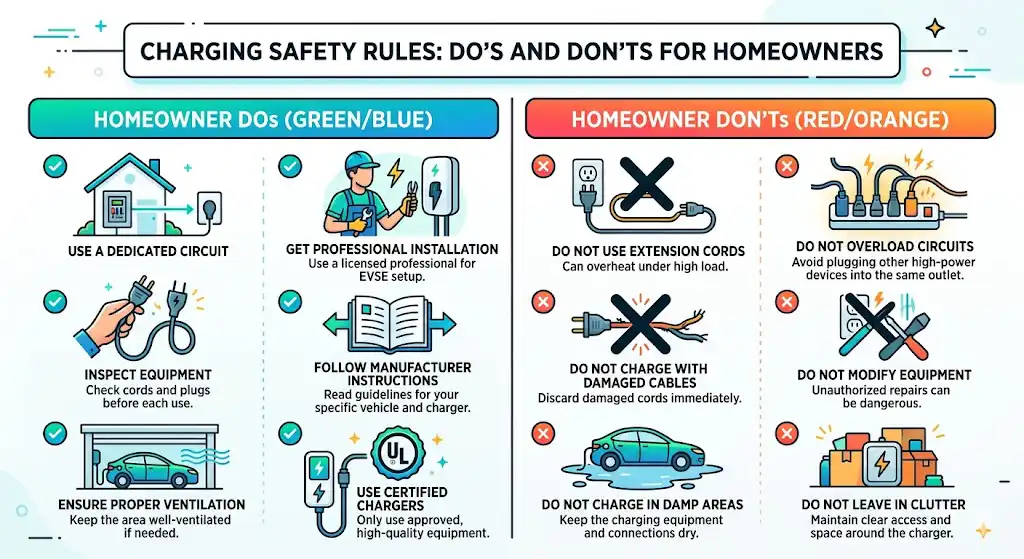
Do
- Use certified chargers from reputable brands (look for UL listing or equivalent safety certification in your region).
- Give chargers airflow. Heat needs to escape.
- Replace cords immediately if you see fraying, cracking, or the plug feels loose.
- Use a surge protector for charging stations, especially in storm-prone areas.
- Keep charging off beds and couches. Use a nightstand, not a pillow.
Don’t
- Don’t charge a phone under a pillow, blanket, or mattress edge.
- Don’t use bargain-bin, no-name chargers for high-value devices.
- Don’t daisy-chain power strips or overload an outlet.
- Don’t charge large batteries (e-bikes, tool packs) while sleeping or when nobody is home.
- Don’t keep using a charger that buzzes, smells odd, or gets hot.
“But It’s Annoying to Unplug” — Easy Ways to Make It Automatic
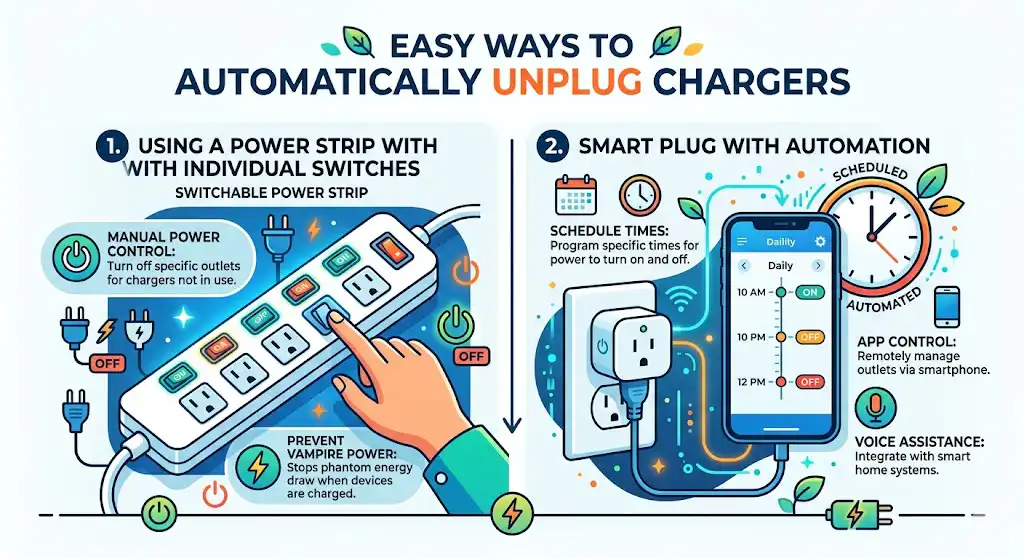
I get it. Some outlets are behind beds or furniture, and nobody wants to play contortionist every day. Here are solutions that actually stick.
1) Put chargers on a switched power strip
Plug your common chargers into one strip and flip one switch at night.
2) Use a smart plug for your charging station
Schedule it to shut off during the hours you never charge (like 1 a.m. to 6 a.m.). That way, even if you forget, the power cuts.
3) Move the charging point somewhere you can reach
If you can’t reach the outlet easily, you won’t unplug. A simple outlet extender can make the habit realistic.
4) Add “unplug” to an existing routine
When you pick up your phone in the morning, unplug the charger as part of the same motion. That’s the easiest behavioral hack.
Common Questions I Hear (And Straight Answers)
Do chargers really draw power when nothing is connected?
Many do. Some draw extremely little, but a lot of chargers still consume standby power just by being plugged in.
Is it dangerous to leave an iPhone or Samsung charger plugged in?
A genuine, certified charger in good condition is generally low risk in a good setup. The bigger danger comes from:
counterfeit chargers
damaged cables
poor ventilation
charging on bedding
overloaded power strips
If I have a surge protector, do I still need to unplug?
A quality surge protector helps a lot, but it’s not perfect forever (surge components wear out). If you’re leaving chargers plugged in long-term, surge protection is the minimum, and unplugging is still the best isolation.
What should I always unplug no matter what?
If you want one simple rule you can live by:
Unplug anything that makes heat (hair tools, heaters, heating pads)
Unplug large battery chargers when not actively charging
Unplug anything damaged or getting hot
My Bottom Line (What I Do at Home)
In my own house, I don’t obsess over every single plug. But I do this:
- I unplug laptop chargers and fast chargers when I’m done.
- I keep a charging station on a surge protector that’s easy to switch off.
- I never leave big battery chargers running unattended.
- If a charger gets warm in a way that feels abnormal, I replace it. No debate.
So should you unplug chargers when not in use?
Most of the time, yes. It’s a small habit that improves safety, reduces wasted power, and helps your chargers last longer. And the more devices you have in your home, the more that “small habit” starts to matter.
Quick Checklist: When You Should Definitely Unplug
- The charger is hot to the touch
- The cable is frayed, bent, or loose
- You’re charging on bedding, a couch, or near curtains
- It’s an off-brand fast charger or multi-port brick
- It charges large batteries (tools, e-bike, scooter)
- You’re leaving the house or going to sleep