I’m Nathan. I’ve worked as an HVAC technician for over 10 years, and I’ve installed and configured a lot of Ecobee thermostats in real homes with real comfort problems. In this guide, I’m going to walk you through setting up your Ecobee the right way, not just getting it powered on, but actually dialing in your comfort settings, holds, schedules, sensors, and energy saving features so it works the way you expect.
If you follow this page in order, you will end up with:
- A properly wired and configured Ecobee
- Wi‑Fi and app control working reliably
- Heat, cool, or auto changeover set correctly
- A schedule that matches your life
- Sensors and Eco+ tuned for comfort and savings
- Quick safety note before you touch any wires
- What you need before setup
- Step 1: Unbox and verify you have everything
- Step 2: Remove your old thermostat the right way
- Step 3: Mount the Ecobee baseplate
- Step 4: Connect wires to the Ecobee terminals
- Step 5: Power up and run the on-screen setup wizard
- Step 6: Connect Ecobee to Wi‑Fi and pair the app
- How to set the temperature on Ecobee (manual change)
- How to set your Ecobee thermostat to hold a temperature
- How to set Ecobee to Cool, Heat, or Auto
- How to set a schedule on your Ecobee thermostat
- A practical schedule that works for most homes (example)
- Fine tuning comfort using Ecobee sensors
- Turn on Eco+ (energy savings) without sacrificing comfort
- Vacation Mode (best way to protect your home while saving money)
- Common Ecobee problems and fixes (the stuff I see on service calls)
- FAQ: Ecobee setup questions I get all the time
Quick safety note before you touch any wires
Turn off power to your HVAC equipment at the breaker before removing your old thermostat. Thermostat wires are low voltage, but you can still short a fuse on the furnace control board (common service call I see) or damage equipment.
If you are not comfortable with wiring, or you open the wall and see extra unused wires, a splice mess, or a heat pump setup you are unsure about, it is completely fine to stop and bring in a pro.
What you need before setup
Tools and info checklist
| Phone with Ecobee app | Faster setup, remote control | Do app setup near the thermostat for pairing |
| Wi‑Fi name and password | Needed for remote access | 2.4 GHz works most reliably in basements and older homes |
| Small screwdriver | Terminal screws | Magnetic tip helps a lot |
| Level (optional) | Looks clean on wall | Not required for function |
| Photos of old thermostat wiring | Avoids mistakes | Take a photo before removing any wire |
Confirm your system type (this affects settings)
Most homes fall into one of these:
- Conventional furnace + AC
- Heat pump
- Boiler or electric baseboard
- Multi-stage systems
Step 1: Unbox and verify you have everything

Most Ecobee kits include:
- Thermostat
- Wall plate and mounting screws
- Wire labels
- Optional Power Extender Kit (PEK) on some models
- Remote sensor (some bundles)
If you are missing the PEK and you do not have a C wire, your install may pause here. Some models come with the PEK, others depend on the bundle.
Step 2: Remove your old thermostat the right way
- Turn off HVAC power at the breaker.
- Pull the old thermostat off its wall plate.
- Take a clear photo of the wires connected to terminals.
- Label each wire using the terminal letters, not the wire colors.
Important: Wire colors are not reliable. I see white used for cooling and yellow used for heating all the time. Trust terminals, not colors.
Step 3: Mount the Ecobee baseplate
- Feed the wires through the center opening.
- Level the baseplate.
- Screw it into the wall (use anchors if needed).
Step 4: Connect wires to the Ecobee terminals
Ecobee terminals are designed to be straightforward, but the key is matching your old thermostat terminal letters to the Ecobee labels.
Common thermostat terminals (plain-English cheat sheet)
| R / Rh / Rc | Power | 24V power from transformer |
| C | Common | Needed for steady power to smart thermostats |
| Y / Y1 | Cooling | Turns on AC compressor |
| Y2 | Second stage cooling | For 2-stage AC |
| W / W1 | Heat | Furnace or boiler heat call |
| W2 | Second stage heat | For 2-stage heat |
| G | Fan | Indoor blower |
| O/B | Heat pump reversing valve | Changes between heat and cool on heat pumps |
| AUX / E | Auxiliary heat | Backup heat for heat pumps |
About the C wire (this is where many installs go wrong)
Ecobee prefers a C wire. If you do not have one:
- Some homes have an unused wire in the wall that can be connected to C at the furnace board.
- If you do not have an extra wire, you may need the PEK.
- In some cases, running a new wire is the cleanest long term solution.
Step 5: Power up and run the on-screen setup wizard
Once wires are connected:
- Snap the thermostat onto the baseplate.
- Restore power at the breaker.
- The Ecobee should boot and launch the setup wizard.
Step 6: Connect Ecobee to Wi‑Fi and pair the app
On the thermostat
- Open Main Menu
- Go to Settings
- Select Wi‑Fi
- Choose your network and enter password
On your phone
- Download the Ecobee app (iOS or Android)
- Sign in or create an account
- Add the thermostat and complete pairing
Once paired, you can change temperature, set schedules, and get alerts remotely.
How to set the temperature on Ecobee (manual change)
When you want it warmer or cooler right now:
- Wake the thermostat screen.
- Tap the current temperature or use the temperature slider.
- Set your desired temperature.
- Choose how long you want the change to hold.
Most Ecobee models will give you hold options such as:
- Until next scheduled activity
- For a set time (example 2 hours)
- Until you change it again (depends on hold settings)
How to set your Ecobee thermostat to hold a temperature
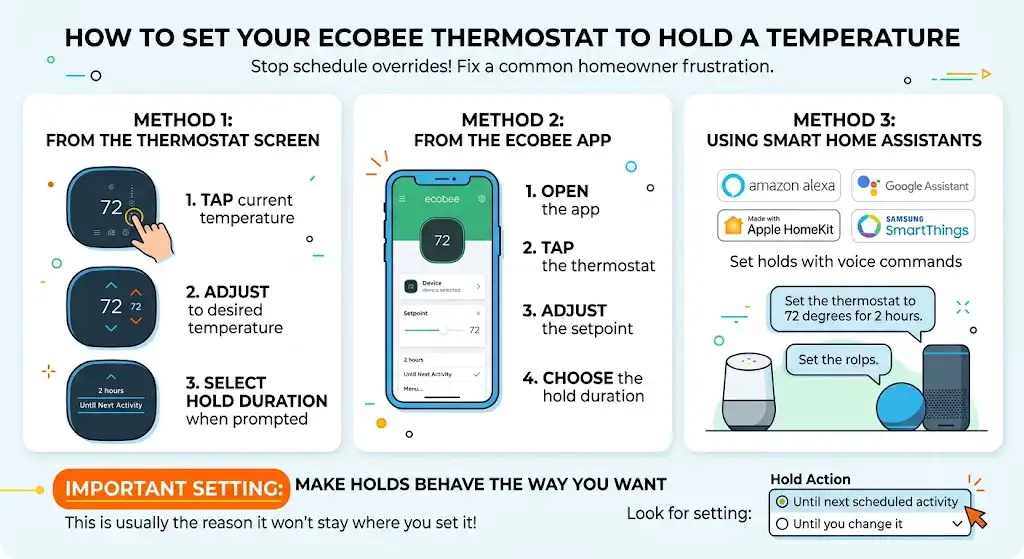
This is one of the most common homeowner frustrations I fix. People change the temp, and then Ecobee changes it back because the schedule takes over.
Method 1: Hold temp from the thermostat screen
- Tap the current temperature
- Adjust to the temperature you want
- Select the hold duration when prompted
Method 2: Hold temp from the Ecobee app
- Open the app
- Tap the thermostat
- Adjust the setpoint
- Choose the hold duration
Method 3: Hold temperature using smart home assistants
If you use integrations, you can set holds through:
- Amazon Alexa
- Google Assistant
- Apple HomeKit
- Samsung SmartThings
Example voice command: “Set the thermostat to 72 degrees for 2 hours.”
Make holds behave the way you want (important setting)
On many Ecobee setups, you can control whether a manual change stays until the next scheduled event or stays indefinitely.
Look for a setting similar to:
- Hold Action: Until next scheduled activity, Until you change it
If your thermostat “won’t stay where you set it,” this setting is usually the reason.
How to set Ecobee to Cool, Heat, or Auto
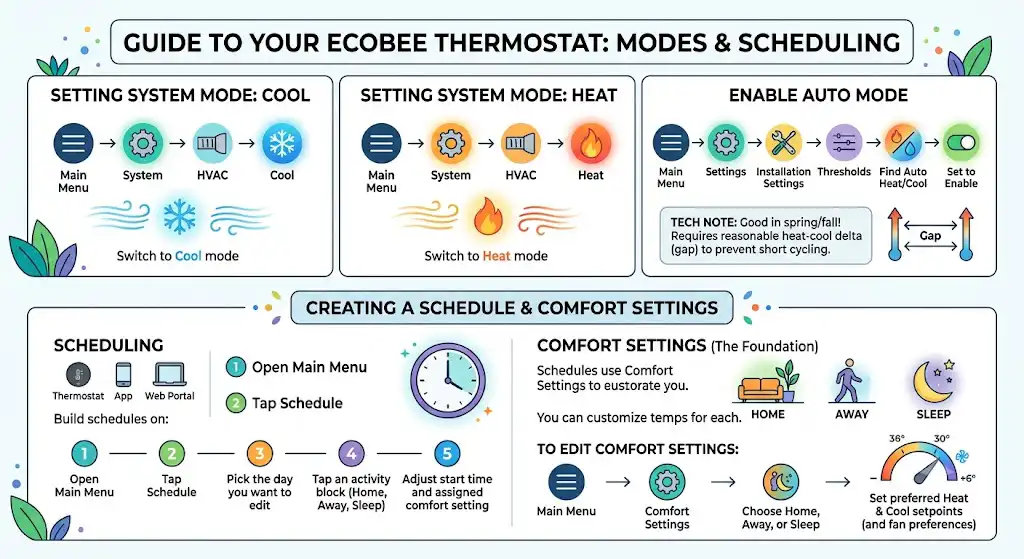
Switch to Cool mode
- Open Main Menu
- Go to System
- Select HVAC
- Choose Cool
Switch to Heat mode
Same path:
- Main Menu > System > HVAC > Heat
Enable Auto (Auto Heat/Cool changeover)
If you want Ecobee to automatically heat or cool as needed, you must enable Auto on some installs.
- Main Menu
- Settings
- Installation Settings
- Thresholds
- Find Auto Heat/Cool
- Set it to Enable
My HVAC tech note: Auto mode is great in spring and fall, but you need a reasonable heat-cool minimum delta (the gap) so the system does not short cycle between heat and cool.
How to set a schedule on your Ecobee thermostat
You can build schedules:
- On the thermostat
- In the app
- Through the Ecobee web portal (if you use it)
Scheduling on the thermostat (or app)
- Open Main Menu
- Tap Schedule
- Pick the day you want to edit
- Tap an activity block (Home, Away, Sleep)
- Adjust the start time and assigned comfort setting
Comfort Settings are the foundation
Ecobee schedules typically use Comfort Settings such as:
- Home
- Away
- Sleep
You can customize the temperatures for each one.
To edit Comfort Settings:
- Main Menu
- Comfort Settings
- Choose Home, Away, or Sleep
- Set your preferred heat and cool setpoints (and fan preferences if available)
A practical schedule that works for most homes (example)
Here is a solid starting point I recommend to many homeowners. Adjust based on your comfort and humidity.
Example weekday schedule
| 6:30 AM | Home | 68 F | 75 to 78 F |
| 8:30 AM | Away | 62 to 64 F | 80 to 82 F |
| 5:30 PM | Home | 68 to 70 F | 75 to 78 F |
| 10:30 PM | Sleep | 62 to 66 F | 76 to 80 F |
Why this works: It reduces runtime when you are asleep or away without making the system work overtime to recover.
Quick energy reality check (useful stats)
- The U.S. Department of Energy commonly recommends 68 F while you are awake and lower when you are sleeping or away in winter.
- ENERGY STAR has reported typical smart thermostat savings around 8 percent on heating and cooling in many households, but real savings depend heavily on your schedule, insulation, and equipment.
- Ecobee marketing commonly claims savings “up to” the mid 20 percent range in ideal usage patterns. In my experience, the biggest savings come when you actually use schedules, Away settings, and sensors correctly.
Fine tuning comfort using Ecobee sensors
If your house has hot and cold rooms, sensors can help a lot, but only if you place and configure them correctly.
Where to place remote sensors
Best locations:
- The room you use most during that time of day (living room in evenings, bedroom at night)
- About 4 to 5 feet off the floor
- Away from supply vents, exterior doors, direct sunlight, TVs, lamps
Avoid:
- Right above a vent
- On an exterior wall that gets cold
- Behind curtains
Enable and configure sensors
- Open Main Menu
- Tap Sensors
- Select which sensors participate in each Comfort Setting (Home, Away, Sleep)
Follow Me and Smart Home/Away
Depending on your model and settings, Ecobee can:
- Use occupancy to focus on rooms that are actually being used (Follow Me style behavior)
- Automatically switch to Away temperatures if nobody is home (Smart Home/Away)
My technician advice: Occupancy features are great, but if you have pets or a room that occasionally gets motion, you may need to adjust sensor participation so it does not “chase” motion in the wrong space.
Turn on Eco+ (energy savings) without sacrificing comfort
Eco+ can automatically adjust setpoints based on:
- Occupancy behavior
- Utility time-of-use rates (if available)
- Weather and system performance
How to enable Eco+
- Main Menu
- Eco+
- Follow the prompts and choose the level of savings you want
When I suggest you dial Eco+ down
If you notice:
- Temperature swings that feel too aggressive
- Your home takes too long to recover
- You have a variable schedule and you prefer manual control
In that case, keep scheduling and sensors, but use a lighter Eco+ setting.
Vacation Mode (best way to protect your home while saving money)
When you leave for several days, do not just shut the system off. You still need freeze protection in winter and humidity control in summer.
How to set Vacation
- Open the app or thermostat menu
- Find Vacation (location varies by model/app version)
- Set start and end dates
- Choose conservative setpoints
Typical vacation setpoints (general guidance):
- Winter: 55 to 60 F (avoid frozen pipes)
- Summer: 82 to 85 F (helps reduce humidity risk depending on climate)
Also enable notifications so you get alerts if temperature drops too low or rises too high.
Common Ecobee problems and fixes (the stuff I see on service calls)
| Ecobee will not turn on | No power, no C wire, blown fuse | Check breaker, check furnace door switch, check low-voltage fuse, confirm C wiring or PEK |
| Not cooling to set temperature | Wrong mode, staging issue, dirty filter, refrigerant or equipment issue | Confirm Cool mode, check schedule holds, replace filter, confirm outdoor unit runs, call HVAC tech if system issue |
| No Heat option or no Cool option | Equipment not detected or wired wrong | Re-run equipment configuration, check wiring terminals |
| Wi‑Fi keeps dropping | Weak signal, router settings | Move router, use 2.4 GHz, reboot router, re-add network |
FAQ: Ecobee setup questions I get all the time
Why does my Ecobee change the temperature by itself?
Almost always one of these:
- Your schedule is taking over
- Smart Home/Away is adjusting based on occupancy
- Eco+ is making energy adjustments
- You set a temporary hold “until next activity,” and the next activity started
Are Ecobee sensors accurate?
They are generally very good, but placement matters. Put a sensor in direct sunlight and it will read high. Put it by a drafty door and it will read low. If a sensor is “wrong,” it is usually the room conditions, not a defective sensor.