
My name is Nathan. I’ve worked as an HVAC technician for over 10 years, and one of the most common heat pump headaches I see after a thermostat swap is simple but confusing: heating and cooling are reversed.
You set the thermostat to Cool and the vents blow warm air. Or you call for Heat and it feels like the AC is running. Nine times out of ten, the fix is in one setting:
Heat pump orientation: O or B.
This guide breaks it down in plain language, shows you how to set it on Nest thermostats, and (most importantly) how to confirm you picked the right one instead of guessing.
- The quick answer: should you choose O or B?
- What “O” and “B” actually mean (in normal words)
- What is a reversing valve, and why does it matter so much?
- Which heat pump brands usually need B (energize in heating)?
- What the O/B wire does on a Nest thermostat (and how to know if you even have one)
- How to set heat pump orientation on a Nest thermostat
- How to tell your O/B setting is wrong (common symptoms)
- The best way to confirm O or B (how I do it in real houses)
- Why this matters: comfort, wear and tear, and power bills
- Common wiring notes (so you don’t chase the wrong problem)
- Light commercial systems: why O/B doesn’t always behave like residential
- My troubleshooting checklist (if you’re still stuck)
- FAQ: Heat pump orientation O or B
- The “golden rule” I live by: read the manual and the wiring diagram
The quick answer: should you choose O or B?
- O is the most common today.
With O, the thermostat energizes the reversing valve in cooling. - B is less common.
With B, the thermostat energizes the reversing valve in heating.
If you’re installing a Nest thermostat, Nest typically defaults to O, which is correct for a lot of systems. But if you have certain brands (Rheem and Ruud are the big ones), you may need B.
What “O” and “B” actually mean (in normal words)
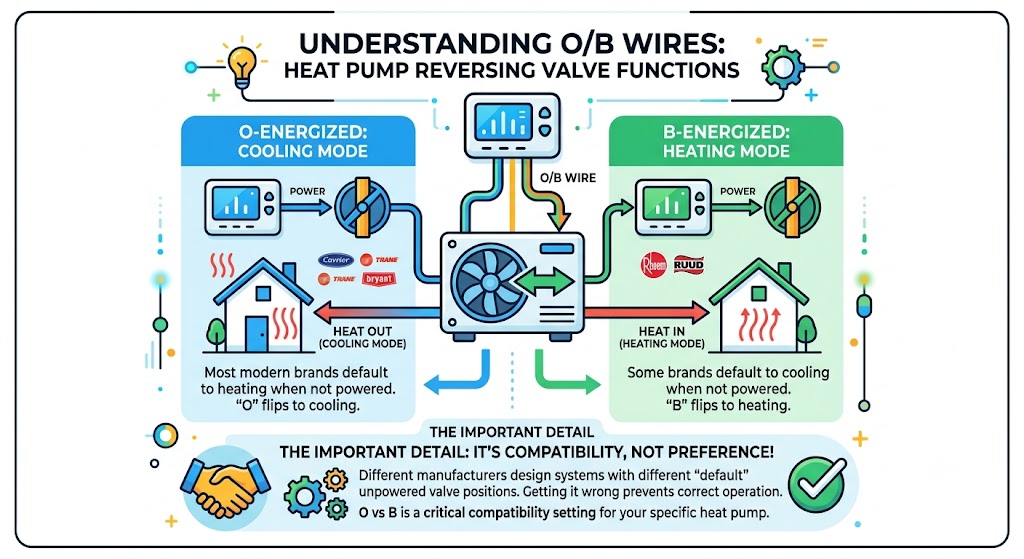
A heat pump has a part called a reversing valve. That valve decides whether the system is set up to:
- move heat out of your home (cooling mode), or
- move heat into your home (heating mode)
Your thermostat controls that valve through the O/B wire.
O vs B behavior table
| O | Energized in cooling | Most modern brands default to heating when not powered, and “O” flips to cooling |
| B | Energized in heating | Some brands default to cooling when not powered, and “B” flips to heating |
The important detail (and the reason people get this wrong) is this:
Different manufacturers designed their systems with different “default” valve positions when the valve is not energized.
So O vs B is not a preference. It’s a compatibility setting.
What is a reversing valve, and why does it matter so much?
A reversing valve is a refrigerant-direction valve in the outdoor unit (or sometimes in packaged equipment). It shifts between two positions:
- In one position, the system operates like a normal air conditioner (indoor coil absorbs heat, outdoor coil rejects heat).
- In the other position, it reverses the refrigerant flow so the system can heat (outdoor coil absorbs heat, indoor coil rejects heat).
From the homeowner’s side, this is the magic that makes one piece of equipment do both heating and cooling.
From the technician’s side, this is why one wrong thermostat setting can make it feel like the system is totally broken when it’s not.
Which heat pump brands usually need B (energize in heating)?
In the field, B is less common, but it absolutely still exists. These are the manufacturers I treat as “check B first” brands.
Manufacturers commonly associated with B orientation.
| Rheem | B | Common “reversed” calls after thermostat replacement |
| Ruud | B | Same family as Rheem |
| WeatherMaker | B (less common today) | Always verify on the unit wiring diagram |
| Ameristar | B (varies) | Verify by model and wiring diagram |
| Bosch (air source) | Often B (verify) | Bosch water-source units may differ; always confirm by documentation |
Important: There are exceptions by model and product line. That’s why I never rely only on brand lore. I confirm using the unit wiring diagram or operation test.
What the O/B wire does on a Nest thermostat (and how to know if you even have one)
If your system is a heat pump, you’ll usually see an O/B terminal on the thermostat base, and typically an orange wire connected to it (orange is common, not guaranteed).
If you do not have an O or O/B connection at the thermostat:
- You may not have a heat pump (you may have a furnace plus AC), or
- The heat pump may be controlled differently (rare, but it happens in some commercial applications)
If you’re unsure, check your indoor unit: if you have terminals like Y, C, R, G, O/B, AUX/W2, that’s heat pump territory.
How to set heat pump orientation on a Nest thermostat
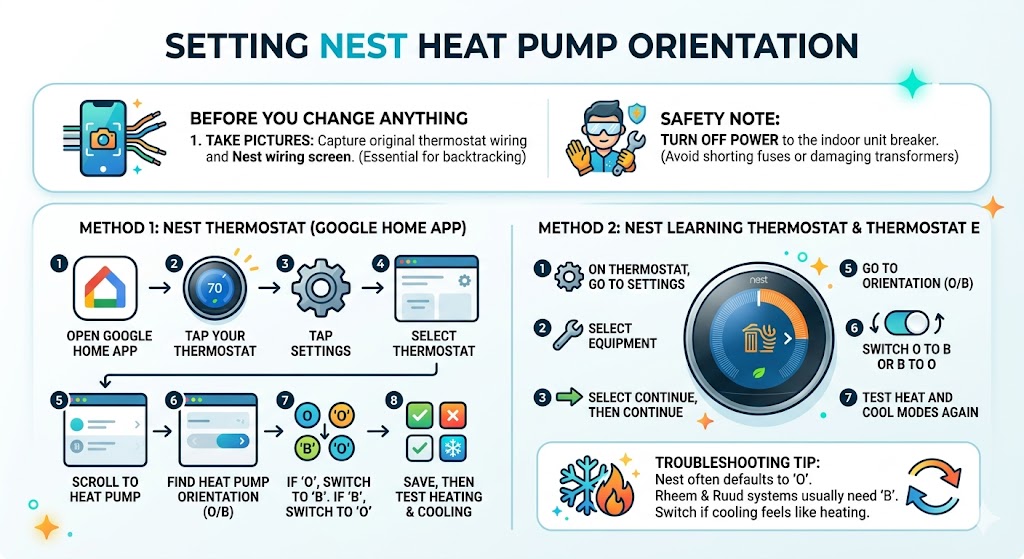
Before you change anything: if you can, take a picture of the original thermostat wiring and the Nest wiring screen. That photo saves a lot of time if you need to backtrack.
Safety note from me as a tech
You’re working with low voltage (24V control), but you can still short a fuse or damage a transformer. Turn off the power to the indoor unit at the breaker or service switch before moving wires.
1) Nest Thermostat (the newer Google Home app model)
- Open the Google Home app.
- Tap your thermostat
- Tap Settings
- Select Thermostat
- Scroll to Heat pump
- Find Heat pump orientation (O/B)
- If it’s set to O, switch to B.
- If it’s set to B, switch to O.
- Save, then test heating and cooling.
2) Nest Learning Thermostat and Nest Thermostat E
- On the thermostat, go to Settings.
- Select Equipment
- Select Continue, then Continue
- Select Heat Pump
- Go to Orientation (O/B)
- Switch O to B or B to O
- Test heat and cool modes again
Nest commonly defaults to O, which is why Rheem and Ruud homeowners often call me after a Nest install with “it’s heating on cool.
How to tell your O/B setting is wrong (common symptoms)
Here’s what I typically hear on service calls when the orientation is wrong.
Symptoms checklist
| Set thermostat to Cool | Air feels warm, outdoor unit runs like it’s heating | O/B is likely flipped |
| Set thermostat to Heat | Air feels cool, may go into defrost-like behavior oddly | O/B is likely flipped |
| Cooling “works” but heating is awful | Heat strips run too much, high electric bill | Heat pump may be running cooling during a heat call, forcing AUX heat |
| System short cycles during mode change | Clicks, temp swings, uncomfortable | Control logic fighting wrong valve position |
One important detail: heat pumps don’t blow furnace-hot air, especially in mild weather. Heat pump supply air might feel “not that hot” but still heat the house. That’s different from being truly reversed.
The best way to confirm O or B (how I do it in real houses)
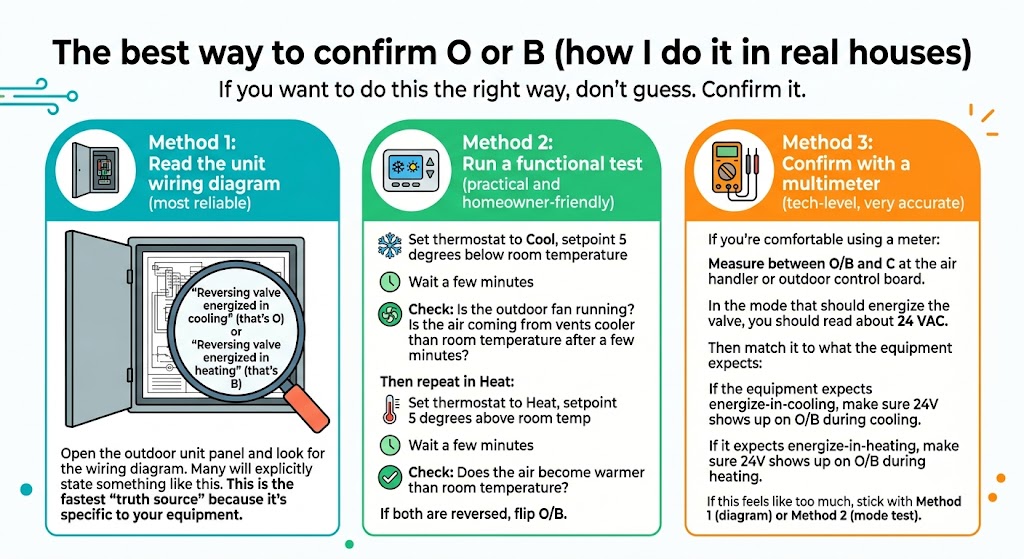
If you want to do this the right way, don’t guess. Confirm it.
Method 1: Read the unit wiring diagram (most reliable)
Open the outdoor unit panel and look for the wiring diagram. Many will explicitly state something like:
- “Reversing valve energized in cooling” (that’s O)
or - “Reversing valve energized in heating” (that’s B)
This is the fastest “truth source” because it’s specific to your equipment.
Method 2: Run a functional test (practical and homeowner-friendly)
- Set thermostat to Cool, setpoint 5 degrees below room temperature
- Wait a few minutes
- Check:
- Is the outdoor fan running?
- Is the air coming from vents cooler than room temperature after a few minutes?
Then repeat in Heat:
- Set thermostat to Heat, setpoint 5 degrees above room temp
- Wait a few minutes
- Check:
- Does the air become warmer than room temperature?
If both are reversed, flip O/B.
Method 3: Confirm with a multimeter (tech-level, very accurate)
If you’re comfortable using a meter:
- Measure between O/B and C at the air handler or outdoor control board.
- In the mode that should energize the valve, you should read about 24 VAC.
Then match it to what the equipment expects:
- If the equipment expects energize-in-cooling, make sure 24V shows up on O/B during cooling.
- If it expects energize-in-heating, make sure 24V shows up on O/B during heating.
If this feels like too much, stick with Method 1 (diagram) or Method 2 (mode test).
Why this matters: comfort, wear and tear, and power bills
When orientation is wrong, the system can still “run,” but it runs in a dumb way.
A big example is auxiliary heat strips. If the heat pump is accidentally in cooling while you call for heat, the thermostat may pull in AUX heat to try to satisfy the call. That can spike electric usage fast.
Heat pump efficiency in simple terms (helpful context)
At moderate outdoor temperatures, many air-source heat pumps deliver roughly:
- 2 to 4 units of heat for every 1 unit of electricity (COP about 2 to 4, depending on conditions)
Electric resistance heat strips, on the other hand, are roughly:
- 1 unit of heat for every 1 unit of electricity (COP about 1)
So when the system is forced into strip heat unnecessarily, you feel it in the bill.
Common wiring notes (so you don’t chase the wrong problem)
These are typical heat pump terminals you might see:
| R | 24V power (hot) |
| C | 24V common |
| Y | Compressor contactor (cooling and heating on a heat pump) |
| G | Indoor blower |
| O/B | Reversing valve |
| AUX/W2 | Electric heat strips or second-stage heat |
| E | Emergency heat (sometimes combined with AUX) |
Two common gotchas I see:
- O/B orientation is correct, but AUX/W2 is misconfigured, so the system uses strips too often.
- The thermostat was wired based on wire color instead of terminal letters at the old thermostat or air handler. Colors lie. Terminals don’t.
Light commercial systems: why O/B doesn’t always behave like residential
Most homeowners won’t deal with this, but I’m mentioning it because it explains why some setups look “wrong” if you’re used to residential heat pumps.
Some light commercial rooftop units use non-traditional logic, where:
- W1 might bring on compressors for heating.
- The control board decides to reverse the valve position internally
I’ve also seen older and oddball systems where:
- Y1 energizes the reversing valve.
- Y2 brings on the compressor.
Bottom line: if you’re working on anything commercial or “custom,” don’t assume O/B logic. Check the manual and the unit diagram.
My troubleshooting checklist (if you’re still stuck)
If flipping O/B didn’t fix it, here’s what I check next on service calls.
- Confirm you actually have a heat pump (outdoor unit should have a reversing valve and typically a defrost control)
- Verify thermostat is set to heat pump type, not conventional.
- Confirm O/B wire is landed on the correct terminal at the thermostat and air handler.
- Check for a blown low-voltage fuse at the air handler control board.
- Confirm 24V between R and C.
- Check that the reversing valve coil is connected and not damaged (tech-level)
- Confirm the system isn’t in defrost (temporary cool-ish air during heat can be normal)
- If it’s a dual-fuel system (heat pump plus gas furnace), confirm proper dual-fuel setup to avoid lockout or wrong staging.
If you’re at steps 4 to 8 and not comfortable, that’s the point where calling a tech is usually cheaper than guessing.
FAQ: Heat pump orientation O or B
Is it safe to try O then B to see which one works?
Usually, yes, as long as you’re only changing the thermostat setting and then testing. You’re not “breaking” the refrigerant system by flipping the control logic. The risk is more about comfort, unnecessary AUX heat, and confusion.
Why does my heat pump air not feel very hot in heating?
Normal. Heat pumps often supply air in the 85 to 100 degree range, depending on conditions, airflow, and staging. It can feel lukewarm compared to a furnace, but still heats the house.
What if I don’t see an O/B wire?
You might not have a heat pump. Or the system may be wired differently (rare). Check the equipment terminals at the indoor unit and the outdoor unit model type.
Does Nest default to O or B?
Nest commonly defaults to O orientation for heat pumps. That’s fine for many systems, but not all.
The “golden rule” I live by: read the manual and the wiring diagram
In HVAC, general rules get you close. The wiring diagram is correct.
If you want the cleanest answer for your exact system:
- Find the outdoor unit wiring diagram.
- Look for reversing valve control notes.
- Match your thermostat orientation to what the unit is designed for