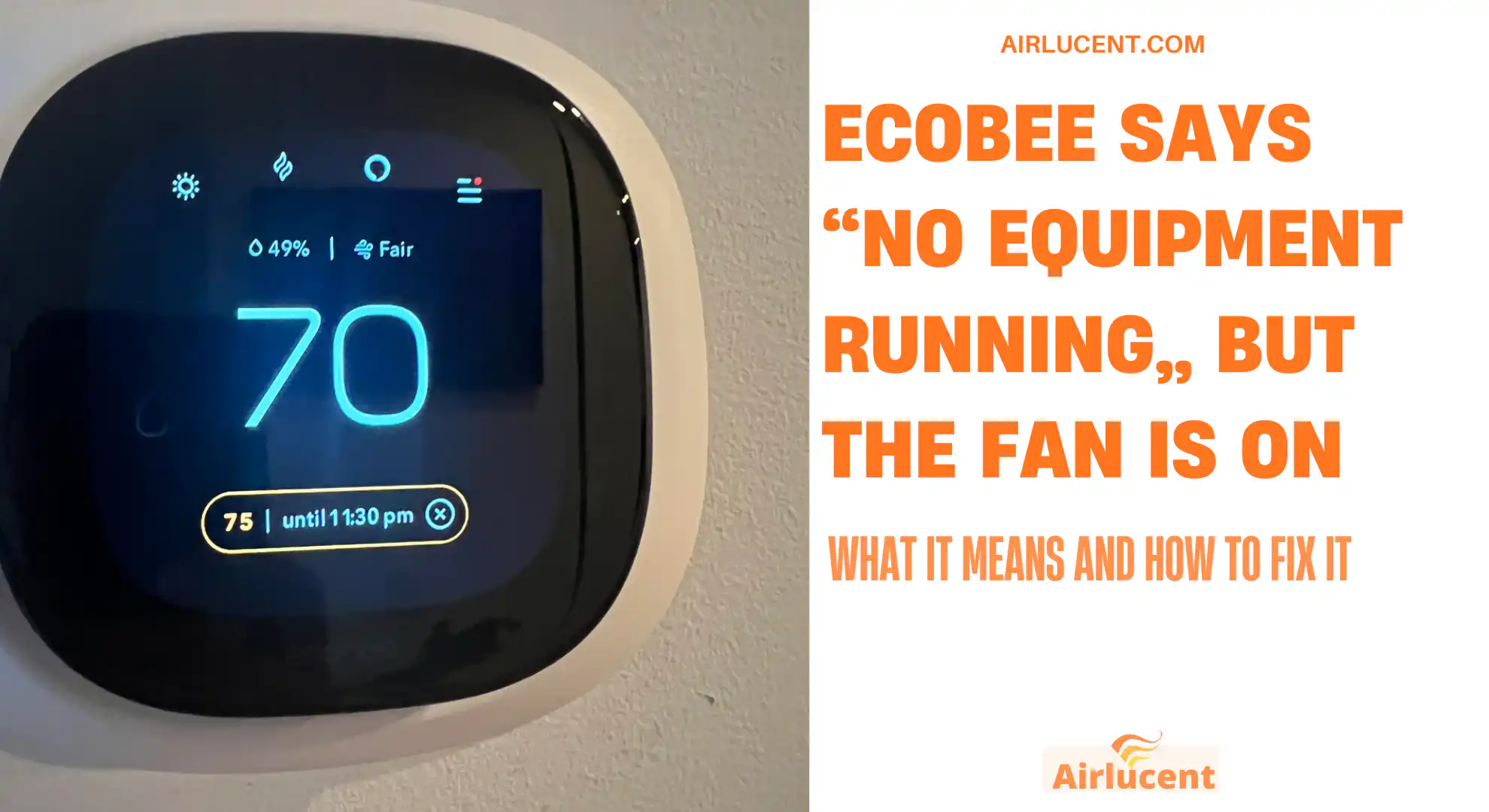
I’m Nathan, and I’ve worked as an HVAC technician for over 10 years. This exact complaint comes up a lot on service calls: you look at your Ecobee and it clearly says No equipment running, but you can hear air moving and the blower fan won’t shut off.
The good news is that this problem is usually diagnosable in 10 to 20 minutes, and many fixes are simple. The key is understanding one important thing:
Your Ecobee only reports what it is commanding. Your HVAC equipment can run the fan on its own (by design or due to a fault).
Below I’ll walk you through the most common causes, the quickest checks, and the deeper troubleshooting steps I use in the field.
- Quick Summary Table: Causes and Fixes
- Step 1: Check the Easy Stuff First (2 Minutes)
- Step 2: Reboot the Ecobee (My Go-To Quick Fix)
- Step 3: Determine Who Is Actually Running the Fan (Important)
- Step 4: The G-Wire Test (Best Diagnostic for This Problem)
- Most Common Real Causes (From My Service Calls)
- Power Cycle Reset (Works When the Control Board Is Glitched)
- How Much Money Can a Constant Fan Cost?
- When You Should Call a Pro (And Why)
- My Practical Fix Map (What I’d Do at Your House)
Quick Summary Table: Causes and Fixes
| Fan runs for a few minutes after heat stops | Normal furnace cool-down | Heat just ended and fan stops within 2 to 10 minutes | No repair needed |
| Fan runs constantly day and night | Fan setting set to On or Circulate | Ecobee fan setting shows On or a fan schedule | Set Fan to Auto, disable Circulate/schedules |
| Fan runs even when you remove the Ecobee from the wall | HVAC control board/relay issue | Ecobee removed and fan still runs | Reset power, diagnose board, relay, limit switch |
| Fan stops when you disconnect the G wire at Ecobee | G signal is causing fan run | Fan stops immediately when G removed | Correct wiring, check shorts, possible thermostat issue |
| Fan only runs when certain accessories run | Humidifier/dehumidifier or ventilator setup | Happens during accessory calls | Correct accessory wiring/config |
| Fan randomly runs, especially with smart home changes | Automation or software state mismatch | Recent integration change, HomeKit/Alexa/IFTTT routines | Remove automation, reboot, reconfigure |
Step 1: Check the Easy Stuff First (2 Minutes)
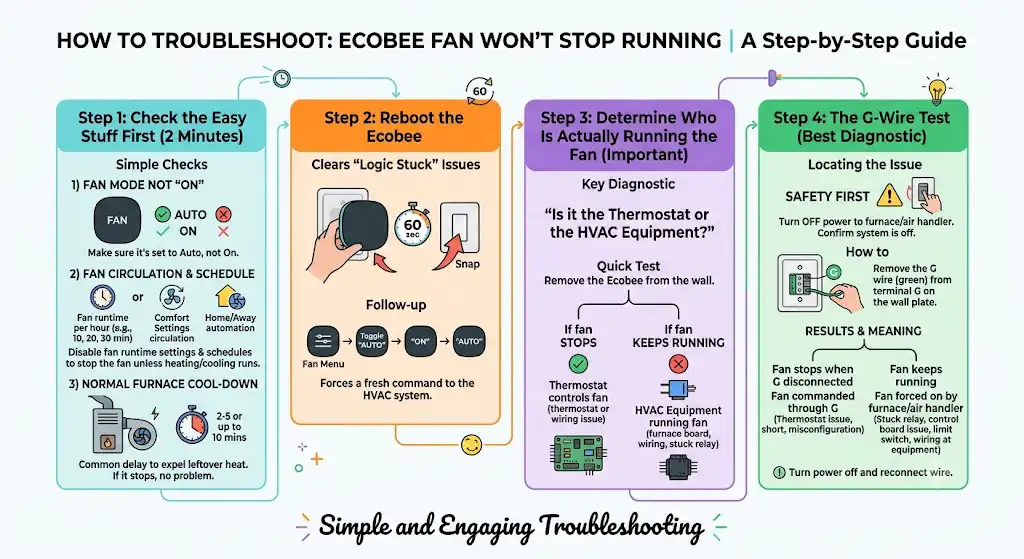
1) Confirm Fan Mode Is Not Set to “On”
On your Ecobee:
- Go to the main screen
- Tap the fan icon or fan menu
- Make sure it is set to Auto, not On
If it’s on “On,” the thermostat will run the blower even if no heating or cooling is running.
2) Check for “Fan Circulation” or a Fan Schedule
A lot of homeowners turn on circulation to even out temperatures. That’s fine, but it can look like a malfunction.
Look for settings like:
- Fan runtime per hour (example: 10, 20, 30 minutes per hour)
- Comfort settings that include fan circulation
- Home or Away automation that runs the fan
If you want the fan to stop completely unless heating/cooling runs, disable circulation and schedules.
3) Consider Normal Furnace Cool-Down
After heating ends, most furnaces keep the blower running to remove leftover heat from the heat exchanger. This is normal and can last:
- Common range: 2 to 5 minutes
- Sometimes: up to 10 minutes depending on furnace settings
If the fan always turns off after a short delay, you likely have no problem.
Step 2: Reboot the Ecobee (My Go-To Quick Fix)
This clears a surprising number of “logic stuck” issues.
- Pull the Ecobee thermostat straight off the wall plate
- Wait 60 seconds
- Snap it back on
Then go to Fan and toggle:
- Auto to On
- Then back to Auto
That forces a fresh command to the HVAC system.
Step 3: Determine Who Is Actually Running the Fan (Important)
Here’s the key diagnostic question I use on-site:
Is the thermostat calling for the fan, or is the HVAC equipment running the fan by itself?
Quick test: Remove the Ecobee from the wall
If you remove the Ecobee faceplate and the fan continues to run after a few minutes:
- The thermostat is not controlling the fan
- The issue is likely in the furnace/air handler control board, wiring, or a stuck relay
If the fan stops shortly after you remove the Ecobee:
- The thermostat or thermostat wiring is likely commanding the fan
Step 4: The G-Wire Test (Best Diagnostic for This Problem)
The green wire, usually on terminal G, is the fan control wire.
Safety first
Before touching wiring:
- Turn off power to your furnace/air handler at the switch or breaker
- Confirm the system is off
How to do the test
- Remove the Ecobee from the wall plate (leave the wall plate wired)
- Locate the G wire (typically green) connected to terminal G
- With power off, loosen the terminal and remove the G wire
- Restore power and observe
What the result means
| Fan stops when G is disconnected | Fan is being commanded through G (thermostat issue, wiring short, or misconfiguration) |
| Fan keeps running even with G disconnected | Fan is being forced on by the furnace/air handler (stuck relay, control board issue, limit switch, wiring at equipment) |
After the test, turn power back off and reconnect the wire unless you’re continuing the diagnosis.
Most Common Real Causes (From My Service Calls)
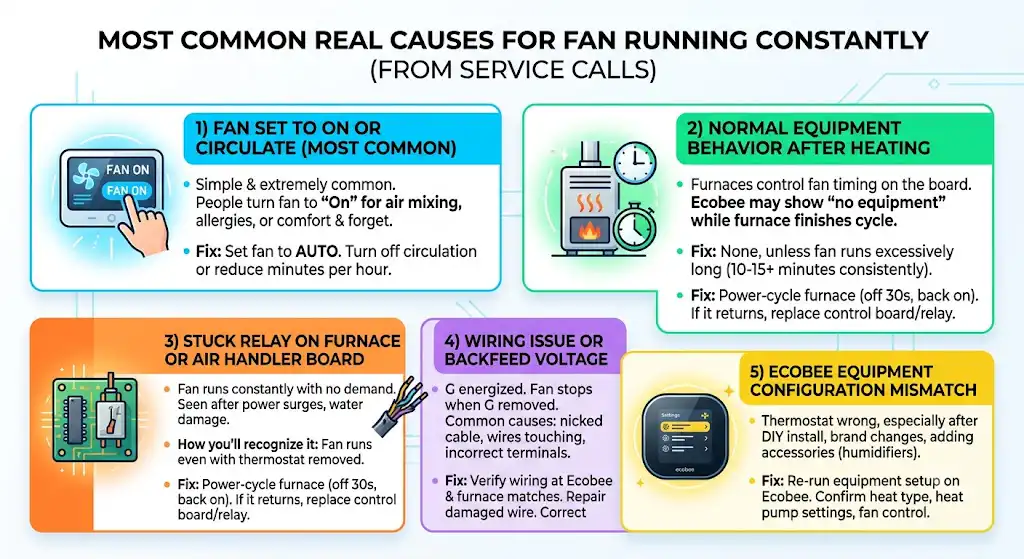
1) Fan is Set to On or Circulate (Most common homeowner setting)
This one is simple and extremely common. People turn the fan to “On” for air mixing, allergy season, or to reduce hot/cold spots and forget it.
Fix:
- Set fan to Auto
- Turn off circulation or reduce minutes per hour
2) Normal Equipment Behavior After Heating
Many furnaces control the fan timing on the control board. Ecobee may show “no equipment” because it is not calling anymore, but the furnace is still finishing its cycle.
Fix:
- None, unless the fan runs excessively long (more than 10 to 15 minutes consistently)
If it runs too long, I start suspecting a control board setting, a temperature limit issue, or a stuck relay.
3) Stuck Relay on the Furnace or Air Handler Control Board
A stuck fan relay will keep the blower running constantly even with no thermostat demand. I’ve seen this after power surges and after water damage near an air handler.
How you’ll recognize it:
- Fan runs even with thermostat removed
- Fan may run as soon as the system has power
Fix:
- Power-cycle the furnace (off 30 seconds, back on)
- If it returns, the control board or relay may need replacement
This is one of the most common “real repairs” behind this complaint.
4) Wiring Issue or Backfeed Voltage Keeping G Energized
If the fan stops when G is removed at the thermostat, the HVAC is receiving a fan signal through that circuit.
Common wiring causes I find:
- Nicked thermostat cable where wires touch
- G wire contacting R somewhere (at the furnace, in the wall, or at the thermostat plate)
- Incorrect terminal placement after thermostat replacement
Fix:
- Verify wiring at Ecobee and at the furnace control board match
- Repair damaged wire
- Correct miswired terminals
5) Ecobee Equipment Configuration Doesn’t Match Your System
Sometimes the thermostat is configured wrong, especially after:
- DIY installation
- Switching from another thermostat brand
- Adding accessories like humidifiers
Fix:
- Re-run equipment setup on Ecobee
- Confirm heat type, heat pump settings (if applicable), and fan control settings
Power Cycle Reset (Works When the Control Board Is Glitched)
If the fan is stuck on and you suspect the furnace board is “latched”:
- Turn off power to the furnace/air handler at the switch or breaker
- Wait 30 to 60 seconds
- Turn it back on
If the fan stays off afterward, you may have had a temporary control board logic issue. If it happens repeatedly, you likely have a relay/board problem or a wiring issue.
How Much Money Can a Constant Fan Cost?
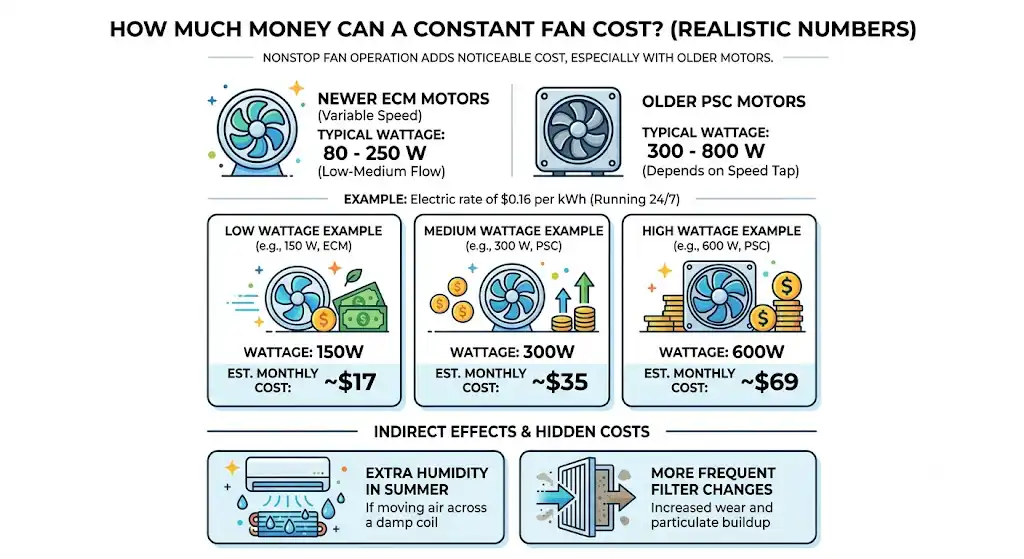
I’ve seen nonstop fan operation add noticeable cost, especially with older PSC blower motors.
Typical blower wattage ranges:
- ECM blower (newer variable speed): often 80 to 250 watts at low to medium airflow
- PSC blower (older): often 300 to 800 watts depending on speed tap
Here’s what that can look like at an electric rate of $0.16 per kWh (adjust for your area):
| 150 W | 24 | 108 kWh | $17 |
| 300 W | 24 | 216 kWh | $35 |
| 600 W | 24 | 432 kWh | $69 |
This doesn’t include the indirect effects like extra humidity in summer (if you’re moving air across a damp coil) or more frequent filter changes.
When You Should Call a Pro (And Why)
I’m all for DIY troubleshooting, but you should stop and call a licensed HVAC tech if:
- The fan runs even with the thermostat completely removed and G disconnected, and a power reset doesn’t help
- You smell burning, see smoke, or hear electrical buzzing at the air handler or furnace
- The system is short cycling, overheating, or showing fault codes
- You suspect a control board or relay replacement (miswiring can get expensive fast)
- Your equipment is under warranty and you don’t want to risk voiding coverage
Control boards and high-voltage compartments are not the place to experiment if you’re unsure.
My Practical Fix Map (What I’d Do at Your House)
Here’s the exact order I’d follow to solve it efficiently:
- Set Fan to Auto and disable fan schedules or circulation
- Reboot Ecobee (pull off for 60 seconds)
- Wait 10 minutes after a heating cycle to rule out normal cool-down
- Remove Ecobee faceplate and see if fan still runs
- Do the G-wire test
- Power cycle the furnace/air handlerFrequently Asked Questions
Is it safe to let the fan run all the time?
Usually it’s not dangerous by itself, but it can:
- Increase your electric bill
- Increase filter loading
- Potentially worsen humidity control in summer
If the fan is running because of overheating or a control fault, that is a different situation and should be checked.
How long should the fan run after heating stops?
Commonly 2 to 5 minutes. Up to 10 minutes can be normal depending on equipment settings. If it never shuts off, that’s not normal.