
I’m Nathan. I’ve worked as an HVAC technician for over 10 years, and I can tell you one of the most common “mystery problems” I get called for is not a broken furnace or AC at all.
It’s a thermostat stuck on Hold.
A homeowner will say, “My schedule isn’t working,” or “It won’t warm up in the morning like it used to,” or “My bill jumped, and nothing changed.” Then I walk over, look at the screen, and there it is: Hold.
Hold is not automatically good or bad. It’s a control tool. Used intentionally, it can make your home more comfortable and keep your HVAC from making pointless temperature changes. Left on by accident, it can quietly cost you money and make your house feel off for days.
Let’s break it down in plain English.
What “Hold” Means on a Thermostat
When your thermostat is programmed (or “scheduled”), it’s supposed to automatically adjust the temperature at certain times of day. For example:
- 6:30 AM: warm up for wake-up time
- 8:00 AM: set back while you’re away
- 5:30 PM: comfort temperature when you return
- 10:30 PM: setback for sleeping
When you press Hold, you’re telling the thermostat:
Ignore the schedule and stay at the temperature I set.
Depending on the thermostat, Hold stays active until:
- the next scheduled change (temporary hold)
- You manually cancel it (permanent hold)
- a timer expires (some smart thermostats let you pick 2 hours, 4 hours, “until tomorrow,” etc.)
Simple way to think about it
Your schedule is autopilot. Hold is you taking the controls?
Types of Thermostat Hold (Temporary vs Permanent vs Vacation)
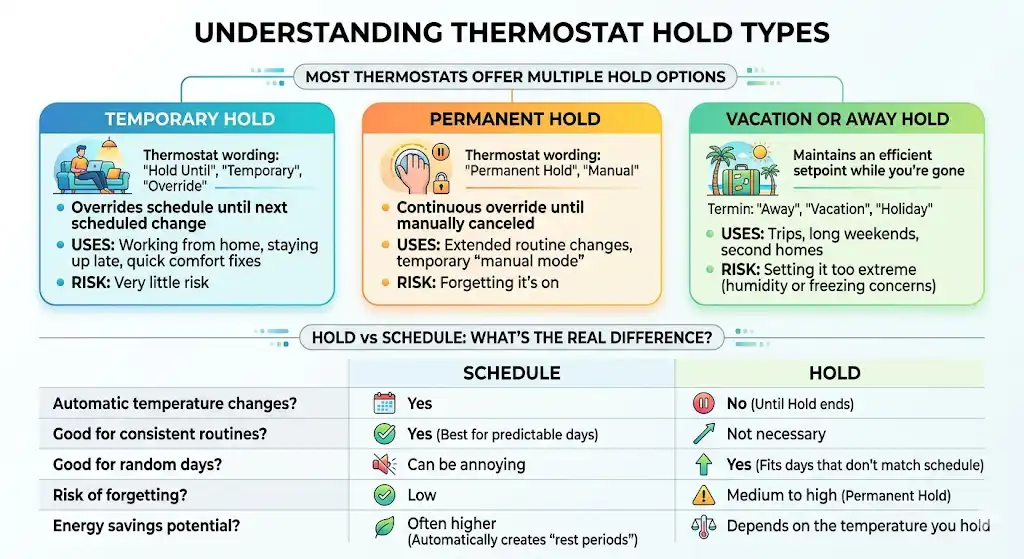
Most thermostats offer at least two hold options.
| Temporary Hold | Overrides the schedule for a short time | Usually until the next scheduled change | Working from home, staying up late, quick comfort fix | Very little risk |
| Permanent Hold | Overrides the schedule continuously | Until you cancel or hit Run Schedule | Extended routine changes, temporary “manual mode” | Forgetting it’s on |
| Vacation or Away Hold | Maintains an efficient setpoint while you’re gone | Until you return or cancel | Trips, second homes, long weekends | Setting it too extreme (humidity or freezing concerns) |
Thermostat wording varies. You might see “Hold,” “Hold Until,” “Override,” “Temporary,” or “Permanent Hold.”
Hold vs Schedule: What’s the Real Difference?
Here’s the practical difference I explain to homeowners.
A schedule is best when your life is predictable.
If you leave and return around the same times most days, scheduling is usually the most comfortable and cost-effective approach because it automatically creates “rest periods” for your HVAC system.
Hold is best when today is not a normal day.
Hold shines on the days your schedule doesn’t match reality.
| Automatic temperature changes | Yes | No (until Hold ends) |
| Good for consistent routines | Yes | Not necessary |
| Good for random days | Can be annoying | Yes |
| Risk of forgetting | Low | Medium to high (permanent hold) |
| Energy savings potential | Often higher | Depends on the temperature you hold |
Is Thermostat Hold Good or Bad?
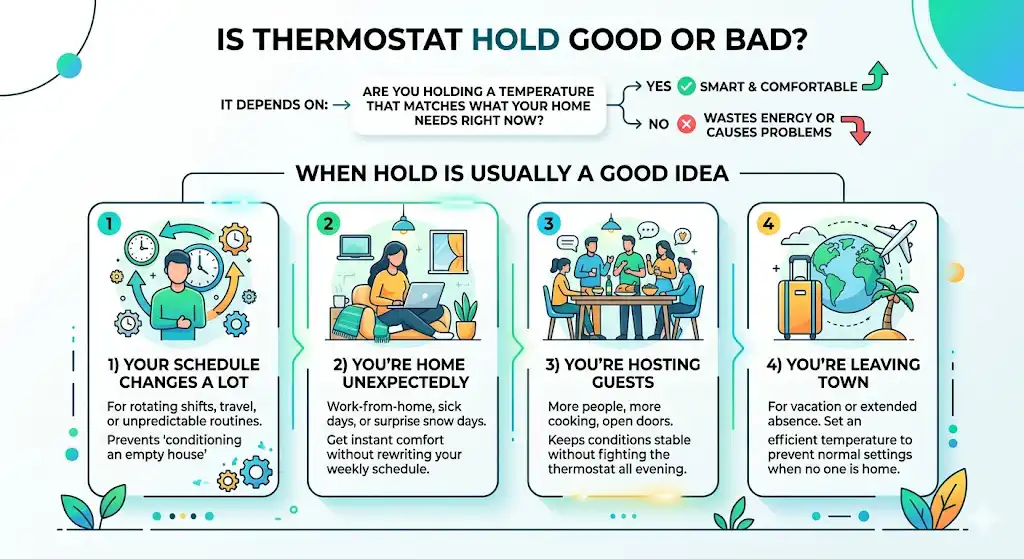
It depends on one question:
Are you holding a temperature that matches what your home needs right now?
- If yes, Hold can be smart and comfortable.
- If not, it can waste energy or cause comfort problems.
When Hold is usually a good idea
1) Your schedule changes a lot
If you work rotating shifts, travel, or your household is just unpredictable, a schedule can easily heat or cool at the wrong times. Hold prevents “conditioning an empty house.”
Example I see a lot: someone works nights, sleeps during the day, and the thermostat schedule blasts AC at 3 PM like they’re hosting a party. A hold keeps things stable.
2) You’re home unexpectedly
Work-from-home day, sick day, kids home from school, surprise snow day. Temporary Hold is perfect here because you get comfort now without rewriting the entire weekly program.
3) You’re hosting guests
More people, more cooking, more doors opening. Indoor conditions change fast. A hold keeps you from fighting the thermostat all evening.
4) You’re leaving town
A vacation hold (or a permanent hold set to an efficient temperature) prevents your system from trying to maintain normal comfort settings when nobody is home.
When Hold is usually a bad idea
1) You hold a comfort temperature 24/7 during extreme weather
If it’s 10°F outside and you hold 72°F nonstop, your system will run more than it would if your schedule allowed setbacks while you sleep or when you’re away.
Schedules create breaks. Permanent hold can remove those breaks.
2) You forget Hold is on
This is the number one issue I see. Someone sets a hold for movie night, falls asleep, and three days later, the system is still ignoring the schedule.
3) You have a smart thermostat that’s designed to optimize
Many smart thermostats use learning, occupancy sensing, or recovery logic. Permanent hold can disable or reduce those benefits and basically turns an intelligent thermostat into a manual one.
4) You have humidity issues (common in humid climates)
In some homes, holding one temperature for long stretches can lead to comfort complaints, especially if the system short-cycles or the equipment is oversized. Temperature and humidity control are related, but they don’t always move together the way people expect.
Does Using Hold Save Energy?
It can, but only under the right conditions.
If Hold prevents heating or cooling when it isn’t needed, it can reduce runtime and save money. If Hold keeps your home at full comfort settings all day when nobody is there, it usually increases runtime and cost.
A useful benchmark (real numbers)
The U.S. Department of Energy notes you can save up to about 10 percent per year on heating and cooling by setting your thermostat back 7°F to 10°F for 8 hours a day (for example, while sleeping or away).
That’s exactly what schedules are built to do. Permanent Hold can erase those setbacks if you’re not careful.
Recommended setpoints (practical starting points)
These are common efficiency targets recommended by programs like ENERGY STAR. Adjust for your comfort, health needs, and equipment.
| Home and awake | Around 68°F | Around 78°F |
| Sleeping | Lower than daytime (often 60°F to 67°F) | Higher than daytime (often 78°F to 82°F) |
| Away | Lower setback (often 55°F to 62°F, but keep pipes safe) | Higher setup (often 82°F to 85°F, watch humidity/pets) |
If you’re going to use a Vacation Hold, those “Away” numbers are a better target than holding your normal comfort temp.
Important HVAC tech note from the field: If you have a heat pump with electric auxiliary heat, big temperature setbacks can sometimes cause the system to kick on expensive backup heat during recovery. In those cases, a smaller setback (or a smarter recovery schedule) may save more.
The Best Way to Use Hold Without Accidentally Raising Your Bill
1) Choose Temporary Hold when you can
If your thermostat offers Temporary Hold, it’s usually the safest option because it ends on its own.
2) Think in hours, not forever
Hold works best when it’s tied to a situation:
- “For tonight”
- “For the next 4 hours.”
- “Until tomorrow morning.”
- “Until we get back from the trip.”
3) Avoid extreme temperatures
Holding 65°F when it’s 100°F outside forces long run cycles. More moderate settings typically keep you comfortable with less runtime.
4) Use Vacation or Away modes when available
Vacation mode is designed to keep your home safe and efficient, not necessarily “perfectly comfortable.”
5) If you always use Hold, your schedule probably needs a rewrite
If you find yourself hitting Hold constantly, that’s usually a sign your programmed schedule doesn’t match your real life anymore.
How to Turn Hold Off (So Your Schedule Works Again)
Most thermostats resume normal programming when you press something like:
- Run
- Run Schedule
- Cancel Hold
- Resume Program
If you can’t find it, look for a “Schedule” or “Program” menu and confirm the thermostat is not set to a manual mode.
How Hold Works on Common Thermostat Brands (What I see most often)
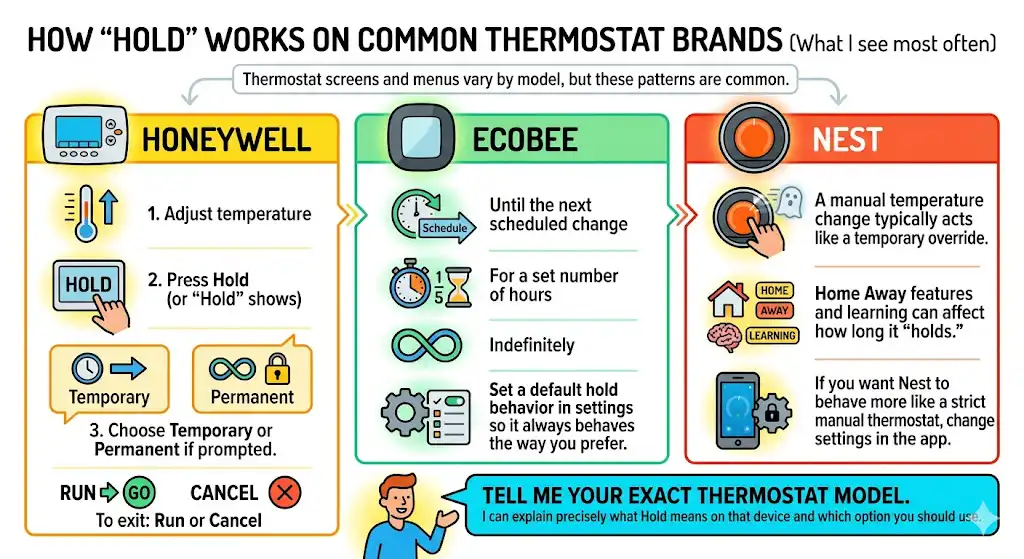
Thermostat screens and menus vary by model, but these patterns are common.
Honeywell (many programmable models)
- Adjust temperature
- Press Hold (or it may show Hold on-screen automatically)
- Choose Temporary or Permanent if prompted.
- To exit: Run or Cancel
Ecobee
Ecobee usually lets you choose how long the hold lasts:
- Until the next scheduled change
- For a set number of hours
- Indefinitely
You can also set a default hold behavior in settings so it always behaves the way you prefer.
Nest
Nest often behaves differently:
- A manual temperature change typically acts like a temporary override.
- Home Away features and learning can affect how long it “holds.”
If you want Nest to behave more like a strict manual thermostat, you usually have to change settings in the app.
If you tell me your exact thermostat model, I can explain precisely what Hold means on that device and which option you should use.
Hold vs Other Modes (Away, Eco, Off)
A lot of homeowners mix these up, so here’s a clean comparison.
| Hold | Locks one temperature and ignores schedule | Short-term control or special situations |
| Run Schedule | Follows your programmed temperatures | Normal day-to-day savings |
| Away or Eco | Uses energy-saving targets (manual or smart) | Leaving for hours, predictable absences |
| Vacation | Longer-term away settings | Multi-day trips |
| Off | Stops heating and cooling | Mild weather, open windows, long vacancy (only if safe) |
Troubleshooting: If Your Thermostat Is Stuck on Hold
Here’s what I recommend before you assume something is broken.
1) Make sure you are not in Vacation mode
Vacation can look like Hold on some thermostats.
2) Hit the correct button
Some models require a Run Schedule specifically. Others use Cancel Hold.
3) Power cycle the thermostat
- If it has batteries, replace them.
- If it’s a removable faceplate, remove it for 30 seconds and reinstall
- As a last resort, power cycle the HVAC circuit (only if you’re comfortable doing it safely)
4) Check smart features
Some smart thermostats can override your manual hold based on:
- geofencing
- occupancy sensors
- learning schedules
If the temperature changes even though you think it’s on hold, a smart automation is often the reason.
5) If the screen is unresponsive
Sometimes the issue is simply:
- low batteries
- dirty touchscreen
- loose thermostat base connection
If you’re seeing blank screens, constant reboots, or the system won’t respond to commands, that’s when it makes sense to involve a technician.
My Real-World Rule (What I Tell Homeowners)
Use Hold when:
- Today doesn’t match your schedule.
- You need stable comfort for a short time.
- You don’t want to reprogram anything.
Avoid Hold when:
- You want long-term savings (use a schedule)
- Your routine is consistent.
- You tend to forget settings.
If you forget things easily, Temporary Hold is your best friend.
Frequently Asked Questions
What does Hold mean on a thermostat?
Hold means the thermostat will maintain the temperature you set and ignore the programmed schedule until the hold ends or you cancel it.
How long does the thermostat Hold last?
Temporary Hold usually lasts until the next scheduled temperature change. Permanent Hold lasts until you manually cancel it. Some smart thermostats let you set a custom duration.
Is thermostat Hold bad for saving energy?
It can be. Hold saves energy if it prevents unnecessary heating or cooling. It wastes energy if it keeps comfort settings all day when the house would normally be set back or set up.
Why is my thermostat ignoring my schedule?
Most often it’s because Hold is still active. Other causes include manual mode, Vacation mode, or smart thermostat features like learning schedules or occupancy-based changes.
Should I use Hold in winter?
Yes, when it matches real life: being home unexpectedly, hosting, or traveling. Just be careful with permanent hold at high temperatures all season, because it can increase runtime and cost.
Bottom Line
Hold is a useful feature when you use it on purpose. It’s a problem when it’s accidental or permanent when it shouldn’t be.
If you want the simplest setup that works for most homes:
- Use a schedule for normal life
- Use Temporary Hold for weird days
- Use Vacation or Away settings when you leave town