
Hi, I’m Nathan. I’ve worked as an HVAC technician for over 10 years, and I’ve installed, replaced, and troubleshot everything from basic dial thermostats to the newest “learning” smart thermostats. If you’re trying to decide between a smart thermostat vs a WiFi thermostat, I’ll walk you through the real differences (not just marketing), what matters for your specific home, and how to avoid the common compatibility and setup mistakes I see all the time.
A lot of homeowners assume these two terms mean the same thing. They don’t.
- The quick truth: all smart thermostats are WiFi thermostats, but not all WiFi thermostats are smart
- Smart thermostat vs WiFi thermostat: side-by-side comparison
- What you actually gain with a WiFi thermostat (and when it’s the better choice)
- What you gain with a smart thermostat (the real-world benefits)
- Cost, rebates, and payback: a practical way to think about it
- The biggest “gotcha” I see: HVAC compatibility (especially the C-wire)
- Smart thermostat vs WiFi thermostat for multiple zones
- Security and privacy: can a WiFi thermostat be hacked?
- My real-world recommendation: which one should you buy?
- A few solid thermostat options to consider (based on what I see in the field)
- Installation: DIY vs hiring a pro (my honest take)
- FAQ I get from homeowners
The quick truth: all smart thermostats are WiFi thermostats, but not all WiFi thermostats are smart
A WiFi thermostat connects to your home’s internet so you can control it from an app. Most of them also let you build schedules and get basic alerts.
A smart thermostat does everything a WiFi thermostat can do, plus it uses automation to reduce how often you have to think about it. Depending on the model, that can include learning your habits, using occupancy sensing, geofencing, room sensors, weather response, and energy optimization features.
Here’s the simplest way I explain it to homeowners:
- If you want remote control, get a WiFi thermostat
- If you want the thermostat to make good decisions without you, get a smart thermostat
Smart thermostat vs WiFi thermostat: side-by-side comparison
| Control from phone | Yes | Yes |
| Scheduling | Yes (you set it) | Yes (often self-adjusting) |
| Learns your routine | Usually no | Often yes |
| Occupancy sensing | Rare | Common |
| Geofencing | Sometimes | Common |
| Room sensors for hot and cold spots | Sometimes (model-dependent) | Common (brand dependent) |
| Energy reports and coaching | Basic or none | Common and more detailed |
| Maintenance alerts (filter, runtime, system issues) | Sometimes | Common |
| Smart home integration (Alexa, Google, Apple) | Often yes | Often yes (usually deeper) |
| Best for | People who like manual control | People who want “set it and forget it” comfort and savings |
What you actually gain with a WiFi thermostat (and when it’s the better choice)
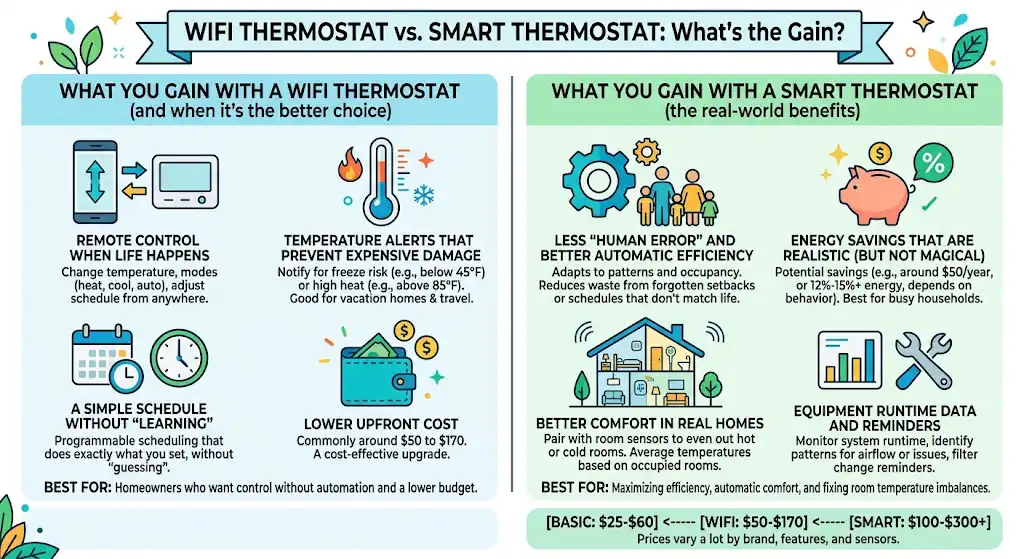
A WiFi thermostat is a big upgrade from a basic thermostat because you can control it anywhere. In my experience, this is enough for a lot of homeowners.
1. Remote control when life happens
If you’ve ever left town and thought, “Did I turn the heat down?” a WiFi thermostat fixes that. You can:
- change the temperature remotely
- change modes (heat, cool, auto)
- adjust your schedule without being home
2. Temperature alerts that can prevent expensive damage
This is a feature I really like for vacation homes, rentals, or anyone who travels.
You can set alerts like:
- “Notify me if the house drops below 45°F” (freeze risk)
- “Notify me if the house rises above 85°F” (pets, plants, humidity risk)
In cold climates, this can help you catch a heating failure before pipes freeze. In hot, humid climates, it can help you catch an AC failure before the house turns into a moisture problem.
3. A simple schedule without “learning”
Some people do not want a thermostat “guessing” what they want. If you’re that kind of homeowner, you’ll often be happier with a WiFi thermostat that does exactly what you program.
4. Lower upfront cost
In the field, I generally see:
- basic digital thermostats: often around $25 to $60
- WiFi thermostats: commonly around $50 to $170
- smart thermostats: commonly around $100 to $300+
Prices vary a lot by brand, features, and whether sensors are included.
What you gain with a smart thermostat (the real-world benefits)
Smart thermostats are popular for one main reason: they reduce waste without you having to constantly manage settings.
1. Less “human error” and better automatic efficiency
Most energy waste I see is simple:
- someone forgets to set back the temperature when leaving
- schedules don’t match real life
- people override settings and never put them back
A good smart thermostat can reduce those problems by adapting to patterns and occupancy.
2. Energy savings that are realistic (but not magical)
You’ll see a lot of savings claims online. Here’s how I frame it as a tech:
- If your schedule is already tight and disciplined, your savings may be modest.
- If your household is busy, inconsistent, or always forgetting setbacks, smart thermostats can save more.
Common published savings ranges:
- ENERGY STAR has reported average savings in the neighborhood of about $50/year for certified smart thermostats (varies by home, rates, and usage).
- Google Nest has published independent study results often cited as about 12 percent heating and 15 percent cooling savings on average (your results depend heavily on climate and behavior).
- ecobee commonly advertises savings up to the low 20 percent range depending on setup and usage.
I’ve personally seen the biggest savings in homes where:
- people were running the system hard during work hours unnecessarily
- the thermostat was set to a constant temperature 24/7
- there were comfort fights between upstairs and downstairs
3. Better comfort in real homes (where one room is always wrong)
If you’ve got hot bedrooms upstairs or a freezing bonus room, a smart thermostat paired with room sensors can help even things out.
This does not “fix” bad duct design, poor insulation, or undersized equipment, but it can improve comfort by:
- averaging temperatures based on occupied rooms
- prioritizing a specific sensor at night (like the bedroom)
- reducing short cycling caused by bad thermostat placement
4. Equipment runtime data and reminders
From a technician’s perspective, runtime data is underrated. A smart thermostat can show:
- how long heating or cooling runs each day
- patterns that suggest airflow issues or failing components
- reminders for filter changes
It’s not a perfect diagnostic tool, but it helps you catch problems earlier.
Cost, rebates, and payback: a practical way to think about it
Here’s how I tell homeowners to make the decision financially: don’t chase a “perfect” payback calculation. Instead, look at rebates, comfort, and how hands-off you want to be.
Typical cost ranges I see
| Basic digital | $25 to $60 | Tight budgets, simple systems |
| WiFi thermostat | $50 to $170 | Remote control and alerts |
| Smart thermostat | $100 to $300+ | Automation, sensors, energy reports |
Potential savings ranges (what you should expect)
| You already use schedules and setbacks consistently | Low to moderate |
| Your schedule changes often, you forget setbacks | Moderate to high |
| You have room sensors and prioritize occupied rooms | Comfort improvements are often more noticeable than bill savings |
| Extreme climates (very hot or very cold) | More opportunity for savings, but also more opportunity to waste energy |
Rebates can change the math fast
Many electric and gas utilities offer rebates for ENERGY STAR certified smart thermostats. I’ve seen rebates from $25 up to $100+ depending on the utility and season.
My advice: before you buy, search:
- your utility name + smart thermostat rebate
- state energy efficiency program + thermostat rebate
The biggest “gotcha” I see: HVAC compatibility (especially the C-wire)
Before you buy any thermostat, check compatibility. This is the part that causes most DIY frustration and service calls.
What is a C-wire and why does it matter?
The C-wire (common wire) provides continuous power to the thermostat. Many smart thermostats need it, especially if they have always-on WiFi and sensors.
Some thermostats can work without a C-wire by “power stealing,” but in the real world that can sometimes cause:
- short cycling
- equipment not turning off
- WiFi dropping
- low battery issues
If you’re not sure, I recommend opening the thermostat and checking the terminals. If you see a wire connected to C, you’re usually in good shape.
Systems you must double-check before buying
In my day-to-day work, these setups require extra attention:
- heat pumps (especially with auxiliary heat wiring)
- multi-stage furnaces and AC units
- dual fuel systems
- boiler or radiant heat
- line-voltage systems (common in some condos and electric baseboards) which typically need special thermostats
If you tell me what kind of system you have, I can usually tell you in a minute what thermostat class will work.
Smart thermostat vs WiFi thermostat for multiple zones
If your home has:
- separate upstairs and downstairs thermostats
- a finished basement zone
- zoned dampers with multiple thermostats
Then you already have “zones.”
What works best in zoned homes
- You typically need one thermostat per zone
- The best setups keep the thermostats within the same ecosystem (same app) for easier management
- Room sensors can help, but remember: sensors do not create new zones. They fine-tune comfort inside a zone
In real homes, zoning can be great, but it also makes installation and wiring a little less forgiving. If you’re unsure, it’s worth having a pro verify wiring and staging so you don’t accidentally fight the zone board.
Security and privacy: can a WiFi thermostat be hacked?
Any internet-connected device carries some risk. That said, thermostats generally don’t store the kind of sensitive data that banks or email accounts do. The bigger risks are usually:
- weak passwords
- reusing passwords
- outdated firmware
- unsecured home WiFi
My practical security checklist
If you install a WiFi or smart thermostat, I recommend you:
- Use a strong, unique password for the thermostat account
- Enable two-factor authentication if the brand offers it
- Keep your router firmware updated
- Put smart devices on a separate guest or IoT network if your router supports it
- Keep the thermostat firmware and app updated
That’s usually enough for most homeowners.
My real-world recommendation: which one should you buy?
Choose a WiFi thermostat if you want:
- remote control and basic scheduling
- temperature alerts (freeze protection, high heat alerts)
- a lower price
- a thermostat that does what you tell it, nothing more
Choose a smart thermostat if you want:
- automation that adjusts to your routine
- occupancy sensing or geofencing
- room sensors to reduce hot and cold spots
- energy reports and efficiency coaching
- smart home integrations and hands-off operation
A quick decision table
| Travels often and wants alerts and remote control | WiFi thermostat or smart thermostat |
| Has a chaotic schedule and forgets setbacks | Smart thermostat |
| Has pets at home and worries about temps while away | WiFi thermostat with alerts or smart thermostat |
| Wants the simplest setup and hates fiddling with tech | WiFi thermostat (simple model) |
| Has hot and cold rooms and wants better comfort | Smart thermostat with room sensors |
| Owns a rental property and wants remote management | WiFi thermostat (simple, reliable) |
A few solid thermostat options to consider (based on what I see in the field)
I’m not married to one brand, but these are commonly installed and generally reliable when matched to the right system.
Popular smart thermostat choices
- Google Nest Learning Thermostat: known for learning behavior and strong ecosystem support. Published studies often cite average heating and cooling savings in the low teens, depending on usage.
- ecobee smart thermostats: strong option if you care about room sensors and balancing comfort across rooms.
- Honeywell Home smart models: widely used, good compatibility across many systems, and often a straightforward app experience.
A good WiFi thermostat style (non-learning)
- Emerson Sensi style models: often chosen by homeowners who want app control and scheduling without heavy automation.
My best advice is to choose based on:
- HVAC compatibility
- How hands-off you want to be
- Whether you need room sensors
- Whether you have a C-wire
Installation: DIY vs hiring a pro (my honest take)
If you’re comfortable shutting off power, taking photos of wiring, and following a setup wizard, many installs are DIY-friendly.
But I recommend hiring a pro if:
- you have a heat pump and aren’t confident about wiring
- you have multi-stage equipment
- you don’t have a C-wire and need an adapter or to run a new wire
- your system behaves oddly after install (short cycling, no heat, no cool)
A thermostat is “just controls,” but incorrect wiring can lead to comfort problems, higher bills, or equipment wear.
FAQ I get from homeowners
Is a WiFi thermostat worth it if I’m home most of the time?
Usually yes, if you like convenience and alerts. If you rarely change settings, the main value becomes monitoring and easy schedule tweaks.
Do smart thermostats work with older furnaces?
Many do, but it depends on the control voltage and wiring. Most modern smart thermostats are designed for 24V systems. Very old or uncommon setups may need a specialty thermostat.
Will a smart thermostat fix my uneven temperatures?
It can help, especially with room sensors, but it won’t fix underlying issues like poor insulation, undersized ducts, or incorrect equipment sizing. If one room is always extreme, I’d also look at airflow and insulation.