
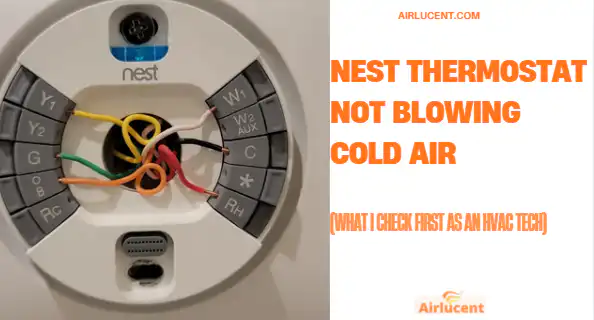
Hi, I’m Nathan. I’ve worked as an HVAC technician for over 10 years, and I’ve seen this exact complaint a lot: “My Nest says it’s cooling, but the house is still warm.”
Here’s the good news. In many cases, the Nest thermostat is not the real problem. It’s usually a setting, a wiring detail, a power issue outside at the condenser, or an airflow or refrigerant problem in the AC system.
This guide walks you through the same step by step checks I’d do at your house, starting with the quickest and cheapest fixes.
- The cheapest part of your cooling system to rule out first
- Quick troubleshooting checklist (5 to 10 minutes)
- 8 common causes of a Nest thermostat not blowing cold air
- Step by step fixes (in the order I recommend)
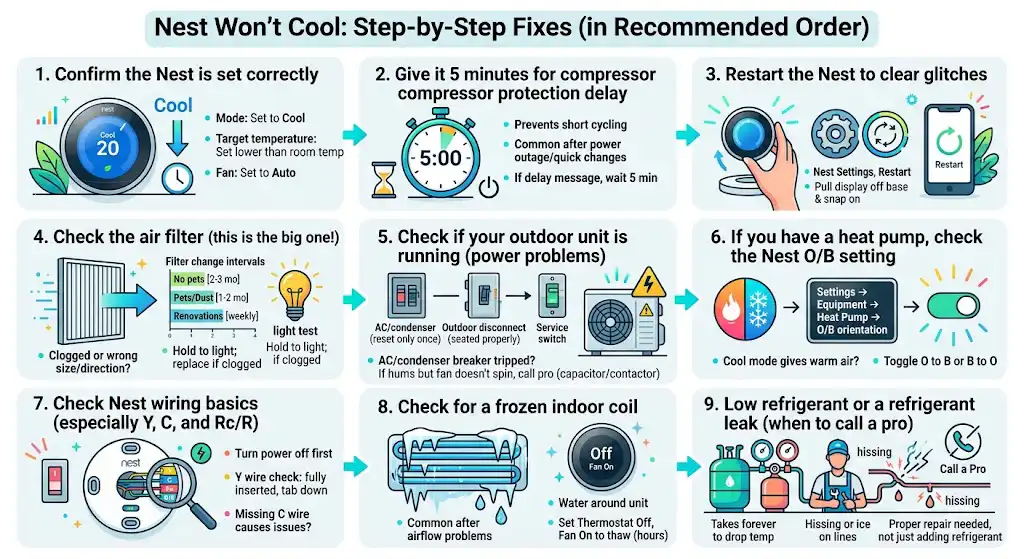
- 1. Confirm the Nest is set correctly
- What to check
- Why it matters
- My quick test
- 2. Give it 5 minutes for compressor protection delay
- 3. Restart the Nest to clear glitches
- How to restart
- 4. Check the air filter (this is the big one)
- What I want you to look for
- Quick “light test”
- Filter change intervals I recommend (typical homes)
- 5. Check if your outdoor unit is running (power problems)
- What to check safely
- If the outdoor fan is not spinning
- 6. If you have a heat pump, check the Nest O/B setting
- The symptom
- Why it happens
- How to fix it on Nest
- 7. Check Nest wiring basics (especially Y, C, and Rc/R)
- Turn power off first
- Wires that matter most for cooling
- My “Y wire” check
- About the C wire
- 8. Check for a frozen indoor coil (very common after airflow problems)
- Signs of a frozen coil
- What I do on a service call
- 9. Low refrigerant or a refrigerant leak (when to call a pro)
- What you might notice
- What a proper repair looks like
- A simple diagnostic table you can use right now
- When I recommend you stop and call a technician
- Final thoughts from me (Nathan)
The cheapest part of your cooling system to rule out first
A clogged filter can restrict airflow and contribute to coil icing, poor cooling, and extra strain on the compressor.
| Air filter replacement | 5 to 35 | Restricted airflow can reduce cooling and contribute to ice on the coil |
| Compressor replacement | 1500 to 2800 plus | A stressed system can shorten compressor life |
A commonly cited benchmark from the U.S. Department of Energy is that replacing a dirty filter can reduce AC energy use by about 5 to 15 percent in many systems. Even when comfort is your main goal, the filter is still the easiest thing to check first.
Quick troubleshooting checklist (5 to 10 minutes)
Before you open panels or touch wiring, do these quick checks.
- Make sure Nest is actually calling for cooling
- The Nest screen should be blue.
- Set the target temperature at least 3 to 5 degrees below the current room temperature.
- Set the fan to Auto (not On for testing unless I mention it).
- Wait out the built in compressor delay
- If you just restored power or recently turned the system off, wait 5 minutes. Nest and many HVAC systems prevent short cycling.
- Restart the Nest
- On the Nest: Settings, Restart
- Or pull the display straight off and snap it back on
- Check your air filter
- If it’s gray, fuzzy, or you cannot see light through it, replace it.
- Look outside
- Is the outdoor unit running and blowing warm air out the top
- Is the fan spinning
If you do the quick checklist and still have no cold air, use the deeper troubleshooting below.
8 common causes of a Nest thermostat not blowing cold air
Here’s a clear summary table, then I’ll walk you through each fix.
| Wrong mode or setpoint | Nest looks normal but never cools | Set to Cool, lower setpoint, fan Auto |
| Compressor delay | “Delayed” message or nothing happens for a few minutes | Wait 5 minutes, then retest |
| Dirty or restrictive air filter | Weak airflow, long runtimes, sometimes ice | Replace filter, confirm correct size and MERV |
| Wiring issue at Nest | New install or recent change, cooling never starts | Verify Y, Rc/R, C, O/B (heat pump) |
| Heat pump O/B setting wrong | Blows warm air in Cool mode | Toggle O/B orientation in Equipment settings |
| Outdoor unit has no power | Indoor fan runs but outside unit is silent | Check breaker, disconnect, service switch |
| Frozen evaporator coil | Very low airflow, indoor pipe iced | Turn system off, fan On to thaw, fix airflow cause |
| Low refrigerant or leak | Runs but never cools well, possible ice, hissing | Call a licensed HVAC tech for leak test and charge |
Step by step fixes (in the order I recommend)
1. Confirm the Nest is set correctly
This sounds too simple, but I still check it first because it costs nothing and saves time.
What to check
- Mode: Set to Cool
- Target temperature: Set lower than room temperature by a few degrees
- Fan: Set to Auto for normal operation
Why it matters
If you’re in Heat, Eco, Off, or a schedule is overriding your setpoint, your AC may never get a proper call to cool.
My quick test
Turn the temperature down 5 degrees and listen:
- You may hear a soft click at the thermostat
- Within a minute or two, the indoor blower may start
- Within a few minutes, the outdoor unit should start (unless a delay is active)
2. Give it 5 minutes for compressor protection delay
Nest and most modern HVAC equipment use a delay to prevent short cycling (starting and stopping the compressor too quickly). This is especially common:
- after a power outage
- after you shut the thermostat off and back on
- after changing settings quickly
If the Nest shows a delay message or nothing happens immediately, wait 5 minutes, then test cooling again.
3. Restart the Nest to clear glitches
I’ve fixed more than a few “it won’t cool” calls with a simple restart, especially after Wi-Fi updates or power flickers.
How to restart
- Nest Settings, Restart
or - Pull the display straight off the base and snap it back on
Then try cooling again.
4. Check the air filter (this is the big one)
If you only do one physical check, do this one.
What I want you to look for
- Is the filter the right size and installed in the correct direction (airflow arrow)
- Is it visibly clogged
- Is it a very high MERV filter your system cannot handle
Quick “light test”
Hold the filter up to a light.
- If you cannot see light through much of it, replace it.
Filter change intervals I recommend (typical homes)
| No pets, low dust | Every 2 to 3 months |
| Pets or dusty area | Every 1 to 2 months |
| Renovations or heavy dust | Check weekly, replace as needed |
If you replace the filter and airflow improves, your system may start cooling normally again. If the coil already froze, you’ll need to thaw it first (I cover that below).
5. Check if your outdoor unit is running (power problems)
A very common scenario is:
- Nest is set to Cool
- Indoor fan blows air
- But the air is not cold
- Outside unit is not running at all
What to check safely
- Breaker panel
- Look for an AC or condenser breaker tripped.
- Reset only once. If it trips again, stop and call a pro.
- Outdoor disconnect
- Near the outdoor unit is a small electrical box (disconnect).
- Make sure it is seated properly (some have a pull-out handle).
- Service switch
- Some systems have a light switch near the furnace or air handler that kills power.
If the outdoor fan is not spinning
If the outdoor unit hums but the fan does not spin, it could be a capacitor or contactor issue. These can be relatively inexpensive parts, but testing them involves electrical hazards. If you are not trained, this is a good time to call a technician.
6. If you have a heat pump, check the Nest O/B setting
This is one of the most common Nest setup issues I see after a thermostat swap.
The symptom
In Cool mode, you get warm air. Or in Heat mode, you get cool air.
Why it happens
Heat pumps use a reversing valve controlled by the O/B wire. If the Nest is configured wrong (O instead of B, or B instead of O), the system can run in the opposite mode.
How to fix it on Nest
- Go to Settings
- Equipment
- Heat pump
- Find O/B orientation
- Toggle it from O to B or B to O
- Test cooling again
If it starts blowing cold after that, you found it.
7. Check Nest wiring basics (especially Y, C, and Rc/R)
If this is a new Nest install or you recently removed another thermostat, wiring is a prime suspect.
Turn power off first
Shut off power to the HVAC system at the breaker before touching thermostat wires.
Wires that matter most for cooling
| Y or Y1 | Calls the compressor for cooling | Outdoor unit may never turn on |
| Rc or R | Power for cooling circuits | System may appear dead or intermittent |
| C | Common wire for steady power | Nest can have power issues or short cycling behavior |
| G | Fan | Fan may not run when it should |
| O/B | Heat pump reversing valve | Wrong temperature air in the wrong mode |
My “Y wire” check
Pull the Nest display off and look at the wire:
- Make sure the Y wire is fully inserted
- Make sure the connector tab is pushed down firmly
About the C wire
A missing C wire does not always stop cooling, but it can cause odd behavior:
- Nest battery issues
- delayed starts
- disconnects and reconnects
- “power stealing” problems
If your Nest frequently shows low battery or power warnings, a C wire (or an approved C wire adapter) is often the correct long-term fix.
8. Check for a frozen indoor coil (very common after airflow problems)
If your AC is running but airflow is weak and it’s not cooling, your evaporator coil may be iced up.
Signs of a frozen coil
- Little to no airflow from vents
- Ice on the copper line near the indoor unit
- Water around the furnace or air handler after it melts
- The system runs constantly but does not cool
What I do on a service call
- Set thermostat to Off
- Set fan to On (to help thaw)
- Let it thaw fully (can take a few hours)
- Fix the cause, usually:
- dirty filter
- blocked return vents
- dirty blower wheel
- low refrigerant
Do not keep running cooling with a frozen coil. You can damage the compressor.
9. Low refrigerant or a refrigerant leak (when to call a pro)
Refrigerant is designed to stay in a sealed system. If it is low, you almost always have a leak.
What you might notice
- It cools a little, but not enough
- It takes forever to drop the temperature
- Ice forms on the indoor coil or lines
- You hear hissing near the coil or outdoor unit
What a proper repair looks like
A real fix is not “just add refrigerant.”
A proper HVAC process is:
- confirm refrigerant charge with measurements
- leak test
- repair the leak
- evacuate and weigh in the correct charge (depending on the system)
Because refrigerant handling requires licensing in many areas and specialized tools, this is where I recommend bringing in a licensed HVAC technician.
A simple diagnostic table you can use right now
Use this to narrow it down fast.
| Indoor fan runs, outside unit is silent | Breaker, disconnect, contactor, capacitor, Y wire not calling | Check breaker and disconnect, then verify Y wire |
| Outside unit runs, but air is not cold | Dirty filter, frozen coil, low refrigerant, dirty outdoor coil | Check filter and airflow, inspect for ice, call pro if low refrigerant suspected |
| Warm air in Cool mode on heat pump | O/B setting wrong | Toggle O/B orientation in Nest settings |
| Nest shows delay or keeps restarting | Power issues, missing C wire, low battery | Add C wire or C wire adapter, verify power |
| Weak airflow everywhere | Filter, blower issue, duct restriction | Replace filter, check registers, consider blower service |
When I recommend you stop and call a technician
I’m all for DIY checks, but these are the lines I don’t want you crossing without training:
- You smell burning, see melted wires, or breakers keep tripping
- The outdoor unit is buzzing loudly but not running
- You suspect a capacitor, contactor, or high voltage issue
- Refrigerant is low or leaking
- Your coil keeps freezing even with a clean filter
A good HVAC tech will quickly verify airflow, temperature split, refrigerant charge, and electrical signals at the condenser.
Final thoughts from me (Nathan)
When a Nest thermostat is not blowing cold air, the fix is usually one of three things I see over and over: a wrong setting or delay, a dirty filter and airflow problem, or an outdoor unit power issue. Heat pump homes add one more big one: the O/B orientation setting.