
I’m Nathan. I’ve been an HVAC technician for over 10 years, and I’ve installed and serviced a lot of smart thermostats, including every major Nest model. Nest thermostats are solid, but when something in the system is slightly off (power, wiring, airflow, Wi‑Fi, or heat pump settings), a Nest will usually be the first thing that looks “broken.”
In this guide, I’ll walk you through the most common Nest thermostat problems I see, what usually causes them, and the same step by step checks I use in the field. I’ll also tell you when it’s safe to DIY and when it’s time to call a pro.
- Quick safety note before you touch anything
- Before you blame the Nest: check your air filter first
- Nest thermostat troubleshooting in 5 minutes (my field checklist)
- Are Nest thermostats likely to malfunction?
- Common Nest thermostat problems and how to fix them
- 1. Nest won’t turn on or the screen is blank
- 2. Nest battery drains fast or won’t charge
- 3. Nest thermostat keeps going offline in the app (Wi‑Fi issues)
- 4. Nest is not turning on heat
- 5. Nest not cooling to the set temperature
- 6. Hot air when you expect cool (or cold air when you expect heat)
- 7. Short cycling (system turns on and off rapidly)
- 8. Fan won’t stop running
- 9. Connector button won’t click or wires won’t stay in
- 10. Nest says no power to Rh or Rc, or “no power wires detected”
- 11. Inaccurate temperature readings
- 12. Sensor malfunctions (including remote sensors)
- Nest light meanings (quick reference)
- FAQs (real questions I hear on service calls)
- My wrap-up as a technician
Quick safety note before you touch anything
If you’re removing the Nest display, checking wires, or working near the furnace control board, turn off power at the breaker first. Low voltage thermostat wires are usually 24V, but you can still blow a fuse on the control board or short something and create a bigger repair.
Before you blame the Nest: check your air filter first
A dirty or overly restrictive filter can cause a surprising number of “thermostat problems” such as short cycling, rooms not reaching temperature, frozen coils, overheating, and weak airflow.
Here are the real world numbers I see most often:
| MERV rating (most homes) | 8 to 13 | Too high for some systems can choke airflow |
| Common filter change interval (baseline) | about every 90 days | EPA commonly recommends a 3 month baseline, shorter with pets, dust, remodeling |
| Typical filter cost | $5 to $35 | Cheapest fix that prevents expensive failures |
If you haven’t changed your filter recently, do that before you dig into thermostat settings. I can’t tell you how many “Nest won’t cool” calls end with a $15 filter and the system instantly breathing again.
Nest thermostat troubleshooting in 5 minutes (my field checklist)
Before we get into specific issues, here’s the fast checklist I use:
- Confirm the HVAC has power
Check the furnace switch (it looks like a light switch), breaker, and any service switch near the air handler. - Confirm the furnace door panel is fully closed
Many furnaces have a safety door switch that kills power if the panel isn’t seated correctly. - Check the air filter
If it’s dirty, replace it. - Check the Nest battery and power
On the thermostat: Settings, Technical Info, Power (wording varies by model). - Confirm the mode and equipment type
Heat pump vs furnace setups are where a lot of “it blows hot on cool” happens.
If you do those five things, you eliminate the most common causes quickly.
Are Nest thermostats likely to malfunction?
In my experience, Nest thermostats themselves fail less often than homeowners expect. Most issues come from:
- Low power to the thermostat (missing C wire, weak transformer, control board problems)
- Wiring mistakes during install (especially heat pumps and dual fuel systems)
- Airflow issues (filter, blower, dirty coil)
- Wi‑Fi signal strength or router settings
- Wrong equipment settings in the Nest setup menu
So yes, they can malfunction, but most “Nest problems” are actually system problems that the Nest is simply revealing.
Common Nest thermostat problems and how to fix them
To make this easy, here’s a quick overview table first, then I’ll break down each issue with detailed steps.
Quick diagnosis table
| Blank screen or won’t turn on | No power, low battery, loose display | Reseat display, check breaker, charge by USB | If it won’t stay on after charging or keeps dying |
| Nest keeps going offline | Low battery, weak Wi‑Fi, router changes | Check battery, restart router, rejoin Wi‑Fi | If voltage is low or wiring needs a C wire |
| Not heating | W wire not connected, furnace safety, heat pump settings | Check mode, check breaker, check furnace door | If burners won’t light or heat pump isn’t running |
| Not cooling to set temp | Dirty filter, frozen coil, wrong wiring, low refrigerant | Change filter, check vents, verify cool mode | If outdoor unit won’t run or coil is icing |
| Blowing hot on cool | Heat pump O B setting wrong, wires swapped | Recheck heat pump configuration | If wiring at air handler is wrong |
| Short cycling | Dirty filter, wrong staging, oversized system, sensor issue | Replace filter, check temp placement | If it keeps cycling after airflow is verified |
| Fan won’t stop running | Fan set to On, wiring issue, stuck relay | Set fan to Auto, reset thermostat | If relay or control board is stuck |
| Temperature reads wrong | Bad location, drafts, sunlight, sensor offset | Reposition or adjust in settings | If sensor is failing or remote sensor is wrong |
| Connector button won’t click | Bulky wires behind base | Re-seat wires, shorten and tuck neatly | If base is damaged or terminals are faulty |
| No power to Rh or Rc error | Loose wire, blown fuse on board, transformer | Reseat wires, check furnace fuse | If fuse keeps blowing or transformer is dead |
1. Nest won’t turn on or the screen is blank
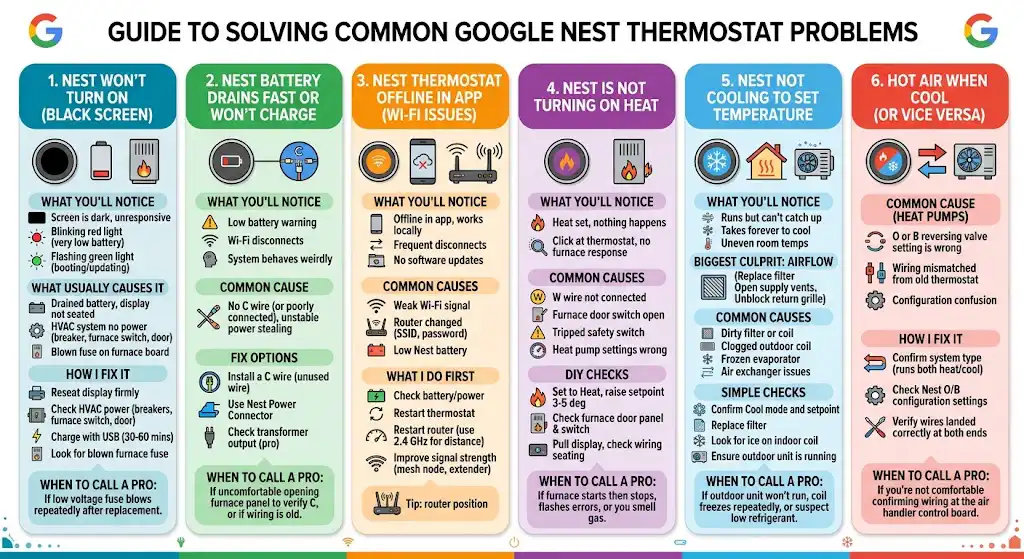
What you’ll notice
- Screen is dark and unresponsive
- The Nest may show a blinking red light (battery very low)
- Or it may flash green (booting or updating)
What usually causes it
- The thermostat battery is drained and not being charged by the system
- The display is not fully seated on the base
- The HVAC system has no power (tripped breaker, furnace switch off, door switch open)
- A blown low voltage fuse on the furnace control board
How I fix it
- Reseat the display
Pull the Nest straight off and push it back onto the base firmly until it feels fully seated. - Check the HVAC power sources
- Breaker panel: HVAC, furnace, air handler, condenser breakers
- Furnace switch near the unit
- Furnace door panel is fully closed
- Charge it by USB (quick test)
Remove the display and charge it with a USB cable and wall adapter for 30 to 60 minutes.
If it powers up on USB but dies when installed, you almost always have a power delivery issue (commonly missing C wire). - Look for a blown fuse
Many furnaces have a small automotive style fuse (often 3A or 5A) on the control board. If that fuse is blown, the thermostat may go dead.
When I recommend calling a pro: if the low voltage fuse is blown and blows again after replacement, that indicates a wiring short or a control issue that needs proper troubleshooting.
2. Nest battery drains fast or won’t charge
What you’ll notice
- Low battery warning
- Nest frequently disconnects from Wi‑Fi
- System behaves weirdly during calls for heating or cooling
The most common cause
No C wire (or a C wire that isn’t actually connected correctly at the furnace). Nest can “power steal” on some systems, but I’ve seen plenty of setups where it’s not stable long term.
Fix options (best to least ideal)
- Install a C wire
Best long term fix if your wiring bundle has an unused wire you can connect to C at both ends. - Use the Nest Power Connector
This is a common solution when you don’t have an extra wire available. - Check transformer output (pro level)
If the transformer is weak, you can get repeated low power issues.
Battery and power numbers that matter
These can vary by model, but as a practical rule, if the thermostat is repeatedly dropping Wi‑Fi or rebooting, you’re usually dealing with marginal power.
When I recommend calling a pro: if you are not comfortable opening the furnace panel to verify C at the control board, or if the system is older and wiring is brittle.
3. Nest thermostat keeps going offline in the app (Wi‑Fi issues)
What you’ll notice
- Thermostat works locally but shows Offline in the app
- Frequent disconnects
- Unable to update software
Common causes
- Weak Wi‑Fi signal where the thermostat sits
- Router changed (new SSID, new password, band steering changes)
- Low Nest battery (this is a big one)
What I do first
- Check the battery and power status on the Nest
If power is borderline, fix that first. No amount of router tweaking beats stable thermostat power. - Restart the thermostat
Settings, Restart. - Restart the router
Also check if your router is broadcasting both 2.4 GHz and 5 GHz. Many smart devices behave better on 2.4 GHz at longer distances. - Improve signal strength
If the thermostat is far from the router, a mesh node or extender can make the connection stable.
Quick Wi‑Fi tip from service calls
If your Nest is on an exterior wall, near metal ductwork, or near a return drop, the signal can be weaker than you’d expect. Moving the router 10 feet can sometimes fix what moving it 10 inches cannot.
4. Nest is not turning on heat
What you’ll notice
- You set Heat, but nothing happens
- You hear a click at the thermostat, but no furnace response
Common causes I see
- W wire not connected or not seated
- Furnace door switch not engaged
- Tripped rollout, limit switch, or other furnace safety
- For heat pumps: lockout settings or auxiliary heat settings wrong
DIY checks
- Make sure Nest is set to Heat and the setpoint is above room temp
Raise it 3 to 5 degrees so it clearly calls for heat. - Check the furnace door panel and switch
If the panel is slightly off, many furnaces will act dead. - Pull the Nest display and check wiring seating
Make sure the wire is fully inserted and the tab is down.
When to call a pro: if the furnace starts then stops, flashes error codes, or you smell gas. Furnaces shut down for safety reasons, and you don’t want to bypass that logic.
5. Nest not cooling to the set temperature
What you’ll notice
- It runs but never catches up
- It takes forever to cool
- Some rooms are warm, some are cold
The biggest non thermostat culprit: airflow
Before you do anything else:
- Replace the filter
- Make sure supply vents are open
- Make sure the return grille is not blocked
Common causes
- Dirty filter or dirty indoor coil
- Outdoor condenser coil packed with lint or cottonwood
- Frozen evaporator coil (low airflow or low refrigerant)
- Air exchanger bringing in warm air (common in some homes)
Simple checks you can do
- Confirm mode is Cool and setpoint is below room temp
- Replace filter
- Look at the indoor coil area for ice
If you see ice, turn the system Off and run the fan to thaw it, then fix airflow and call for service if it keeps freezing. - Make sure the outdoor unit is running
If the indoor blower runs but the outdoor unit is silent, you may have an electrical or capacitor issue.
When to call a pro: if the outdoor unit won’t run, the coil freezes repeatedly, or you suspect low refrigerant (refrigerant is not a DIY fix).
6. Hot air when you expect cool (or cold air when you expect heat)
This is extremely common on heat pump systems after a new thermostat install.
What usually causes it
- Heat pump O or B reversing valve setting is wrong in Nest setup
- Wiring mismatched compared to the old thermostat
- Confusion between conventional and heat pump configuration
How I fix it
- Confirm what type of system you have
If you have an outdoor unit that runs for both heating and cooling, you likely have a heat pump. - Check Nest equipment settings
The O B configuration is critical. If it’s backwards, you’ll get heating when you ask for cooling. - Verify wires are landed correctly at both ends
I always tell homeowners this: the thermostat wiring is a loop. The thermostat can be perfect, but if the air handler control board is wired wrong or a wire is spliced incorrectly, the system will behave wrong.
When to call a pro: if you’re not comfortable confirming wiring at the air handler control board. That is where the truth is.
7. Short cycling (system turns on and off rapidly)
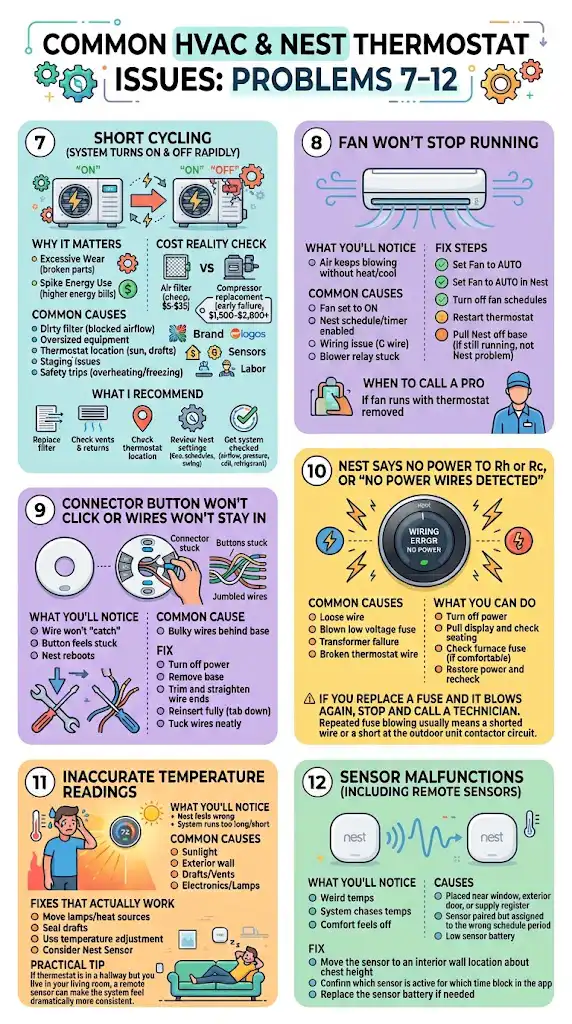
Why it matters
Short cycling increases wear on compressors, igniters, and control boards. It can also spike energy use.
Here’s a cost reality check I share with homeowners:
| Air filter | $5 to $35 | Prevents airflow stress |
| Compressor replacement (early failure scenario) | often $1,500 to $2,800 or more | Varies by brand, tonnage, labor, warranty |
Common causes
- Dirty filter restricting airflow
- Oversized HVAC equipment
- Thermostat location issue (sun, drafts)
- Heat pump staging or furnace staging settings incorrect
- System safety trips from overheating or freezing
What I recommend
- Replace the filter
- Check for closed vents and blocked returns
- Check thermostat location and nearby drafts
- Review Nest settings like Eco, schedules, and temperature swing behavior
- If it continues, get the system checked for airflow, static pressure, coil condition, and refrigerant charge
8. Fan won’t stop running
What you’ll notice
- Air keeps blowing even when the system isn’t heating or cooling
Common causes
- Fan is set to On instead of Auto
- Nest schedule or fan timer is enabled
- Wiring issue at G
- Blower relay stuck on the furnace control board
Fix steps
- In the Nest, set Fan to Auto
- Check for fan schedule features and turn them off temporarily
- Restart the thermostat
- If the fan still runs, pull the Nest off the base
If the fan continues running with the thermostat removed, the issue is not the Nest. It’s in the HVAC equipment or wiring.
When to call a pro: if the fan runs with the thermostat removed. That’s a strong clue the control board or relay is stuck.
9. Connector button won’t click or wires won’t stay in
What you’ll notice
- A wire won’t “catch” in the terminal
- The button feels stuck
- Nest reboots when you press the display on
Common cause
Bulky wires behind the base push against the terminal block or prevent full seating.
Fix
- Turn off power
- Remove the Nest base
- Trim and straighten wire ends
- Reinsert fully and make sure the connector tab is down
- Tuck wires neatly so the base sits flat
If the base is warped or a terminal is broken, replacement parts may be needed.
10. Nest says no power to Rh or Rc, or “no power wires detected”
This often shows up as wiring errors during install or after a power event.
Common causes
- Loose wire not fully inserted
- Blown low voltage fuse on control board
- Transformer failure
- Broken thermostat wire in the wall (less common, but it happens)
What you can do
- Turn off power
- Pull the Nest display and confirm each wire is fully seated
- Check the furnace control board fuse (if you’re comfortable)
- Restore power and recheck
If you replace a fuse and it blows again, stop and call a technician. Repeated fuse blowing usually means a shorted wire or a short at the outdoor unit contactor circuit.
11. Inaccurate temperature readings
What you’ll notice
- Nest says 72 but it feels like 76
- System runs too long or not long enough
Common causes
- Thermostat in direct sunlight
- Mounted on an exterior wall that gets cold or hot
- Nearby drafts, supply vents, or returns
- Heat from electronics or lamps
Fixes that actually work
- Move lamps or heat sources away from the thermostat area
- Seal drafts in the wall cavity behind the thermostat
- Use Nest’s temperature adjustment options (if available on your model)
- Consider a Nest temperature sensor for better averaging in the room you actually use
Practical tip: If your thermostat is in a hallway but you live in your living room, a remote sensor can make the system feel dramatically more consistent.
12. Sensor malfunctions (including remote sensors)
What you’ll notice
- A room sensor shows weird temps
- The thermostat seems to “chase” temperatures and comfort feels off
Causes
- Sensor placed near a window, exterior door, or supply register
- Sensor paired but assigned to the wrong schedule period
- Low sensor battery
Fix
- Move the sensor to an interior wall location about chest height
- Confirm which sensor is active for which time block in the app
- Replace the sensor battery if needed
Nest light meanings (quick reference)
| Blinking red | Battery drained, charging | Charge by USB, then fix power delivery (often C wire) |
| Blinking green | Starting up, updating, restarting | Wait a few minutes, don’t power cycle repeatedly |
| No light | No power or not waking | Check HVAC power, reseat display |
FAQs (real questions I hear on service calls)
What should I do if my Nest thermostat is not displaying anything?
First reseat the display on the base, then check the breaker and furnace switch. If it still won’t power on, charge the display by USB for 30 to 60 minutes. If it works on USB but won’t stay on installed, you likely need a proper C wire or a power connector solution.
Why is my Nest thermostat not cooling?
Make sure it’s set to Cool and the set temperature is below the room temperature. Then check the filter and confirm the outdoor unit is running. If the indoor coil is freezing or the outdoor unit is not running, you’ll probably need service.
How do I know if it’s a wiring issue?
Common signs are power errors, repeated reboots, heat running when cooling is called for, or the system doing the opposite of what you selected. If you’re comfortable, verify wires are fully seated at the Nest base and match the equipment type in the Nest setup.
How can I improve my Nest thermostat’s Wi‑Fi connection?
Fix low battery or power issues first. Then restart the thermostat and router. If the signal is weak at the thermostat location, add a mesh node or extender.
What if none of these solutions work?
At that point, I recommend two things: check the furnace or air handler for diagnostic codes and contact either Google Nest support or an HVAC technician. If the problem is power, wiring, airflow, refrigerant, or safety controls, an HVAC service call is usually the fastest way to stop the guesswork.
My wrap-up as a technician
Most Nest thermostat problems come down to three categories: power, wiring, and airflow. If you start with the basics (filter, power to the HVAC, thermostat battery, and correct heat pump settings), you can solve a lot of issues without replacing anything.
If you tell me what Nest model you have and your system type (furnace, heat pump, dual fuel), plus what wires are connected (a photo works), I can help you narrow it down to the most likely fix quickly.