Hi, I’m Nathan. I’ve worked as an HVAC technician for over 10 years, and I’ve walked into a lot of homes where someone says, “My thermostat has a flashing snowflake and the AC won’t kick on. Is it broken?”
Most of the time, it’s not broken. A flashing snowflake is usually your thermostat protecting your compressor from damage. But there are a few other common causes too, and I’ll walk you through the exact troubleshooting process I use in the field.
By the end of this guide, you’ll know:
- What the flashing snowflake actually means
- When you should wait and when you should act
- How to reset your system safely
- What to check if cooling still won’t start
- What Does a Flashing Snowflake Mean on a Thermostat?
- Quick Answer: What to Do First (My Go-To 60 Second Check)
- Why Thermostats Use a Compressor Delay (And Why You Should Respect It)
- Step-by-Step: How to Fix a Flashing Snowflake on Your Thermostat
- Step 1: Wait out the delay (5 to 10 minutes)
- Step 2: Check the air filter (fast fix that prevents coil freeze)
- Step 3: Check if the outdoor unit is running
- Step 4: Do a full system reset (the safe way)
- Step 5: Check the drain line and float switch (very common in humid climates)
- Step 6: Look for ice on the indoor coil (or copper line)
- Flashing Snowflake Troubleshooting Table (What I See Most Often)
- Brand Notes (Because Not All Thermostats Behave the Same)
- The One Mistake I Want You to Avoid
- When a Flashing Snowflake Means You Should Call a Pro
- FAQ: Flashing Snowflake on Thermostat
- My Simple Checklist (Do These in Order)
What Does a Flashing Snowflake Mean on a Thermostat?
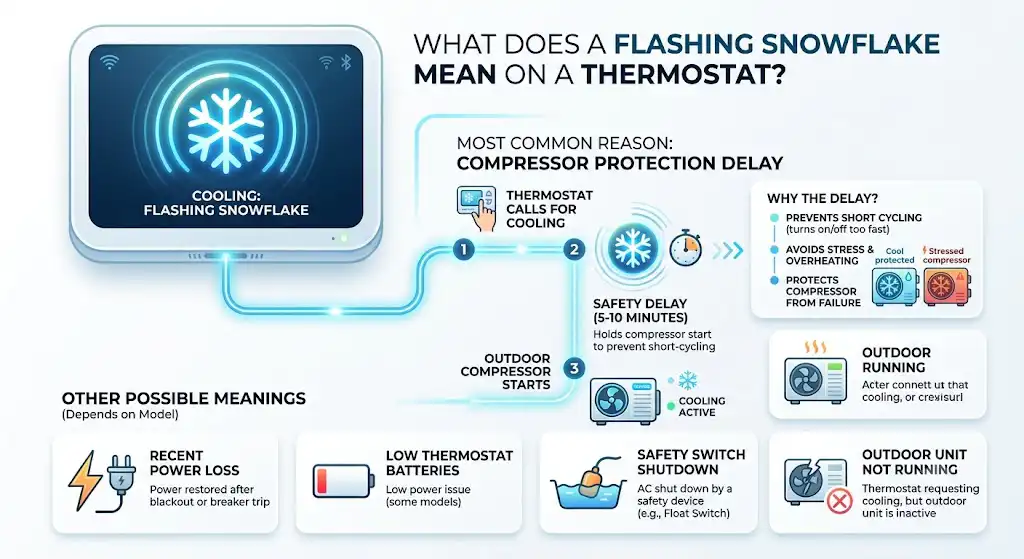
In most homes, a flashing snowflake means your thermostat is calling for cooling, but it’s holding the system in a short safety delay before starting the outdoor compressor.
The most common reason: compressor protection delay
Modern thermostats and control boards often enforce a 5-minute delay (sometimes up to 10 minutes) to prevent short cycling, which is when the compressor turns on and off too quickly.
Short cycling is hard on compressors and can lead to overheating, blown capacitors, or compressor failure. That’s why the delay exists.
Other possible meanings (depends on thermostat model)
A flashing snowflake can also show up when:
- Power was recently lost and restored (blackout or breaker trip)
- Your thermostat batteries are low (some models)
- Your AC shut down due to a safety switch (like a float switch in the drain pan)
- Your outdoor unit isn’t running, and the thermostat is still requesting cooling
Quick Answer: What to Do First (My Go-To 60 Second Check)
Before you start taking things apart, do this:
- Wait 5 to 10 minutes
- Don’t change settings repeatedly. Don’t flip it from Cool to Off to Cool.
- Lower the set temperature 2 to 3 degrees
- Example: If the room is 76, set it to 72.
- Listen
- Indoor blower running? Outdoor unit running? Any buzzing or clicking?
Why Thermostats Use a Compressor Delay (And Why You Should Respect It)
As a tech, I’ve seen homeowners accidentally create bigger problems by forcing rapid restarts.
Here’s what commonly triggers the delay:
- You just changed the thermostat settings
- You replaced thermostat batteries
- The breaker was turned off and back on
- The system stopped due to a safety switch
- The system briefly lost power during a storm
What the delay protects
Your outdoor compressor is basically the heart of your AC. Rapid cycling can create high starting pressure and electrical strain.
Step-by-Step: How to Fix a Flashing Snowflake on Your Thermostat
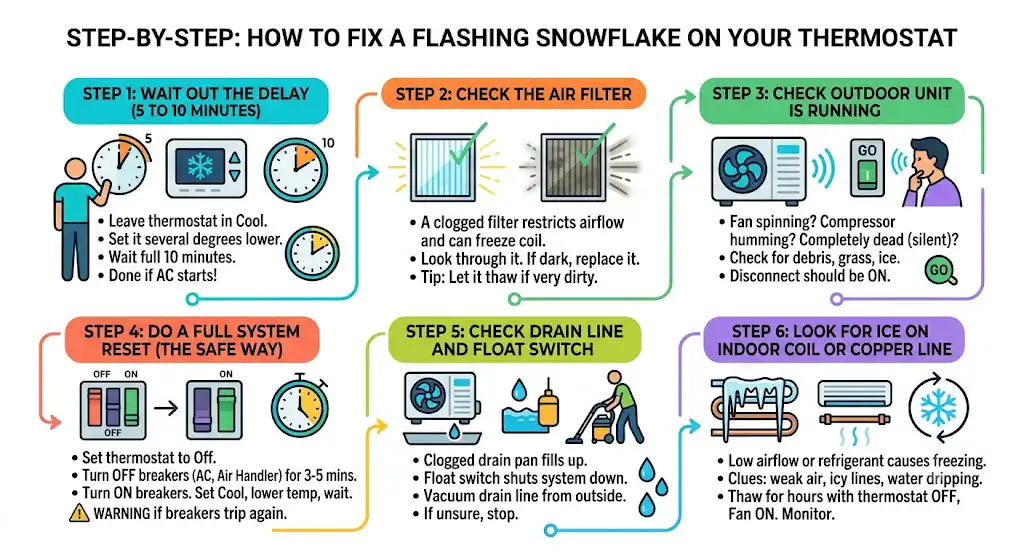
Step 1: Wait out the delay (5 to 10 minutes)
This sounds too easy, but it solves a lot of calls.
What I recommend:
- Leave the thermostat in Cool
- Set it a few degrees lower than room temperature
- Wait a full 10 minutes
Step 2: Check the air filter (fast fix that prevents coil freeze)
A clogged air filter restricts airflow. Low airflow can cause the evaporator coil to get too cold and freeze, which can lead to poor cooling and weird system behavior.
How to check:
- Pull the filter out
- If you can’t see light through it, replace it
Step 3: Check if the outdoor unit is running
Go outside and look at the outdoor condenser.
You’re looking for:
- Is the fan spinning?
- Do you hear the compressor hum?
- Is the unit completely dead (silent)?
Quick things to check outside:
- Leaves, grass clippings, or debris blocking the coil
- Ice buildup (rare in cooling mode, but possible if things are seriously off)
- A shut-off disconnect near the unit (should be ON)
Step 4: Do a full system reset (the safe way)
If waiting didn’t work, I typically do a controlled reset.
Safe reset steps
- Set thermostat to Off
- Turn off breakers at the main electrical panel:
- Breaker labeled AC / Condenser
- Breaker labeled Air Handler / Furnace
- Leave them off for 3 to 5 minutes
- Turn breakers back on
- Set thermostat to Cool
- Set temperature 2 to 3 degrees below room temp
- Wait 5 to 10 minutes
This clears many minor lockouts and control hiccups.
Step 5: Check the drain line and float switch (very common in humid climates)
Many AC systems have a float switch in the drain pan. If the pan fills up because the drain line is clogged, the float switch shuts the system down to prevent water damage.
Signs this might be the issue:
- You see water near the indoor unit
- The AC stopped cooling suddenly
- Thermostat calls for cooling but the outdoor unit won’t run
What you can do:
- Check the drain line exit outside for blockage
- If you have a wet dry vac, you can try vacuuming the drain line from the outside drain termination
Step 6: Look for ice on the indoor coil (or copper line)
If your system has low airflow or low refrigerant, the evaporator coil can freeze.
Common clues:
- Weak airflow from vents
- The larger copper line near the air handler is icy
- Water dripping after the system shuts off (thawing ice)
What to do if you suspect freezing:
- Turn thermostat to Off
- Set fan to On (this helps thaw faster)
- Let it thaw for a few hours
- Replace the filter
- After thawing, restart and monitor
If it freezes again within a day, you likely have an airflow issue (dirty coil, blower problem) or refrigerant issue (leak). That’s a service call.
Flashing Snowflake Troubleshooting Table (What I See Most Often)
| Snowflake flashing right after power outage | Compressor delay | Wait 5 to 10 minutes |
| Snowflake flashing and AC starts later | Normal delay | No repair needed |
| Snowflake flashing and indoor fan runs but no outdoor unit | Breaker, capacitor, contactor, float switch | Check breakers, drain pan, outdoor unit |
| Snowflake flashing and airflow is weak | Dirty filter or frozen coil | Replace filter, check for ice |
| Snowflake flashing nonstop even after reset | Thermostat issue or control board lockout | Confirm wiring, batteries, model-specific code, call tech |
Brand Notes (Because Not All Thermostats Behave the Same)
Different brands display the snowflake differently. Here’s a simple guide based on what I see most often in homes.
| Honeywell (many models) | Compressor delay or “Cool On” delay | Wait 5 minutes, then reset if needed |
| Emerson / White-Rodgers | Time delay after power change | Wait, check filter and outdoor unit |
| Lux / budget digital stats | Delay, low battery behavior varies | Replace batteries, confirm settings |
| Smart thermostats (varies) | App may show delay or equipment protection | Follow app message, check power and float switch |
The One Mistake I Want You to Avoid
If the thermostat is flashing and you keep doing this:
- Off to Cool
- Changing temperature up and down
- Cycling breakers repeatedly
You can actually extend the delay and make troubleshooting harder. Pick one change, then give it time.
When a Flashing Snowflake Means You Should Call a Pro
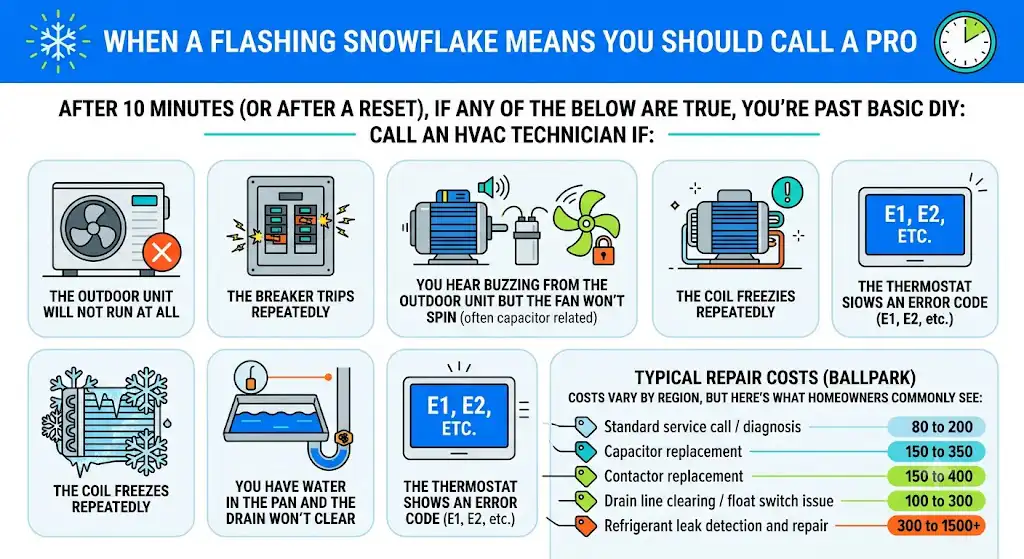
After 10 minutes (or after a reset), if any of the below are true, you’re past basic DIY:
Call an HVAC technician if:
- The outdoor unit will not run at all
- The breaker trips repeatedly
- You hear buzzing from the outdoor unit but the fan won’t spin (often capacitor related)
- The coil freezes repeatedly
- You have water in the pan and the drain won’t clear
- The thermostat shows an error code (E1, E2, etc.)
Typical repair costs (ballpark)
Costs vary by region, but here’s what homeowners commonly see:
| Standard service call / diagnosis | 80 to 200 |
| Capacitor replacement | 150 to 350 |
| Contactor replacement | 150 to 400 |
| Drain line clearing / float switch issue | 100 to 300 |
| Refrigerant leak detection and repair | 300 to 1500+ |
(These are general ranges I see across many residential calls, not a quote.)
FAQ: Flashing Snowflake on Thermostat
How long should the snowflake flash?
Usually 5 minutes. Some systems can push closer to 10 minutes depending on the control board and thermostat.
Can I bypass the delay?
I don’t recommend it. That delay exists to protect the compressor. Bypassing it can shorten equipment life.
Does a flashing snowflake mean my AC is broken?
Not by itself. Most of the time it means the system is in a normal protection delay. It becomes a problem if it never stops flashing and cooling never starts.
My thermostat says “Cool On” and it’s blinking. Is that different?
Not really. Many thermostats blink “Cool On” for the same reason: compressor delay or a pending cooling call.
My Simple Checklist (Do These in Order)
- Wait 10 minutes
- Replace the air filter
- Confirm outdoor unit is running
- Check breakers (AC and air handler)
- Check drain pan and drain line
- Look for ice on the indoor coil
- Do a full system reset
If it still flashes, it’s time to narrow it down by model, error codes, and whether the outdoor unit is actually getting a call to run.