If you’re here because your surge protector reset button won’t stay in, the switch keeps flipping off, or the “Protected” light went out, you’re not alone. I run into this constantly on service calls. Homeowners plug in a few extra things, a small surge hits the neighborhood, and suddenly the power strip looks “dead.”
In this guide, I’ll tell you all about it.
- What the Surge Protector Reset Button Actually Does
- Quick Safety Check Before You Touch Anything
- How to Reset a Surge Protector (Step-by-Step)
- If the Reset Button Won’t Stay In (Most Common Causes)
- Troubleshooting Table: Symptom to Likely Cause
- How Many Amps Are You Actually Using? (Real-World Examples)
- The “Protected” Light: What It Can (and Can’t) Tell You
- Why Surge Protectors “Die” After a Storm (Joules Explained Simply)
- When to Replace Instead of Reset (My Rule)
- What If Your Surge Protector Has No Reset Button
- Don’t Daisy Chain Surge Protectors (One of the Most Common Mistakes)
- My Quick “On-Site” Checklist (What I Do in Homes)
- FAQ: Surge Protector Reset Button
- Bottom Line
What the Surge Protector Reset Button Actually Does
On many surge protectors, the “reset” isn’t a magic electronics reset like your router.
In most common power-strip style surge protectors, the reset button or rocker switch is a built-in circuit breaker, usually rated 15 amps. It trips for the same reason a breaker in your home’s electrical panel trips:
- Too much current (overload)
- A short circuit in a connected device
- Internal failure of the surge protector itself
Reset button vs rocker switch (they can be the same thing)
Some units have a tiny push-button labeled Reset. Others use a big rocker switch that clicks to RESET / OFF. Functionally, many of those rocker switches are a 15A resettable breaker, not just a simple on/off.
Quick Safety Check Before You Touch Anything
I know it’s tempting to just keep pressing reset. Don’t.
Before resetting, do this quick check:
- Unplug the surge protector from the wall.
- Smell it. If you smell burning plastic or an electrical “burnt” odor, replace it.
- Look for damage. Melted spots, discoloration, loose outlets, cracked housing = replace it.
- If the wall outlet is warm, discolored, or loose, stop and get it checked.
How to Reset a Surge Protector (Step-by-Step)
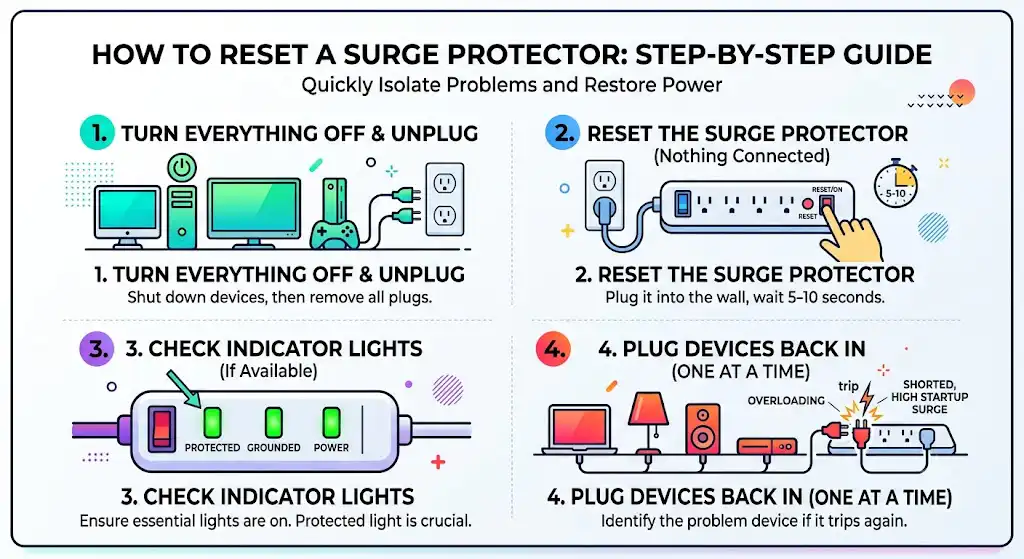
This is the exact process I use on-site because it isolates the problem fast.
Step 1: Turn everything off and unplug everything
- Turn off your computer, TV, game console, etc.
- Unplug every device from the surge protector.
Step 2: Reset the surge protector with nothing connected
- Plug the surge protector into the wall outlet.
- Press the reset button (or flip the breaker switch back to RESET/ON).
- Wait 5 to 10 seconds.
Step 3: Check indicator lights (if your model has them)
Look for labels like:
- Protected
- Grounded
- Power
If there’s a Protected light and it does not come on, that’s a huge clue (more on that below).
Step 4: Plug devices back in one at a time
Plug in one device, wait a few seconds, then plug in the next.
When it trips again, the last device plugged in is usually:
- Overloading the strip
- Shorted internally
- Drawing a high startup surge (common with motors)
If the Reset Button Won’t Stay In (Most Common Causes)
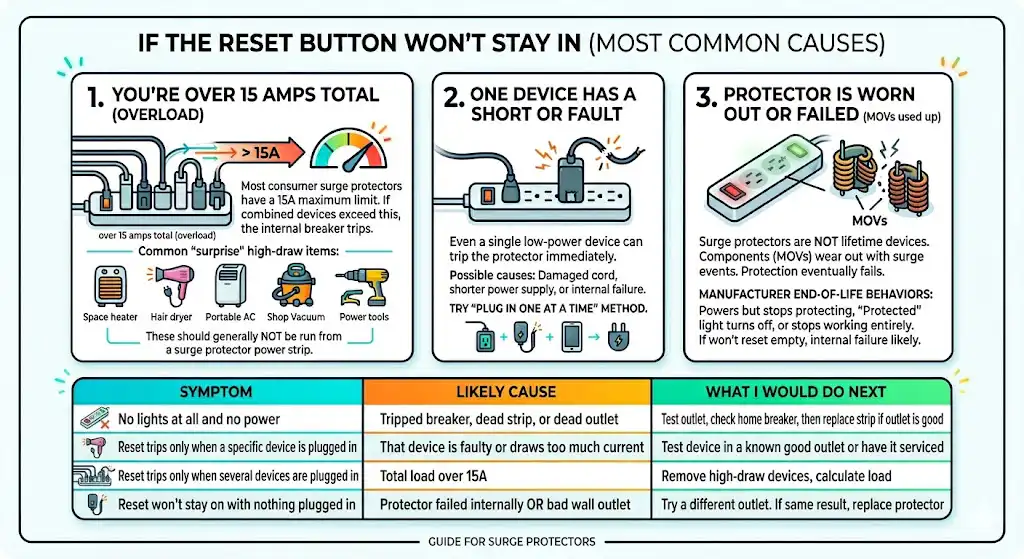
1) You’re over 15 amps total (overload)
Most consumer surge protectors are designed for 15A maximum (in the U.S., many standard household circuits are also 15A).
If your combined devices exceed that, the internal breaker trips.
Common “surprise” overload items I see
- Space heaters (huge one)
- Hair dryers
- Portable AC units
- Shop vacuums
- Microwaves
- Air compressors
- Power tools
These should generally not be run from a surge protector power strip.
2) One plugged-in device has a short or a fault
If even one low-power device trips the surge protector immediately, it may have:
- A shorter power supply
- A damaged cord
- Internal failure
This is why the “plug in one at a time” method works so well.
3) The surge protector is worn out or has failed (MOVs used up)
Surge protectors aren’t lifetime devices.
Most use components called MOVs (metal oxide varistors) that absorb surge energy. Every surge event takes a little life out of the MOVs. Eventually, protection fails.
Manufacturers handle end-of-life differently:
- Some keep powering devices but stop protecting (dangerous because you won’t know).
- Some show a “Protected” light turning off.
- Some units stop working entirely so you don’t keep using a dead protector.
If yours won’t reset even with nothing plugged in, an internal failure is very possible.
Troubleshooting Table: Symptom to Likely Cause
| What you see | Most likely cause | What I would do next |
| Reset won’t stay on with nothing plugged in | Protector failed internally OR bad wall outlet | Try a different outlet. If same result, replace protector |
| Reset trips only when a specific device is plugged in | That device is faulty or draws too much current | Test device in a known good outlet or have it serviced |
| Reset trips only when several devices are plugged in | Total load over 15A | Remove high-draw devices, calculate load |
| “Protected” light is off but power still works | No surge protection left | Replace the surge protector |
| No lights at all and no power | Tripped breaker, dead strip, or dead outlet | Test outlet, check home breaker, then replace strip if outlet is good |
How Many Amps Are You Actually Using? (Real-World Examples)
Here’s a practical cheat sheet. Many people overload strips without realizing it.
Rule of thumb: Amps = Watts / Volts.
In the U.S., voltage is typically about 120V.
Common Devices and Typical Current Draw (Approximate)
| Device | Typical watts | Approx. amps at 120V |
| Phone charger | 5 to 30W | 0.04 to 0.25A |
| Laptop | 45 to 100W | 0.4 to 0.8A |
| Desktop PC | 200 to 600W | 1.7 to 5A |
| TV (LED) | 60 to 200W | 0.5 to 1.7A |
| Gaming console | 70 to 220W | 0.6 to 1.8A |
| Refrigerator (running) | 150 to 400W | 1.3 to 3.3A |
| Space heater | 1500W | 12.5A |
| Hair dryer | 1200 to 1875W | 10 to 15.6A |
| Microwave | 1000 to 1500W | 8.3 to 12.5A |
| Shop vac | 900 to 1400W | 7.5 to 11.7A |
What this means in plain English:
A single space heater can almost max out a 15A surge protector by itself. Add a TV and a console, and you’re tripping the breaker.
From my HVAC side of things, I’ll add this: anything with a motor or heating element is a bad match for a typical surge protector power strip.
The “Protected” Light: What It Can (and Can’t) Tell You
Many surge protectors include indicator lights. They’re helpful, but I don’t treat them as perfect.
| Light label | Usually means | If it’s OFF |
| Power | The strip has power | Could be tripped, dead, or unplugged |
| Protected | Surge protection circuitry is still functioning | Often means protection has failed and the strip should be replaced |
| Grounded | Outlet grounding is present | If off, protection may be reduced and wiring may need checking |
Important note from real-world experience
I’ve seen old strips where the “Protected” light stayed on even though the strip was clearly unreliable. Age, heat, and repeated surges matter. If you can’t remember when you bought it, treat it like a wear item.
Why Surge Protectors “Die” After a Storm (Joules Explained Simply)
Surge protectors are commonly rated in joules, which is basically the amount of surge energy they can absorb over time before the protection parts are used up.
- Many consumer units are in the hundreds to a few thousand joules.
- Surges are cumulative: lots of small surges or one big one can finish it off.
If your power flickered, you heard a pop outside, or a storm rolled through, and then your surge protector won’t reset, that’s a classic failure pattern.
When to Replace Instead of Reset (My Rule)
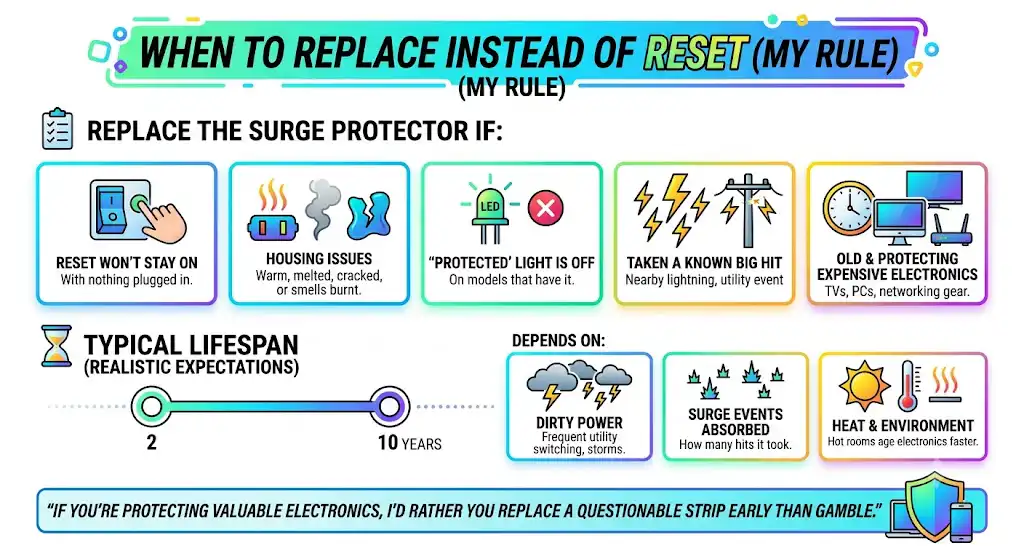
Replace the surge protector if:
- The reset won’t stay on with nothing plugged in.
- The housing is warm, melted, cracked, or smells burnt.
- The Protected light is off (on models that have it)
- It has taken a known big hit (nearby lightning, utility event)
- It’s old and protecting expensive electronics (TVs, PCs, networking gear)
Typical lifespan (realistic expectations)
You’ll see estimates ranging roughly from 2 to 10 years, but it depends on:
- How “dirty” your power is (frequent utility switching, storms)
- How many surge events has it absorbed
- Heat and environment (hot rooms age electronics faster)
If you’re protecting valuable electronics, I’d rather you replace a questionable strip early than gamble.
What If Your Surge Protector Has No Reset Button
Some models don’t have a dedicated surge protector reset button.
Try this:
- Unplug everything from the strip.
- Turn the strip switch OFF.
- Unplug the strip from the wall for 30 seconds.
- Plug it back in
- Turn it ON
- Plug devices back one at a time
If it still won’t power up, it’s likely failed or the wall outlet/circuit has an issue.
Don’t Daisy Chain Surge Protectors (One of the Most Common Mistakes)
Plugging one surge protector into another seems harmless, but in practice, it:
- Makes overloads more likely
- Can create heat at plug connections
- Can defeat the intent of the built-in breaker protection
If you need more outlets, use:
- A properly rated power strip (not stacked)
- Or better: have an electrician add outlets where you actually need them
My Quick “On-Site” Checklist (What I Do in Homes)
When I’m troubleshooting power issues for homeowners (especially around furnaces, air handlers, condensate pumps, thermostats, or home office setups), I follow this order:
- Confirm the wall outlet works (test lamp or outlet tester)
- Check the home breaker (panel) isn’t tripped.
- Reset the surge protector with nothing plugged in.
- Plug devices back in one at a time.
- Identify high-draw devices and move them off the strip.
- Replace the protector if protection is questionable.
It’s fast, it’s safe, and it prevents chasing your tail.
FAQ: Surge Protector Reset Button
Why does my surge protector’s reset button keep popping out?
Most commonly, you’re overloading it (over 15A total), or one connected device has a fault or high startup draw.
Can I keep resetting it over and over?
You can try once or twice for troubleshooting, but repeated trips mean you have a real issue: overload, a faulty device, or a failing surge protector. Repeated trips also create heat in weak connections.
If the surge protector still provides power, does that mean it’s still protecting?
Not always. Many units will still pass power even after surge protection is gone. If the “Protected” light is off, or the unit is old and has seen storms, replace it.
Bottom Line
A surge protector reset button is usually a small circuit breaker, and when it won’t stay reset, it’s almost always one of three things:
- You’re pulling too many amps.
- One device is faulty.
- The surge protector has reached end-of-life and needs replacement.
If you want, tell me what’s plugged into your surge protector (and whether the “Protected” light is on). I’ll help you estimate the load and pinpoint the most likely cause.