
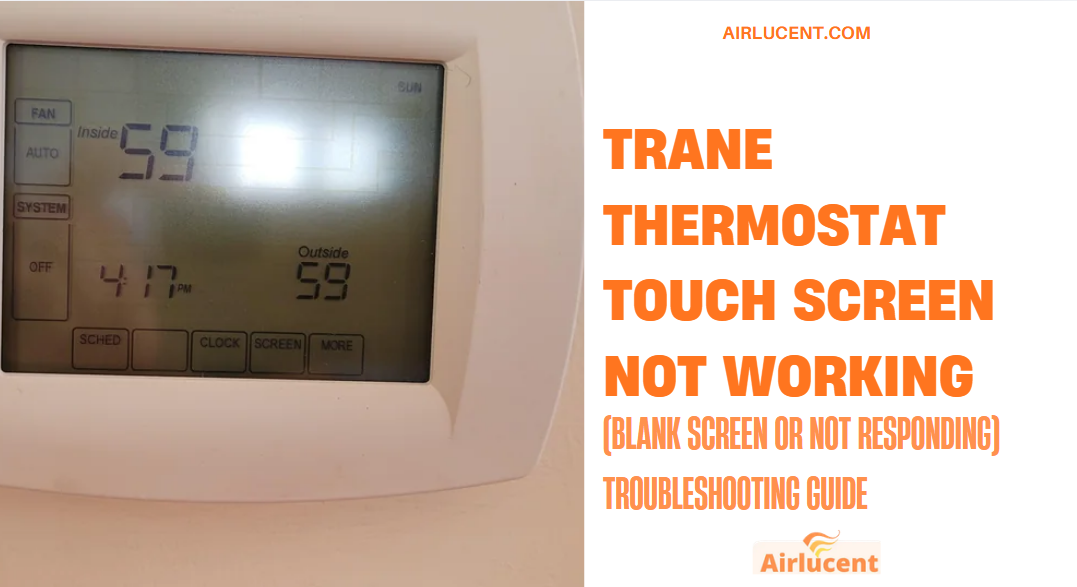
If your Trane thermostat touch screen isn’t working, isn’t responding, or the screen is blank (black, white, or completely dead), you’re usually dealing with one of a few root causes: lost power to the thermostat, dead batteries (on battery models), a safety switch that shut the system down, or a thermostat software freeze.
I’ve been an HVAC technician for over a decade, and in real homes the most common pattern I see is simple: the thermostat isn’t “broken”, it’s not getting the 24 volt power it needs, or it’s locked up and needs a reboot.
Below is the same process I use on service calls, written so you can follow it safely at home.
Safety first (please read)
You’ll be working around electrical equipment.
- If you’re not comfortable opening your furnace or air handler panels, stop after the basic steps and call a pro.
- Turn off power at the breaker before opening the indoor unit.
- If you smell burning or see melted wiring, shut the system off and call an HVAC company.
Quick 60 second checklist (start here)
Before we go deeper, do these quick checks:
- Is the screen totally blank?
That usually means power loss (batteries, breaker, blown fuse, float switch, loose wire). - Is the screen on but touch won’t respond?
That’s often a frozen thermostat, dirty screen, calibration issue, or software glitch. - Did this happen right after a storm, power outage, or drain clog?
That points strongly to power interruption, a tripped float switch, or a blown low voltage fuse.
Common symptoms and the most likely fixes (fast reference)
| What you see | Most likely cause | What to do first |
|---|---|---|
| Blank screen (no backlight at all) | No 24V power, dead batteries, blown 3 amp fuse, tripped float switch | Replace batteries (if applicable), then power cycle breaker |
| Blank white screen / frozen logo | Thermostat software freeze or power glitch | Power cycle breaker, then hard reboot thermostat |
| Screen is on but touch is not responding | Dirty screen, frozen UI, calibration issue | Clean screen, hard reboot, recalibrate if prompted |
| Thermostat keeps rebooting | Loose wiring, failing transformer, shorted thermostat wire | Check R and C connections, inspect for pinched wires |
| Thermostat dead after filter change or maintenance | Furnace door switch open or panel not seated | Reseat blower door panel fully |
From my experience, blank screens are most often power related (batteries, breaker, 3 amp fuse, float switch, door switch), not the touchscreen itself.
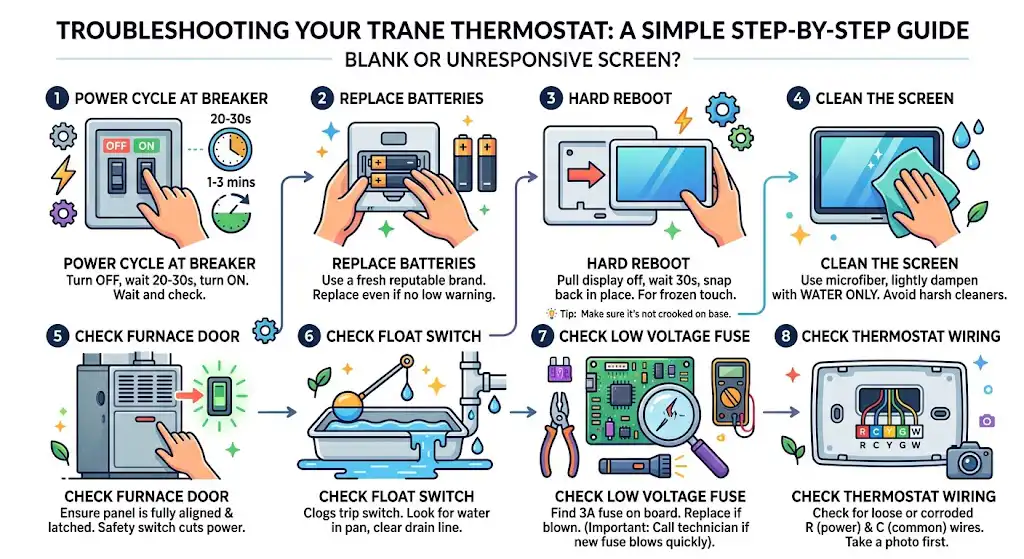
Step 1: Power cycle your Trane thermostat (best first fix)

If your Trane thermostat is showing a blank screen or a blank white screen, a power cycle clears a lot of lockups.
How to power cycle at the breaker
- Make sure the HVAC system is not actively running. If it’s running, turn it off at the thermostat first (if possible).
- Go to your home’s breaker panel.
- Find the breaker labeled something like Furnace, Air Handler, HVAC, AC, or Heat.
- Flip it OFF for 20 to 30 seconds.
- Flip it back ON.
- Wait 1 to 3 minutes and check the thermostat.
If your thermostat comes back on, you likely had a temporary software freeze or power glitch.
Step 2: Replace batteries (if your Trane thermostat uses them)
Not every Trane thermostat uses batteries, but many have either:
- batteries as the main power source, or
- batteries as backup power (so you may still get weird behavior when they’re weak)
What I recommend
- Replace with a reputable brand (Energizer, Panasonic, Duracell).
- Put in a fresh set even if you didn’t see a low battery warning. I can’t tell you how many times I’ve seen homeowners miss the warning and the screen goes dead later.
How to do it (general)
- Carefully remove the thermostat face or open the battery compartment (depends on model).
- Replace batteries.
- Snap it back in place and wait for reboot.
If the screen comes back instantly, you found the issue.
Step 3: Do a hard reboot (especially for unresponsive touch screens)
When the display is on but the touch screen won’t respond, I use this method constantly.
Hard reboot method
- Firmly pull the display straight off the wall plate (don’t twist it).
- Wait 30 seconds.
- Snap it back into place.
This forces a reboot on many Trane touchscreen models and clears “frozen” touch input.
Tip from the field: If the thermostat is slightly crooked on the base, it may not seat correctly. Reseat it firmly.
Step 4: Clean the screen (yes, it matters)
Touchscreens can stop responding if there’s a layer of oil, cooking residue, dust, or cleaning chemical film.
How to clean it correctly
- Use a microfiber cloth
- Lightly dampen with water only (or screen safe cleaner if you have it)
- Do not spray directly onto the thermostat
- Wipe gently, then dry with a clean microfiber
Avoid harsh cleaners. I’ve personally seen overspray from cleaners creep into the edges and cause problems.
Step 5: Check the furnace or air handler door (door switch)
This one is more common than people think.
If someone recently changed a filter or did maintenance, the blower door panel might not be fully seated. Many systems have a door safety switch that cuts power when the panel is off. When that switch opens, the thermostat can go blank because the system’s 24V power drops.
What to do
- Locate your indoor unit (furnace or air handler).
- Make sure the front panel is properly aligned and fully latched.
- Turn power off and on again at the breaker after reseating the panel.
Step 6: Check for a tripped float switch (condensate overflow)
If your AC is running, it creates condensation. That water drains through a PVC line. When the drain clogs, many systems trigger a float switch to prevent flooding. When that switch trips, it can shut off 24V power and your thermostat may go blank.
Signs this is your issue
- Your AC stopped and the thermostat went blank during hot weather
- You see water in the drain pan
- You notice a clogged drain line near the indoor unit
What to do
- Turn off HVAC power at the breaker.
- Look for a float switch near the PVC drain line (often a small device with two wires).
- If there’s water in the pan, remove the water and clear the drain line.
- Restore power and check thermostat.
If you keep getting a tripped float switch, the drain likely needs a proper cleaning. Don’t ignore it. Water damage gets expensive fast.
Step 7: Check the 3 amp low voltage fuse (very common after shorts)
If your Trane thermostat is blank and power cycling didn’t help, a blown low voltage fuse is a strong possibility.
Many furnaces and air handlers have a 3 amp automotive style fuse on the control board (often purple). If a thermostat wire shorts (common during DIY work, landscaping staples, or rodents), that fuse pops and the thermostat goes dead.
What you’ll need
| Tool | Why you need it |
|---|---|
| Flashlight | To see the control board clearly |
| Needle nose pliers | To pull the fuse safely |
| Replacement 3 amp fuse | Same rating only |
| Multimeter (optional but best) | To confirm 24V and diagnose safely |
Basic process (high level)
- Turn off power at the breaker.
- Open the indoor unit panel.
- Locate the control board and find the 3A fuse.
- Inspect it. If it’s visibly broken, replace it with the same type and rating.
- Restore power.
Important: If the new fuse blows again quickly, you likely have a short in the thermostat wiring or a bad component. At that point, I recommend calling a technician so you don’t keep popping fuses.
Step 8: Check thermostat wiring (R and C are the big ones)
Once batteries, rebooting, and basic power checks are done, wiring is next.
What I look for first
- Loose R wire (power)
- Loose C wire (common return)
- Corrosion or a wire that slipped out of the terminal
Even one slightly loose connection can cause a blank screen or random resets.
If you open the thermostat:
- Take a photo before touching anything.
- Make sure each conductor is firmly clamped.
If you’re not sure what you’re looking at, stop and get help. Miswiring can blow the 3 amp fuse.
A simple voltage check (optional but very effective)
If you have a multimeter, this is the cleanest way to know if the thermostat is getting power.
What you should typically see
Most residential systems use 24VAC control power.
| Test points | Normal reading (typical) | What it means if not normal |
|---|---|---|
| R to C | About 24VAC | If 0VAC, thermostat is not getting control power |
| R to W (heat call) | 24VAC when calling | If never changes, thermostat may not be sending signal |
| R to Y (cool call) | 24VAC when calling | Same idea for cooling |
If you do not have 24VAC between R and C at the thermostat, the problem is usually upstream (fuse, transformer, float switch, door switch, wiring).
If the touch screen is on but not responding (deeper fixes)
1) Touchscreen calibration prompt (if your model supports it)
Some Trane touchscreen models will show a Start prompt or a calibration sequence during reboot. If you see it, follow the on screen steps to realign touch sensors.
If it keeps drifting or missing touches even after calibration, that’s a sign of hardware wear or moisture damage.
2) Firmware or software glitches
Like phones, thermostats run software. Power flickers and brownouts can cause the interface to lag or freeze.
What I recommend:
- Do the breaker power cycle
- Do the hard reboot (remove face, wait 30 seconds)
- If your thermostat is connected to Wi‑Fi, check for updates in settings (varies by model)
If updates fail repeatedly, the thermostat may be stuck mid update or having Wi‑Fi related freezing. A reset may be needed.
3) Physical damage or moisture intrusion
If the screen is cracked, has dark blotches, or there’s evidence of moisture, the touch layer can fail.
Common causes I’ve seen:
- Cleaning spray getting into the edges
- High humidity directly on an exterior wall
- Someone bumped it hard and cracked the digitizer
If the touch panel is physically damaged, troubleshooting won’t fix it. Replacement is the real solution.
Why this happens so often (what I see in the field)
From my own service history, the majority of blank or dead thermostat screens trace back to one of these:
- Loss of 24V power from the indoor unit (blown fuse, float switch, door switch)
- Weak or dead batteries (on battery or hybrid models)
- Loose common wire connection
- Software freeze after a power event
Actual thermostat screen failure happens, but it’s not my first assumption unless you’ve confirmed proper 24V power and the thermostat still won’t boot or register touch.
When to stop troubleshooting and call a technician
I’m all for DIY when it’s safe, but I also know when a job starts turning into guesswork. Call a pro if:
- You replaced the 3 amp fuse and it blows again
- You do not have 24VAC between R and C and you can’t find why
- You suspect a bad transformer or shorted thermostat cable
- Water is overflowing and the float switch keeps tripping
- The thermostat boots but the touchscreen is physically damaged
If you want a second opinion before replacing anything, you can also contact Trane support with your thermostat model number.
Troubleshooting summary table (cause and fix)
Here’s the same info condensed the way I’d write it on my work order notes.
| Possible cause | What you’ll notice | Fix |
|---|---|---|
| Dead batteries | Blank screen, may have missed low battery warning | Replace batteries |
| Power interruption | Blank screen after outage or flicker | Power cycle breaker (20 to 30 seconds off) |
| Thermostat frozen | White screen, stuck logo, touch not responding | Hard reboot, breaker power cycle |
| Loose wiring (R or C) | Random resets, blank screen, intermittent power | Reseat wiring at thermostat and indoor board |
| Blown 3 amp fuse | Thermostat dead, usually after wiring work or short | Replace fuse, diagnose short if it repeats |
| Tripped float switch | AC stops, water in pan, blank thermostat on some setups | Drain water, clear drain line |
| Furnace door switch open | Happened after filter change | Reseat panel fully |
Frequently asked questions
Why is my Trane thermostat screen blank but the breakers are on?
Even with breakers on, the thermostat can be missing 24V control power due to a blown 3 amp fuse, open float switch, open door switch, or broken common wire.
Can a blank thermostat screen be caused by the outdoor unit?
Usually no. The thermostat’s power almost always comes from the indoor unit (furnace or air handler transformer). Outdoor problems can stop cooling, but they don’t typically kill the thermostat display.
Should I replace the thermostat if the touch doesn’t respond?
Only after you confirm:
the thermostat has stable power (about 24VAC between R and C), and
hard reboot and cleaning did not help
If those check out and it’s still unresponsive, replacement becomes likely.
Final thoughts (from Nathan)
If your Trane thermostat touch screen is not working, I’d start exactly the same way I do in a customer’s home: power cycle first, then batteries, then hard reboot, then check the common shutdown causes like the float switch, door switch, and 3 amp fuse.