
Hi, I’m Nathan. I’ve worked as an HVAC technician for over 10 years, and one of the most common “it’s driving me crazy” calls I get is this exact problem: your Nest thermostat says the system is off, but the blower fan keeps running anyway.
Sometimes it’s a simple setting. Other times it’s a power issue (missing C wire), a wiring short, or a failing relay on the furnace control board. I’ll walk you through the same checks I do in the field, in the safest order, so you can pinpoint whether the issue is your Nest or your HVAC equipment.
- Why this happens (in plain English)
- Safety first (please do this before opening anything)
- Step 1: Check Nest fan settings (this is the easiest win)
- Step 2: Check for a fan schedule (it can override what you think you set)
- Step 3: Restart the thermostat and HVAC equipment (fixes firmware glitches)
- Step 4: Do the “pull-the-display” test (my go-to diagnostic)
- Step 5: Check for a missing C wire (most common “real fix” I see)
- Step 6: Check wiring for a short (especially behind the thermostat)
- Step 7: Check the furnace control board and G wire (this is the “HVAC side” proof)
- Step 8: Bad furnace control board (stuck fan relay)
- Step 9: Bad Nest thermostat (yes, it happens)
- Troubleshooting summary table (bookmark this)
- When I recommend calling a technician
- Final thoughts
Why this happens (in plain English)
Your thermostat doesn’t “power” the fan motor directly. It sends a low-voltage signal (typically through the G wire) that tells the furnace or air handler to run the blower.
So if the fan won’t turn off, one of these is happening:
- The thermostat is still calling for fan (settings or schedule)
- The thermostat is glitching or mispowered (common with no C wire)
- The G circuit is shorted or miswired
- The furnace control board relay is stuck closed (fan runs no matter what)
Safety first (please do this before opening anything)
If you’re going to open your furnace or air handler:
- Turn the system off at the breaker, not just the thermostat.
- Wait a few minutes.
- If you smell burning, see melted wires, or the blower runs even when the breaker is on/off unpredictably, stop and call a pro.
Step 1: Check Nest fan settings (this is the easiest win)
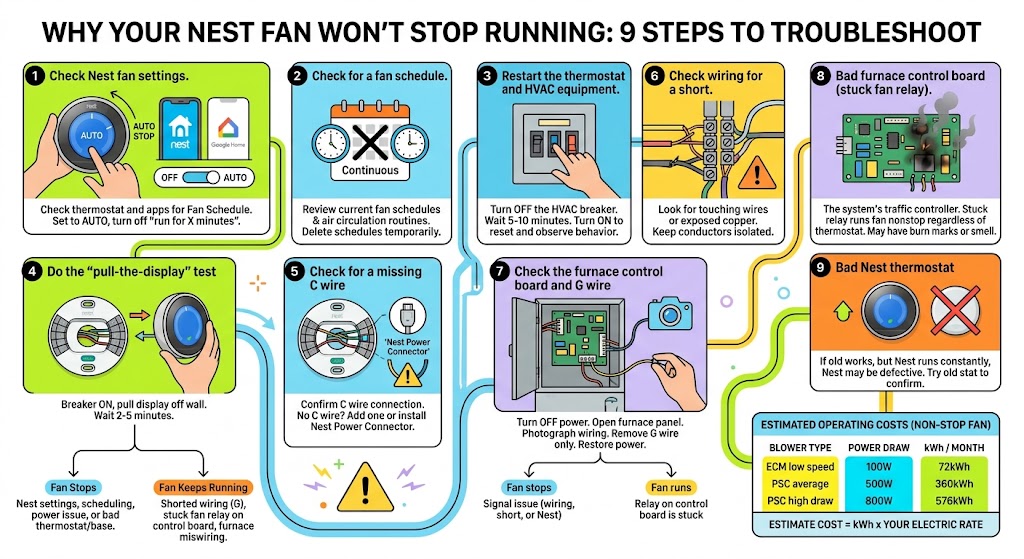
A Nest fan can be set to run constantly on purpose.
On the Nest thermostat itself
- Press the Nest ring (or tap, depending on model)
- Go to Fan
- Choose Auto or Stop fan (wording varies by model)
In the Google Home app (common on newer Nest models)
- Open Google Home
- Select your thermostat
- Look for Fan
- Set to Auto and turn off any “run for X minutes” options
In the Nest app (common on Learning Thermostat / Nest E)
- Open Nest app
- Choose your thermostat
- Check Fan Schedule
- Make sure it’s not set to run continuously
What I see in real homes
A lot of homeowners accidentally turned the fan “On” while trying to improve airflow, then forget about it. Nest will happily keep it running.
Step 2: Check for a fan schedule (it can override what you think you set)
Nest can run the blower as part of:
- A Fan Schedule
- An air circulation routine
- A Home/Away routine (less common, but I’ve seen automations cause weird behavior)
What to do
- Delete the fan schedule entirely as a test.
- Recheck if the fan shuts off within a few minutes.
Step 3: Restart the thermostat and HVAC equipment (fixes firmware glitches)
If settings look correct and the fan still runs, reset power like this:
- Turn off HVAC power at the breaker
- Leave it off for 5 to 10 minutes
- Turn it back on
- Watch the fan behavior
This clears a surprising number of “stuck state” issues, especially after a power flicker.
Step 4: Do the “pull-the-display” test (my go-to diagnostic)
This is the fastest way to separate a Nest problem from an HVAC problem.
How to do it
- Leave the HVAC breaker on for this test
- Pull the Nest display straight off the wall base
- Wait 2 to 5 minutes
Results and what they mean
If the fan turns off
That usually points to:
- Nest settings or schedule
- Nest power problem (common with no C wire)
- Bad Nest base or thermostat
If the fan keeps running
That usually points to:
- Shorted wiring (G is being energized)
- Stuck fan relay on the control board
- Miswiring at the furnace terminals
This one test saves a ton of guesswork.
Step 5: Check for a missing C wire (most common “real fix” I see)
Nest often “works” without a C wire, but in the field I’ve seen plenty of systems act flaky without one. When Nest can’t get stable power, it may do power-stealing behavior that leads to odd control problems, including fan behavior.
What to check
- Pull the Nest display off
- Look at the wire labels on the base
- Confirm whether you have a wire connected to C
If you do not have a C wire
You have two solid options:
- Add a C wire from your furnace/air handler to the thermostat
- Install a Nest Power Connector
In many homes, installing the Nest Power Connector is faster than pulling new thermostat wire.
If you do have a C wire
Make sure:
- It’s fully seated in the C terminal
- The copper isn’t nicked
- The wire isn’t loose
A loose common wire can act like “no C wire,” causing intermittent issues.
Step 6: Check wiring for a short (especially behind the thermostat)
I’ve seen this happen after DIY thermostat swaps.
Because different thermostats mount differently, the new base can pinch wires or force them to bend sharply. If bare copper touches another terminal conductor, the system can behave like it’s constantly being told to run the fan.
What you should look for
- Stray copper strands touching another terminal
- Cracked insulation near the base
- Wires pushed so tightly that copper is exposed
Fix
- Cut and re-strip cleanly if needed
- Keep each conductor isolated
- Push wires gently back into the wall so nothing is being crushed
Step 7: Check the furnace control board and G wire (this is the “HVAC side” proof)
If the fan still runs with the Nest display removed, go to the furnace/air handler.
What you’re checking
You’re trying to find out whether the furnace is running the fan because:
- It’s receiving a fan signal on G, or
- The fan relay on the control board is stuck closed
Simple test I do on service calls
- Turn off power at the breaker
- Open the blower compartment panel
- Find the low-voltage terminal strip (usually labeled R C G Y W)
- Take a photo so you can restore wiring correctly
- Remove the G wire from the control board (only the G wire)
- Restore power and observe
What the result means
- Fan stops when G is removed: the system was being told to run the fan. That points back to thermostat wiring, a short, or a Nest issue.
- Fan keeps running even with G removed: the control board relay is likely stuck, or there’s an internal issue in the air handler/furnace wiring.
Step 8: Bad furnace control board (stuck fan relay)
A furnace control board is like the system’s traffic controller. When its fan relay sticks closed, the blower can run nonstop regardless of what the thermostat is doing.
Signs I see when a control board is failing
- Fan runs constantly even with thermostat removed
- Fan ignores mode changes
- Burn marks, swollen components, or a “hot electronics” smell on the board
- Other weird behavior like intermittent cycling
What to do
Control boards can be replaced, but I recommend getting a second opinion if you’re not comfortable diagnosing electronics. A wrong board replacement is expensive and frustrating.
Step 9: Bad Nest thermostat (yes, it happens)
If the fan behaves normally with an old thermostat but runs constantly with Nest installed, the Nest is the likely culprit.
Quick confirmation test
- Reinstall the old thermostat (if you still have it)
- If the fan stops acting up, your Nest may be defective or incompatible without a C wire/power connector.
How much does it cost to run the fan nonstop (rough real-world math)
Actual power draw depends heavily on blower type:
- Older PSC blower motors often pull 300 to 800 watts
- ECM variable-speed motors often pull 80 to 250 watts at low airflow, more at high airflow
Here’s a simple estimate so you understand what’s at stake:
| ECM at low speed | 100 W | 2.4 kWh/day | 72 kWh/month |
| PSC average | 500 W | 12 kWh/day | 360 kWh/month |
| PSC high draw | 800 W | 19.2 kWh/day | 576 kWh/month |
To estimate your cost: kWh x your electric rate.
Example: 360 kWh/month x $0.16 = about $57.60/month.
Troubleshooting summary table (bookmark this)
| Fan runs only when set to On | Fan setting | Set fan to Auto or Stop fan |
| Fan runs on a schedule | Fan schedule/automation | Delete fan schedule in app |
| Fan won’t stop, but stops when Nest display is removed | Nest issue or power issue | Add C wire or Nest Power Connector, reset Nest, inspect base wiring |
| Fan won’t stop even when Nest display is removed | HVAC equipment issue | Check G wire at furnace board, check for stuck relay |
| Fan stops when you remove G wire at furnace | Thermostat or shorted wire | Inspect thermostat wire, replace damaged cable, recheck Nest |
| Fan keeps running even with G wire removed | Control board/relay stuck | Call HVAC tech, likely board replacement |
When I recommend calling a technician
You should strongly consider an on-site HVAC tech if:
- The fan continues with the thermostat removed and G wire removed
- You see burned components or melted insulation
- The system is doing other strange things (random shutdowns, buzzing relays, repeated fuse blowing)
- You’re not comfortable working near electrical components
A good tech will confirm whether it’s a thermostat control issue or a relay/board failure in one visit.
Final thoughts
If your Nest thermostat fan won’t turn off, start with settings and schedules, then use the pull-the-display test to separate thermostat problems from furnace problems. In my experience, the most reliable long-term fix is ensuring you have stable thermostat power with a proper C wire or a Nest Power Connector, and then verifying the furnace control board isn’t sticking.