
I’m Nathan. I’ve worked as an HVAC technician for over 10 years, and I can tell you this straight: when a Honeywell thermostat keeps rebooting, it’s usually not “the thermostat being weird.” It’s almost always a power problem, a wiring problem, or your HVAC system tripping a safety (like overheating).
The good news is you can diagnose most rebooting issues in one visit to the thermostat and one trip to the furnace or air handler. I’ll walk you through the exact checks I do in the field, in the same order, so you don’t waste time or money.
- What “Rebooting” Usually Looks Like
- Quick Safety Note (Please Read)
- The Most Common Causes (In Plain English)
- Troubleshooting Table (Match Your Symptom to the Likely Fix)
- Step-by-Step: Stop Your Honeywell Thermostat From Rebooting
- Step 1: Do a Proper Power Cycle (The Right Way)
- Step 2: Check Batteries (Even If It’s Partially Wired)
- Step 3: Make Sure the Thermostat Is Fully Seated on the Wall Plate
- Step 4: Check Your Air Filter (Yes, It Can Cause Reboots)
- Step 5: Look for an Overheating Furnace (High Limit Switch Trips)
- Step 6: Check for a Condensate Float Switch Trip (Cooling or High-Efficiency Heat)
- Step 7: Inspect Thermostat Wiring (Loose Wires Cause Random Resets)
- Step 8: Verify You Have Stable 24VAC (Transformer and C-Wire Issues)
- Step 9: Update Firmware and Check Software (Wi-Fi Models)
- Step 10: Factory Reset (Last Resort Before Replacement)
- Tools That Make This Faster (Optional but Helpful)
- When You Should Call a Technician (I’d Call One Too)
- Maintenance Tips That Prevent Rebooting Issues
- FAQs
What “Rebooting” Usually Looks Like
Homeowners describe it like this:
- The screen turns on, then goes blank, then comes back
- The Honeywell logo appears repeatedly
- It restarts whenever heat or AC kicks on
- It resets after a few minutes of running
- It works fine until nighttime or a temperature change
That pattern matters because it hints at voltage dropping under load or a safety switch opening.
Quick Safety Note (Please Read)
Before you touch wiring:
- Turn off power to the HVAC system at the switch near the furnace or at the breaker
- If you smell gas, stop and call your gas utility or a licensed HVAC pro
- If you’re not comfortable using a multimeter, skip those steps and call a technician
The Most Common Causes (In Plain English)
Here’s the short list I see most often on Honeywell thermostats:
- Low or unstable 24V power (transformer, C-wire, loose connection)
- Batteries dying or battery contacts failing (battery models)
- Loose thermostat faceplate or loose wiring at terminals
- Furnace overheating and tripping the high limit switch (dirty filter is a big culprit)
- Condensate float switch tripping (common on high-efficiency furnaces and AC systems)
- Blown low-voltage fuse on the control board
- Firmware/software glitch (less common, but real)
- Shorted thermostat wire (staple through wire, rubbed insulation, moisture)
Troubleshooting Table (Match Your Symptom to the Likely Fix)
| Reboots only when heat or AC turns on | Voltage drop, weak transformer, missing/poor C-wire, short | Furnace control board and thermostat wiring | Tighten wiring, add/repair C-wire, replace transformer |
| Screen goes blank randomly | Loose R/C connection, intermittent power, failing board | Thermostat terminals and furnace board | Re-terminate wires, inspect board, check fuse |
| Reboots every few minutes during heat | Overheating furnace, dirty filter, limit switch opening | Filter, blower, high limit switch | Replace filter, fix airflow, test/replace limit switch |
| Reboots during cooling or when humid | Condensate float switch opening | Condensate drain/float switch | Clear drain, reset/replace float switch |
| Battery icon shows or dim display | Low batteries or weak contacts | Thermostat | Replace batteries, clean contacts |
| Stuck on Honeywell boot screen | Firmware glitch or power instability | Power + reset steps | Full power cycle, firmware update, possible replacement |
Step-by-Step: Stop Your Honeywell Thermostat From Rebooting
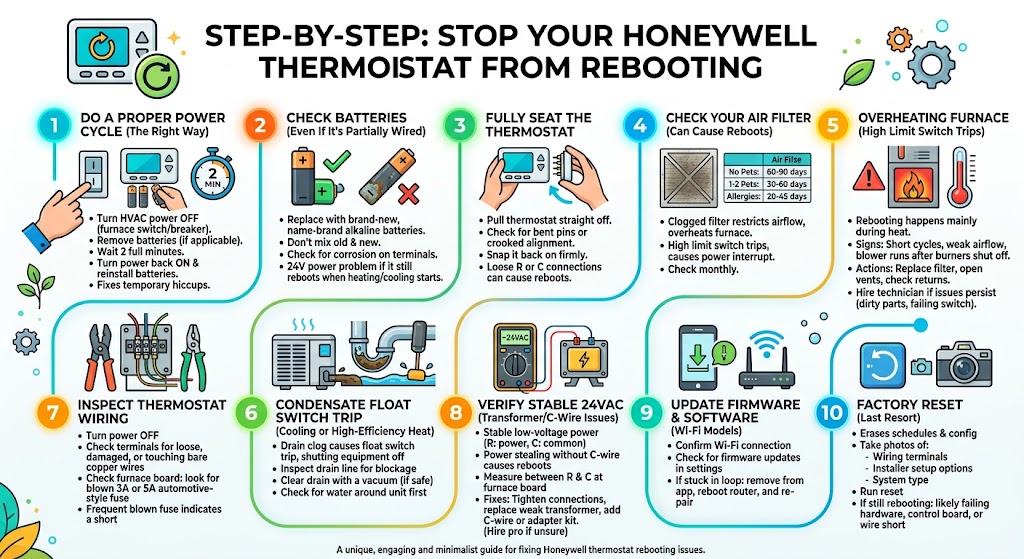
Step 1: Do a Proper Power Cycle (The Right Way)
This is my “first visit” fix because it costs nothing.
- Turn HVAC power OFF at the furnace switch or breaker
- If your thermostat has batteries, remove them
- Wait 2 full minutes
- Turn HVAC power back ON
- Reinstall batteries (if applicable)
If it stops rebooting after this, you likely had a temporary power or software hiccup. If it comes back, keep going.
Step 2: Check Batteries (Even If It’s Partially Wired)
Some Honeywell models use batteries as backup. Weak batteries can cause boot loops.
What I recommend:
- Replace with brand-new, name-brand alkaline batteries
- Don’t mix old and new
- Check for corrosion on battery terminals
Tip from the field: if you replace batteries and the thermostat reboots less often but still reboots when heating/cooling starts, you’re dealing with a 24V power problem, not just batteries.
Step 3: Make Sure the Thermostat Is Fully Seated on the Wall Plate
I’ve fixed more rebooting thermostats than you’d believe by simply reseating the head unit.
- Pull the thermostat straight off
- Check for bent pins or crooked alignment
- Snap it back on firmly
If the thermostat is slightly loose, the R or C connection can drop out, causing reboots.
Step 4: Check Your Air Filter (Yes, It Can Cause Reboots)
This surprises homeowners, but it’s real.
A clogged filter restricts airflow. Poor airflow can overheat the furnace. When the furnace overheats, the high limit switch opens, shutting the system down. That power interruption can make a thermostat appear to “reboot,” especially if your wiring/power is marginal.
Quick filter reference table
| No pets, low dust | 60 to 90 days | Check monthly anyway |
| 1 to 2 pets | 30 to 60 days | Hair loads filters fast |
| Allergies, high dust, renovations | 20 to 45 days | Consider lower restriction if airflow is weak |
| Very restrictive high-MERV + older system | Varies | Can trigger overheating if airflow wasn’t designed for it |
If your filter is dirty, replace it first before chasing anything else.
Step 5: Look for an Overheating Furnace (High Limit Switch Trips)
If rebooting happens mainly during heat, I’m immediately thinking “limit switch.”
Signs you may be overheating:
- Furnace runs a short time, shuts off, then restarts
- Air feels weak from vents
- The blower keeps running after burners shut off
- You recently installed a more restrictive filter
What you can do safely
- Replace the filter
- Make sure supply vents are open
- Make sure return grilles aren’t blocked
If it still overheats, you may have:
- Dirty blower wheel
- Dirty evaporator coil
- Incorrect blower speed
- Failing limit switch
At that point, I recommend a technician. Overheating can crack heat exchangers over time, and that’s not a DIY gamble.
Step 6: Check for a Condensate Float Switch Trip (Cooling or High-Efficiency Heat)
If your thermostat reboots during AC or during high-efficiency furnace operation, check the condensate system.
Many systems have a float switch that shuts equipment off if the drain clogs. That shutdown can look like thermostat rebooting, especially when power is interrupted at the control side.
What you can do:
- Inspect the condensate drain line for blockage
- If you have a clear trap, look for sludge
- If safe and accessible, clear the drain with a wet/dry vacuum at the outlet
If you see water around the furnace or air handler, stop and address that first.
Step 7: Inspect Thermostat Wiring (Loose Wires Cause Random Resets)
Turn HVAC power OFF first.
Pull the thermostat off and check:
- Are wires fully clamped into terminals?
- Is bare copper exposed and touching another terminal?
- Any corrosion or damaged wire?
Then check the furnace control board:
- Make sure the low-voltage terminals are tight
- Look for a blown 3A or 5A automotive-style fuse (common on many boards)
If that fuse keeps blowing, you likely have a short in thermostat wiring or a component short. That’s when I break out the meter and isolate circuits.
Step 8: Verify You Have Stable 24VAC (Transformer and C-Wire Issues)
This is one of the biggest root causes I see, especially with smart Honeywell thermostats.
A thermostat needs stable low-voltage power:
- R is power
- C is the return path (common)
If your thermostat is “power stealing” without a solid C-wire, it may reboot when the system tries to energize a relay or contactor.
Basic field check (best with a multimeter)
With power ON:
- Measure between R and C at the furnace board
You typically want around 24VAC. If it drops significantly when the system starts, you’ve found your problem.
Common fixes:
- Tighten/redo R and C connections
- Replace a weak transformer
- Add or properly connect the C-wire
- Use an approved C-wire adapter kit if running new wire isn’t possible
If you’re unsure, this is a good point to hire a pro. Miswiring can blow the low-voltage fuse quickly.
Step 9: Update Firmware and Check Software (Wi-Fi Models)
Software issues happen, just not as often as power issues.
What I do:
- Confirm the thermostat is connected to Wi-Fi
- Check for firmware updates in settings (model-dependent)
- If it’s stuck in a loop, remove it from the app, reboot router, and re-pair
Step 10: Factory Reset (Last Resort Before Replacement)
A factory reset can help if settings are corrupted, but it will erase schedules and configuration.
Before resetting, take photos of:
- Wiring terminals
- Installer setup options (if accessible)
- System type settings (heat pump vs conventional)
Then run the reset per your model’s instructions.
If it still reboots after a reset and after verifying stable power, you’re likely looking at:
- failing thermostat hardware
- failing control board
- intermittent short in thermostat cable
Tools That Make This Faster (Optional but Helpful)
| Flashlight | Seeing terminals and board fuses clearly |
| Small screwdriver | Re-terminating thermostat wires |
| Multimeter | Confirming 24VAC stability under load |
| Wet/dry vacuum | Clearing condensate drain clogs |
When You Should Call a Technician (I’d Call One Too)
In my own house, I’d stop DIY and call for service if:
- The low-voltage fuse blows repeatedly
- You suspect a failing transformer
- The furnace is overheating after a new filter
- You see water around the air handler/furnace
- You’re not confident in wiring or meter testing
A good tech can isolate whether the reboot is from thermostat power, the control board, safety switches, or a short in the cable.
Maintenance Tips That Prevent Rebooting Issues
These are the habits that prevent most reboot-related calls I run:
- Replace filters on a consistent schedule (and use the right MERV for your system)
- Keep return vents unblocked
- Keep the thermostat out of direct sunlight and away from supply vents
- Once or twice a year, check thermostat wiring for looseness (power off first)
- Flush condensate drains periodically if you have a high-efficiency system
FAQs
Why does my Honeywell thermostat reboot only when heat turns on?
That’s a classic sign of voltage drop when the system energizes, or the furnace is overheating and tripping a limit. Check filter and airflow first, then check R and C power stability.
Can a dirty air filter really cause thermostat rebooting?
Indirectly, yes. A dirty filter can cause furnace overheating, which triggers safeties that shut the system down. That power interruption can look like thermostat rebooting or restarting.
Will replacing batteries fix it permanently?
Only if the issue is truly battery-related. If it reboots when heating/cooling starts, batteries are usually not the main cause.
Do I need a C-wire?
Many smart Honeywell thermostats run best with a dedicated C-wire. Without it, you can get reboot loops, disconnects, or strange cycling depending on equipment.
Will a factory reset erase everything?
Yes. It typically wipes schedules, Wi-Fi settings, and configuration. Take photos first.