
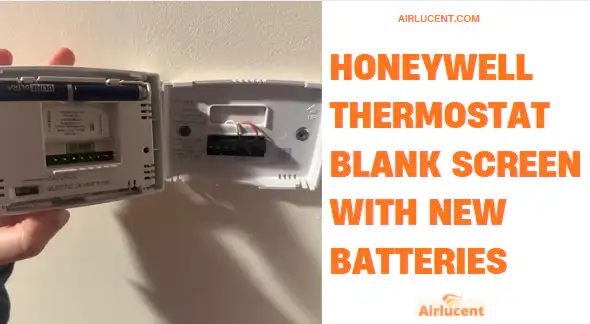
If your Honeywell thermostat screen is blank even after you installed brand new batteries, I know how frustrating that feels. I’ve been on a lot of service calls where the homeowner did the right thing first, replaced the batteries, and the display still looked completely dead.
Here’s the important truth: once you’ve confirmed the batteries are fresh, the blank screen is usually caused by one of these issues:
- The batteries are not actually making good contact
- The thermostat is not fully seated on the wall plate
- Your thermostat model mainly runs on the C wire, and the HVAC system is not supplying power
- A furnace safety switch, breaker, fuse, or transformer issue is cutting low voltage power
I’m going to walk you through this the same way I do in the field, starting with the easiest and most likely fixes first.
- Quick safety note before you start
- What I see most often on service calls
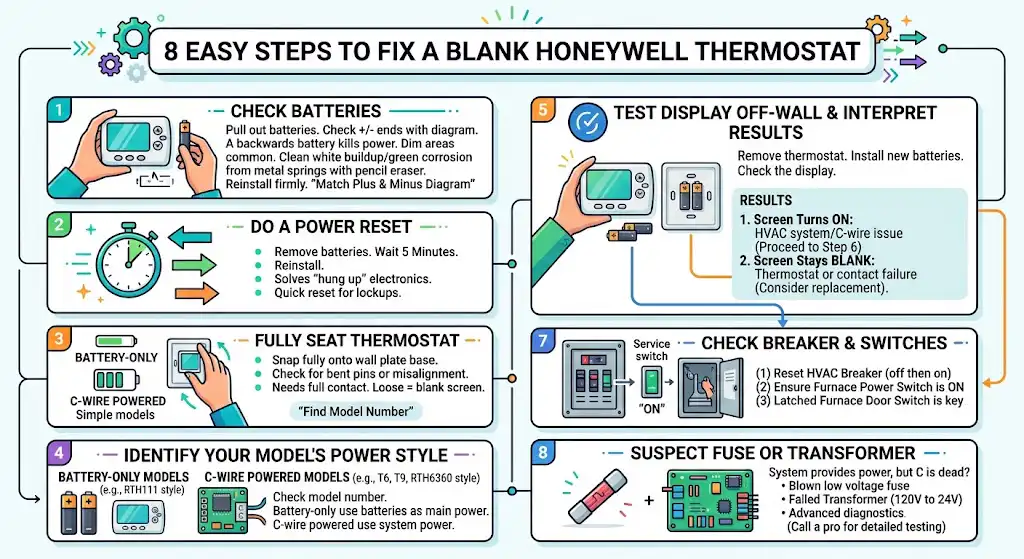
- Step 1: Reseat the batteries and check polarity and contact
- Step 2: Do a proper power reset
- Step 3: Make sure the thermostat is fully seated on the wall plate
- Step 4: Identify whether your model is battery only or C wire powered
- Step 5: Test if the thermostat can power up on batteries alone (C wire models)
- Step 6: Check the C wire connection at the thermostat and at the furnace
- Step 7: Check the breaker, furnace switch, and furnace door switch
- Step 8: If everything above checks out, suspect a blown fuse or transformer issue
- Troubleshooting checklist in the right order
- When I recommend replacing the thermostat
- FAQ
Quick safety note before you start
If you’re going to remove the thermostat from the wall, that’s usually safe. But if you plan to open the furnace or air handler cabinet, turn off power at the breaker first.
If you’re not 100 percent sure which breaker controls the HVAC system, stop there and call a licensed HVAC tech. I’m saying that as someone who’s seen simple checks turn into blown fuses because a wire touched the wrong terminal.
What I see most often on service calls
In my day to day work, a blank Honeywell screen with new batteries usually comes down to basic contact and mounting issues or a power issue from the HVAC equipment.
Here’s a simple “most likely first” list:
- Batteries installed wrong or not seated well
- Battery contacts dirty or corroded
- Thermostat not clicked fully onto the wall plate
- Thermostat model needs C wire power and the system has no power
- Furnace door switch open or furnace switch off
- Blown 3 amp fuse on control board or failed transformer
Now let’s troubleshoot it in the correct order.
Step 1: Reseat the batteries and check polarity and contact
Even “new” batteries won’t power the thermostat if the connection is bad.
Check battery polarity
Pull the batteries back out and reinstall them slowly.
- Match the plus and minus ends to the diagram inside the battery compartment
- One battery backwards can keep the whole thermostat dead
This is extremely common in dim hallways and tight utility closets.
Check the battery contacts
Look at the metal springs or tabs where the batteries touch.
If you see:
- White powdery buildup
- Greenish corrosion
- Flattened springs that don’t push firmly
Then the thermostat may not be getting power even with fresh batteries.
What I do:
- Wipe with a dry cloth first
- If needed, lightly rub contacts with a clean pencil eraser
- Reinstall batteries firmly
Do not soak anything in liquid cleaners. Moisture can make things worse.
Step 2: Do a proper power reset
This is a quick reset that fixes odd lockups.
- Remove the batteries
- Wait 5 minutes
- Reinstall the batteries
A lot of Honeywell models will recover if the internal electronics were “hung up.”
Step 3: Make sure the thermostat is fully seated on the wall plate
This one is bigger than most people realize.
Many Honeywell thermostats clip onto a wall plate, and the thermostat needs to be fully snapped in so the pins make contact.
What to do:
- Pull the thermostat straight off (gentle but firm)
- Inspect for bent pins or misalignment
- Line it up carefully and press until it clicks into place
If it’s even slightly loose, you can end up with a blank screen.
Step 4: Identify whether your model is battery only or C wire powered
This is the point where troubleshooting splits.
Some Honeywell thermostats run entirely on batteries. Others use system power from the C wire, and batteries are only backup or memory retention.
Where to find your model number
- On the back of the thermostat (remove it from the wall plate)
- Inside the battery compartment on some models
- In the manual
Common Honeywell power styles (quick reference)
| Battery only | Some basic non programmable models like RTH111 style units | Batteries | If batteries and contacts are good, thermostat may be failed |
| C wire powered (hardwired) | Many programmable models like RTH6360 style units | C wire from HVAC | System power issue, wiring issue, or HVAC safety shutdown |
| Wi Fi models | T6, T9 and similar | C wire required in most installs | Loss of system power or C wire problem is very common |
Important: don’t rely on wire color to decide if you have a C wire. I’ve seen plenty of non standard wiring in older homes.
Step 5: Test if the thermostat can power up on batteries alone (C wire models)
This is one of my favorite “is it the thermostat or the system” tests.
- Remove the thermostat from the wall plate
- Leave the wall wiring alone
- Install the batteries
- See if the display turns on while it’s off the wall
Results and what they mean
| Screen turns on off the wall, but blank when mounted | HVAC system power or C wire issue | Check C terminal connections and system power items |
| Screen stays blank even off the wall with batteries | Thermostat failure or battery contact problem | Recheck contacts, try different brand batteries, consider replacement |
If it stays blank off the wall after you’ve already cleaned contacts and verified polarity, I start suspecting a failed thermostat.
Step 6: Check the C wire connection at the thermostat and at the furnace
If the thermostat works off the wall but goes blank when mounted, the wall plate connection or system power is the likely issue.
At the thermostat wall plate
- Find the terminal labeled C
- Make sure the wire is fully inserted and clamped
- Gently tug the wire. It should not slide out
Go by terminal letters, not wire color.
At the furnace or air handler control board
If you’re comfortable and the power is OFF at the breaker:
- Remove the access panel
- Find the low voltage terminal strip
- Confirm that the same conductor used for C at the thermostat is connected to C at the control board
Loose connections at either end can cause a blank display.
Step 7: Check the breaker, furnace switch, and furnace door switch
Honeywell thermostats that depend on the C wire will go blank if the HVAC equipment loses power.
These are the three things I check first on a no power call:
1. HVAC breaker
Go to your electrical panel and find the breaker labeled furnace, air handler, or HVAC.
- If it’s tripped, reset it fully (off, then on)
If it trips again, stop and call a pro. Something may be shorting.
2. Furnace power switch
Many furnaces have a light switch style power switch mounted on or near the unit.
Make sure it’s ON.
3. Furnace door safety switch
Gas furnaces and many air handlers have a door interlock switch that cuts power when the panel is off.
If you recently changed the filter or opened the unit:
- Reseat the door panel carefully
- Make sure it’s fully latched
I’ve fixed a lot of “dead thermostat” complaints by simply getting the furnace door to press that safety switch properly.
Step 8: If everything above checks out, suspect a blown fuse or transformer issue
When the thermostat is good and the system should be providing power, but the C wire is dead, these are common culprits:
Blown low voltage fuse
Many furnaces have a small automotive style blade fuse on the control board, often 3 amps.
A blown fuse can happen from:
- A thermostat wire short
- A wire touching metal inside the furnace
- A mistake during thermostat installation
Failed transformer
The transformer converts 120 volts to about 24 volts for thermostat controls.
Diagnosing this correctly requires a multimeter and safe testing practices. This is where I usually recommend calling a licensed tech if you’re not experienced.
Troubleshooting checklist in the right order
Use this as a quick run through:
- Confirm battery polarity
- Clean and inspect battery contacts
- Power reset, batteries out 5 minutes
- Snap thermostat firmly onto wall plate
- Check model, battery only vs C wire powered
- If C wire model, test thermostat off wall on batteries
- Check C wire connection at thermostat and furnace
- Check breaker, furnace switch, and door switch
- If still blank, suspect control board fuse or transforme
When I recommend replacing the thermostat
I’ll be straight with you. If you have a battery only Honeywell thermostat and the screen stays blank after:
- verified fresh batteries
- clean contacts
- correct polarity
- proper reset
Then replacement is often the realistic next step. There’s no other power source to troubleshoot.
For C wire models, I don’t jump to replacement until I’ve confirmed the HVAC system is actually providing proper low voltage power.
FAQ
Why is my Honeywell thermostat blank even with new batteries?
Most often it’s not the battery charge. It’s one of these:
wrong polarity
corroded or weak battery contacts
thermostat not seated on the wall plate
loss of HVAC system power on C wire models
My thermostat turns on when I pull it off the wall but goes blank when mounted. What does that mean?
That usually means the thermostat itself is okay, but it’s losing power through the wall plate connection or the HVAC system is not supplying power through the C wire. Next steps are checking the C terminal wiring and the furnace power and safety switches.