
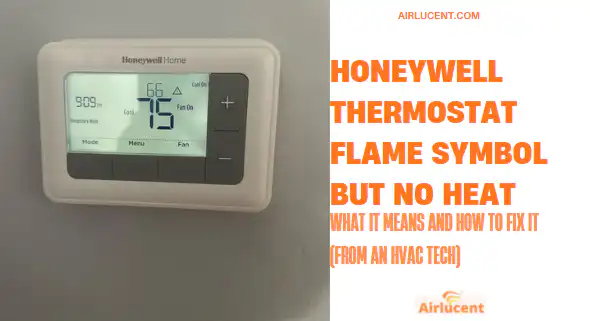
My name is Nathan, and I’ve worked as an HVAC technician for over 10 years. When a homeowner tells me, “My Honeywell thermostat shows a flame, but the house is cold,” it’s almost always one of a handful of issues. Some are simple (a built-in delay or a tripped switch), and some point to a furnace or heat pump safety shutdown.
This guide walks you through the same troubleshooting order I use in the field so you don’t waste time or accidentally reset the wrong thing.
- Quick answer
- What the Honeywell flame icon means (solid vs blinking)
- Step 1: Wait out the built-in delay (very common)
- Step 2: Confirm the thermostat is actually commanding heat
- Step 3: Check power to the HVAC equipment (indoor and outdoor)
- Step 4: Look for a blown low-voltage fuse (common after thermostat work)
- Step 5: Check the air filter and airflow (high limit switch issues)
- Step 6: Check for furnace or boiler lockout (ignition or flame proving problems)
- Step 7: Check thermostat wiring basics (R and W are the big ones)
- Step 8: If you have a wireless Honeywell setup, re-link it
- My “do this in order” checklist (fastest path to heat)
- When you should stop and call a pro
- Helpful stats (why small issues cause big comfort problems)
- Prevent this from happening again (maintenance that actually matters)
- FAQs
Quick answer
- The flame symbol means your thermostat is calling for heat.
- A blinking or flashing flame usually means a built-in delay (often up to about 5 minutes) before heat starts.
- If the flame keeps blinking and you still have no heat after the delay, the problem is usually power, a safety switch (like a high limit), a blown fuse, wiring, or a furnace/boiler lockout.
Honeywell also explains that a thermostat can be set to heat while the boiler/furnace still doesn’t come on due to system-side issues. Source: Honeywell Home support
https://www.honeywellhome.com/us/en/support/my-thermostat-is-set-to-heat-but-my-boiler-isnt-coming-on-why/
What the Honeywell flame icon means (solid vs blinking)
Different Honeywell models display it a little differently, but the meaning is consistent.
Flame icon meanings at a glance
| Solid flame | Thermostat is actively calling for heat (or heat is running) | Wait 1–3 minutes, then check if vents/radiators are warming |
| Blinking flame | System delay or “time off delay” to protect equipment | Wait up to 5 minutes first |
| Flame icon + no heat after 5+ minutes | Thermostat is calling but system isn’t responding | Start troubleshooting power, safeties, and equipment |
In my experience, the most common mistake is troubleshooting too early. Many systems intentionally “pause” to prevent short cycling.
Step 1: Wait out the built-in delay (very common)
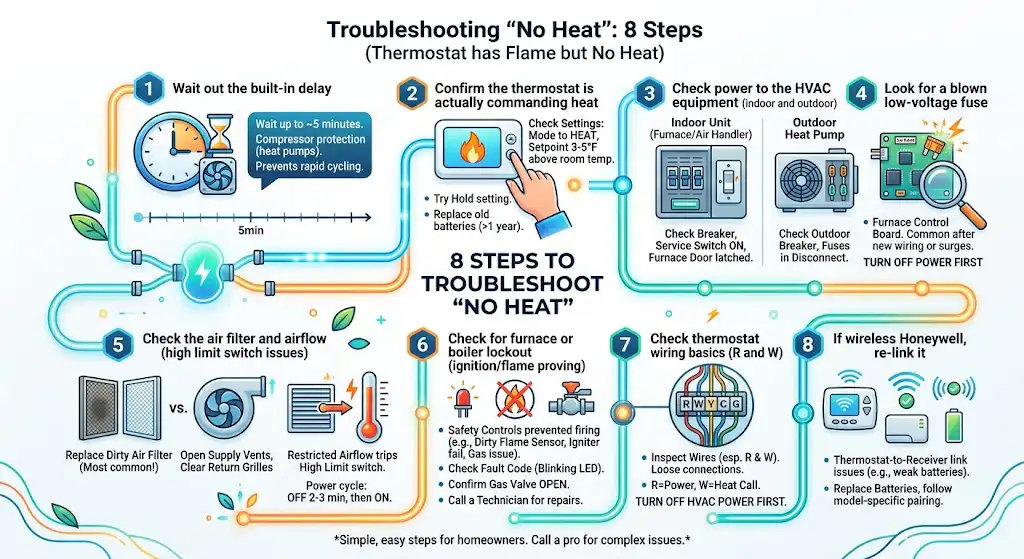
If you have a heat pump, the thermostat may enforce a compressor protection delay after the system shuts off. This is often called a time off delay. It prevents the compressor from turning on and off too quickly, which can shorten equipment life.
How long should you wait?
- Typically up to about 5 minutes
- Sometimes a little longer depending on model and settings
If you’re within that window, do nothing yet. If it still hasn’t started after 5 minutes, keep going.
Step 2: Confirm the thermostat is actually commanding heat
This sounds obvious, but I can’t tell you how many “no heat” calls end right here.
Check these settings
- Mode: Make sure it’s set to Heat (not Off or Cool).
- Setpoint: Set the temperature 3 to 5 degrees above the room temperature.
- Schedule/Hold: If you use a schedule, it might be overriding what you expect. Try Hold (if your model has it).
- Fan setting: Leave fan on Auto for most systems. Fan On can confuse the diagnosis because you’ll feel airflow even when heat isn’t running.
Replace batteries if your thermostat uses them
Weak batteries can cause odd behavior, delayed calls, or display issues.
My rule: if batteries are over a year old, replace them before you do anything complicated.
Step 3: Check power to the HVAC equipment (indoor and outdoor)
A flame icon with no heat often means the thermostat is “asking,” but the equipment has no power to respond.
What to check (safe homeowner checks)
For furnaces and air handlers (indoor unit)
- Breaker labeled “Furnace,” “Air Handler,” or “HVAC”
- Service switch near the furnace (looks like a light switch). Make sure it’s ON.
- Furnace door panel: many units have a door safety switch. If the panel isn’t seated, the unit won’t run.
For heat pumps (outdoor unit)
If you have a heat pump and it’s not running, you may get lukewarm or no heat indoors.
- Outdoor unit breaker
- Outdoor disconnect (near the outdoor unit). Some contain fuses.
Power troubleshooting table
| Main electrical panel | Tripped breaker | Breaker not fully ON, sits in the middle |
| Furnace switch | Power to furnace | Switch OFF or loose |
| Furnace access door | Door safety switch | Door not fully latched |
| Outdoor disconnect | Power to heat pump | Disconnect pulled out, blown fuses (if fused) |
If breakers trip repeatedly, stop resetting and call a pro. Repeated trips usually mean an electrical or motor issue.
Step 4: Look for a blown low-voltage fuse (common after thermostat work)
If someone recently changed a thermostat, did wiring work, or you had a power surge, the furnace control board may have a blown 3-amp or 5-amp blade fuse.
What it causes
- Thermostat may still light up (especially battery-powered models)
- Flame icon may appear
- But the furnace/air handler won’t respond properly
If you’re comfortable opening the furnace panel, turn off power first. If you’re not, this is a good point to call a technician.
Step 5: Check the air filter and airflow (high limit switch issues)
An open high limit switch is a big reason you’ll see a call for heat but get no heat.
What the high limit switch does
It’s a safety device. If the furnace gets too hot (often because airflow is restricted), it shuts the burners down to prevent overheating.
What causes it to trip (real-world common causes)
- Dirty air filter (most common)
- Too many closed supply vents
- Blocked return grille
- Blower motor or capacitor issues
- Dirty evaporator coil (on combination systems)
What you can do right now
- Replace the filter with the correct size and airflow rating.
- Open supply vents and ensure returns aren’t blocked.
- Power cycle the furnace:
- Turn the furnace switch OFF for 2–3 minutes
- Turn it back ON
If the furnace starts and then shuts off again quickly, that’s a sign the limit is still being triggered and you likely have an airflow or blower problem that needs service.
From my own service history, airflow and filter problems account for a big chunk of mid-winter “no heat” or “heat keeps shutting off” calls, especially after homeowners forget to change filters during heavy run months.
Step 6: Check for furnace or boiler lockout (ignition or flame proving problems)
If you have a gas furnace or gas boiler, the thermostat can call for heat perfectly, but the appliance may refuse to fire due to safety controls.
Common equipment-side causes
- Dirty flame sensor (very common)
- Failing hot surface igniter
- Pilot ignition issues (older systems)
- Gas supply issue (closed gas valve, gas interruption)
- Condensate drain issues on high-efficiency furnaces
- Pressure switch or venting problems
What you can safely do
- Confirm the gas shutoff valve is parallel to the gas pipe (open)
- Check if the furnace shows a blinking LED fault code on the control board (many do)
- Power cycle once (OFF 2–3 minutes, then ON)
What I don’t recommend DIY
- Cleaning flame sensors
- Testing igniters
- Jumping safety switches
- Diagnosing gas valve problems
Those are all doable for technicians with tools and training, but they’re not good homeowner DIY steps because the risks are real and the diagnosis can go sideways fast.
Step 7: Check thermostat wiring basics (R and W are the big ones)
If the thermostat is calling for heat but the system doesn’t respond, sometimes it’s simply a loose wire.
Basic thermostat terminal map for heating
| R / Rc | 24V power | Thermostat may be dead or act weird |
| W / W1 | Heat call | Flame icon shows but no heat |
| C | Common (power stabilizer) | Random resets, Wi-Fi drops, odd behavior |
| Y | Cooling / compressor | Heat pump heating may fail if miswired |
| G | Fan | Fan runs but no heat |
If you open the thermostat, turn HVAC power off first to avoid blowing the low-voltage fuse.
If you recently installed this thermostat and the issue started immediately afterward, wiring is a top suspect.
Step 8: If you have a wireless Honeywell setup, re-link it
Some Honeywell systems use a thermostat that communicates to a receiver near the boiler/furnace. If the link drops, the thermostat may show a heat demand (flame) while the receiver never gets the message.
What to do:
- Replace thermostat batteries (if applicable)
- Follow the model-specific pairing steps to rebind the thermostat to the receiver
If you tell me your exact model number, I can point you to the right pairing method.
My “do this in order” checklist (fastest path to heat)
- Wait 5 minutes (delay is normal)
- Set Heat mode and raise temp 3–5 degrees
- Replace thermostat batteries (if used)
- Check breakers and the furnace service switch
- Make sure furnace door panel is fully seated
- Replace air filter and open vents/returns
- Power cycle furnace once
- Check for furnace fault light codes
- If heat pump, verify outdoor unit has power and is running
- If still no heat, call a licensed technician
When you should stop and call a pro
Call for service if:
- Breakers trip repeatedly
- You smell gas or suspect a gas leak (leave the home and contact your utility/emergency services)
- The furnace starts then shuts off repeatedly
- You see error codes you can’t interpret
- You have a heat pump and outdoor unit is iced up heavily and not defrosting
- You’ve done the basic checks and still have no heat
I’m all for homeowners learning their systems, but there’s a line where it stops being “simple troubleshooting” and becomes “specialized diagnosis.”
Helpful stats (why small issues cause big comfort problems)
- In the U.S., space heating is typically the largest home energy use, around 29 percent of residential energy consumption (Energy Star). That’s why small faults like airflow restriction or short cycling show up fast in comfort and bills.
Source: https://www.energystar.gov/products/heating_cooling
In plain terms: when heat fails, it’s not just comfort, it’s also pipes, humidity, and safety.
Prevent this from happening again (maintenance that actually matters)
From the systems I’ve serviced over the years, the best prevention is simple:
- Change filters on schedule (often every 1–3 months depending on filter type, pets, and dust)
- Keep return grilles clear
- Get a yearly heating inspection before peak season
- If you have a heat pump, keep the outdoor coil clear of leaves and debris
If you’re the type who forgets filters, put a reminder in your phone. It’s the cheapest “repair” you’ll ever do.
FAQs
Why is the flame icon showing but the air is cold?
Because the thermostat is calling for heat, but the equipment is delayed, powered off, locked out, or unable to ignite/operate. Start with the 5-minute wait, then power and airflow checks.
What does “Heat On” flashing mean on a Honeywell thermostat?
Usually it means the thermostat is calling for heat but is either in a delay period or the heating system hasn’t started yet. If it keeps flashing beyond the delay, troubleshoot power, safeties, and equipment.
Can a bad thermostat cause the flame symbol with no heat?
Yes. Loose wiring, weak batteries, incorrect configuration (especially with heat pumps), or internal thermostat failure can all create call-for-heat issues. But in my field experience, many “thermostat problems” turn out to be power, airflow, or furnace lockout problems.
Is it safe to troubleshoot this myself?
Basic steps like checking settings, replacing batteries, checking breakers, and replacing filters are generally safe. Anything involving internal furnace controls, gas ignition components, or electrical diagnostics is where I recommend bringing in a licensed HVAC technician.